
Download 中華電信 APK 4.0.21 arm64-v8a, armeabi-v7a, x86, x86_64 · Android 24+
Download APK
Verified Safe
This is the arm64-v8a, armeabi-v7a, x86, x86_64 build of 中華電信 4.0.21. Pick this build if your device's primary ABI matches.
File size: 37.2 MB • Min Android: 24 • Target Android: 34 • Version code: 703 • Framework: Native (Java/Kotlin) • Permissions: 46
Screenshots



File Information
| Package Name | com.cht.custservice |
|---|---|
| Version Name | 4.0.21 |
| Version Code | 703 |
| Architecture | arm64-v8a, armeabi-v7a, x86, x86_64 |
| Min Android Version | Android 24 (API 34) |
| Main Activity | com.cht.custservice.SplashActivity |
| Framework | Native (Java/Kotlin) |
| File Size | 37.19 MB |
| Signature (SHA1) | CD8956BE3DAF1727F0685D5E0440EE89C1C405E2 |
| File Hash (SHA256) | bbb47af7205ebfb892d18be93a09294f592eee47cfe606af0e86259c0eac1fac |
What's New
+4.0.20
bug fix
+4.0.19
bug fix
+4.0.17
功能優化
+4.0.16
功能優化
+4.0.15
bug fix
bug fix
+4.0.19
bug fix
+4.0.17
功能優化
+4.0.16
功能優化
+4.0.15
bug fix
App Description
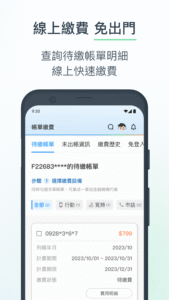
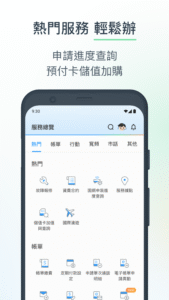
使用中華電信會員登入並綁定證號,即可查詢同證號申請的行動門號、預付卡、市內電話或寬頻等常用資訊;也提供簡訊登入,快速查詢行動門號資訊。
中華電信APP提供:
常用資訊:Hami Point、上網量、資費合約、帳單、網內外門號、SIM解鎖碼查詢
常用服務:線上繳費、加購流量、申請國際漫遊、行動預付卡儲值、申請電子帳單、故障報修、查詢光世代供裝距離、門市預約
2G偽基地偵測功能:本功能可使用戶於接收2G偽基地台訊號時受到提醒或通知,但不具備阻絕2G偽基地台訊號功能。本公司不擔保用戶因接收2G偽基地台訊號所受之任何損失或損害。用戶於收到任何可疑訊息、網站或連結時,仍應自行提高注意,避免遭受詐騙受有損害。
若您有較急迫的業務需求或問題,請您以手機直接撥打123或0800-080123,由客服人員為您提供快速的服務。
中華電信APP提供:
常用資訊:Hami Point、上網量、資費合約、帳單、網內外門號、SIM解鎖碼查詢
常用服務:線上繳費、加購流量、申請國際漫遊、行動預付卡儲值、申請電子帳單、故障報修、查詢光世代供裝距離、門市預約
2G偽基地偵測功能:本功能可使用戶於接收2G偽基地台訊號時受到提醒或通知,但不具備阻絕2G偽基地台訊號功能。本公司不擔保用戶因接收2G偽基地台訊號所受之任何損失或損害。用戶於收到任何可疑訊息、網站或連結時,仍應自行提高注意,避免遭受詐騙受有損害。
若您有較急迫的業務需求或問題,請您以手機直接撥打123或0800-080123,由客服人員為您提供快速的服務。
Download 中華電信 APK
Fast, free and safe download.
APK Permissions 46
- android.permission.ACCESS_ALL_DOWNLOADS
- android.permission.ACCESS_COARSE_LOCATION
- android.permission.ACCESS_FINE_LOCATION
- android.permission.ACCESS_NETWORK_STATE
- android.permission.ACCESS_WIFI_STATE
- android.permission.AUTHENTICATE_ACCOUNTS
- android.permission.CAMERA
- android.permission.CHANGE_NETWORK_STATE
- android.permission.FOREGROUND_SERVICE
- android.permission.FOREGROUND_SERVICE_PHONE_CALL
- android.permission.GET_ACCOUNTS
- android.permission.INTERNET
- android.permission.MANAGE_ACCOUNTS
- android.permission.MANAGE_OWN_CALLS
- android.permission.POST_NOTIFICATIONS
- android.permission.READ_APP_BADGE
- android.permission.READ_EXTERNAL_STORAGE
- android.permission.READ_MEDIA_AUDIO
- android.permission.READ_MEDIA_IMAGES
- android.permission.READ_MEDIA_VIDEO
- android.permission.READ_PHONE_STATE
- android.permission.RECEIVE_BOOT_COMPLETED
- android.permission.RECORD_AUDIO
- android.permission.USE_FINGERPRINT
- android.permission.VIBRATE
- android.permission.WAKE_LOCK
- android.permission.WRITE_CALENDAR
- android.permission.WRITE_EXTERNAL_STORAGE
- com.anddoes.launcher.permission.UPDATE_COUNT
- com.google.android.c2dm.permission.RECEIVE
- com.google.android.finsky.permission.BIND_GET_INSTALL_REFERRER_SERVICE
- com.google.android.gms.permission.AD_ID
- com.htc.launcher.permission.READ_SETTINGS
- com.htc.launcher.permission.UPDATE_SHORTCUT
- com.huawei.android.launcher.permission.CHANGE_BADGE
- com.huawei.android.launcher.permission.READ_SETTINGS
- com.huawei.android.launcher.permission.WRITE_SETTINGS
- com.majeur.launcher.permission.UPDATE_BADGE
- com.oppo.launcher.permission.READ_SETTINGS
- com.oppo.launcher.permission.WRITE_SETTINGS
- com.sec.android.provider.badge.permission.READ
- com.sec.android.provider.badge.permission.WRITE
- com.sonyericsson.home.permission.BROADCAST_BADGE
- com.sonymobile.home.permission.PROVIDER_INSERT_BADGE
- me.everything.badger.permission.BADGE_COUNT_READ
- me.everything.badger.permission.BADGE_COUNT_WRITE
APK Verified
The cryptographic signature guarantees that the file is safe to install and was not tampered with in any way.


Frequently Asked Questions about 中華電信 APK
This variant is built for devices that report `arm64-v8a, armeabi-v7a, x86, x86_64` as their primary ABI. If your device's CPU matches, this is the smallest, fastest version to install.
Yes — the APK's signature has been cryptographically verified against the publisher's signing key. The SHA-256 hash is shown in the File Information panel so you can independently confirm the file matches the original release.
Android 24 (API level 34) or newer. Older devices will refuse the install.
Install a free app like 'CPU-Z' or 'Droid Hardware Info' from the Play Store and look at the ABI / Instruction Set row. Most phones made after 2017 are arm64-v8a; if in doubt, download the universal variant.
All variants are functionally identical — same features, same version. They differ only in which CPU architectures the native code is compiled for, and (sometimes) which screen densities the included graphics target. Pick the one that matches your device for the smallest install size, or pick 'Universal' if you're unsure.