
Download 장기이식센터 복약알리미 APK 1.1.12 arm64-v8a, armeabi-v7a, x86, x86_64 · Android 24+
Download APK
Verified Safe
This is the arm64-v8a, armeabi-v7a, x86, x86_64 build of 장기이식센터 복약알리미 1.1.12. Pick this build if your device's primary ABI matches.
File size: 13.6 MB • Min Android: 24 • Target Android: 35 • Version code: 47 • Framework: Native (Java/Kotlin) • Permissions: 23
Screenshots
File Information
| Package Name | com.smc.drug.trans |
|---|---|
| Version Name | 1.1.12 |
| Version Code | 47 |
| Architecture | arm64-v8a, armeabi-v7a, x86, x86_64 |
| Min Android Version | Android 24 (API 35) |
| Main Activity | com.smc.drug.trans.MainActivity |
| Framework | Native (Java/Kotlin) |
| File Size | 13.61 MB |
| Signature (SHA1) | B875F6FB6DDDE80219BA6BBCA4B4BB419959C154 |
| File Hash (SHA256) | 3bafd4ac3c2c3952af98eafb2d4bb672bd91e60c42f7c549ef1159df0d369020 |
App Description
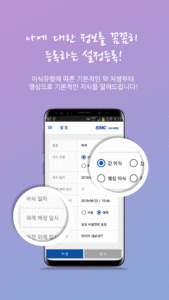
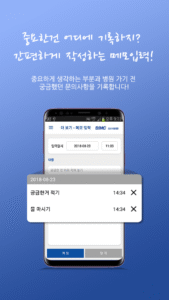
삼성서울병원 장기이식센터가 제공하는 복약알리미는 장기이식 후 주요 약물의 정확한 복용을 도와 드리고, 이식에 관한 정보를 제공합니다.
[주요서비스]
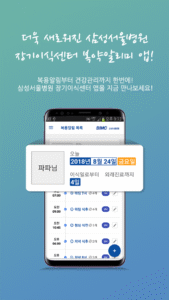
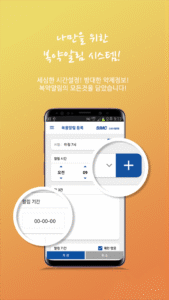
1. 복용알람
-면역억제제를 포함한 이식받은 장기를 유지하기 위한 필수 약들을 쉽게 알람등록하여 복약시간에 대한 알람을 제공함으로써 복용율을 높여줍니다.
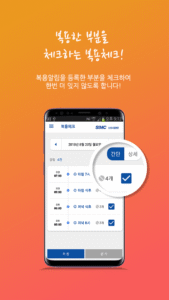
2. 복용통계
-복용알람에 대한 복용체크를 통해 일정기간 동안의 복용율을 자동 계산하여 확인할수 있습니다.
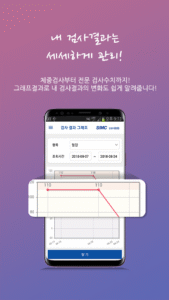
3. 검사결과입력
- 주요 혈액 검사 결과를 입력하여 일정기간 동안의 변화를 확인할 수 있습니다.
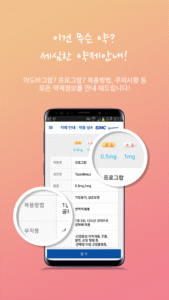
4. 약제안내
- 면역억제제를 포함한 이식받은 장기를 유지하기 위해 필요한 주요약들에 대한 정보를 설명합니다.
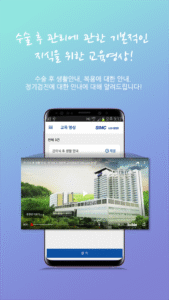
5. 교육영상
- 이식에 관련한 다양한 교육 컨텐츠를 제공합니다.
[앱 권한 정보 안내]
앱에서 사용하는 접근 권한에 대하여 아래와 같이 안내 해드립니다.
접근 권한은 필수적 접근 권한과 선택적 접근 권한으로 나누어지며, 선택적 접근 권한의 경우 허용에 동의하지 않으셔도 앱 사용이 가능합니다.
■ 필수적 접근 권한
· 알림
: 복약 알림을 받기 위해 반드시 필요한 권한
· 기기관리자 권한 | 전체 화면 알림 | 다른 앱 위에 표시
: 휴대전화가 잠겨있을때 복용알림 화면을 띄우는데 필요한 권한
· 알람 및 리마인더
: 앱이 알람을 설정하고 시간 기반 작업을 예약할 때 필요한 권한 (안드로이드 12이상)
■ 선택적 접근 권한
· 카메라 : 사용자 프로필 사진을 촬영하거나 앨범에서 불러오기 기능 시 사용
■ 안드로이드 OS 6.0 미만 버전 스마트폰을 이용하시는 경우, 선택적 접근 권한 없이 모두 필수적 접근 권한으로 적용될 수 있습니다. 이 경우 운영체제를 6.0 이상으로 업그레이드하고 앱을 재설치 하셔야 접근 권한 설정이 정상적으로 가능합니다.
■ 기존 설치된 앱을 사용하시는 경우에는 앱을 삭제 후 재설치 하셔야 접근 권한 설정이 가능합니다.
※ 고객님의 원활한 앱 이용을 위해 최소한의 접근권한을 요청합니다.
※ 선택적 접근 권한은 동의하지 않아도 서비스를 이용할 수 있으나, 일부 기능 사용에 제한이 있을 수 있습니다.
※ 접근권한 변경 방법: 휴대폰 설정 > 애플리케이션(앱) 관리 > 복약알리미 > 권한
[주요서비스]
1. 복용알람
-면역억제제를 포함한 이식받은 장기를 유지하기 위한 필수 약들을 쉽게 알람등록하여 복약시간에 대한 알람을 제공함으로써 복용율을 높여줍니다.
2. 복용통계
-복용알람에 대한 복용체크를 통해 일정기간 동안의 복용율을 자동 계산하여 확인할수 있습니다.
3. 검사결과입력
- 주요 혈액 검사 결과를 입력하여 일정기간 동안의 변화를 확인할 수 있습니다.
4. 약제안내
- 면역억제제를 포함한 이식받은 장기를 유지하기 위해 필요한 주요약들에 대한 정보를 설명합니다.
5. 교육영상
- 이식에 관련한 다양한 교육 컨텐츠를 제공합니다.
[앱 권한 정보 안내]
앱에서 사용하는 접근 권한에 대하여 아래와 같이 안내 해드립니다.
접근 권한은 필수적 접근 권한과 선택적 접근 권한으로 나누어지며, 선택적 접근 권한의 경우 허용에 동의하지 않으셔도 앱 사용이 가능합니다.
■ 필수적 접근 권한
· 알림
: 복약 알림을 받기 위해 반드시 필요한 권한
· 기기관리자 권한 | 전체 화면 알림 | 다른 앱 위에 표시
: 휴대전화가 잠겨있을때 복용알림 화면을 띄우는데 필요한 권한
· 알람 및 리마인더
: 앱이 알람을 설정하고 시간 기반 작업을 예약할 때 필요한 권한 (안드로이드 12이상)
■ 선택적 접근 권한
· 카메라 : 사용자 프로필 사진을 촬영하거나 앨범에서 불러오기 기능 시 사용
■ 안드로이드 OS 6.0 미만 버전 스마트폰을 이용하시는 경우, 선택적 접근 권한 없이 모두 필수적 접근 권한으로 적용될 수 있습니다. 이 경우 운영체제를 6.0 이상으로 업그레이드하고 앱을 재설치 하셔야 접근 권한 설정이 정상적으로 가능합니다.
■ 기존 설치된 앱을 사용하시는 경우에는 앱을 삭제 후 재설치 하셔야 접근 권한 설정이 가능합니다.
※ 고객님의 원활한 앱 이용을 위해 최소한의 접근권한을 요청합니다.
※ 선택적 접근 권한은 동의하지 않아도 서비스를 이용할 수 있으나, 일부 기능 사용에 제한이 있을 수 있습니다.
※ 접근권한 변경 방법: 휴대폰 설정 > 애플리케이션(앱) 관리 > 복약알리미 > 권한
Download 장기이식센터 복약알리미 APK
Fast, free and safe download.
APK Permissions 23
- android.permission.ACCESS_ADSERVICES_AD_ID
- android.permission.ACCESS_ADSERVICES_ATTRIBUTION
- android.permission.ACCESS_NETWORK_STATE
- android.permission.ACCESS_WIFI_STATE
- android.permission.CAMERA
- android.permission.DIAL_PHONE
- android.permission.DISABLE_KEYGUARD
- android.permission.FOREGROUND_SERVICE
- android.permission.FOREGROUND_SERVICE_DATA_SYNC
- android.permission.FOREGROUND_SERVICE_MEDIA_PLAYBACK
- android.permission.INTERNET
- android.permission.POST_NOTIFICATIONS
- android.permission.RECEIVE_BOOT_COMPLETED
- android.permission.REQUEST_IGNORE_BATTERY_OPTIMIZATIONS
- android.permission.SCHEDULE_EXACT_ALARM
- android.permission.SYSTEM_ALERT_WINDOW
- android.permission.USE_FULL_SCREEN_INTENT
- android.permission.VIBRATE
- android.permission.WAKE_LOCK
- com.google.android.finsky.permission.BIND_GET_INSTALL_REFERRER_SERVICE
- com.google.android.gms.permission.AD_ID
- com.google.android.providers.gsf.permission.READ_GSERVICES
- com.smc.drug.trans.DYNAMIC_RECEIVER_NOT_EXPORTED_PERMISSION
APK Verified
The cryptographic signature guarantees that the file is safe to install and was not tampered with in any way.


Frequently Asked Questions about 장기이식센터 복약알리미 APK
This variant is built for devices that report `arm64-v8a, armeabi-v7a, x86, x86_64` as their primary ABI. If your device's CPU matches, this is the smallest, fastest version to install.
Yes — the APK's signature has been cryptographically verified against the publisher's signing key. The SHA-256 hash is shown in the File Information panel so you can independently confirm the file matches the original release.
Android 24 (API level 35) or newer. Older devices will refuse the install.
Install a free app like 'CPU-Z' or 'Droid Hardware Info' from the Play Store and look at the ABI / Instruction Set row. Most phones made after 2017 are arm64-v8a; if in doubt, download the universal variant.
All variants are functionally identical — same features, same version. They differ only in which CPU architectures the native code is compiled for, and (sometimes) which screen densities the included graphics target. Pick the one that matches your device for the smallest install size, or pick 'Universal' if you're unsure.