
This is the universal build of AdGuard Mail & Temp Mail 1.1.2. It contains native libraries for every CPU architecture (arm64-v8a, armeabi-v7a, x86, x86_64), so it installs on any Android device. The trade-off is size — it's larger than per-architecture variants. Pick this one if you're unsure which CPU your phone has, or if you plan to share the APK with multiple devices.
File size: 77.9 MB • Min Android: 24 • Target Android: 35 • Version code: 2301 • Framework: Native (Java/Kotlin) • Permissions: 6
Screenshots
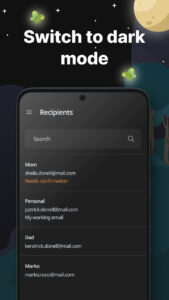
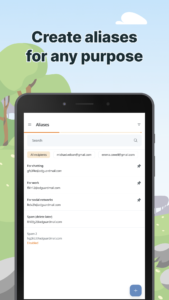
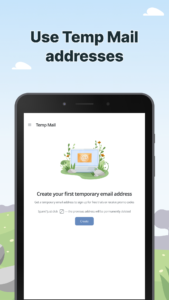
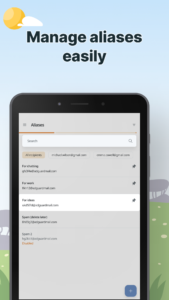
File Information
| Package Name | com.adguard.email |
|---|---|
| Version Name | 1.1.2 |
| Version Code | 2301 |
| Architecture | Universal |
| Min Android Version | Android 24 (API 35) |
| Main Activity | com.adguard.email.MainActivity |
| Framework | Native (Java/Kotlin) |
| File Size | 77.86 MB |
| Signature (SHA1) | 8AE64E07E5136A87955B79BDB6720C505221E379 |
| File Hash (SHA256) | 0d67b9de894289b91ca7b838369b237e611d0685151fb7fc2d983743a3219be0 |
What's New
We’ve listened to your feedback and made some small but useful updates:
• Aliases can now be filtered by status — active or disabled — and by whether they’re linked to a recipient.
• Recently edited aliases and recipients appear at the top of the list.
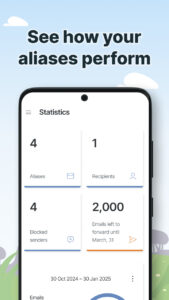
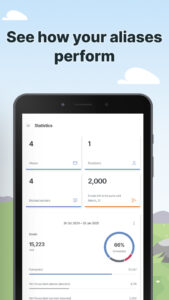
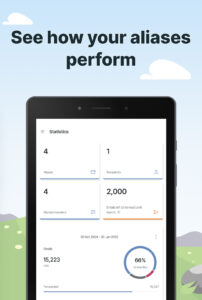
• Statistics show how many emails weren’t forwarded due to free version limits — helpful to understand if you’re using aliases actively enough to consider a subscription.
• You can now manually refresh statistics to see changes right away.
• Aliases can now be filtered by status — active or disabled — and by whether they’re linked to a recipient.
• Recently edited aliases and recipients appear at the top of the list.
• Statistics show how many emails weren’t forwarded due to free version limits — helpful to understand if you’re using aliases actively enough to consider a subscription.
• You can now manually refresh statistics to see changes right away.
App Description
AdGuard Mail is a service that allows you to receive emails without revealing your personal email address to the sender.
Our service provides you with everything you need to protect your mail:
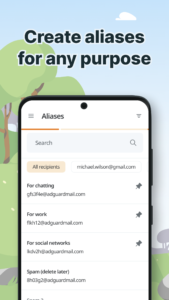
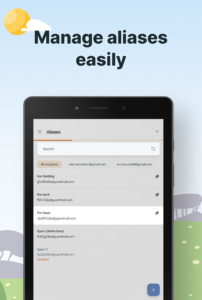
- Aliases for email forwarding
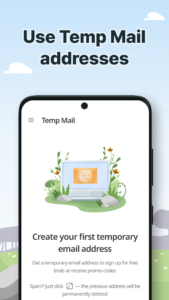
- Temporary email addresses for short-term communications
From the industry leader with over 15 years of experience in user privacy tools and services.
With AdGuard Mail you can:
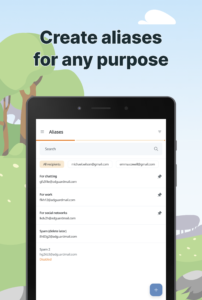
* Create aliases
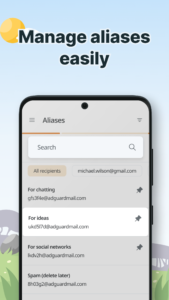
* Manage your email subscriptions
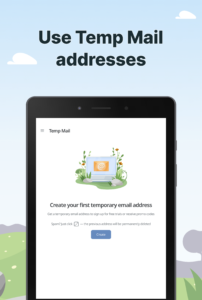
* Use temporary email addresses
Why use AdGuard Mail?
1. Receive email anonymously
2. Control email forwarding
3. Avoid spam in your main inbox
4. Protect your privacy
5. Prevent tracking
1. Receive email anonymously: Use aliases to receive email anonymously instead of exposing your primary email address. This method allows you to subscribe to services or share your contact information with people or organizations you don’t fully trust without revealing your real email address. Email sent to these aliases is seamlessly forwarded to your primary inbox, keeping your personal address private and reducing the risk of spam and unwanted communication. By using aliases, you can maintain your privacy while securely and efficiently managing multiple interactions.
2. Control email forwarding: If you start receiving spam or unwanted email at a specific alias, you can simply disable it to prevent further messages from being forwarded to your main inbox. This feature helps maintain a clean, organized email setup. By disabling problematic aliases, you can prevent spam from cluttering your inbox and ensure that only relevant and trusted email reaches you. It helps protect your primary email address from any kind of unwanted messages.
3. Avoid spam in your main inbox: Use temporary email addresses for quick online interactions. When you sign up for free trials, receive promotional codes, or participate in online forums, choose a disposable email address instead of your primary email address. This approach keeps your primary inbox uncluttered and protected from potential spam. Temporary email addresses provide a secure way to handle short-term interactions without compromising the integrity of your primary email. In addition, all messages to these temporary addresses are sent directly to your inbox in AdGuard Mail. Unlike aliases, Temp Mail allows you to quickly manage your email subscriptions without having to switch between your primary email service and AdGuard Mail.
4. Protect your privacy: If a website requires email verification, but you’re not sure your information will remain confidential, you can use a random address from a temporary email address generator or an alias. That way, even if the untrustworthy site shares it with third parties, your primary email address remains hidden. This method helps protect your personal information, such as your name and address, and prevents spam newsletters from reaching your primary inbox.
5. Prevent tracking: A disposable email address helps protect your online privacy by preventing websites from collecting data that could be used to target ads or track user activity, so your browsing habits remain private.
Privacy policy:
adguard-mail.com/privacy.html
Terms of use:
adguard-mail.com/eula.html
Our service provides you with everything you need to protect your mail:
- Aliases for email forwarding
- Temporary email addresses for short-term communications
From the industry leader with over 15 years of experience in user privacy tools and services.
With AdGuard Mail you can:
* Create aliases
* Manage your email subscriptions
* Use temporary email addresses
Why use AdGuard Mail?
1. Receive email anonymously
2. Control email forwarding
3. Avoid spam in your main inbox
4. Protect your privacy
5. Prevent tracking
1. Receive email anonymously: Use aliases to receive email anonymously instead of exposing your primary email address. This method allows you to subscribe to services or share your contact information with people or organizations you don’t fully trust without revealing your real email address. Email sent to these aliases is seamlessly forwarded to your primary inbox, keeping your personal address private and reducing the risk of spam and unwanted communication. By using aliases, you can maintain your privacy while securely and efficiently managing multiple interactions.
2. Control email forwarding: If you start receiving spam or unwanted email at a specific alias, you can simply disable it to prevent further messages from being forwarded to your main inbox. This feature helps maintain a clean, organized email setup. By disabling problematic aliases, you can prevent spam from cluttering your inbox and ensure that only relevant and trusted email reaches you. It helps protect your primary email address from any kind of unwanted messages.
3. Avoid spam in your main inbox: Use temporary email addresses for quick online interactions. When you sign up for free trials, receive promotional codes, or participate in online forums, choose a disposable email address instead of your primary email address. This approach keeps your primary inbox uncluttered and protected from potential spam. Temporary email addresses provide a secure way to handle short-term interactions without compromising the integrity of your primary email. In addition, all messages to these temporary addresses are sent directly to your inbox in AdGuard Mail. Unlike aliases, Temp Mail allows you to quickly manage your email subscriptions without having to switch between your primary email service and AdGuard Mail.
4. Protect your privacy: If a website requires email verification, but you’re not sure your information will remain confidential, you can use a random address from a temporary email address generator or an alias. That way, even if the untrustworthy site shares it with third parties, your primary email address remains hidden. This method helps protect your personal information, such as your name and address, and prevents spam newsletters from reaching your primary inbox.
5. Prevent tracking: A disposable email address helps protect your online privacy by preventing websites from collecting data that could be used to target ads or track user activity, so your browsing habits remain private.
Privacy policy:
adguard-mail.com/privacy.html
Terms of use:
adguard-mail.com/eula.html
Download AdGuard Mail & Temp Mail APK
Fast, free and safe download.
APK Permissions 6
- android.permission.ACCESS_NETWORK_STATE
- android.permission.INTERNET
- com.adguard.email.DYNAMIC_RECEIVER_NOT_EXPORTED_PERMISSION
- com.android.vending.BILLING
- com.android.vending.CHECK_LICENSE
- com.google.android.finsky.permission.BIND_GET_INSTALL_REFERRER_SERVICE
APK Verified
The cryptographic signature guarantees that the file is safe to install and was not tampered with in any way.
Similar in Communication


More by ADGUARD SOFTWARE LIMITED


Frequently Asked Questions about AdGuard Mail & Temp Mail APK
This is the universal variant — a single APK that contains native libraries for every CPU architecture. It installs on any Android device but is larger than per-architecture variants.
Yes — the APK's signature has been cryptographically verified against the publisher's signing key. The SHA-256 hash is shown in the File Information panel so you can independently confirm the file matches the original release.
Android 24 (API level 35) or newer. Older devices will refuse the install.
Install a free app like 'CPU-Z' or 'Droid Hardware Info' from the Play Store and look at the ABI / Instruction Set row. Most phones made after 2017 are arm64-v8a; if in doubt, download the universal variant.
All variants are functionally identical — same features, same version. They differ only in which CPU architectures the native code is compiled for, and (sometimes) which screen densities the included graphics target. Pick the one that matches your device for the smallest install size, or pick 'Universal' if you're unsure.