
This is the universal build of Remote for Google TV - aTV+ 1.23. It contains native libraries for every CPU architecture (arm64-v8a, armeabi-v7a, x86, x86_64), so it installs on any Android device. The trade-off is size — it's larger than per-architecture variants. Pick this one if you're unsure which CPU your phone has, or if you plan to share the APK with multiple devices.
File size: 14.5 MB • Min Android: 26 • Target Android: 34 • Version code: 24 • Framework: Native (Java/Kotlin) • Permissions: 13
Screenshots
File Information
| Package Name | com.remote.androidtvremote |
|---|---|
| Version Name | 1.23 |
| Version Code | 24 |
| Architecture | Universal |
| Min Android Version | Android 26 (API 34) |
| Main Activity | com.remote.OnBoardingActivity |
| Framework | Native (Java/Kotlin) |
| File Size | 14.54 MB |
| Signature (SHA1) | E1B5331C1C85C8F927F3ADF183A07F9F28A4ABCB |
| File Hash (SHA256) | b44c3529669afefe7c6f965654894df42f857fddd0cc65f6f9076e698b466552 |
What's New
Small adjustments to make our app much simpler and more intuitive.
Translation to Spanish, English, Hindi, French, Spanish, Arabic, Russian, Portuguese, German, Japanese, Dutch, Catalan, Indonesian, Italian, Korean, Polish, Swedish, Thai, Turkish, Hebrew, and Vietnamese.
Tested on many more brands of televisions with Android TV installed.
Algorithm improvements to increase connection speed as well as command sending speed (button and voice). Now our app is much smoother.
Translation to Spanish, English, Hindi, French, Spanish, Arabic, Russian, Portuguese, German, Japanese, Dutch, Catalan, Indonesian, Italian, Korean, Polish, Swedish, Thai, Turkish, Hebrew, and Vietnamese.
Tested on many more brands of televisions with Android TV installed.
Algorithm improvements to increase connection speed as well as command sending speed (button and voice). Now our app is much smoother.
App Description
Congratulations! You've found the most complete
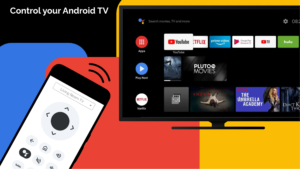
Android TV remote control app
:
aTV+ The Android TV Remote
.
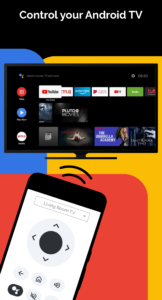
No more searching for your physical remote. With
aTV+ The Android TV Remote
, you can use this
remote control for TV
to control your
Android TV from your phone
with total convenience.
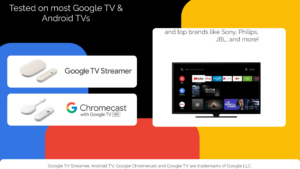
Tested with most Android TV and Google TV devices on the market:
Google TV Streamer, Google Chromecast, Nvidia Shield, and Smart TVs with Android TV
. Use our app as Sony remote, Philips remote, JBL remote, Haier remote, Toshiba remote, TCL remote, Hisense remote, and many more (More brands with Android TV:
www.android.com/tv/
)
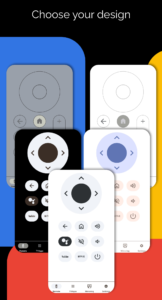
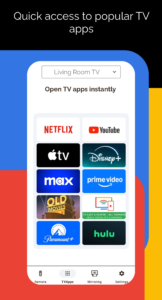
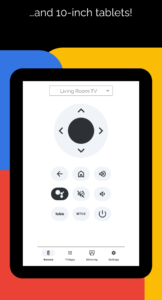
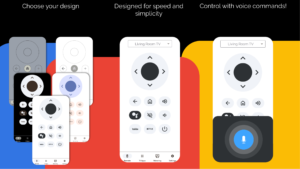
Choose the design that best suits your style and control your TV effortlessly. Turn your TV on and off, adjust the volume, and navigate through the Android TV interface with ease. Open your favorite apps instantly. Fast response time. Your entertainment always under your control.
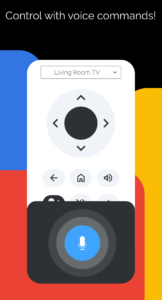
Thanks to
voice commands
you can control your Android TV, search for content, or ask questions to your Android TV such as "when will it rain in my city?", "what time does Saturday Night Live start?", or "what action movies are on Netflix?".
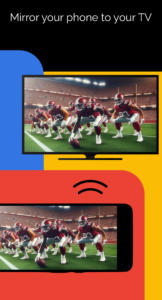
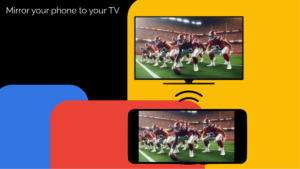
Screen Mirroring
allows you to
view your smartphone screen on your Android TV 📲➡️📺
for presentations, web browsing, or watch live sports on a big screen, enhancing your viewing experience and making it more interactive and social.
aTV+ The Android TV Remote is completely free
, with no hidden costs. 💰 Moreover, no registration is required 📝.
Our app follows Google's Material 3 design guidelines, ensuring a modern, intuitive, and consistent user interface. Additionally,
aTV+ The Android TV Remote
is fully optimized to work with the "dark theme" setting available in the latest versions of Android.
MAIN FEATURES:
🖥 A versatile
remote control for TV
, perfect for Android TV and other supported devices.
🎨 Choose the
design
that best suits your style.
🌐
Works as a Chromecast remote, Android TV remote, Google TV Streamer remote, Nvidia Shield remote
, and more.
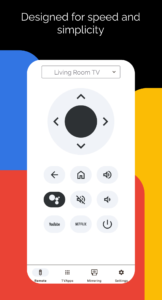
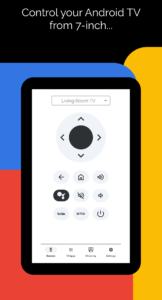
🔌 Turn your TV on/off, adjust the volume, and navigate through Android TV easily.
🎙️ Control with
voice commands
for an effortless entertainment experience.
🖥
Screen Mirroring
to share your mobile screen on your Android TV.
💸
Completely free
: No hidden costs.
🌙 Compatible with
Android's Dark Theme
.
Whether you're
watching movies, playing games, or simply exploring your TV
,
aTV+ The Android TV Remote
offers you a powerful and seamless control experience.
Download this
Google TV remote app
today and take control of your
Android TV, Chromecast, Google TV Streamer, Nvidia Shield, or Smart TV like never before!
Please note:
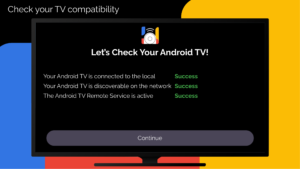
For the app to function correctly, your Android TV must be connected to the same Wi-Fi network as your mobile device. Make sure your Android TV is on and the remote control feature is enabled in your TV settings.
This application is not associated with or endorsed by Google LLC or any of its affiliates. All names, logos, and brands related to Google TV, Android TV, Google TV Streamer, Google Chromecast, and other Google products are the property of Google LLC. The developer of this application has no official connection with Google or its products. Brand and product names are trademarks of their respective owners.
Android TV remote control app
:
aTV+ The Android TV Remote
.
No more searching for your physical remote. With
aTV+ The Android TV Remote
, you can use this
remote control for TV
to control your
Android TV from your phone
with total convenience.
Tested with most Android TV and Google TV devices on the market:
Google TV Streamer, Google Chromecast, Nvidia Shield, and Smart TVs with Android TV
. Use our app as Sony remote, Philips remote, JBL remote, Haier remote, Toshiba remote, TCL remote, Hisense remote, and many more (More brands with Android TV:
www.android.com/tv/
)
Choose the design that best suits your style and control your TV effortlessly. Turn your TV on and off, adjust the volume, and navigate through the Android TV interface with ease. Open your favorite apps instantly. Fast response time. Your entertainment always under your control.
Thanks to
voice commands
you can control your Android TV, search for content, or ask questions to your Android TV such as "when will it rain in my city?", "what time does Saturday Night Live start?", or "what action movies are on Netflix?".
Screen Mirroring
allows you to
view your smartphone screen on your Android TV 📲➡️📺
for presentations, web browsing, or watch live sports on a big screen, enhancing your viewing experience and making it more interactive and social.
aTV+ The Android TV Remote is completely free
, with no hidden costs. 💰 Moreover, no registration is required 📝.
Our app follows Google's Material 3 design guidelines, ensuring a modern, intuitive, and consistent user interface. Additionally,
aTV+ The Android TV Remote
is fully optimized to work with the "dark theme" setting available in the latest versions of Android.
MAIN FEATURES:
🖥 A versatile
remote control for TV
, perfect for Android TV and other supported devices.
🎨 Choose the
design
that best suits your style.
🌐
Works as a Chromecast remote, Android TV remote, Google TV Streamer remote, Nvidia Shield remote
, and more.
🔌 Turn your TV on/off, adjust the volume, and navigate through Android TV easily.
🎙️ Control with
voice commands
for an effortless entertainment experience.
🖥
Screen Mirroring
to share your mobile screen on your Android TV.
💸
Completely free
: No hidden costs.
🌙 Compatible with
Android's Dark Theme
.
Whether you're
watching movies, playing games, or simply exploring your TV
,
aTV+ The Android TV Remote
offers you a powerful and seamless control experience.
Download this
Google TV remote app
today and take control of your
Android TV, Chromecast, Google TV Streamer, Nvidia Shield, or Smart TV like never before!
Please note:
For the app to function correctly, your Android TV must be connected to the same Wi-Fi network as your mobile device. Make sure your Android TV is on and the remote control feature is enabled in your TV settings.
This application is not associated with or endorsed by Google LLC or any of its affiliates. All names, logos, and brands related to Google TV, Android TV, Google TV Streamer, Google Chromecast, and other Google products are the property of Google LLC. The developer of this application has no official connection with Google or its products. Brand and product names are trademarks of their respective owners.
Download Remote for Google TV - aTV+ APK
Fast, free and safe download.
APK Permissions 13
- android.permission.ACCESS_ADSERVICES_AD_ID
- android.permission.ACCESS_ADSERVICES_ATTRIBUTION
- android.permission.ACCESS_ADSERVICES_TOPICS
- android.permission.ACCESS_NETWORK_STATE
- android.permission.FOREGROUND_SERVICE
- android.permission.INTERNET
- android.permission.RECORD_AUDIO
- android.permission.VIBRATE
- android.permission.WAKE_LOCK
- com.android.vending.BILLING
- com.google.android.finsky.permission.BIND_GET_INSTALL_REFERRER_SERVICE
- com.google.android.gms.permission.AD_ID
- com.remote.androidtvremote.DYNAMIC_RECEIVER_NOT_EXPORTED_PERMISSION
APK Verified
The cryptographic signature guarantees that the file is safe to install and was not tampered with in any way.
Similar in Tools


More by Aether Studios

Frequently Asked Questions about Remote for Google TV - aTV+ APK
This is the universal variant — a single APK that contains native libraries for every CPU architecture. It installs on any Android device but is larger than per-architecture variants.
Yes — the APK's signature has been cryptographically verified against the publisher's signing key. The SHA-256 hash is shown in the File Information panel so you can independently confirm the file matches the original release.
Android 26 (API level 34) or newer. Older devices will refuse the install.
Install a free app like 'CPU-Z' or 'Droid Hardware Info' from the Play Store and look at the ABI / Instruction Set row. Most phones made after 2017 are arm64-v8a; if in doubt, download the universal variant.
All variants are functionally identical — same features, same version. They differ only in which CPU architectures the native code is compiled for, and (sometimes) which screen densities the included graphics target. Pick the one that matches your device for the smallest install size, or pick 'Universal' if you're unsure.