
Download OSS Document Scanner (github version) APK 1.16.0.123 armeabi-v7a · Android 21+
Download APK
Verified Safe
This is the armeabi-v7a build of OSS Document Scanner (github version) 1.16.0.123, compiled for 32-bit ARM processors found in older Android phones (roughly 2013-2017). Use this build if your device's primary ABI is armeabi-v7a — modern 64-bit phones should pick the arm64-v8a or universal variant for better performance.
File size: 15.3 MB • Min Android: 21 • Target Android: 35 • Version code: 123 • Framework: Native (Java/Kotlin) • Permissions: 8
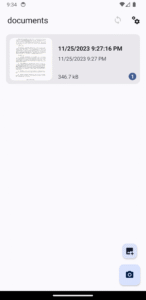
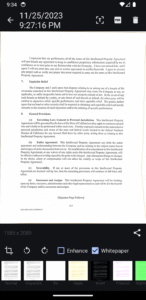
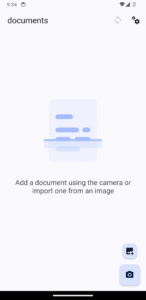
Screenshots
File Information
| Package Name | com.akylas.documentscanner |
|---|---|
| Version Name | 1.16.0.123 |
| Version Code | 123 |
| Architecture | armeabi-v7a |
| Min Android Version | Android 21 (API 35) |
| Main Activity | com.akylas.documentscanner.MainActivity |
| Framework | Native (Java/Kotlin) |
| File Size | 15.31 MB |
| Signature (SHA1) | 9ABC5054DCDB51266670EA159EF9F1CBC62AA871 |
| File Hash (SHA256) | 802b9e782da228a2e096d0f30f0112b0dbc7887a70dc0d42183d5d426e557354 |
What's New
Features
zoom slider in camera view * camera view fixed in portrait mode (
3bc217f
)
new app shortcut to ocr and copy text (
e628697
)
Bug fixes
thin white line in OCR data view at the bottom of the screen (
1bd0639
)
make alert content scrollable
#477
(
0a4d733
)
wrong actionbar title padding
#481
(
5fe56ea
)
floating action buttons margin fix (
1d7bc58
)
accessibility font size correctly scale with system display size (
4e673c8
)
missing ripple on list items (
4d15005
)
new menu item to enable reordering of pages in document view
#46
#214
#381
(
8636185
)
pdf generation now supports cyrillic characters and should be rendering better (
8c23c98
)
prompt to select export folder if not defined (
8cd8ff5
)
added letter page format
#474
(
5e10671
)
camera option to have front camera preview flipped. Image is not flipped yet (
e59dcae
)
Translations update by
@zenobit
,
@disroot
,
@mankurt
,
@gmail
,
@bora
,
@hoyd
,
@mihai
,
@HarukiHayashi
,
@david
,
@proton
, @Ophiushi, @users,
@elid
,
@bal
,
@mailbox
,
@ButterflyOfFire
,
@jordi
,
@marciozomb13
,
@outlook
,
@philip
zoom slider in camera view * camera view fixed in portrait mode (
3bc217f
)
new app shortcut to ocr and copy text (
e628697
)
Bug fixes
thin white line in OCR data view at the bottom of the screen (
1bd0639
)
make alert content scrollable
#477
(
0a4d733
)
wrong actionbar title padding
#481
(
5fe56ea
)
floating action buttons margin fix (
1d7bc58
)
accessibility font size correctly scale with system display size (
4e673c8
)
missing ripple on list items (
4d15005
)
new menu item to enable reordering of pages in document view
#46
#214
#381
(
8636185
)
pdf generation now supports cyrillic characters and should be rendering better (
8c23c98
)
prompt to select export folder if not defined (
8cd8ff5
)
added letter page format
#474
(
5e10671
)
camera option to have front camera preview flipped. Image is not flipped yet (
e59dcae
)
Translations update by
@zenobit
,
@disroot
,
@mankurt
,
@gmail
,
@bora
,
@hoyd
,
@mihai
,
@HarukiHayashi
,
@david
,
@proton
, @Ophiushi, @users,
@elid
,
@bal
,
@mailbox
,
@ButterflyOfFire
,
@jordi
,
@marciozomb13
,
@outlook
,
@philip
App Description
This repository is now the home of 2 apps
Installation
OSS Document Scanner
Oss CardWallet
AppVerifier hashes
OSS Document Scanner
:
com.akylas.documentscanner 0D:10:AA:10:E0:3A:7E:76:97:22:BE:43:88:BE:63:BD:15:7A:7B:7B:F1:96:FB:3C:EB:AB:87:37:F9:6C:A8:71
OSS CardWallet
:
com.akylas.cardwallet 0D:10:AA:10:E0:3A:7E:76:97:22:BE:43:88:BE:63:BD:15:7A:7B:7B:F1:96:FB:3C:EB:AB:87:37:F9:6C:A8:71
Enjoying OSS Document Scanner or OSS Card Wallet?
Please consider making a small donation to help fund the project. Developing an application, especially one that is open source and completely free, takes a lot of time and effort.
❤️ Sponsor
Open Source app to scan your documents.
Screenshots
|
|
|
|
|
|
|
|
Having issues, suggestions and feedback?
You can,
Create an issue here
Languages:
The Translations are hosted by
Weblate.org
.
Feature Graphic generated with
hotpot.ai
Building Setup
This repo can be used to build 2 different apps:
OSS DocumentScanner
and
OSS CardWallet
Those apps are using
Nativescript
which is a cross platform framework to build apps for iOS/Android
Setup / Environment
This project uses a few environment variables. While most are for publishing and thus not necessary for most, some are used to decide which app to build:
APP_ID
:
com.akylas.documentscanner
or
com.akylas.cardwallet
APP_BUILD_PATH
:
build/documentscanner
or
build/cardwallet
APP_RESOURCES
:
App_Resources/documentscanner
or
App_Resources/cardwallet
You can either define them yourself. If you are using vscode the
vscode/settings.json
of this repo defines different custom shells which will try to source
.env.documentscanner
and
.env.cardwallet
. To do this it use the plugin
dotenv
from omzsh
here
If those variables are not define the project will default to variables for
OSS DocumentScanner
Nativescript
First
setup Nativescript
This project is optimized to be built with
Akylas Fork
. Though it would work with main it is best to use this fork. The
package.json
defines a resolution to
../NativeScript/dist/packages/core
so clone the fork and build it using
npm run setup:yarn && npm run ui-mobile-base:build && npm run core:build
Another change is that this project uses new features of the Nativescript
cli
which were not released yet. So for now you need to clone
it
, build with
npm run setup
then use it with
PATH_TO_CLI_FOLDER/bin/ns
dotenv
The app uses
.env
file to set up needed environment variables.
.env
is not commited as it contains sensitive data Simply create a
.env
file with:
source .env.ci
Then "source" the file in the terminal so that variable are exported and available to nativescript cli. I use dotenv plugin for zsh which automatically loads the
.env
file
3rd parties
This app also uses opencv and tesseract. I did not include the libraries in git because there are huge and would make the github repo too big. There are 2 ways to install them:
download from
here
and uncompress them at the root
build them yourself:
OpenCV
Android
: You can download Opencv 4.8.0 for android
here
. Then place the necessary libs/includes in the
opencv/android
at the root of this repo like shown here:
iOS
: You can download Opencv 4.8.0 for iOS
here
. Then place the
opencv2.xcframework
in the
opencv/ios
at the root of this repo
This should be enough. Android and iOS build will use it using symlinks
Tesseract
It is a bit trickier for Tesseract as we need to compile it
Android
:
clone
https://github.com/Akylas/Tesseract4Android
build with
./gradlew assembleRelease
search for the built static libs (search for
libtesseract.a
) in
tesseract4android/build/intermediates/cxx/*/obj
copy the static libs and the includes(in
tesseract4android/src/main/cpp/tesseract/src/include
) in the
tesseract/android
at the root of this repo like shown here:
iOS
:
clone
https://github.com/Akylas/TesseractBuild
build with
./Scripts/Build_All.sh
copy everything from
Root
to the
tesseract/ios
at the root of this repo
Yarn
You need to use yarn with this project as it uses the
portal:
protocol for some dependencies. Note that the project has some
yarn link
for easy local dev for me. The best is for you to remove the
resolutions
part of the
package.json
Building
Now that all is setup and that you prepared the 3rd party libraries you can actually build and run the app:
yarn
ns run android --no-hmr --env.devlog
(replace by
ios
for iOS...)
This should run the app on the first discovered device or emulator.
Installation
OSS Document Scanner
Oss CardWallet
AppVerifier hashes
OSS Document Scanner
:
com.akylas.documentscanner 0D:10:AA:10:E0:3A:7E:76:97:22:BE:43:88:BE:63:BD:15:7A:7B:7B:F1:96:FB:3C:EB:AB:87:37:F9:6C:A8:71
OSS CardWallet
:
com.akylas.cardwallet 0D:10:AA:10:E0:3A:7E:76:97:22:BE:43:88:BE:63:BD:15:7A:7B:7B:F1:96:FB:3C:EB:AB:87:37:F9:6C:A8:71
Enjoying OSS Document Scanner or OSS Card Wallet?
Please consider making a small donation to help fund the project. Developing an application, especially one that is open source and completely free, takes a lot of time and effort.
❤️ Sponsor
Open Source app to scan your documents.
Screenshots
|
|
|
|
|
|
|
|
Having issues, suggestions and feedback?
You can,
Create an issue here
Languages:
The Translations are hosted by
Weblate.org
.
Feature Graphic generated with
hotpot.ai
Building Setup
This repo can be used to build 2 different apps:
OSS DocumentScanner
and
OSS CardWallet
Those apps are using
Nativescript
which is a cross platform framework to build apps for iOS/Android
Setup / Environment
This project uses a few environment variables. While most are for publishing and thus not necessary for most, some are used to decide which app to build:
APP_ID
:
com.akylas.documentscanner
or
com.akylas.cardwallet
APP_BUILD_PATH
:
build/documentscanner
or
build/cardwallet
APP_RESOURCES
:
App_Resources/documentscanner
or
App_Resources/cardwallet
You can either define them yourself. If you are using vscode the
vscode/settings.json
of this repo defines different custom shells which will try to source
.env.documentscanner
and
.env.cardwallet
. To do this it use the plugin
dotenv
from omzsh
here
If those variables are not define the project will default to variables for
OSS DocumentScanner
Nativescript
First
setup Nativescript
This project is optimized to be built with
Akylas Fork
. Though it would work with main it is best to use this fork. The
package.json
defines a resolution to
../NativeScript/dist/packages/core
so clone the fork and build it using
npm run setup:yarn && npm run ui-mobile-base:build && npm run core:build
Another change is that this project uses new features of the Nativescript
cli
which were not released yet. So for now you need to clone
it
, build with
npm run setup
then use it with
PATH_TO_CLI_FOLDER/bin/ns
dotenv
The app uses
.env
file to set up needed environment variables.
.env
is not commited as it contains sensitive data Simply create a
.env
file with:
source .env.ci
Then "source" the file in the terminal so that variable are exported and available to nativescript cli. I use dotenv plugin for zsh which automatically loads the
.env
file
3rd parties
This app also uses opencv and tesseract. I did not include the libraries in git because there are huge and would make the github repo too big. There are 2 ways to install them:
download from
here
and uncompress them at the root
build them yourself:
OpenCV
Android
: You can download Opencv 4.8.0 for android
here
. Then place the necessary libs/includes in the
opencv/android
at the root of this repo like shown here:
iOS
: You can download Opencv 4.8.0 for iOS
here
. Then place the
opencv2.xcframework
in the
opencv/ios
at the root of this repo
This should be enough. Android and iOS build will use it using symlinks
Tesseract
It is a bit trickier for Tesseract as we need to compile it
Android
:
clone
https://github.com/Akylas/Tesseract4Android
build with
./gradlew assembleRelease
search for the built static libs (search for
libtesseract.a
) in
tesseract4android/build/intermediates/cxx/*/obj
copy the static libs and the includes(in
tesseract4android/src/main/cpp/tesseract/src/include
) in the
tesseract/android
at the root of this repo like shown here:
iOS
:
clone
https://github.com/Akylas/TesseractBuild
build with
./Scripts/Build_All.sh
copy everything from
Root
to the
tesseract/ios
at the root of this repo
Yarn
You need to use yarn with this project as it uses the
portal:
protocol for some dependencies. Note that the project has some
yarn link
for easy local dev for me. The best is for you to remove the
resolutions
part of the
package.json
Building
Now that all is setup and that you prepared the 3rd party libraries you can actually build and run the app:
yarn
ns run android --no-hmr --env.devlog
(replace by
ios
for iOS...)
This should run the app on the first discovered device or emulator.
Download OSS Document Scanner (github version) APK
Fast, free and safe download.
APK Permissions 8
- android.permission.ACCESS_NETWORK_STATE
- android.permission.CAMERA
- android.permission.INTERNET
- android.permission.READ_EXTERNAL_STORAGE
- android.permission.USE_BIOMETRIC
- android.permission.USE_FINGERPRINT
- android.permission.WRITE_EXTERNAL_STORAGE
- com.akylas.documentscanner.DYNAMIC_RECEIVER_NOT_EXPORTED_PERMISSION
APK Verified
The cryptographic signature guarantees that the file is safe to install and was not tampered with in any way.
Similar in Tools


More by Akylas

Frequently Asked Questions about OSS Document Scanner (github version) APK
This variant is built for 32-bit ARM (older Android phones, ~2013–2017). If your device's CPU matches, this is the smallest, fastest version to install.
Yes — the APK's signature has been cryptographically verified against the publisher's signing key. The SHA-256 hash is shown in the File Information panel so you can independently confirm the file matches the original release.
Android 21 (API level 35) or newer. Older devices will refuse the install.
Install a free app like 'CPU-Z' or 'Droid Hardware Info' from the Play Store and look at the ABI / Instruction Set row. Most phones made after 2017 are arm64-v8a; if in doubt, download the universal variant.
All variants are functionally identical — same features, same version. They differ only in which CPU architectures the native code is compiled for, and (sometimes) which screen densities the included graphics target. Pick the one that matches your device for the smallest install size, or pick 'Universal' if you're unsure.