
This is the universal build of DNS Changer - IPv4 & IPv6 2.8.2. It contains native libraries for every CPU architecture (arm64-v8a, armeabi-v7a, x86, x86_64), so it installs on any Android device. The trade-off is size — it's larger than per-architecture variants. Pick this one if you're unsure which CPU your phone has, or if you plan to share the APK with multiple devices.
File size: 6.3 MB • Min Android: 23 • Target Android: 35 • Version code: 59 • Framework: Native (Java/Kotlin) • Permissions: 18
Screenshots
File Information
| Package Name | com.appplanex.dnschanger |
|---|---|
| Version Name | 2.8.2 |
| Version Code | 59 |
| Architecture | Universal |
| Min Android Version | Android 23 (API 35) |
| Main Activity | com.appplanex.dnschanger.activities.MainHomeActivity |
| Framework | Native (Java/Kotlin) |
| File Size | 6.30 MB |
| Signature (SHA1) | 26A8F05AB49F5A964BA21C1487F37630D2A7629B |
| File Hash (SHA256) | 02feb23e82c46acabfffd52a4c88a3e6e69570eb234257f4697c2c5d1a2eba50 |
What's New
• App Locking Feature
• Backup & Restore
• Added a New DNS Server
• Latest Android Compatibility
• App Improvements & Bug Fixes
• Backup & Restore
• Added a New DNS Server
• Latest Android Compatibility
• App Improvements & Bug Fixes
App Description
What is DNS Changer for Android?
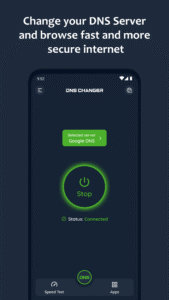
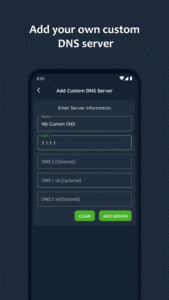
DNS Changer is the simplest way to change your DNS server and find fastest DNS server with DNS server speed test. It works for both Mobile network data and Wi-Fi connection without root and support IPv4 and IPv6 DNS servers. You can simply choose from a list of preconfigured public DNS Servers or add your own custom DNS Server.
DNS Changer change’s your device’s DNS address without affecting your connection speed and help keep your web browsing fast, more secure and private. it also allow you to access websites region-blocked by your ISP and may speed up your internet connection and improve online gaming experience with reduce of latency ping time which give faster response.
How does DNS Changer app improve my internet browsing?
When you have high speed internet connection but you noticed your web browsing speed its not all that it should be then your problem may lie in device default DNS server. By optimizing or changing your device's DNS servers you can find the fastest routes to travel internet for your data packets to take. it will not boost your download/upload speed but it will quite a noticeable improve your web browsing time.
Default DNS server directly affect on your internet browsing speed, so by choosing the fastest DNS server based on your location will help you to speed up internet browsing.
With DNS changer app, you can find fastest DNS server and simply connect to it with single touch.
List of preconfigured DNS servers:
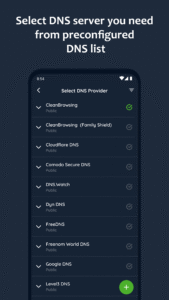
CleanBrowsing, Cloudflare DNS, DNS.WATCH, Comodo Secure DNS, Google Public DNS, Level3 DNS, Neustar UltraDNS, OpenDNS, Quad9, UncensoredDNS, Yandex.DNS and more.
Why to change DNS server?
✔ Freely explore on your favorite sites & apps
✔ Enjoy the fast and private internet browsing experience
✔ Stay more secure on public Wi-Fi
✔ Accessing restricted websites
✔ Prevent access to malicious websites
✔ Improve online gaming experience
✔ Easy to use and one tap connect – no login required
Key features:
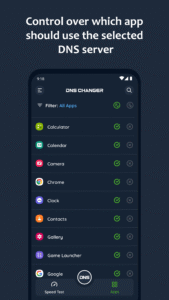
✔ Control over which app should use the Selected DNS Server (Pro)
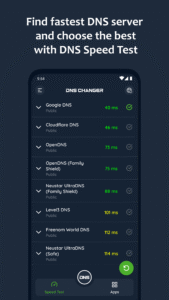
✔ DNS Speed Test to find the fastest DNS server
✔ Choose from Preconfigured public DNS server list
✔ Add your own custom DNS server
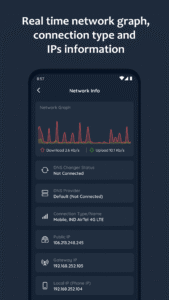
✔ Gives Real time network graph, connection type and IPs information
✔ Works for Mobile Network Data (2G/3G/4G/5G) and WiFi
✔ IPv4 & IPv6 DNS support
✔ Start on boot feature
✔ Works without root
✔ No system resources consumption (Battery/Ram/Cpu)
✔ 100% Ad-free
✔ Fast, Reliable and Easy to use
AppPlanex DNS Changer is 100% ad free. No pop-ups, no interruptions, just a smooth experience.
Please Note:
This app use a VPN Service to only setup a local VPN interface to change the DNS server addresses. Your network traffic will not be sent to a remote VPN server.
If you have any questions, queries or suggestions regarding app get in touch at
support@AppPlanex.com
.
DNS Changer is the simplest way to change your DNS server and find fastest DNS server with DNS server speed test. It works for both Mobile network data and Wi-Fi connection without root and support IPv4 and IPv6 DNS servers. You can simply choose from a list of preconfigured public DNS Servers or add your own custom DNS Server.
DNS Changer change’s your device’s DNS address without affecting your connection speed and help keep your web browsing fast, more secure and private. it also allow you to access websites region-blocked by your ISP and may speed up your internet connection and improve online gaming experience with reduce of latency ping time which give faster response.
How does DNS Changer app improve my internet browsing?
When you have high speed internet connection but you noticed your web browsing speed its not all that it should be then your problem may lie in device default DNS server. By optimizing or changing your device's DNS servers you can find the fastest routes to travel internet for your data packets to take. it will not boost your download/upload speed but it will quite a noticeable improve your web browsing time.
Default DNS server directly affect on your internet browsing speed, so by choosing the fastest DNS server based on your location will help you to speed up internet browsing.
With DNS changer app, you can find fastest DNS server and simply connect to it with single touch.
List of preconfigured DNS servers:
CleanBrowsing, Cloudflare DNS, DNS.WATCH, Comodo Secure DNS, Google Public DNS, Level3 DNS, Neustar UltraDNS, OpenDNS, Quad9, UncensoredDNS, Yandex.DNS and more.
Why to change DNS server?
✔ Freely explore on your favorite sites & apps
✔ Enjoy the fast and private internet browsing experience
✔ Stay more secure on public Wi-Fi
✔ Accessing restricted websites
✔ Prevent access to malicious websites
✔ Improve online gaming experience
✔ Easy to use and one tap connect – no login required
Key features:
✔ Control over which app should use the Selected DNS Server (Pro)
✔ DNS Speed Test to find the fastest DNS server
✔ Choose from Preconfigured public DNS server list
✔ Add your own custom DNS server
✔ Gives Real time network graph, connection type and IPs information
✔ Works for Mobile Network Data (2G/3G/4G/5G) and WiFi
✔ IPv4 & IPv6 DNS support
✔ Start on boot feature
✔ Works without root
✔ No system resources consumption (Battery/Ram/Cpu)
✔ 100% Ad-free
✔ Fast, Reliable and Easy to use
AppPlanex DNS Changer is 100% ad free. No pop-ups, no interruptions, just a smooth experience.
Please Note:
This app use a VPN Service to only setup a local VPN interface to change the DNS server addresses. Your network traffic will not be sent to a remote VPN server.
If you have any questions, queries or suggestions regarding app get in touch at
support@AppPlanex.com
.
Download DNS Changer - IPv4 & IPv6 APK
Fast, free and safe download.
APK Permissions 18
- android.permission.ACCESS_ADSERVICES_AD_ID
- android.permission.ACCESS_ADSERVICES_ATTRIBUTION
- android.permission.ACCESS_NETWORK_STATE
- android.permission.ACCESS_WIFI_STATE
- android.permission.FOREGROUND_SERVICE
- android.permission.FOREGROUND_SERVICE_SYSTEM_EXEMPTED
- android.permission.INTERNET
- android.permission.POST_NOTIFICATIONS
- android.permission.READ_EXTERNAL_STORAGE
- android.permission.RECEIVE_BOOT_COMPLETED
- android.permission.USE_BIOMETRIC
- android.permission.USE_FINGERPRINT
- android.permission.WAKE_LOCK
- android.permission.WRITE_EXTERNAL_STORAGE
- com.android.vending.BILLING
- com.appplanex.dnschanger.DYNAMIC_RECEIVER_NOT_EXPORTED_PERMISSION
- com.google.android.finsky.permission.BIND_GET_INSTALL_REFERRER_SERVICE
- com.google.android.gms.permission.AD_ID
APK Verified
The cryptographic signature guarantees that the file is safe to install and was not tampered with in any way.
Similar in Tools


Frequently Asked Questions about DNS Changer - IPv4 & IPv6 APK
This is the universal variant — a single APK that contains native libraries for every CPU architecture. It installs on any Android device but is larger than per-architecture variants.
Yes — the APK's signature has been cryptographically verified against the publisher's signing key. The SHA-256 hash is shown in the File Information panel so you can independently confirm the file matches the original release.
Android 23 (API level 35) or newer. Older devices will refuse the install.
Install a free app like 'CPU-Z' or 'Droid Hardware Info' from the Play Store and look at the ABI / Instruction Set row. Most phones made after 2017 are arm64-v8a; if in doubt, download the universal variant.
All variants are functionally identical — same features, same version. They differ only in which CPU architectures the native code is compiled for, and (sometimes) which screen densities the included graphics target. Pick the one that matches your device for the smallest install size, or pick 'Universal' if you're unsure.