
This is the universal build of Send Reduced Lite 0.28. It contains native libraries for every CPU architecture (arm64-v8a, armeabi-v7a, x86, x86_64), so it installs on any Android device. The trade-off is size — it's larger than per-architecture variants. Pick this one if you're unsure which CPU your phone has, or if you plan to share the APK with multiple devices.
File size: 0.1 MB • Min Android: 14 • Target Android: 30 • Version code: 2800 • Framework: Native (Java/Kotlin) • Permissions: 2
Screenshots
File Information
| Package Name | mobi.omegacentauri.SendReduced |
|---|---|
| Version Name | 0.28 |
| Version Code | 2800 |
| Architecture | Universal |
| Min Android Version | Android 14 (API 30) |
| Main Activity | mobi.omegacentauri.SendReduced.Options |
| Framework | Native (Java/Kotlin) |
| File Size | 91.53 KB |
| Signature (SHA1) | 24907DD478934A03917EACC1A6A912A95A7037AD |
| File Hash (SHA256) | d3db5de419210f4b5bd41820feb3058d60ac057e31d03eefcc775168863e5446 |
What's New
0.28: rename to fit Google requirements
0.27: drop support for some old Android devices and improve support for others
0.24: fix crash when selecting License
0.22: option to include/exclude direct shares
0.21: bug fixes
0.20: support Android 10+
0.27: drop support for some old Android devices and improve support for others
0.24: fix crash when selecting License
0.22: option to include/exclude direct shares
0.21: bug fixes
0.20: support Android 10+
App Description
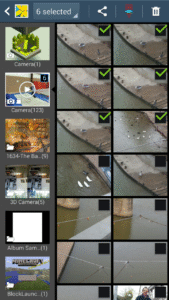
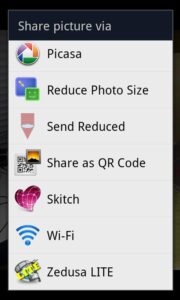
Send Reduced lets you share reduced resolution photos by email or text with the minimum number of taps. When sharing a photo, just choose "Send Reduced". The first time, you'll have to choose the email (or other) app you want to use with it, but if you set the checkmark to make this permanent, next time you won't even have to do that--as soon as you choose "Send Reduced", you'll be in the email (or other) app.
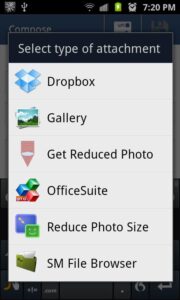
You can also use Send Reduced to attach a reduced photo--when choosing the attachment from your email app, first time choose the Gallery and set a checkmark, and next time you'll automatically get the photo from the gallery and reduce it.
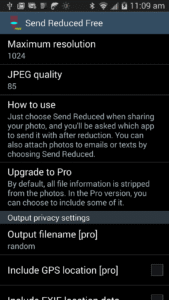
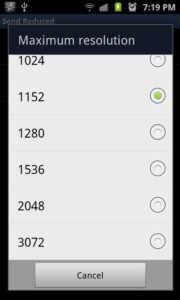
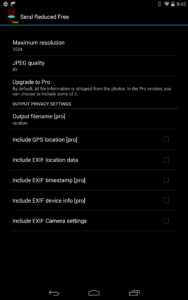
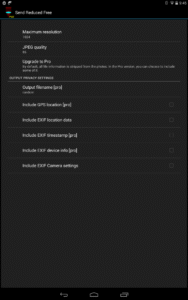
You can adjust the resolution and quality of the reduced photo by running Send Reduced from your launcher.
Send Reduced is tiny, open source (search the web for source code) and has no ads. It strips identifying information (EXIF and filename) from the photos. There is also a Pro version which lets you include some EXIF data and preserve filenames if you are interested in supporting the developer.
You can also use Send Reduced to attach a reduced photo--when choosing the attachment from your email app, first time choose the Gallery and set a checkmark, and next time you'll automatically get the photo from the gallery and reduce it.
You can adjust the resolution and quality of the reduced photo by running Send Reduced from your launcher.
Send Reduced is tiny, open source (search the web for source code) and has no ads. It strips identifying information (EXIF and filename) from the photos. There is also a Pro version which lets you include some EXIF data and preserve filenames if you are interested in supporting the developer.
Download Send Reduced Lite APK
Fast, free and safe download.
APK Permissions 2
- android.permission.READ_EXTERNAL_STORAGE
- android.permission.WRITE_EXTERNAL_STORAGE
APK Verified
The cryptographic signature guarantees that the file is safe to install and was not tampered with in any way.


Frequently Asked Questions about Send Reduced Lite APK
This is the universal variant — a single APK that contains native libraries for every CPU architecture. It installs on any Android device but is larger than per-architecture variants.
Yes — the APK's signature has been cryptographically verified against the publisher's signing key. The SHA-256 hash is shown in the File Information panel so you can independently confirm the file matches the original release.
Android 14 (API level 30) or newer. Older devices will refuse the install.
Install a free app like 'CPU-Z' or 'Droid Hardware Info' from the Play Store and look at the ABI / Instruction Set row. Most phones made after 2017 are arm64-v8a; if in doubt, download the universal variant.
All variants are functionally identical — same features, same version. They differ only in which CPU architectures the native code is compiled for, and (sometimes) which screen densities the included graphics target. Pick the one that matches your device for the smallest install size, or pick 'Universal' if you're unsure.