
Download AIMP v4.25.1665 (24.12.2025) (120-640dpi) (Android APK v4.20.1622 (05.09.2025) Universal · Android 23+
Download APK
Verified Safe
This is the universal build of AIMP v4.25.1665 (24.12.2025) (120-640dpi) (Android v4.20.1622 (05.09.2025). It contains native libraries for every CPU architecture (arm64-v8a, armeabi-v7a, x86, x86_64), so it installs on any Android device. The trade-off is size — it's larger than per-architecture variants. Pick this one if you're unsure which CPU your phone has, or if you plan to share the APK with multiple devices.
File size: 11.8 MB • Min Android: 23 • Target Android: 35 • Version code: 1622 • Framework: Native (Java/Kotlin) • Permissions: 17
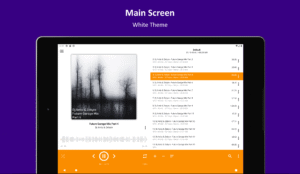
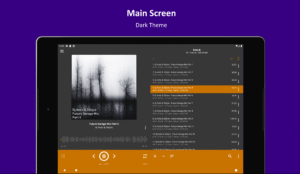
Screenshots
File Information
| Package Name | com.aimp.player |
|---|---|
| Version Name | v4.20.1622 (05.09.2025) |
| Version Code | 1622 |
| Architecture | Universal |
| Min Android Version | Android 23 (API 35) |
| Main Activity | com.aimp.player.ui.activities.main.MainActivity |
| Framework | Native (Java/Kotlin) |
| File Size | 11.84 MB |
| Signature (SHA1) | 0FCBD2BC044E050C804F3E5E7012FF4C0E21C1D0 |
| File Hash (SHA256) | 2f0abb3dc510b0644c1f0a2be4e35a509151aab107f0c41f4636d23f0f20109f |
What's New
+ Track part repeat (A-B)
+ Sleep timer: the "wait for track end" option
+ UI: appearance of context menu has been updated
+ UI: custom button for Notification / Android Auto
+ Sleep timer: the "wait for track end" option
+ UI: appearance of context menu has been updated
+ UI: custom button for Notification / Android Auto
App Description
Attention!
App may works incorrectly on devices based on M.I.U.I firmware.
Key features
:
+ Supported formats: aac, ape, dff, dsf, flac, it, m4a, m4b, mo3, mod, mp2, mp3, mp4, mpc, mpga, mtm, ogg, opus, s3m, tta, umx, wav, webm, wv, xm
+ Supported playlists: m3u, m3u8, xspf, pls and cue
+ Support for Android Auto and custom Car PCs
+ Support for OpenSL / AudioTrack / AAudio output methods
+ Support for CUE Sheets
+ Support for OTG-storages and custom file providers
+ Support for user bookmarks
+ Support for user defined playback queue
+ Support for album arts and lyrics
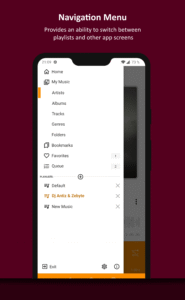
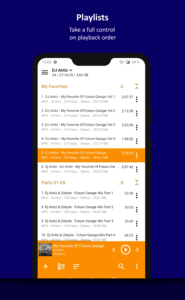
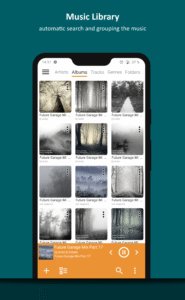
+ Support for multiple playlists and smart-playlists based on folders
+ Support for internet radio (including Http Live Streaming)
+ Automatic detection of tags encoding
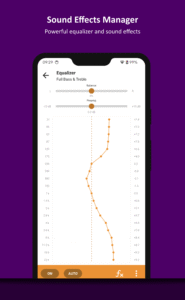
+ Built-in 20-band graphic equalizer
+ Balance, Pitch and speed control
+ A-B track part repeat
+ Volume normalization using replay gain or peak-based normalization
+ Sleep timer feature
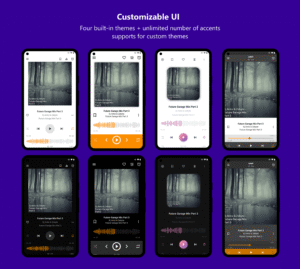
+ Custom themes support
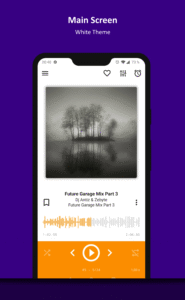
+ Built-in light, dark and black themes
+ Support for night and day mode
Optional features
:
+ Automatic music search and indexing
+ An ability to cross-fade tracks
+ An ability to repeat playlist / track / playback without repeating
+ An ability to down mix multi-channels audio files to stereo
+ An ability to down mix audio files to mono
+ An ability to control playback from notification area
+ An ability to control playback via gestures in album art area
+ An ability to control playback via headset
+ An ability to switch the tracks via volume buttons
Additional features
:
+ An ability to play files from the File Manager applications
+ An ability to play files from Windows shared folders (only v2 and v3 of samba protocol are supported)
+ An ability to play files from WebDAV-based cloud storage
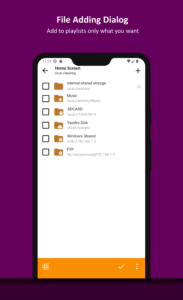
+ An ability to add to playlist only chosen files / folders
+ An ability to delete files physically
+ An ability to sort files by template / manually
+ An ability to group files by template
+ An ability to search files in filtering mode
+ An ability to share audio files
+ An ability to register playing track as ringtone from player
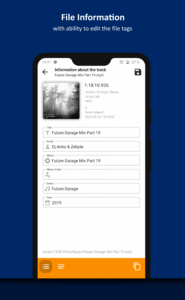
+ An ability to edit meta of APE, MP3, FLAC, OGG and M4A file formats
Additionally, our app is ads free.
App may works incorrectly on devices based on M.I.U.I firmware.
Key features
:
+ Supported formats: aac, ape, dff, dsf, flac, it, m4a, m4b, mo3, mod, mp2, mp3, mp4, mpc, mpga, mtm, ogg, opus, s3m, tta, umx, wav, webm, wv, xm
+ Supported playlists: m3u, m3u8, xspf, pls and cue
+ Support for Android Auto and custom Car PCs
+ Support for OpenSL / AudioTrack / AAudio output methods
+ Support for CUE Sheets
+ Support for OTG-storages and custom file providers
+ Support for user bookmarks
+ Support for user defined playback queue
+ Support for album arts and lyrics
+ Support for multiple playlists and smart-playlists based on folders
+ Support for internet radio (including Http Live Streaming)
+ Automatic detection of tags encoding
+ Built-in 20-band graphic equalizer
+ Balance, Pitch and speed control
+ A-B track part repeat
+ Volume normalization using replay gain or peak-based normalization
+ Sleep timer feature
+ Custom themes support
+ Built-in light, dark and black themes
+ Support for night and day mode
Optional features
:
+ Automatic music search and indexing
+ An ability to cross-fade tracks
+ An ability to repeat playlist / track / playback without repeating
+ An ability to down mix multi-channels audio files to stereo
+ An ability to down mix audio files to mono
+ An ability to control playback from notification area
+ An ability to control playback via gestures in album art area
+ An ability to control playback via headset
+ An ability to switch the tracks via volume buttons
Additional features
:
+ An ability to play files from the File Manager applications
+ An ability to play files from Windows shared folders (only v2 and v3 of samba protocol are supported)
+ An ability to play files from WebDAV-based cloud storage
+ An ability to add to playlist only chosen files / folders
+ An ability to delete files physically
+ An ability to sort files by template / manually
+ An ability to group files by template
+ An ability to search files in filtering mode
+ An ability to share audio files
+ An ability to register playing track as ringtone from player
+ An ability to edit meta of APE, MP3, FLAC, OGG and M4A file formats
Additionally, our app is ads free.
Download AIMP v4.25.1665 (24.12.2025) (120-640dpi) (Android APK
Fast, free and safe download.
APK Permissions 17
- android.permission.ACCESS_ALL_DOWNLOADS
- android.permission.ACCESS_NETWORK_STATE
- android.permission.BLUETOOTH
- android.permission.FOREGROUND_SERVICE
- android.permission.FOREGROUND_SERVICE_DATA_SYNC
- android.permission.FOREGROUND_SERVICE_MEDIA_PLAYBACK
- android.permission.INTERNET
- android.permission.MODIFY_AUDIO_SETTINGS
- android.permission.POST_NOTIFICATIONS
- android.permission.READ_EXTERNAL_STORAGE
- android.permission.READ_MEDIA_AUDIO
- android.permission.READ_MEDIA_IMAGES
- android.permission.READ_PHONE_STATE
- android.permission.WAKE_LOCK
- android.permission.WRITE_EXTERNAL_STORAGE
- android.permission.WRITE_SETTINGS
- com.aimp.player.DYNAMIC_RECEIVER_NOT_EXPORTED_PERMISSION
APK Verified
The cryptographic signature guarantees that the file is safe to install and was not tampered with in any way.
Similar in Music & Audio


Frequently Asked Questions about AIMP v4.25.1665 (24.12.2025) (120-640dpi) (Android APK
This is the universal variant — a single APK that contains native libraries for every CPU architecture. It installs on any Android device but is larger than per-architecture variants.
Yes — the APK's signature has been cryptographically verified against the publisher's signing key. The SHA-256 hash is shown in the File Information panel so you can independently confirm the file matches the original release.
Android 23 (API level 35) or newer. Older devices will refuse the install.
Install a free app like 'CPU-Z' or 'Droid Hardware Info' from the Play Store and look at the ABI / Instruction Set row. Most phones made after 2017 are arm64-v8a; if in doubt, download the universal variant.
All variants are functionally identical — same features, same version. They differ only in which CPU architectures the native code is compiled for, and (sometimes) which screen densities the included graphics target. Pick the one that matches your device for the smallest install size, or pick 'Universal' if you're unsure.