
Screenshots
File Information
| Package Name | com.artifex.mupdf.mini.app |
|---|---|
| Version Name | 1.26.11a |
| Version Code | 170 |
| Architecture | arm64-v8a, armeabi-v7a, x86 |
| Min Android Version | Android 21 (API 35) |
| Main Activity | com.artifex.mupdf.mini.app.LibraryActivity |
| Framework | Native (Java/Kotlin) |
| File Size | 13.71 MB |
| Signature (SHA1) | AC9E7E0D1F98E3DB547E4DF0A75E374A96BFDE70 |
| File Hash (SHA256) | 6aba0c70029c3a62372330a7f8b65f50181377b94842cea42551e9170a01e815 |
App Description
MuPDF Mini Viewer
is a minimalist Android app that uses the MuPDF library to
view PDF, XPS, CBZ, unprotected EPUB, and FB2 documents.
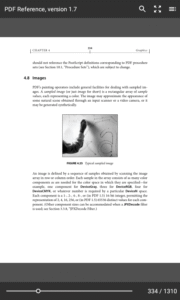
This is a minimalist version of the MuPDF app, which focuses on reading only. It
does not support editing annotations or filling out forms.
The app will start with a file picker showing the contents of the external
storage directory. Only files that it can open will be listed.
Each document you open will start its own activity, so you can view many
documents at once. Use the Overview system button to switch between the file
picker and any open documents and other activities you have running.
Tapping on the left and right side of the screen will flip to the previous and
next pages. Tapping in the middle will bring up or hide the tool bars. A long
tap will toggle highlighting of links. When the links are highlighted they are
also active and tappable.
You can pinch to zoom in. When zoomed in, tapping will scroll to advance the
next screenful of content.
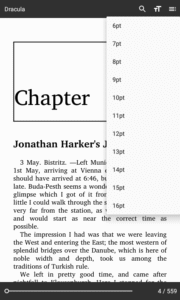
In the toolbar there is a button to show the table of contents, if the document
has one. In EPUB and FB2 documents, there is also a menu item to pick the font
size. The scrubber at the bottom allows you to quickly jump to a given page in
the document.
Author: Artifex Software LLC
License:
GNU Affero General Public License v3.0 or later
Website
Issue Tracker
Source Code
Build Metadata
Reproducibility Status
is a minimalist Android app that uses the MuPDF library to
view PDF, XPS, CBZ, unprotected EPUB, and FB2 documents.
This is a minimalist version of the MuPDF app, which focuses on reading only. It
does not support editing annotations or filling out forms.
The app will start with a file picker showing the contents of the external
storage directory. Only files that it can open will be listed.
Each document you open will start its own activity, so you can view many
documents at once. Use the Overview system button to switch between the file
picker and any open documents and other activities you have running.
Tapping on the left and right side of the screen will flip to the previous and
next pages. Tapping in the middle will bring up or hide the tool bars. A long
tap will toggle highlighting of links. When the links are highlighted they are
also active and tappable.
You can pinch to zoom in. When zoomed in, tapping will scroll to advance the
next screenful of content.
In the toolbar there is a button to show the table of contents, if the document
has one. In EPUB and FB2 documents, there is also a menu item to pick the font
size. The scrubber at the bottom allows you to quickly jump to a given page in
the document.
Author: Artifex Software LLC
License:
GNU Affero General Public License v3.0 or later
Website
Issue Tracker
Source Code
Build Metadata
Reproducibility Status
Download MuPDF mini APK
Fast, free and safe download.
APK Permissions 1
- android.permission.READ_EXTERNAL_STORAGE
APK Verified
The cryptographic signature guarantees that the file is safe to install and was not tampered with in any way.


