
Download Photoroom: AI Photo Editor APK 2025.33.02 Universal · Android 29+
Download APK
Verified Safe
This is the universal build of Photoroom: AI Photo Editor 2025.33.02. It contains native libraries for every CPU architecture (arm64-v8a, armeabi-v7a, x86, x86_64), so it installs on any Android device. The trade-off is size — it's larger than per-architecture variants. Pick this one if you're unsure which CPU your phone has, or if you plan to share the APK with multiple devices.
File size: 83.4 MB • Min Android: 29 • Target Android: 35 • Version code: 2004 • Framework: Native (Java/Kotlin) • Permissions: 26
Screenshots

File Information
| Package Name | com.photoroom.app |
|---|---|
| Version Name | 2025.33.02 |
| Version Code | 2004 |
| Architecture | Universal |
| Min Android Version | Android 29 (API 35) |
| Main Activity | com.photoroom.application.LaunchActivity |
| Framework | Native (Java/Kotlin) |
| File Size | 83.39 MB |
| Signature (SHA1) | 0424A4898A4B33940D8BF16E44251B876E97F8D0 |
| File Hash (SHA256) | 83d7755a85b6647329472855d9cd5e924dc3783170209a30eeec979560bdf2b0 |
What's New
From version
2025.30.02
:
This update brings new features and stability improvements to make your Photoroom experience even greater.
2025.30.02
:
This update brings new features and stability improvements to make your Photoroom experience even greater.
App Description
Create stunning images in seconds with Photoroom AI.
Photoroom’s AI technology makes it easy to design, edit, and remove backgrounds from your photos. Create professional-quality images that elevate your brand, boost engagement, and drive sales.
Why choose Photoroom?
🌟 AI-powered design
No design experience needed! Simply describe your idea, and Photoroom AI quickly creates your logo, custom stickers, scenes, and more. Save time while the AI creates professional designs for you in seconds.
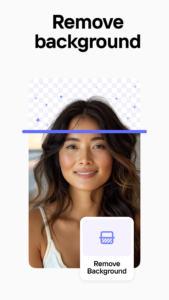
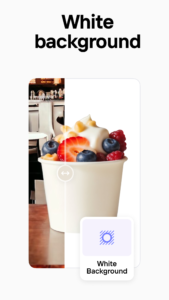
🖼️ One-tap background removal and replacement
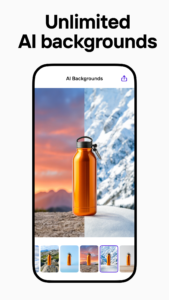
Enhance your product photos effortlessly with AI backgrounds. Create polished product shots, eye-catching posts, or ad-ready images.
💡 Perfect your photos with AI Photo Editor
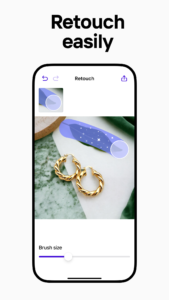
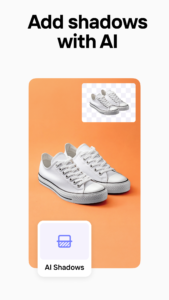
Photoroom’s AI photo editor helps you remove unwanted objects, clean up images, and improve photos with ease. Adjust lighting, shadows, and sharpness for professional-level results.
🖌️ Create your Brand Kit
Keep your logos, colors, and fonts all in one place for consistent look every time.
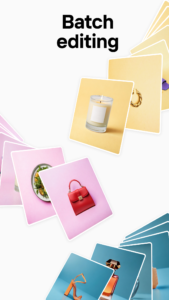
🔄 Boost productivity with batch editing
Edit multiple images at once, perfect for e-commerce sellers or content creators. Save time while maintaining high-quality images.
✨ Resizing tools
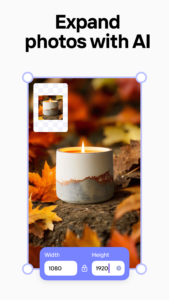
Ensure your images are optimized for Instagram, Facebook, YouTube, Amazon, Shopify and more—without cropping or pixelation.
🎨 Customizable templates for every occasion
Choose from a variety of AI-powered templates for holidays, promotions, and events. Customize templates quickly to match your needs, saving time on design and creating standout content.
🤝 Collaborate easily
Invite team members to Photoroom to collaborate on designs in real-time. Photoroom’s AI-powered tools make sharing, commenting, and editing seamless, ensuring consistent branding and efficient teamwork.
📱 Quick export and easy sharing
Export your creations and share them directly to social media or download them for marketing campaigns, product listings, or personal projects—all hassle-free.
Who is Photoroom for?
- E-commerce sellers: Generate your logo and create product listings with AI-powered background removal and editing. Edit multiple photos with batch editing functionality.
- Content creators: Design standout images to grow your brand. Access pre-made templates for easy customization.
- Social media managers: Produce engaging social media posts across platforms. Resize images for Instagram, YouTube and more—no cropping needed.
- Freelancers: Deliver professional designs to clients on time. Invite members to comment, edit, then share designs.
- Everyone: Whether a logo, product photo, sticker, or social media image, Photoroom’s AI tools have you covered.
Why millions love Photoroom
⭐ Easy to use: With Photoroom’s intuitive AI tools, anyone can create professional visuals—no design skills required.
⭐ Pro-level results: Achieve high-quality results effortlessly, thanks to Photoroom’s AI photo editor.
Try Photoroom Pro
Unlock advanced AI tools, premium templates, and unlimited exports with Photoroom Pro.
Whether you’re growing your online store, building your social media presence, or designing content, Photoroom’s AI-powered tools make it easy to create stunning visuals. Join over 200 million users today and experience AI photo editing!
Photoroom’s AI technology makes it easy to design, edit, and remove backgrounds from your photos. Create professional-quality images that elevate your brand, boost engagement, and drive sales.
Why choose Photoroom?
🌟 AI-powered design
No design experience needed! Simply describe your idea, and Photoroom AI quickly creates your logo, custom stickers, scenes, and more. Save time while the AI creates professional designs for you in seconds.
🖼️ One-tap background removal and replacement
Enhance your product photos effortlessly with AI backgrounds. Create polished product shots, eye-catching posts, or ad-ready images.
💡 Perfect your photos with AI Photo Editor
Photoroom’s AI photo editor helps you remove unwanted objects, clean up images, and improve photos with ease. Adjust lighting, shadows, and sharpness for professional-level results.
🖌️ Create your Brand Kit
Keep your logos, colors, and fonts all in one place for consistent look every time.
🔄 Boost productivity with batch editing
Edit multiple images at once, perfect for e-commerce sellers or content creators. Save time while maintaining high-quality images.
✨ Resizing tools
Ensure your images are optimized for Instagram, Facebook, YouTube, Amazon, Shopify and more—without cropping or pixelation.
🎨 Customizable templates for every occasion
Choose from a variety of AI-powered templates for holidays, promotions, and events. Customize templates quickly to match your needs, saving time on design and creating standout content.
🤝 Collaborate easily
Invite team members to Photoroom to collaborate on designs in real-time. Photoroom’s AI-powered tools make sharing, commenting, and editing seamless, ensuring consistent branding and efficient teamwork.
📱 Quick export and easy sharing
Export your creations and share them directly to social media or download them for marketing campaigns, product listings, or personal projects—all hassle-free.
Who is Photoroom for?
- E-commerce sellers: Generate your logo and create product listings with AI-powered background removal and editing. Edit multiple photos with batch editing functionality.
- Content creators: Design standout images to grow your brand. Access pre-made templates for easy customization.
- Social media managers: Produce engaging social media posts across platforms. Resize images for Instagram, YouTube and more—no cropping needed.
- Freelancers: Deliver professional designs to clients on time. Invite members to comment, edit, then share designs.
- Everyone: Whether a logo, product photo, sticker, or social media image, Photoroom’s AI tools have you covered.
Why millions love Photoroom
⭐ Easy to use: With Photoroom’s intuitive AI tools, anyone can create professional visuals—no design skills required.
⭐ Pro-level results: Achieve high-quality results effortlessly, thanks to Photoroom’s AI photo editor.
Try Photoroom Pro
Unlock advanced AI tools, premium templates, and unlimited exports with Photoroom Pro.
Whether you’re growing your online store, building your social media presence, or designing content, Photoroom’s AI-powered tools make it easy to create stunning visuals. Join over 200 million users today and experience AI photo editing!
Download Photoroom: AI Photo Editor APK
Fast, free and safe download.
APK Permissions 26
- android.permission.ACCESS_ADSERVICES_AD_ID
- android.permission.ACCESS_ADSERVICES_ATTRIBUTION
- android.permission.ACCESS_ADSERVICES_CUSTOM_AUDIENCE
- android.permission.ACCESS_ADSERVICES_TOPICS
- android.permission.ACCESS_NETWORK_STATE
- android.permission.ACCESS_WIFI_STATE
- android.permission.CAMERA
- android.permission.DETECT_SCREEN_CAPTURE
- android.permission.FOREGROUND_SERVICE
- android.permission.FOREGROUND_SERVICE_MEDIA_PROJECTION
- android.permission.HIGH_SAMPLING_RATE_SENSORS
- android.permission.INTERNET
- android.permission.POST_NOTIFICATIONS
- android.permission.READ_EXTERNAL_STORAGE
- android.permission.READ_MEDIA_IMAGES
- android.permission.RECEIVE_BOOT_COMPLETED
- android.permission.RECORD_AUDIO
- android.permission.VIBRATE
- android.permission.WAKE_LOCK
- android.permission.WRITE_EXTERNAL_STORAGE
- com.android.vending.BILLING
- com.google.android.c2dm.permission.RECEIVE
- com.google.android.finsky.permission.BIND_GET_INSTALL_REFERRER_SERVICE
- com.google.android.gms.permission.AD_ID
- com.google.android.providers.gsf.permission.READ_GSERVICES
- com.photoroom.app.DYNAMIC_RECEIVER_NOT_EXPORTED_PERMISSION
APK Verified
The cryptographic signature guarantees that the file is safe to install and was not tampered with in any way.


Frequently Asked Questions about Photoroom: AI Photo Editor APK
This is the universal variant — a single APK that contains native libraries for every CPU architecture. It installs on any Android device but is larger than per-architecture variants.
Yes — the APK's signature has been cryptographically verified against the publisher's signing key. The SHA-256 hash is shown in the File Information panel so you can independently confirm the file matches the original release.
Android 29 (API level 35) or newer. Older devices will refuse the install.
Install a free app like 'CPU-Z' or 'Droid Hardware Info' from the Play Store and look at the ABI / Instruction Set row. Most phones made after 2017 are arm64-v8a; if in doubt, download the universal variant.
All variants are functionally identical — same features, same version. They differ only in which CPU architectures the native code is compiled for, and (sometimes) which screen densities the included graphics target. Pick the one that matches your device for the smallest install size, or pick 'Universal' if you're unsure.