
Download Photoroom: AI Photo Editor APK 2025.30.02 Universal · Android 29+
Download APK
Verified Safe
This is the universal build of Photoroom: AI Photo Editor 2025.30.02. It contains native libraries for every CPU architecture (arm64-v8a, armeabi-v7a, x86, x86_64), so it installs on any Android device. The trade-off is size — it's larger than per-architecture variants. Pick this one if you're unsure which CPU your phone has, or if you plan to share the APK with multiple devices.
File size: 76.6 MB • Min Android: 29 • Target Android: 35 • Version code: 1968 • Framework: Native (Java/Kotlin) • Permissions: 26
Screenshots

File Information
| Package Name | com.photoroom.app |
|---|---|
| Version Name | 2025.30.02 |
| Version Code | 1968 |
| Architecture | Universal |
| Min Android Version | Android 29 (API 35) |
| Main Activity | com.photoroom.application.LaunchActivity |
| Framework | Native (Java/Kotlin) |
| File Size | 76.65 MB |
| Signature (SHA1) | 0424A4898A4B33940D8BF16E44251B876E97F8D0 |
| File Hash (SHA256) | dd2af9411c451af9223575f40f95fded1b017eda6d7c0115a6b9445a2aa543b1 |
What's New
This update brings new features and stability improvements to make your Photoroom experience even greater.
App Description
PhotoRoom is the all-in-one app that edits, designs and optimizes great visual content that helps you run your business from your phone. Remove or erase the background of photos, use templates and create your own content.
No need to be a photographer or design pro anymore: with PhotoRoom, you can turn your photos into pro-quality content in seconds.
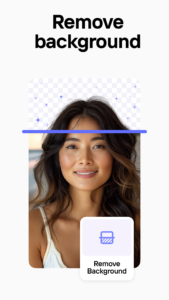
Our magic? The app crops objects and people in your picture, automatically. With one tap, remove the background and create stand-out content that showcases a product or person. Edit the image, add text or a logo, stickers, make collages.
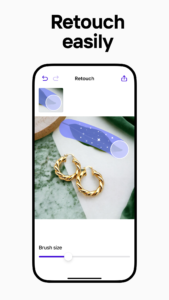
With our Magic Retouch, now you can remove any unwanted details effortlessly (POOF!) with a swipe of your fingertip,
Editing perfect product shots is a breeze (and dare we say, fun!). We mean it when we say we do visual magic so you can sell faster!
More than 6 million shop owners, resellers, and creators trust us. Join our mobile-first entrepreneur revolution and download PhotoRoom free today.
What you can create:
- Product content for e-commerce & marketplaces like Shopify, eBay, Etsy, Facebook marketplace, or Depop.
- Portrait photography and profile pics for business or social
- Instagram Stories to promote you or your business
- Fun collages and stickers
How to use PhotoRoom:
1. Take a picture or upload one from your library
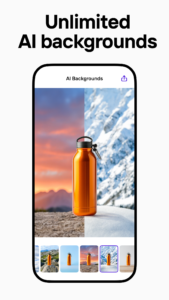
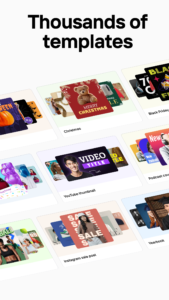
2. Pick from one of our 1000+ available backgrounds or templates
3. Edit the image and add text. Apply filters, remove the background, play with Magic Retouch, mmodify the contrast, or add quotes easily with our smart photo editor.
4. Add your logo (with PhotoRoom PRO)
5. Export your content to your Library, or directly to Whatsapp, Messages, Social Media, or marketplaces like Poshmark, Depop, Vinted, etc.
PhotoRoom is the Photo Editor for Everyone
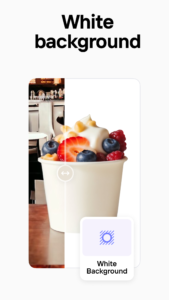
- Use the most accurate and easy background eraser to cut out objects in images & erase their backgrounds, apply a white background, blur the background or cut the background itself
- Easily crop photos
- Use Magic Retouch to remove any unwanted objects
- Make your own stickers in a few steps
- Use our seasonal templates to create easy, dynamic seasonal content
- Make photo collages
PhotoRoom for Resellers
If you are a reseller on marketplaces like Poshmark, Depop you can optimize your business with features like the background remover, product or person cut out, easy export directly to the marketplaces platform, or batch export mode with our PRO membership.
PhotoRoom for Small Business
Create professional images for your website or app in a few seconds. Use PhotoRoom to remove background, magic retouch pictures, or cut out a product or person perfectly. Edit to your liking and easily export. If you’re looking for Pixelcut, why not try the original PhotoRoom.
PhotoRoom for Creators
Promote you and your business on social by easily creating templates for Youtube or Podcast covers, and Facebook, Instagram, or Pinterest content.
PhotoRoom Pro : you'll have access to the following features.
- Remove the PhotoRoom logo
- Access to 3 Pro cutout options (Standard, Person, Object)
- Access to the full Pro backdrop & template library
- Export at higher resolutions
- Edit and export in batch mode
- Try PhotoRoom Pro with a free trial - limited to one per Google Play account. Once the trial is over, you’ll be charged a subscription fee. Your Pro subscription will automatically renew unless auto-renew is turned off at least 24 hours before the end of the current period. Go to your Google Play account to manage your membership & to turn auto-renew off.
Love PhotoRoom?
Follow us on Instagram @photoroom for illustrations and design tips.
Send your feedback to
hello@photoroom.com
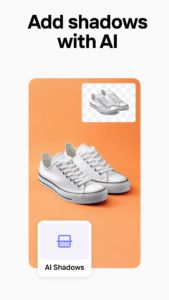
With PhotoRoom, you will enjoy the most accurate background eraser. In a few taps, you will add a white background to your pictures, have a perfect pixelcut, or have access to multiple photo editing options.
No need to be a photographer or design pro anymore: with PhotoRoom, you can turn your photos into pro-quality content in seconds.
Our magic? The app crops objects and people in your picture, automatically. With one tap, remove the background and create stand-out content that showcases a product or person. Edit the image, add text or a logo, stickers, make collages.
With our Magic Retouch, now you can remove any unwanted details effortlessly (POOF!) with a swipe of your fingertip,
Editing perfect product shots is a breeze (and dare we say, fun!). We mean it when we say we do visual magic so you can sell faster!
More than 6 million shop owners, resellers, and creators trust us. Join our mobile-first entrepreneur revolution and download PhotoRoom free today.
What you can create:
- Product content for e-commerce & marketplaces like Shopify, eBay, Etsy, Facebook marketplace, or Depop.
- Portrait photography and profile pics for business or social
- Instagram Stories to promote you or your business
- Fun collages and stickers
How to use PhotoRoom:
1. Take a picture or upload one from your library
2. Pick from one of our 1000+ available backgrounds or templates
3. Edit the image and add text. Apply filters, remove the background, play with Magic Retouch, mmodify the contrast, or add quotes easily with our smart photo editor.
4. Add your logo (with PhotoRoom PRO)
5. Export your content to your Library, or directly to Whatsapp, Messages, Social Media, or marketplaces like Poshmark, Depop, Vinted, etc.
PhotoRoom is the Photo Editor for Everyone
- Use the most accurate and easy background eraser to cut out objects in images & erase their backgrounds, apply a white background, blur the background or cut the background itself
- Easily crop photos
- Use Magic Retouch to remove any unwanted objects
- Make your own stickers in a few steps
- Use our seasonal templates to create easy, dynamic seasonal content
- Make photo collages
PhotoRoom for Resellers
If you are a reseller on marketplaces like Poshmark, Depop you can optimize your business with features like the background remover, product or person cut out, easy export directly to the marketplaces platform, or batch export mode with our PRO membership.
PhotoRoom for Small Business
Create professional images for your website or app in a few seconds. Use PhotoRoom to remove background, magic retouch pictures, or cut out a product or person perfectly. Edit to your liking and easily export. If you’re looking for Pixelcut, why not try the original PhotoRoom.
PhotoRoom for Creators
Promote you and your business on social by easily creating templates for Youtube or Podcast covers, and Facebook, Instagram, or Pinterest content.
PhotoRoom Pro : you'll have access to the following features.
- Remove the PhotoRoom logo
- Access to 3 Pro cutout options (Standard, Person, Object)
- Access to the full Pro backdrop & template library
- Export at higher resolutions
- Edit and export in batch mode
- Try PhotoRoom Pro with a free trial - limited to one per Google Play account. Once the trial is over, you’ll be charged a subscription fee. Your Pro subscription will automatically renew unless auto-renew is turned off at least 24 hours before the end of the current period. Go to your Google Play account to manage your membership & to turn auto-renew off.
Love PhotoRoom?
Follow us on Instagram @photoroom for illustrations and design tips.
Send your feedback to
hello@photoroom.com
With PhotoRoom, you will enjoy the most accurate background eraser. In a few taps, you will add a white background to your pictures, have a perfect pixelcut, or have access to multiple photo editing options.
Download Photoroom: AI Photo Editor APK
Fast, free and safe download.
APK Permissions 26
- android.permission.ACCESS_ADSERVICES_AD_ID
- android.permission.ACCESS_ADSERVICES_ATTRIBUTION
- android.permission.ACCESS_ADSERVICES_CUSTOM_AUDIENCE
- android.permission.ACCESS_ADSERVICES_TOPICS
- android.permission.ACCESS_NETWORK_STATE
- android.permission.ACCESS_WIFI_STATE
- android.permission.CAMERA
- android.permission.DETECT_SCREEN_CAPTURE
- android.permission.FOREGROUND_SERVICE
- android.permission.HIGH_SAMPLING_RATE_SENSORS
- android.permission.INTERNET
- android.permission.POST_NOTIFICATIONS
- android.permission.READ_EXTERNAL_STORAGE
- android.permission.READ_MEDIA_IMAGES
- android.permission.READ_PHONE_STATE
- android.permission.RECEIVE_BOOT_COMPLETED
- android.permission.RECORD_AUDIO
- android.permission.VIBRATE
- android.permission.WAKE_LOCK
- android.permission.WRITE_EXTERNAL_STORAGE
- com.android.vending.BILLING
- com.google.android.c2dm.permission.RECEIVE
- com.google.android.finsky.permission.BIND_GET_INSTALL_REFERRER_SERVICE
- com.google.android.gms.permission.AD_ID
- com.google.android.providers.gsf.permission.READ_GSERVICES
- com.photoroom.app.DYNAMIC_RECEIVER_NOT_EXPORTED_PERMISSION
APK Verified
The cryptographic signature guarantees that the file is safe to install and was not tampered with in any way.


Frequently Asked Questions about Photoroom: AI Photo Editor APK
This is the universal variant — a single APK that contains native libraries for every CPU architecture. It installs on any Android device but is larger than per-architecture variants.
Yes — the APK's signature has been cryptographically verified against the publisher's signing key. The SHA-256 hash is shown in the File Information panel so you can independently confirm the file matches the original release.
Android 29 (API level 35) or newer. Older devices will refuse the install.
Install a free app like 'CPU-Z' or 'Droid Hardware Info' from the Play Store and look at the ABI / Instruction Set row. Most phones made after 2017 are arm64-v8a; if in doubt, download the universal variant.
All variants are functionally identical — same features, same version. They differ only in which CPU architectures the native code is compiled for, and (sometimes) which screen densities the included graphics target. Pick the one that matches your device for the smallest install size, or pick 'Universal' if you're unsure.