
This is the universal build of Parental Control App - Kidsee 8.0. It contains native libraries for every CPU architecture (arm64-v8a, armeabi-v7a, x86, x86_64), so it installs on any Android device. The trade-off is size — it's larger than per-architecture variants. Pick this one if you're unsure which CPU your phone has, or if you plan to share the APK with multiple devices.
File size: 48.0 MB • Min Android: 24 • Target Android: 36 • Version code: 117 • Framework: Native (Java/Kotlin) • Permissions: 25
Screenshots
File Information
| Package Name | com.artpoldev.kidsee |
|---|---|
| Version Name | 8.0 |
| Version Code | 117 |
| Architecture | Universal |
| Min Android Version | Android 24 (API 36) |
| Main Activity | com.artpoldev.kidsee.screen.MainActivity |
| Framework | Native (Java/Kotlin) |
| File Size | 47.97 MB |
| Signature (SHA1) | CA4F9FED4E3D353D4A52D03331C8554F70E33154 |
| File Hash (SHA256) | 22bbf0411986c602b0e0d7de8b6bfb68eed30c0dcd528c5c6a2e540d880a6cfe |
What's New
Bug fixes, minor improvements, and more.
App Description
Kidsee Parental Control – Family Safety, Screen Time & GPS Tracking
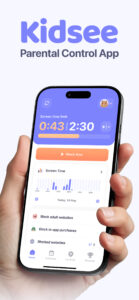
Kidsee is a powerful parental control solution that helps families build healthy screen habits, manage app usage, and stay connected with their kids.
With flexible screen time limits, instant app blocking, and real-time GPS tracking, Kidsee empowers parents to support digital wellbeing while keeping their child safe.
Control screen time & apps remotely
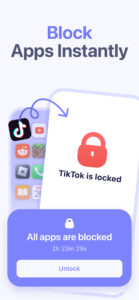
✔ Instantly lock apps on your child's phone when needed
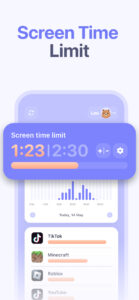
✔ Set daily time limits for screen use or specific apps
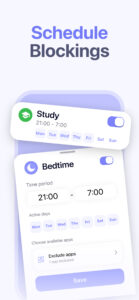
✔ Create custom schedules by day of the week – for school, bedtime, or weekends
✔ Block games, social media, or any distracting apps
✔ Exclude useful or educational apps from limits
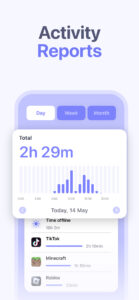
✔ Track app usage by hour and day
✔ Supports Android and iPhone / iPad child devices
GPS tracker & phone monitor
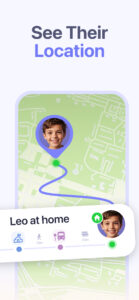
✔ See your child's real-time GPS location
✔ Check location history to know where your child has been
✔ View battery level on the child's smartphone – avoid lost connection
✔ Monitor phone usage from the parent's device anytime
Keep your child safe online
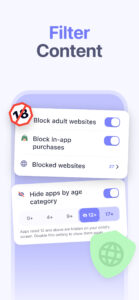
✔ Automatically block 18+ and adult content
✔ Add custom websites to block manually
✔ Block in-app purchases and prevent accidental payments
✔ Promote digital wellbeing and reduce screen overuse
Made for families
✔ Manage multiple kids from one parent account
✔ Control up to 10 child devices
✔ Easy to install and manage from the parent's phone
✔ Works on Android phones, tablets, and iOS devices
Why parents choose Kidsee
✔ All-in-one family solution to guide kids, support healthy screen habits, and keep them safe
✔ Helps prevent phone addiction and improve focus
✔ Gives parents confidence, control, and peace of mind
Start with a 3 day free trial
Explore all premium features with no obligation.
No ads. Just full control for your family.
Need support? Reach us at
support@kidsee.app
—
Important info:
– Requires internet connection
– Uses AccessibilityService API to block apps and monitor screen time
– GPS features require location permission on child's device
– Kidsee does not share data with third parties
Learn more at:
kidsee.app
Kidsee is a powerful parental control solution that helps families build healthy screen habits, manage app usage, and stay connected with their kids.
With flexible screen time limits, instant app blocking, and real-time GPS tracking, Kidsee empowers parents to support digital wellbeing while keeping their child safe.
Control screen time & apps remotely
✔ Instantly lock apps on your child's phone when needed
✔ Set daily time limits for screen use or specific apps
✔ Create custom schedules by day of the week – for school, bedtime, or weekends
✔ Block games, social media, or any distracting apps
✔ Exclude useful or educational apps from limits
✔ Track app usage by hour and day
✔ Supports Android and iPhone / iPad child devices
GPS tracker & phone monitor
✔ See your child's real-time GPS location
✔ Check location history to know where your child has been
✔ View battery level on the child's smartphone – avoid lost connection
✔ Monitor phone usage from the parent's device anytime
Keep your child safe online
✔ Automatically block 18+ and adult content
✔ Add custom websites to block manually
✔ Block in-app purchases and prevent accidental payments
✔ Promote digital wellbeing and reduce screen overuse
Made for families
✔ Manage multiple kids from one parent account
✔ Control up to 10 child devices
✔ Easy to install and manage from the parent's phone
✔ Works on Android phones, tablets, and iOS devices
Why parents choose Kidsee
✔ All-in-one family solution to guide kids, support healthy screen habits, and keep them safe
✔ Helps prevent phone addiction and improve focus
✔ Gives parents confidence, control, and peace of mind
Start with a 3 day free trial
Explore all premium features with no obligation.
No ads. Just full control for your family.
Need support? Reach us at
support@kidsee.app
—
Important info:
– Requires internet connection
– Uses AccessibilityService API to block apps and monitor screen time
– GPS features require location permission on child's device
– Kidsee does not share data with third parties
Learn more at:
kidsee.app
Download Parental Control App - Kidsee APK
Fast, free and safe download.
APK Permissions 25
- android.permission.ACCESS_ADSERVICES_AD_ID
- android.permission.ACCESS_ADSERVICES_ATTRIBUTION
- android.permission.ACCESS_BACKGROUND_LOCATION
- android.permission.ACCESS_COARSE_LOCATION
- android.permission.ACCESS_FINE_LOCATION
- android.permission.ACCESS_NETWORK_STATE
- android.permission.ACCESS_WIFI_STATE
- android.permission.FOREGROUND_SERVICE
- android.permission.INTERNET
- android.permission.PACKAGE_USAGE_STATS
- android.permission.POST_NOTIFICATIONS
- android.permission.QUERY_ALL_PACKAGES
- android.permission.READ_EXTERNAL_STORAGE
- android.permission.RECEIVE_BOOT_COMPLETED
- android.permission.SYSTEM_ALERT_WINDOW
- android.permission.WAKE_LOCK
- android.permission.WRITE_EXTERNAL_STORAGE
- com.android.vending.BILLING
- com.android.vending.CHECK_LICENSE
- com.artpoldev.kidsee.DYNAMIC_RECEIVER_NOT_EXPORTED_PERMISSION
- com.google.android.finsky.permission.BIND_GET_INSTALL_REFERRER_SERVICE
- com.google.android.gms.permission.AD_ID
- com.google.android.providers.gsf.permission.READ_GSERVICES
- com.huawei.appmarket.service.commondata.permission.GET_COMMON_DATA
- com.samsung.android.mapsagent.permission.READ_APP_INFO
APK Verified
The cryptographic signature guarantees that the file is safe to install and was not tampered with in any way.


Frequently Asked Questions about Parental Control App - Kidsee APK
This is the universal variant — a single APK that contains native libraries for every CPU architecture. It installs on any Android device but is larger than per-architecture variants.
Yes — the APK's signature has been cryptographically verified against the publisher's signing key. The SHA-256 hash is shown in the File Information panel so you can independently confirm the file matches the original release.
Android 24 (API level 36) or newer. Older devices will refuse the install.
Install a free app like 'CPU-Z' or 'Droid Hardware Info' from the Play Store and look at the ABI / Instruction Set row. Most phones made after 2017 are arm64-v8a; if in doubt, download the universal variant.
All variants are functionally identical — same features, same version. They differ only in which CPU architectures the native code is compiled for, and (sometimes) which screen densities the included graphics target. Pick the one that matches your device for the smallest install size, or pick 'Universal' if you're unsure.