
This is the universal build of Parental Control App - Kidsee v6.8. It contains native libraries for every CPU architecture (arm64-v8a, armeabi-v7a, x86, x86_64), so it installs on any Android device. The trade-off is size — it's larger than per-architecture variants. Pick this one if you're unsure which CPU your phone has, or if you plan to share the APK with multiple devices.
File size: 41.4 MB • Min Android: 24 • Target Android: 36 • Version code: 96 • Framework: Native (Java/Kotlin) • Permissions: 26
Screenshots

File Information
| Package Name | com.artpoldev.kidsee |
|---|---|
| Version Name | v6.8 |
| Version Code | 96 |
| Architecture | Universal |
| Min Android Version | Android 24 (API 36) |
| Main Activity | com.artpoldev.kidsee.screen.MainActivity |
| Framework | Native (Java/Kotlin) |
| File Size | 41.43 MB |
| Signature (SHA1) | CA4F9FED4E3D353D4A52D03331C8554F70E33154 |
| File Hash (SHA256) | a37661655b0f30cc44d0cccaafe162fc106722a4f17af870c542bd3859b8a6ca |
App Description
Kidsee — your screen time management assistant.
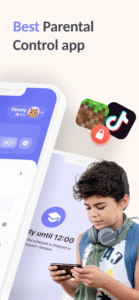
Kidsee is an app that helps parents guide and manage time spent on mobile devices. With Kidsee, you can easily:
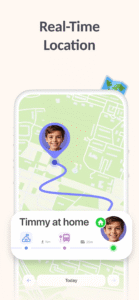
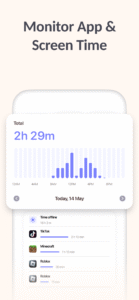
• Monitor daily device usage and app activity
• Pause distracting apps with one tap when needed
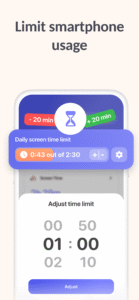
• Set flexible screen time limits for different days
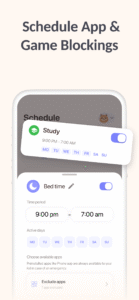
• Create custom schedules for family time or focus hours
By balancing time spent in games, apps, and social media, Kidsee helps create a healthy relationship between the digital and real world.
Why Kidsee?
Kidsee goes beyond basic monitoring to provide:
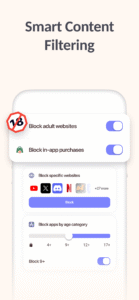
- Smart controls that adapt to your family's routine
- Quick app pausing for focus time
- Customizable limits that meet your family's needs
All while maintaining a safe and balanced digital environment that promotes responsible technology use.
Start taking care of your digital balance with Kidsee!
Kidsee uses the AccessibilityService API to monitor and effectively manage mobile device usage. This helps the app promote more mindful and balanced technology usage. All collected data is used solely for these purposes and is not shared with third parties.
If you have any questions or need assistance, contact us at:
support@kidsee.app
.
Kidsee is an app that helps parents guide and manage time spent on mobile devices. With Kidsee, you can easily:
• Monitor daily device usage and app activity
• Pause distracting apps with one tap when needed
• Set flexible screen time limits for different days
• Create custom schedules for family time or focus hours
By balancing time spent in games, apps, and social media, Kidsee helps create a healthy relationship between the digital and real world.
Why Kidsee?
Kidsee goes beyond basic monitoring to provide:
- Smart controls that adapt to your family's routine
- Quick app pausing for focus time
- Customizable limits that meet your family's needs
All while maintaining a safe and balanced digital environment that promotes responsible technology use.
Start taking care of your digital balance with Kidsee!
Kidsee uses the AccessibilityService API to monitor and effectively manage mobile device usage. This helps the app promote more mindful and balanced technology usage. All collected data is used solely for these purposes and is not shared with third parties.
If you have any questions or need assistance, contact us at:
support@kidsee.app
.
Download Parental Control App - Kidsee APK
Fast, free and safe download.
APK Permissions 26
- android.permission.ACCESS_ADSERVICES_AD_ID
- android.permission.ACCESS_ADSERVICES_ATTRIBUTION
- android.permission.ACCESS_BACKGROUND_LOCATION
- android.permission.ACCESS_COARSE_LOCATION
- android.permission.ACCESS_FINE_LOCATION
- android.permission.ACCESS_NETWORK_STATE
- android.permission.ACCESS_WIFI_STATE
- android.permission.FOREGROUND_SERVICE
- android.permission.FOREGROUND_SERVICE_DATA_SYNC
- android.permission.INTERNET
- android.permission.PACKAGE_USAGE_STATS
- android.permission.POST_NOTIFICATIONS
- android.permission.QUERY_ALL_PACKAGES
- android.permission.READ_EXTERNAL_STORAGE
- android.permission.RECEIVE_BOOT_COMPLETED
- android.permission.SYSTEM_ALERT_WINDOW
- android.permission.WAKE_LOCK
- android.permission.WRITE_EXTERNAL_STORAGE
- com.android.vending.BILLING
- com.android.vending.CHECK_LICENSE
- com.artpoldev.kidsee.DYNAMIC_RECEIVER_NOT_EXPORTED_PERMISSION
- com.google.android.finsky.permission.BIND_GET_INSTALL_REFERRER_SERVICE
- com.google.android.gms.permission.AD_ID
- com.google.android.providers.gsf.permission.READ_GSERVICES
- com.huawei.appmarket.service.commondata.permission.GET_COMMON_DATA
- com.samsung.android.mapsagent.permission.READ_APP_INFO
APK Verified
The cryptographic signature guarantees that the file is safe to install and was not tampered with in any way.


Frequently Asked Questions about Parental Control App - Kidsee APK
This is the universal variant — a single APK that contains native libraries for every CPU architecture. It installs on any Android device but is larger than per-architecture variants.
Yes — the APK's signature has been cryptographically verified against the publisher's signing key. The SHA-256 hash is shown in the File Information panel so you can independently confirm the file matches the original release.
Android 24 (API level 36) or newer. Older devices will refuse the install.
Install a free app like 'CPU-Z' or 'Droid Hardware Info' from the Play Store and look at the ABI / Instruction Set row. Most phones made after 2017 are arm64-v8a; if in doubt, download the universal variant.
All variants are functionally identical — same features, same version. They differ only in which CPU architectures the native code is compiled for, and (sometimes) which screen densities the included graphics target. Pick the one that matches your device for the smallest install size, or pick 'Universal' if you're unsure.