
This is the universal build of Mexico Topo Maps 7.8.5. It contains native libraries for every CPU architecture (arm64-v8a, armeabi-v7a, x86, x86_64), so it installs on any Android device. The trade-off is size — it's larger than per-architecture variants. Pick this one if you're unsure which CPU your phone has, or if you plan to share the APK with multiple devices.
File size: 19.7 MB • Min Android: 24 • Target Android: 35 • Version code: 423 • Framework: Native (Java/Kotlin) • Permissions: 20
Screenshots
File Information
| Package Name | com.atlogis.mexico |
|---|---|
| Version Name | 7.8.5 |
| Version Code | 423 |
| Architecture | Universal |
| Min Android Version | Android 24 (API 35) |
| Main Activity | com.atlogis.mapapp.MapAppStartActivity2 |
| Framework | Native (Java/Kotlin) |
| File Size | 19.69 MB |
| Signature (SHA1) | DC241ED06E07F3E5071DEEE1D66379B8CB9EBAA2 |
| File Hash (SHA256) | 02c3cc4c002852add958e75daf22ec604482c45a5100bffff4b8e472b0f8267c |
What's New
・Improvements & Fixes
App Description
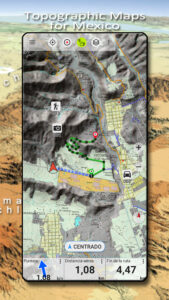
Easy to use outdoor navigation app with free access to the best available maps and aerial imagery for Mexico.
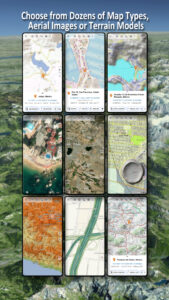
Choose between 20+ map layers (topographical maps, aerial imagery, road maps, ...) to plan the perfect trip and
turn your Andoid Phone/Tablet into an outdoor GPS for offline trips into the backcountry.
Add easily maps from other sources (GeoPDF, GeoTiff, Online Map Services like WMS, ...)
Available basemap layers for Mexico:
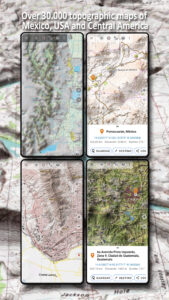
• INEGI topographical maps 1:20.000 - 1:250.000 ( over 7.000 maps !)
• INEGI digital topographical map
• INEGI digital road map
• INEGI hipsographic map
• USA traditional topographical maps: Seamless coverage of topo maps of the USA at Scales 1:250.000, 1:100.000, 1:63.000 and 1:24.000/25.000
• Topographical maps of Central America 1:50.000 - 1:250.000
Worldwide basemap layers:
• OpenStreetMaps (5 different map layouts), also downloadable in space saving vectorformat
• Google Maps (Satellite images, Road- and Terrain-Map)
• Bing Maps (Satellite images, Road-Map)
• ESRI Maps (Satellite images, Road- and Terrain-Map)
• Earth At Night
• Waze
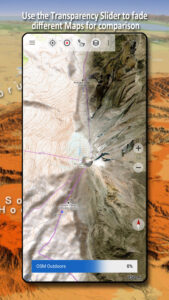
Configure a basemap layer as an overlay and utilize a transparency fader to seamlessly compare maps with each other.
Add maps from other sources:
• Import raster maps in GeoPDF, GeoTiff, MBTiles or Ozi (Oziexplorer OZF2 & OZF3)
• Add web mapping services as WMS or WMTS/Tileserver
• Import OpenStreetMaps in Vectorformat, eg complete Mexico for just some GBs
Available Mexico map Overlays - add additional information to any other base map:
• Roads
• Railroads
• National Hydrographic Dataset
• Airports
• Geographical names
• Vulcans
• Boundaries
Available worldwide overlays:
• Hillshading overlay
• 20m Contourlines
• OpenSeaMap
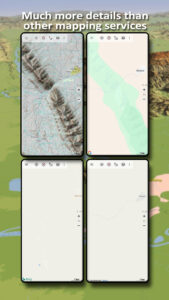
There is no perfect map. Toggle between the different map layers or use the compare maps feature to find the most interesting route. Especially the topographical 20k & 50k maps contain many small pathes or other features that are missing on modern digital maps.
Main features for outdoor-navigation:
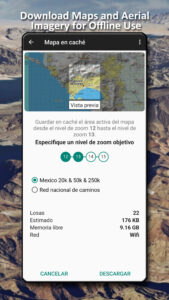
• Download map data for OFFLINE USAGE
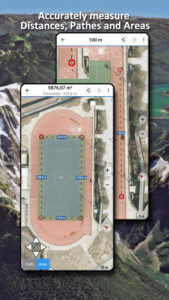
• Measure pathes and aereas
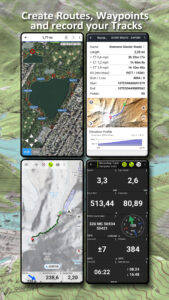
• Create and edit Waypoints
• GoTo-Waypoint-Navigation
• Create and edit Routes
• Route-Navigation (Point-to-Point Navigation)
• Track Recording (with speed, elevation and accuracy profile)
• Tripmaster with fields for odometer, average speed, bearing, elevation, etc.
• GPX/KML/KMZ Import/Export
• Search (placenames, POIs, streets)
• Get elevation and distance
• Customizable datafields in Map View and Tripmaster (e.g. Speed, Distance, Compass, ...)
• Share Waypoints, Tracks or Routes (via eMail, Dropbox, WhatsApp, ..)
• Use coordinates in WGS84, UTM or MGRS/USNG (Military Grid/ US National Grid), What3Words• Track Replay
• and many more ...
Use this navigation app for outdoor activities like hiking, biking, camping, climbing, riding, skiing, canoeing, hunting, snowmobile tours, offroad 4WD tours or search&rescue (SAR).
Add custom waypoints in longitude/latitude, UTM or MGRS/USNG format with WGS84 datum.
Import/Export/Share GPS-Waypoints/Tracks/Routes in GPX or Google Earth KML/KMZ format.
Please send questions, comments and feature requests to
support@atlogis.com
Choose between 20+ map layers (topographical maps, aerial imagery, road maps, ...) to plan the perfect trip and
turn your Andoid Phone/Tablet into an outdoor GPS for offline trips into the backcountry.
Add easily maps from other sources (GeoPDF, GeoTiff, Online Map Services like WMS, ...)
Available basemap layers for Mexico:
• INEGI topographical maps 1:20.000 - 1:250.000 ( over 7.000 maps !)
• INEGI digital topographical map
• INEGI digital road map
• INEGI hipsographic map
• USA traditional topographical maps: Seamless coverage of topo maps of the USA at Scales 1:250.000, 1:100.000, 1:63.000 and 1:24.000/25.000
• Topographical maps of Central America 1:50.000 - 1:250.000
Worldwide basemap layers:
• OpenStreetMaps (5 different map layouts), also downloadable in space saving vectorformat
• Google Maps (Satellite images, Road- and Terrain-Map)
• Bing Maps (Satellite images, Road-Map)
• ESRI Maps (Satellite images, Road- and Terrain-Map)
• Earth At Night
• Waze
Configure a basemap layer as an overlay and utilize a transparency fader to seamlessly compare maps with each other.
Add maps from other sources:
• Import raster maps in GeoPDF, GeoTiff, MBTiles or Ozi (Oziexplorer OZF2 & OZF3)
• Add web mapping services as WMS or WMTS/Tileserver
• Import OpenStreetMaps in Vectorformat, eg complete Mexico for just some GBs
Available Mexico map Overlays - add additional information to any other base map:
• Roads
• Railroads
• National Hydrographic Dataset
• Airports
• Geographical names
• Vulcans
• Boundaries
Available worldwide overlays:
• Hillshading overlay
• 20m Contourlines
• OpenSeaMap
There is no perfect map. Toggle between the different map layers or use the compare maps feature to find the most interesting route. Especially the topographical 20k & 50k maps contain many small pathes or other features that are missing on modern digital maps.
Main features for outdoor-navigation:
• Download map data for OFFLINE USAGE
• Measure pathes and aereas
• Create and edit Waypoints
• GoTo-Waypoint-Navigation
• Create and edit Routes
• Route-Navigation (Point-to-Point Navigation)
• Track Recording (with speed, elevation and accuracy profile)
• Tripmaster with fields for odometer, average speed, bearing, elevation, etc.
• GPX/KML/KMZ Import/Export
• Search (placenames, POIs, streets)
• Get elevation and distance
• Customizable datafields in Map View and Tripmaster (e.g. Speed, Distance, Compass, ...)
• Share Waypoints, Tracks or Routes (via eMail, Dropbox, WhatsApp, ..)
• Use coordinates in WGS84, UTM or MGRS/USNG (Military Grid/ US National Grid), What3Words• Track Replay
• and many more ...
Use this navigation app for outdoor activities like hiking, biking, camping, climbing, riding, skiing, canoeing, hunting, snowmobile tours, offroad 4WD tours or search&rescue (SAR).
Add custom waypoints in longitude/latitude, UTM or MGRS/USNG format with WGS84 datum.
Import/Export/Share GPS-Waypoints/Tracks/Routes in GPX or Google Earth KML/KMZ format.
Please send questions, comments and feature requests to
support@atlogis.com
Download Mexico Topo Maps APK
Fast, free and safe download.
APK Permissions 20
- android.permission.ACCESS_ADSERVICES_AD_ID
- android.permission.ACCESS_ADSERVICES_ATTRIBUTION
- android.permission.ACCESS_ADSERVICES_TOPICS
- android.permission.ACCESS_BACKGROUND_LOCATION
- android.permission.ACCESS_COARSE_LOCATION
- android.permission.ACCESS_FINE_LOCATION
- android.permission.ACCESS_NETWORK_STATE
- android.permission.FOREGROUND_SERVICE
- android.permission.FOREGROUND_SERVICE_LOCATION
- android.permission.INTERNET
- android.permission.POST_NOTIFICATIONS
- android.permission.READ_EXTERNAL_STORAGE
- android.permission.REQUEST_IGNORE_BATTERY_OPTIMIZATIONS
- android.permission.VIBRATE
- android.permission.WAKE_LOCK
- android.permission.WRITE_EXTERNAL_STORAGE
- com.android.vending.BILLING
- com.atlogis.mexico.DYNAMIC_RECEIVER_NOT_EXPORTED_PERMISSION
- com.google.android.finsky.permission.BIND_GET_INSTALL_REFERRER_SERVICE
- com.google.android.gms.permission.AD_ID
APK Verified
The cryptographic signature guarantees that the file is safe to install and was not tampered with in any way.
Similar in Maps & Navigation


More by ATLOGIS Geoinformatics GmbH & Co. KG


Frequently Asked Questions about Mexico Topo Maps APK
This is the universal variant — a single APK that contains native libraries for every CPU architecture. It installs on any Android device but is larger than per-architecture variants.
Yes — the APK's signature has been cryptographically verified against the publisher's signing key. The SHA-256 hash is shown in the File Information panel so you can independently confirm the file matches the original release.
Android 24 (API level 35) or newer. Older devices will refuse the install.
Install a free app like 'CPU-Z' or 'Droid Hardware Info' from the Play Store and look at the ABI / Instruction Set row. Most phones made after 2017 are arm64-v8a; if in doubt, download the universal variant.
All variants are functionally identical — same features, same version. They differ only in which CPU architectures the native code is compiled for, and (sometimes) which screen densities the included graphics target. Pick the one that matches your device for the smallest install size, or pick 'Universal' if you're unsure.