
Download Avast One: Antivirus, Security APK 25.13.1 Universal · Android 28+
Download APK
Verified Safe
This is the universal build of Avast One: Antivirus, Security 25.13.1. It contains native libraries for every CPU architecture (arm64-v8a, armeabi-v7a, x86, x86_64), so it installs on any Android device. The trade-off is size — it's larger than per-architecture variants. Pick this one if you're unsure which CPU your phone has, or if you plan to share the APK with multiple devices.
File size: 56.5 MB • Min Android: 28 • Target Android: 34 • Version code: 1004751 • Framework: Native (Java/Kotlin) • Permissions: 39
Screenshots
File Information
| Package Name | com.avast.android.mobilesecurity |
|---|---|
| Version Name | 25.13.1 |
| Version Code | 1004751 |
| Architecture | Universal |
| Min Android Version | Android 28 (API 34) |
| Main Activity | com.avast.android.one.base.ui.main.MainActivity |
| Framework | Native (Java/Kotlin) |
| File Size | 56.53 MB |
| Signature (SHA1) | 342C8F0921EA04EA4EE826316F53685CCC9D1AA3 |
| File Hash (SHA256) | b8a578a9ff6fd7cc2f7a6f5dbd3219c87c1d1e916f60027897c4e1526fa7735c |
What's New
* You'll experience more stability and better performance thanks to small fixes throughout the app.
* Your feedback is important to us. Let us know about your experience so we can make the app even better for you.
* Your feedback is important to us. Let us know about your experience so we can make the app even better for you.
App Description
Protect against viruses & other types of malware with Avast Mobile Security, our free antivirus app for Android. Trusted by over 435 million people.
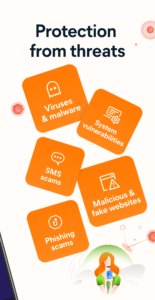
Protect your privacy by receiving alerts when spyware or adware-infected apps are downloaded onto your device.
Secure your device against phishing attacks from emails and infected websites.
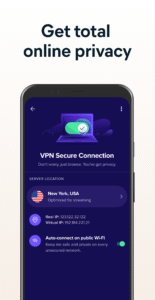
Turn on the VPN to keep your online browsing private and safe, as well as to access your favorite paid streaming services when traveling abroad. Get alerts when your passwords have been compromised by hackers. Avoid scams with advanced scans and alerts. Our trusty Email Guard will monitor your email accounts for suspicious emails.
With more than
100 million installs
, Avast Mobile Security & Antivirus provides much more than just antivirus protection.
Free features:
✔ Antivirus Engine
✔ Hack Check
✔ Photo Vault
✔ File scanner
✔ Privacy Permissions
✔ Junk Cleaner
✔ Web Guard
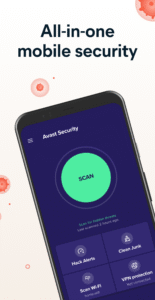
✔ Wi-Fi Security
✔ App Insights
✔ Virus Cleaner
✔ Mobile Security
✔ Wi-Fi Speed Test
Premium features for advanced protection:
■
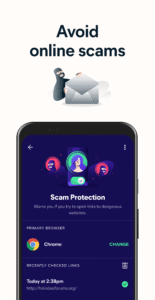
Scam Protection:
Protect yourself from scammers with advanced security features and smart alerts.
■
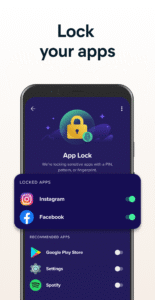
App Lock:
Keep your sensitive content secure and private by locking any app with a PIN code, pattern, or fingerprint password. Only you’ll be able to access them.
■
Remove Ads:
Eliminate ads from your Avast Mobile Security & Antivirus experience.
■
Avast Direct Support:
Contact Avast directly from the app to receive quick responses to your inquiries.
■
Email Guard:
Your inbox will be continuously monitored for any suspicious emails, making your mailbox a safer place.
Finally, Ultimate users can enjoy our VPN (Virtual Private Network) as well
- Hide your online activities from hackers and your ISP by encrypting your connection. You can also change your location to access your favorite paid streaming services from anywhere.
Avast Mobile Security & Antivirus in detail
■
Antivirus Engine:
Automatically scan for viruses and other kinds of malware, including spyware, Trojans, and more. Web, file, and app scanning provides complete mobile protection.
■
App Insights:
Browse your apps and see what permissions are requested in each individual app
■
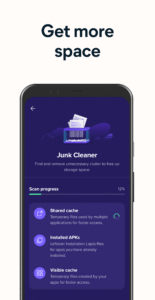
Junk Cleaner:
Instantly clean out unnecessary data, junk files, gallery thumbnails, installation files, and residual files to give you more space.
■
Photo Vault:
Secure your photos with a PIN code, pattern, or fingerprint password. After moving photos to the Vault, they are fully encrypted and only accessible to you.
■
Web Guard:
Scan and block malware-infected links, as well as Trojans, adware, and spyware (for privacy and safe web browsing, e.g. Chrome).
■
Wi-Fi Security:
Check the security of public Wi-Fi networks, browse safely, and make secure online payments from anywhere.
■
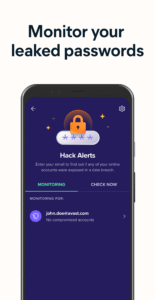
Hack Alerts:
See which of your passwords have been leaked with a quick and simple scan, so you can update your login credentials before hackers infiltrate your accounts.
■
Email Guard:
We’ll keep your inbox safe by continuously monitoring your emails for anything suspicious.
This app uses Accessibility Service API to protect the visually impaired and other users against phishing attacks and malicious websites via Web Guard feature.
Contacts: A particular subset of this permission group is required to access device accounts to enable “restore a pin” action as part of App Lock feature.
Location: Allows Network Inspector feature to identify new networks and scan them for threats.
Protect your privacy by receiving alerts when spyware or adware-infected apps are downloaded onto your device.
Secure your device against phishing attacks from emails and infected websites.
Turn on the VPN to keep your online browsing private and safe, as well as to access your favorite paid streaming services when traveling abroad. Get alerts when your passwords have been compromised by hackers. Avoid scams with advanced scans and alerts. Our trusty Email Guard will monitor your email accounts for suspicious emails.
With more than
100 million installs
, Avast Mobile Security & Antivirus provides much more than just antivirus protection.
Free features:
✔ Antivirus Engine
✔ Hack Check
✔ Photo Vault
✔ File scanner
✔ Privacy Permissions
✔ Junk Cleaner
✔ Web Guard
✔ Wi-Fi Security
✔ App Insights
✔ Virus Cleaner
✔ Mobile Security
✔ Wi-Fi Speed Test
Premium features for advanced protection:
■
Scam Protection:
Protect yourself from scammers with advanced security features and smart alerts.
■
App Lock:
Keep your sensitive content secure and private by locking any app with a PIN code, pattern, or fingerprint password. Only you’ll be able to access them.
■
Remove Ads:
Eliminate ads from your Avast Mobile Security & Antivirus experience.
■
Avast Direct Support:
Contact Avast directly from the app to receive quick responses to your inquiries.
■
Email Guard:
Your inbox will be continuously monitored for any suspicious emails, making your mailbox a safer place.
Finally, Ultimate users can enjoy our VPN (Virtual Private Network) as well
- Hide your online activities from hackers and your ISP by encrypting your connection. You can also change your location to access your favorite paid streaming services from anywhere.
Avast Mobile Security & Antivirus in detail
■
Antivirus Engine:
Automatically scan for viruses and other kinds of malware, including spyware, Trojans, and more. Web, file, and app scanning provides complete mobile protection.
■
App Insights:
Browse your apps and see what permissions are requested in each individual app
■
Junk Cleaner:
Instantly clean out unnecessary data, junk files, gallery thumbnails, installation files, and residual files to give you more space.
■
Photo Vault:
Secure your photos with a PIN code, pattern, or fingerprint password. After moving photos to the Vault, they are fully encrypted and only accessible to you.
■
Web Guard:
Scan and block malware-infected links, as well as Trojans, adware, and spyware (for privacy and safe web browsing, e.g. Chrome).
■
Wi-Fi Security:
Check the security of public Wi-Fi networks, browse safely, and make secure online payments from anywhere.
■
Hack Alerts:
See which of your passwords have been leaked with a quick and simple scan, so you can update your login credentials before hackers infiltrate your accounts.
■
Email Guard:
We’ll keep your inbox safe by continuously monitoring your emails for anything suspicious.
This app uses Accessibility Service API to protect the visually impaired and other users against phishing attacks and malicious websites via Web Guard feature.
Contacts: A particular subset of this permission group is required to access device accounts to enable “restore a pin” action as part of App Lock feature.
Location: Allows Network Inspector feature to identify new networks and scan them for threats.
Download Avast One: Antivirus, Security APK
Fast, free and safe download.
APK Permissions 39
- android.permission.ACCESS_ADSERVICES_AD_ID
- android.permission.ACCESS_ADSERVICES_ATTRIBUTION
- android.permission.ACCESS_ADSERVICES_TOPICS
- android.permission.ACCESS_BACKGROUND_LOCATION
- android.permission.ACCESS_COARSE_LOCATION
- android.permission.ACCESS_FINE_LOCATION
- android.permission.ACCESS_NETWORK_STATE
- android.permission.ACCESS_WIFI_STATE
- android.permission.AUTHENTICATE_ACCOUNTS
- android.permission.FOREGROUND_SERVICE
- android.permission.FOREGROUND_SERVICE_SPECIAL_USE
- android.permission.GET_ACCOUNTS
- android.permission.GET_PACKAGE_SIZE
- android.permission.INTERNET
- android.permission.KILL_BACKGROUND_PROCESSES
- android.permission.MANAGE_ACCOUNTS
- android.permission.MANAGE_EXTERNAL_STORAGE
- android.permission.PACKAGE_USAGE_STATS
- android.permission.POST_NOTIFICATIONS
- android.permission.QUERY_ALL_PACKAGES
- android.permission.READ_EXTERNAL_STORAGE
- android.permission.RECEIVE_BOOT_COMPLETED
- android.permission.REQUEST_DELETE_PACKAGES
- android.permission.REQUEST_PASSWORD_COMPLEXITY
- android.permission.SYSTEM_ALERT_WINDOW
- android.permission.USE_CREDENTIALS
- android.permission.USE_FINGERPRINT
- android.permission.USE_FULL_SCREEN_INTENT
- android.permission.WAKE_LOCK
- android.permission.WRITE_EXTERNAL_STORAGE
- com.android.vending.BILLING
- com.android.vending.CHECK_LICENSE
- com.avast.android.account.ACCOUNT_PERMISSION_V2
- com.avast.android.applocker.TEMPORARY_DISABLE
- com.avast.android.mobilesecurity.BIND_GET_INSTALL_REFERRER_SERVICE
- com.avast.android.mobilesecurity.DYNAMIC_RECEIVER_NOT_EXPORTED_PERMISSION
- com.google.android.c2dm.permission.RECEIVE
- com.google.android.finsky.permission.BIND_GET_INSTALL_REFERRER_SERVICE
- com.google.android.gms.permission.AD_ID
APK Verified
The cryptographic signature guarantees that the file is safe to install and was not tampered with in any way.
Similar in Tools


More by Avast Software


Frequently Asked Questions about Avast One: Antivirus, Security APK
This is the universal variant — a single APK that contains native libraries for every CPU architecture. It installs on any Android device but is larger than per-architecture variants.
Yes — the APK's signature has been cryptographically verified against the publisher's signing key. The SHA-256 hash is shown in the File Information panel so you can independently confirm the file matches the original release.
Android 28 (API level 34) or newer. Older devices will refuse the install.
Install a free app like 'CPU-Z' or 'Droid Hardware Info' from the Play Store and look at the ABI / Instruction Set row. Most phones made after 2017 are arm64-v8a; if in doubt, download the universal variant.
All variants are functionally identical — same features, same version. They differ only in which CPU architectures the native code is compiled for, and (sometimes) which screen densities the included graphics target. Pick the one that matches your device for the smallest install size, or pick 'Universal' if you're unsure.