
This is the universal build of Avis Car Rental 20.3. It contains native libraries for every CPU architecture (arm64-v8a, armeabi-v7a, x86, x86_64), so it installs on any Android device. The trade-off is size — it's larger than per-architecture variants. Pick this one if you're unsure which CPU your phone has, or if you plan to share the APK with multiple devices.
File size: 138.2 MB • Min Android: 24 • Target Android: 35 • Version code: 272 • Framework: React Native • Permissions: 34
Screenshots



File Information
| Package Name | com.avis.androidapp |
|---|---|
| Version Name | 20.3 |
| Version Code | 272 |
| Architecture | Universal |
| Min Android Version | Android 24 (API 35) |
| Main Activity | com.avis.androidapp.NamSplashScreenActivity |
| Framework | React Native |
| File Size | 138.19 MB |
| Signature (SHA1) | 371218EA4636D940C4504BB5FD2F5F19F2A3FA85 |
| File Hash (SHA256) | fa73a40ba0a55f02c5d527b024431bc5623961fb6ff4b59d5fd7753c0b3d1c93 |
What's New
- General maintenance and performance improvements
- Bug fixes for a smoother app experience
Thank you for choosing Avis 🚗
- Bug fixes for a smoother app experience
Thank you for choosing Avis 🚗
App Description
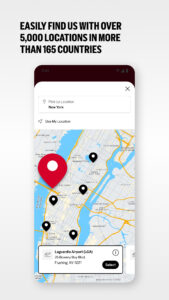
Avis Car Rental is one of the world's best-known car rental brands with over 5,000 locations in more than 165 countries. Book with confidence with our Best Price Guarantee* and save on your upcoming economy or luxury rental.
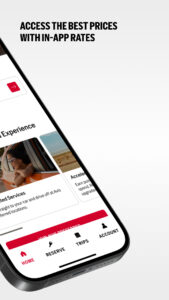
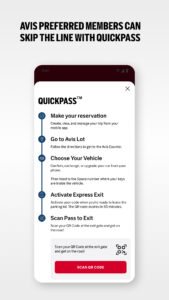
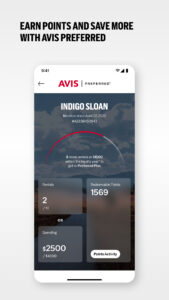
Save time by skipping the counter with an Avis Preferred membership in the Avis Car Rental app.** Easily book, modify, and upgrade your rental vehicle from your phone. Sign into your Avis Preferred account to earn points and save your rental preferences.
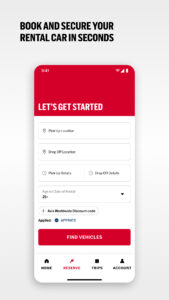
Book your car rental
- Find Avis locations at an airport or city near you
- Filter our fleet and find the perfect rental for your needs
- Book your long- or short-term car rental with a few taps
Access all car rental information in one place
- Search for Avis locations and view details such as business hours, address, and phone numbers
- View your receipts and information for upcoming trips
- Get access to exclusive offers with Avis Preferred
Contact us:
Phone: 1.800.398.2847
Email:
avisapp@avisbudget.com
*Terms & Conditions apply. Visit avis.com/bestprice for details.
**Available at select locations and identity verification required on first Preferred rental. See avis.com/preferred for details.
By tapping the Install button or by downloading the Avis App published by Avis Rent A Car System LLC, you consent to the installation of the Avis App and to its future updates and upgrades. You can withdraw your consent at any time by uninstalling the app. To request assistance with the removal or disabling of the Avis App, please contact us.
You acknowledge and understand and agree that the Avis App (including any updates or upgrades) may cause your device to automatically communicate with Avis’ servers to deliver the functionality described above and to record location-based information and usage metrics, (ii) affect app-related preferences or data stored in your device, and (iii) collect personal information as set out in our Privacy Notice at
www.avis.com/privacy
and in the Avis App Terms of Use at
www.avis.com/mobiletou
. The Avis App delivers push notifications. You may turn push notifications off in the “Preferences” tab.
Save time by skipping the counter with an Avis Preferred membership in the Avis Car Rental app.** Easily book, modify, and upgrade your rental vehicle from your phone. Sign into your Avis Preferred account to earn points and save your rental preferences.
Book your car rental
- Find Avis locations at an airport or city near you
- Filter our fleet and find the perfect rental for your needs
- Book your long- or short-term car rental with a few taps
Access all car rental information in one place
- Search for Avis locations and view details such as business hours, address, and phone numbers
- View your receipts and information for upcoming trips
- Get access to exclusive offers with Avis Preferred
Contact us:
Phone: 1.800.398.2847
Email:
avisapp@avisbudget.com
*Terms & Conditions apply. Visit avis.com/bestprice for details.
**Available at select locations and identity verification required on first Preferred rental. See avis.com/preferred for details.
By tapping the Install button or by downloading the Avis App published by Avis Rent A Car System LLC, you consent to the installation of the Avis App and to its future updates and upgrades. You can withdraw your consent at any time by uninstalling the app. To request assistance with the removal or disabling of the Avis App, please contact us.
You acknowledge and understand and agree that the Avis App (including any updates or upgrades) may cause your device to automatically communicate with Avis’ servers to deliver the functionality described above and to record location-based information and usage metrics, (ii) affect app-related preferences or data stored in your device, and (iii) collect personal information as set out in our Privacy Notice at
www.avis.com/privacy
and in the Avis App Terms of Use at
www.avis.com/mobiletou
. The Avis App delivers push notifications. You may turn push notifications off in the “Preferences” tab.
Download Avis Car Rental APK
Fast, free and safe download.
APK Permissions 34
- android.permission.ACCESS_ADSERVICES_AD_ID
- android.permission.ACCESS_ADSERVICES_ATTRIBUTION
- android.permission.ACCESS_BACKGROUND_LOCATION
- android.permission.ACCESS_COARSE_LOCATION
- android.permission.ACCESS_FINE_LOCATION
- android.permission.ACCESS_NETWORK_STATE
- android.permission.ACCESS_NOTIFICATION_POLICY
- android.permission.ACCESS_WIFI_STATE
- android.permission.BROADCAST_CLOSE_SYSTEM_DIALOGS
- android.permission.CAMERA
- android.permission.DETECT_SCREEN_CAPTURE
- android.permission.DOWNLOAD_WITHOUT_NOTIFICATION
- android.permission.FLASHLIGHT
- android.permission.FOREGROUND_SERVICE
- android.permission.INTERNET
- android.permission.MODIFY_AUDIO_SETTINGS
- android.permission.NFC
- android.permission.POST_NOTIFICATIONS
- android.permission.READ_CALENDAR
- android.permission.READ_PHONE_STATE
- android.permission.RECEIVE_BOOT_COMPLETED
- android.permission.RECORD_AUDIO
- android.permission.SCHEDULE_EXACT_ALARM
- android.permission.USE_BIOMETRIC
- android.permission.USE_FINGERPRINT
- android.permission.VIBRATE
- android.permission.WAKE_LOCK
- android.permission.WRITE_CALENDAR
- com.avis.androidapp.DYNAMIC_RECEIVER_NOT_EXPORTED_PERMISSION
- com.google.android.c2dm.permission.RECEIVE
- com.google.android.finsky.permission.BIND_GET_INSTALL_REFERRER_SERVICE
- com.google.android.gms.permission.AD_ID
- com.huawei.appmarket.service.commondata.permission.GET_COMMON_DATA
- com.samsung.android.mapsagent.permission.READ_APP_INFO
APK Verified
The cryptographic signature guarantees that the file is safe to install and was not tampered with in any way.
Similar in Travel & Local


More by Avis Budget Car Rental LLC

Frequently Asked Questions about Avis Car Rental APK
This is the universal variant — a single APK that contains native libraries for every CPU architecture. It installs on any Android device but is larger than per-architecture variants.
Yes — the APK's signature has been cryptographically verified against the publisher's signing key. The SHA-256 hash is shown in the File Information panel so you can independently confirm the file matches the original release.
Android 24 (API level 35) or newer. Older devices will refuse the install.
Install a free app like 'CPU-Z' or 'Droid Hardware Info' from the Play Store and look at the ABI / Instruction Set row. Most phones made after 2017 are arm64-v8a; if in doubt, download the universal variant.
All variants are functionally identical — same features, same version. They differ only in which CPU architectures the native code is compiled for, and (sometimes) which screen densities the included graphics target. Pick the one that matches your device for the smallest install size, or pick 'Universal' if you're unsure.