
This is the universal build of 1Tap Cleaner (clear cache) 5.02. It contains native libraries for every CPU architecture (arm64-v8a, armeabi-v7a, x86, x86_64), so it installs on any Android device. The trade-off is size — it's larger than per-architecture variants. Pick this one if you're unsure which CPU your phone has, or if you plan to share the APK with multiple devices.
File size: 7.5 MB • Min Android: 23 • Target Android: 35 • Version code: 230005029 • Framework: Native (Java/Kotlin) • Permissions: 21
Screenshots
File Information
| Package Name | com.a0soft.gphone.acc.free |
|---|---|
| Version Name | 5.02 |
| Version Code | 230005029 |
| Architecture | Universal |
| Min Android Version | Android 23 (API 35) |
| Main Activity | com.a0soft.gphone.acc.free.MainWnd |
| Framework | Native (Java/Kotlin) |
| File Size | 7.51 MB |
| Signature (SHA1) | 190D8057CD872B2F7EF67A2A7DEA5117E0CC8945 |
| File Hash (SHA256) | c4956d522531b298978a6b041ad14c3d2651aa163008dca2e6358f369ff949c2 |
What's New
v5.02
★ new "Color contrast" setting, Android 14+ only
★ fixed: failed to clear the cache on some Android 15, and Lenovo with Android 16 devices
★ see FAQ #10 if the clear cache function fails to start or complete
★ send me an email if you'd like to help with the translation
★ bugs fixed and optimizations
v5.01/v5.00
★ new material 3 theme
★ stop supporting deprecated themes
★ improved the clear cache speed for some Xiaomi devices
★ fixed: failed to clear the cache on some Android 15 devices
★ new "Color contrast" setting, Android 14+ only
★ fixed: failed to clear the cache on some Android 15, and Lenovo with Android 16 devices
★ see FAQ #10 if the clear cache function fails to start or complete
★ send me an email if you'd like to help with the translation
★ bugs fixed and optimizations
v5.01/v5.00
★ new material 3 theme
★ stop supporting deprecated themes
★ improved the clear cache speed for some Xiaomi devices
★ fixed: failed to clear the cache on some Android 15 devices
App Description
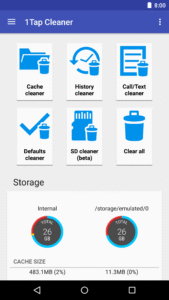
1-Tap to clean all cache files, defaults settings, and SD card.
Are you running out of application storage?
You now can get more available storage space by clearing apps created cache/data files.
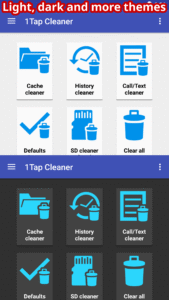
There are some cleaners included in this app.
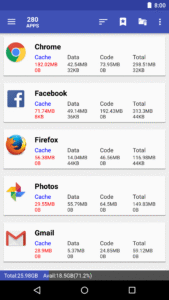
Cache Cleaner
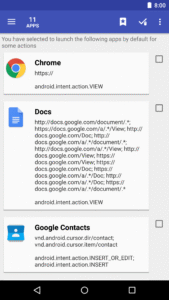
helps you to get more free space for the internal phone storage by clearing apps cached files, data files. If you have selected to launch apps by default for some actions.
Defaults Cleaner
helps you to clear the default settings.
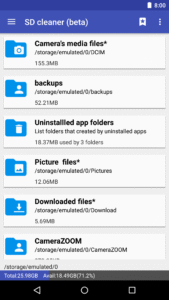
SD Cleaner
helps to delete junk files from the SD card.
Features
:
★ 1-tap to clear all cached files
★ list all default apps and clear selected defaults
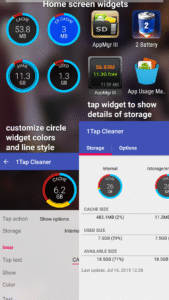
★ home screen widget shows cache and available size
★ clear cache or history for a specified application
★ notify if apps used cache size large than your specified value
★ list applications by either cache, data, code, total size, or app name
★ show application details page
Required permissions:
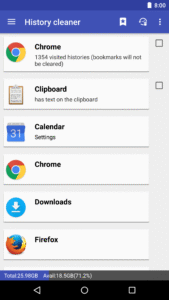
* READ_HISTORY_BOOKMARKS, WRITE_HISTORY_BOOKMARKS: show and clear browser navigation history records
* INTERNET: for sending the crash report
* GET_PACKAGE_SIZE, PACKAGE_USAGE_STATS: get the size information of apps
* BIND_ACCESSIBILITY_SERVICE: this app uses Accessibility services to automate the function (e.g. clear cache), optional. It helps those who have difficulty in tapping and complete the task easier
* WRITE_SETTINGS: prevent the screen rotation during the automatic function
* SYSTEM_ALERT_WINDOW: draw a wait screen above other apps during the automatic function
For the user's manual, FAQ, please tap MENU > Settings > About for details.
You have to install this app on the phone storage if you want to use the widget function. It's required by Android.
We have been selected as a Google I/O 2011 Developer Sandbox partner, for its innovative design and advanced technology.
Credits:
Arabic - Hazem Hamdi
Czech - Michal Fiurášek
Danish - Christian Stangegaard Kappelgaard
Dutch - Niko Strijbol, Vincenzo Messina
French - Philippe LEROY
German - Michael Vollmer
Japanese - nnnn
Hebrew - אלישיב סבח
Hindi - Adarsh Jha
Hungarian - RootRulez
Indonesian - Khairul Agasta
Italian - Luca Snoriguzzi
Korean - 장승훈
Polish - Grzegorz Jabłoński
Romanian - Stelian Balinca
Portuguese - Wagner Santos
Russian - Идрис a.k.a. Мансур (Ghost-Unit)
Serbian - Dusan Trojanovic
Slovak - Patrik Žec
Slovenian - Matevž Kersnik
Spanish - Alfredo Ramos (Abaddon Ormuz)
Swedish - Hampus Westin
Tagalog - Angelo Laus
Turkish - Kutay KuFTi
Ukrainian - Владислав Іванишин
Vietnamese - Nguyễn Trung Hậu
Let me know if you are interested in translating this app into your native language. Thanks.
Are you running out of application storage?
You now can get more available storage space by clearing apps created cache/data files.
There are some cleaners included in this app.
Cache Cleaner
helps you to get more free space for the internal phone storage by clearing apps cached files, data files. If you have selected to launch apps by default for some actions.
Defaults Cleaner
helps you to clear the default settings.
SD Cleaner
helps to delete junk files from the SD card.
Features
:
★ 1-tap to clear all cached files
★ list all default apps and clear selected defaults
★ home screen widget shows cache and available size
★ clear cache or history for a specified application
★ notify if apps used cache size large than your specified value
★ list applications by either cache, data, code, total size, or app name
★ show application details page
Required permissions:
* READ_HISTORY_BOOKMARKS, WRITE_HISTORY_BOOKMARKS: show and clear browser navigation history records
* INTERNET: for sending the crash report
* GET_PACKAGE_SIZE, PACKAGE_USAGE_STATS: get the size information of apps
* BIND_ACCESSIBILITY_SERVICE: this app uses Accessibility services to automate the function (e.g. clear cache), optional. It helps those who have difficulty in tapping and complete the task easier
* WRITE_SETTINGS: prevent the screen rotation during the automatic function
* SYSTEM_ALERT_WINDOW: draw a wait screen above other apps during the automatic function
For the user's manual, FAQ, please tap MENU > Settings > About for details.
You have to install this app on the phone storage if you want to use the widget function. It's required by Android.
We have been selected as a Google I/O 2011 Developer Sandbox partner, for its innovative design and advanced technology.
Credits:
Arabic - Hazem Hamdi
Czech - Michal Fiurášek
Danish - Christian Stangegaard Kappelgaard
Dutch - Niko Strijbol, Vincenzo Messina
French - Philippe LEROY
German - Michael Vollmer
Japanese - nnnn
Hebrew - אלישיב סבח
Hindi - Adarsh Jha
Hungarian - RootRulez
Indonesian - Khairul Agasta
Italian - Luca Snoriguzzi
Korean - 장승훈
Polish - Grzegorz Jabłoński
Romanian - Stelian Balinca
Portuguese - Wagner Santos
Russian - Идрис a.k.a. Мансур (Ghost-Unit)
Serbian - Dusan Trojanovic
Slovak - Patrik Žec
Slovenian - Matevž Kersnik
Spanish - Alfredo Ramos (Abaddon Ormuz)
Swedish - Hampus Westin
Tagalog - Angelo Laus
Turkish - Kutay KuFTi
Ukrainian - Владислав Іванишин
Vietnamese - Nguyễn Trung Hậu
Let me know if you are interested in translating this app into your native language. Thanks.
Download 1Tap Cleaner (clear cache) APK
Fast, free and safe download.
APK Permissions 21
- android.permission.ACCESS_ADSERVICES_AD_ID
- android.permission.ACCESS_ADSERVICES_ATTRIBUTION
- android.permission.ACCESS_ADSERVICES_TOPICS
- android.permission.ACCESS_NETWORK_STATE
- android.permission.CLEAR_APP_CACHE
- android.permission.FOREGROUND_SERVICE
- android.permission.GET_PACKAGE_SIZE
- android.permission.INTERNET
- android.permission.READ_EXTERNAL_STORAGE
- android.permission.RECEIVE_BOOT_COMPLETED
- android.permission.SYSTEM_ALERT_WINDOW
- android.permission.WAKE_LOCK
- android.permission.WRITE_EXTERNAL_STORAGE
- android.permission.WRITE_SETTINGS
- com.a0soft.gphone.acc.free.DYNAMIC_RECEIVER_NOT_EXPORTED_PERMISSION
- com.android.browser.permission.READ_HISTORY_BOOKMARKS
- com.android.browser.permission.WRITE_HISTORY_BOOKMARKS
- com.android.vending.BILLING
- com.android.vending.CHECK_LICENSE
- com.google.android.finsky.permission.BIND_GET_INSTALL_REFERRER_SERVICE
- com.google.android.gms.permission.AD_ID
APK Verified
The cryptographic signature guarantees that the file is safe to install and was not tampered with in any way.
Similar in Tools


Frequently Asked Questions about 1Tap Cleaner (clear cache) APK
This is the universal variant — a single APK that contains native libraries for every CPU architecture. It installs on any Android device but is larger than per-architecture variants.
Yes — the APK's signature has been cryptographically verified against the publisher's signing key. The SHA-256 hash is shown in the File Information panel so you can independently confirm the file matches the original release.
Android 23 (API level 35) or newer. Older devices will refuse the install.
Install a free app like 'CPU-Z' or 'Droid Hardware Info' from the Play Store and look at the ABI / Instruction Set row. Most phones made after 2017 are arm64-v8a; if in doubt, download the universal variant.
All variants are functionally identical — same features, same version. They differ only in which CPU architectures the native code is compiled for, and (sometimes) which screen densities the included graphics target. Pick the one that matches your device for the smallest install size, or pick 'Universal' if you're unsure.