
This is the universal build of App Usage - Manage/Track Usage 5.97. It contains native libraries for every CPU architecture (arm64-v8a, armeabi-v7a, x86, x86_64), so it installs on any Android device. The trade-off is size — it's larger than per-architecture variants. Pick this one if you're unsure which CPU your phone has, or if you plan to share the APK with multiple devices.
File size: 8.4 MB • Min Android: 23 • Target Android: 35 • Version code: 230005979 • Framework: Native (Java/Kotlin) • Permissions: 24
Screenshots
File Information
| Package Name | com.a0soft.gphone.uninstaller |
|---|---|
| Version Name | 5.97 |
| Version Code | 230005979 |
| Architecture | Universal |
| Min Android Version | Android 23 (API 35) |
| Main Activity | com.a0soft.gphone.uninstaller.free.MainWnd |
| Framework | Native (Java/Kotlin) |
| File Size | 8.45 MB |
| Signature (SHA1) | 190D8057CD872B2F7EF67A2A7DEA5117E0CC8945 |
| File Hash (SHA256) | 87a520c9d6df900e24fe5f8d5193635fed219ef22bb43f0af62b78baebdfe916 |
What's New
v5.97
★ new "Color contrast" setting, Android 14+ only. Settings
★ battery history window: new buttons to move the cursor to the next battery level change time
★ don't display the over-user reminder on usage ignored apps unless it's a launcher
★ see FAQ #1 if it fails to track the usage
★ send me an email if you'd like to help with the translation
★ bugs fixed and optimizations
★ new "Color contrast" setting, Android 14+ only. Settings
★ battery history window: new buttons to move the cursor to the next battery level change time
★ don't display the over-user reminder on usage ignored apps unless it's a launcher
★ see FAQ #1 if it fails to track the usage
★ send me an email if you'd like to help with the translation
★ bugs fixed and optimizations
App Description
App Usage is an app/device usage management app.
It provides the following key features:
★
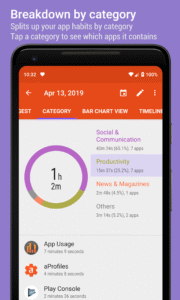
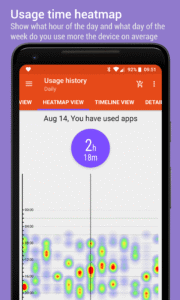
App usage history
: gather the usage time about apps that you used
★
Check phone history
: gather counts of you checked the phone
★
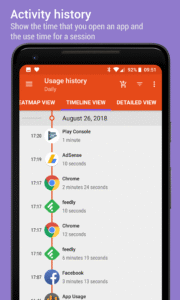
Activity history
: gather the time that you open apps
★
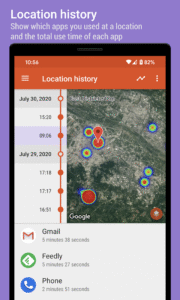
Location history
: display apps you used at a location
★
Notification history
: show the time that apps posted notifications
★
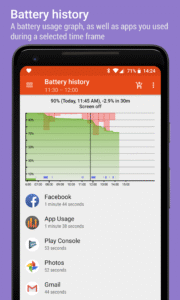
Battery history
: display the battery usage graph
★
Over-use reminder
: remind when you spend on phone or apps for a long time
★
Lock mode
: lock app settings and over-use reminder options with a PIN
★
Most used apps
- show most used apps on widgets or a notification
★
Track all installs
: keep track of all installs and uninstalled apps
★
App install reminder
: notify when apps are installed and the summary of daily installed apps
★
Manage apps
: 1-tap to uninstall apps, sort apps by various options
Due to the restriction of Android, the app usage can only be tracked when you are using the app and the screen is on.
► APP USAGE HISTORY
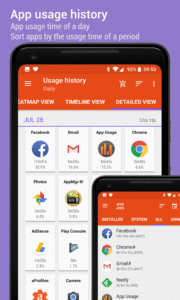
Do you know how much time you spend on an app? Do you know the total use time of a day or the average use time of an app?
It lists the usage time of apps by your preferred sorting order. This usage information is helpful for you to check which apps should be uninstalled as they are not used. It can also be used for spying whether an app has been used by someone else.
► CHECK PHONE HISTORY
Do you know how many times a day that you check your phone?
It shows the daily count that you checked on your phone in either a bar chart or calendar view.
► ACTIVITY HISTORY
Do you know the time that you open Messaging or E-Mail app in a day?
It shows the time that you open an app in either a timeline or calendar view.
► NOTIFICATION HISTORY
It shows you the number of notifications you received for each day and the time that an app posted the notification.
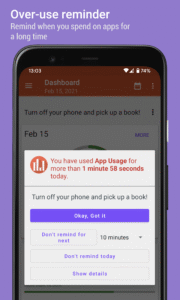
► OVER-USE REMINDER
It reminds you of when you spend on phone or apps for a long time.
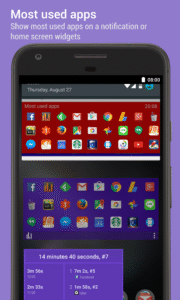
► MOST USED APPS
It shows a list of your most used apps on widgets or system notifications. It's a convenient way to quickly start the apps you use most frequently. The more you use it, the better it gets.
► TRACK ALL INSTALLS
It tracks and lists the history of all installed and uninstalled apps by your preferred sorting order. It's convenient for you to track how many apps are updated in a day, and how frequent updates of an app.
► APP INSTALL REMINDER
It reminds you when an app is installed and the summary of daily apps installation.
► MANAGE APPS
It lists apps by app name, usage time, access count, update time or size, and allows you to uninstall apps easily and quickly.
FEATURES
★ Phone/App usage, activity, check phone, notification, and battery history
★ Daily usage, over-use reminder
★ Lock app settings and over-use reminder options with a PIN
★ Most used apps
★ Export/backup/restore usage data
★ App installation history
★ App install reminder
★ Keep track of uninstalled apps so you can install them later
★ Root uninstaller, 1-tap to uninstall apps, rooted device required
★ Add personal notes for each app
★ Sort apps by name, usage time, access count, update time or size
★ Batch clear apps cache or data
★ Easy search apps by name
This app collects location data to enable the location history function even when the app is closed or not in use.
PRIVACY
Your privacy is very important to us, we understand this problem and won't collect/sell your usage data
We have been selected as a Google I/O 2011 Developer Sandbox partner, for its innovative design and advanced technology.
If you'd like to help the translation, please send me an email.
It provides the following key features:
★
App usage history
: gather the usage time about apps that you used
★
Check phone history
: gather counts of you checked the phone
★
Activity history
: gather the time that you open apps
★
Location history
: display apps you used at a location
★
Notification history
: show the time that apps posted notifications
★
Battery history
: display the battery usage graph
★
Over-use reminder
: remind when you spend on phone or apps for a long time
★
Lock mode
: lock app settings and over-use reminder options with a PIN
★
Most used apps
- show most used apps on widgets or a notification
★
Track all installs
: keep track of all installs and uninstalled apps
★
App install reminder
: notify when apps are installed and the summary of daily installed apps
★
Manage apps
: 1-tap to uninstall apps, sort apps by various options
Due to the restriction of Android, the app usage can only be tracked when you are using the app and the screen is on.
► APP USAGE HISTORY
Do you know how much time you spend on an app? Do you know the total use time of a day or the average use time of an app?
It lists the usage time of apps by your preferred sorting order. This usage information is helpful for you to check which apps should be uninstalled as they are not used. It can also be used for spying whether an app has been used by someone else.
► CHECK PHONE HISTORY
Do you know how many times a day that you check your phone?
It shows the daily count that you checked on your phone in either a bar chart or calendar view.
► ACTIVITY HISTORY
Do you know the time that you open Messaging or E-Mail app in a day?
It shows the time that you open an app in either a timeline or calendar view.
► NOTIFICATION HISTORY
It shows you the number of notifications you received for each day and the time that an app posted the notification.
► OVER-USE REMINDER
It reminds you of when you spend on phone or apps for a long time.
► MOST USED APPS
It shows a list of your most used apps on widgets or system notifications. It's a convenient way to quickly start the apps you use most frequently. The more you use it, the better it gets.
► TRACK ALL INSTALLS
It tracks and lists the history of all installed and uninstalled apps by your preferred sorting order. It's convenient for you to track how many apps are updated in a day, and how frequent updates of an app.
► APP INSTALL REMINDER
It reminds you when an app is installed and the summary of daily apps installation.
► MANAGE APPS
It lists apps by app name, usage time, access count, update time or size, and allows you to uninstall apps easily and quickly.
FEATURES
★ Phone/App usage, activity, check phone, notification, and battery history
★ Daily usage, over-use reminder
★ Lock app settings and over-use reminder options with a PIN
★ Most used apps
★ Export/backup/restore usage data
★ App installation history
★ App install reminder
★ Keep track of uninstalled apps so you can install them later
★ Root uninstaller, 1-tap to uninstall apps, rooted device required
★ Add personal notes for each app
★ Sort apps by name, usage time, access count, update time or size
★ Batch clear apps cache or data
★ Easy search apps by name
This app collects location data to enable the location history function even when the app is closed or not in use.
PRIVACY
Your privacy is very important to us, we understand this problem and won't collect/sell your usage data
We have been selected as a Google I/O 2011 Developer Sandbox partner, for its innovative design and advanced technology.
If you'd like to help the translation, please send me an email.
Download App Usage - Manage/Track Usage APK
Fast, free and safe download.
APK Permissions 24
- android.permission.ACCESS_ADSERVICES_AD_ID
- android.permission.ACCESS_ADSERVICES_ATTRIBUTION
- android.permission.ACCESS_ADSERVICES_TOPICS
- android.permission.ACCESS_COARSE_LOCATION
- android.permission.ACCESS_NETWORK_STATE
- android.permission.FOREGROUND_SERVICE
- android.permission.FOREGROUND_SERVICE_SPECIAL_USE
- android.permission.GET_ACCOUNTS
- android.permission.GET_PACKAGE_SIZE
- android.permission.INTERNET
- android.permission.PACKAGE_USAGE_STATS
- android.permission.RECEIVE_BOOT_COMPLETED
- android.permission.SYSTEM_ALERT_WINDOW
- android.permission.USE_CREDENTIALS
- android.permission.VIBRATE
- android.permission.WAKE_LOCK
- android.permission.WRITE_EXTERNAL_STORAGE
- android.permission.WRITE_SECURE_SETTINGS
- com.a0soft.gphone.uninstaller.DYNAMIC_RECEIVER_NOT_EXPORTED_PERMISSION
- com.a0soft.gphone.uninstaller.permission.ReceiveTopAppChangedAction
- com.android.vending.BILLING
- com.android.vending.CHECK_LICENSE
- com.google.android.finsky.permission.BIND_GET_INSTALL_REFERRER_SERVICE
- com.google.android.gms.permission.AD_ID
APK Verified
The cryptographic signature guarantees that the file is safe to install and was not tampered with in any way.
Similar in Productivity


Frequently Asked Questions about App Usage - Manage/Track Usage APK
This is the universal variant — a single APK that contains native libraries for every CPU architecture. It installs on any Android device but is larger than per-architecture variants.
Yes — the APK's signature has been cryptographically verified against the publisher's signing key. The SHA-256 hash is shown in the File Information panel so you can independently confirm the file matches the original release.
Android 23 (API level 35) or newer. Older devices will refuse the install.
Install a free app like 'CPU-Z' or 'Droid Hardware Info' from the Play Store and look at the ABI / Instruction Set row. Most phones made after 2017 are arm64-v8a; if in doubt, download the universal variant.
All variants are functionally identical — same features, same version. They differ only in which CPU architectures the native code is compiled for, and (sometimes) which screen densities the included graphics target. Pick the one that matches your device for the smallest install size, or pick 'Universal' if you're unsure.