
Download Aegis Authenticator - 2FA App APK 3.4.1 arm64-v8a, armeabi-v7a, x86, x86_64 · Android 23+
Download APK
Verified Safe
This is the arm64-v8a, armeabi-v7a, x86, x86_64 build of Aegis Authenticator - 2FA App 3.4.1. Pick this build if your device's primary ABI matches.
File size: 6.3 MB • Min Android: 23 • Target Android: 35 • Version code: 80 • Framework: Native (Java/Kotlin) • Permissions: 5
Screenshots
File Information
| Package Name | com.beemdevelopment.aegis |
|---|---|
| Version Name | 3.4.1 |
| Version Code | 80 |
| Architecture | arm64-v8a, armeabi-v7a, x86, x86_64 |
| Min Android Version | Android 23 (API 35) |
| Main Activity | com.beemdevelopment.aegis.ui.MainActivity |
| Framework | Native (Java/Kotlin) |
| File Size | 6.25 MB |
| Signature (SHA1) | BC7B9E059934FA647F0003808F60D30E4B8F3948 |
| File Hash (SHA256) | 6ec31603d104ccf6b4d5626d5dcb722b5f276bd5276e892fcf07518909a31152 |
App Description
Aegis Authenticator is a free, secure and open source app to manage your 2-step verification tokens for your online services.
Compatibility
Aegis supports the HOTP and TOTP algorithms. These two algorithms are industry-standard and widely supported, making Aegis compatible with thousands of services. Any web service that supports Google Authenticator will also work with Aegis Authenticator.
Encryption and biometric unlock
All of your one-time passwords are stored in a vault. If you choose to set a password (highly recommended), the vault will be encrypted using strong cryptography. If someone with malicious intent gets a hold of the vault file, it’s impossible for them to retrieve the contents without knowing the password. Entering your password each time you need access to a one-time password can be cumbersome. Fortunately, you can also enable biometric unlock if your device has a biometrics sensor (i.e. fingerprint or face unlock).
Organization
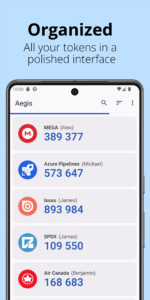
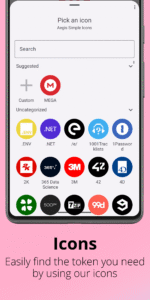
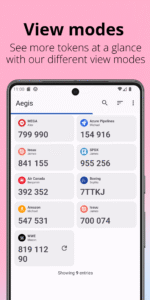
Over time, you'll likely accumulate tens of entries in your vault. Aegis Authenticator has lots of organization options to make finding the one you need at a particular moment easier. Set a custom icon for an entry to make it easier to find. Search by account name or service name. Have a lot of one-time passwords? Add them to custom groups for easier access. Personal, Work and Social can each get their own group.
Backups
To make sure you will never lose access to your online accounts, Aegis Authenticator can create automatic backups of the vault to a location of your choosing. If your cloud provider supports the Storage Access Framework of Android (like Nextcloud does), it can even create automatic backups to the cloud. Creating manual exports of the vault is also supported.
Making the switch
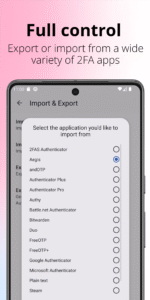
To make the switch easier, Aegis Authenticator can import the entries of lots of other authenticators, including: 2FAS Authenticator, Authenticator Plus, Authy, andOTP, FreeOTP, FreeOTP+, Google Authenticator, Microsoft Authenticator, Steam, TOTP Authenticator and WinAuth (root access is required for the apps that don't have an option to export).
Feature overview
Free and open source
Secure
Encrypted, can be unlocked with a password or biometrics
Screen capture prevention
Tap to reveal
Compatible with Google Authenticator
Supports industry standard algorithms: HOTP and TOTP
Lots of ways to add new entries
Scan a QR code or an image of one
Enter details manually
Import from other popular authenticator apps
Organization
Alphabetic/custom sorting
Custom or automatically generated icons
Group entries together
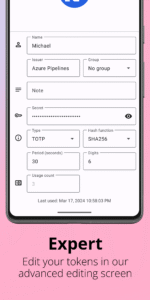
Advanced entry editing
Search by name/issuer
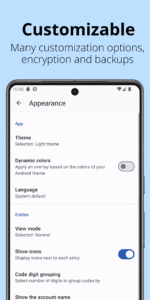
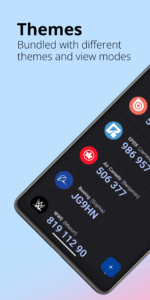
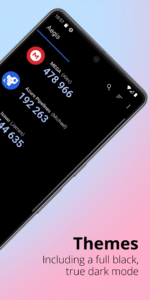
Material design with multiple themes: Light, Dark, AMOLED
Export (plaintext or encrypted)
Automatic backups of the vault to a location of your choosing
Open source and license
Aegis Authenticator is open source (licensed under GPL v3) and the source code can be found here:
github.com/beemdevelopment/Aegis
Author:
Beem Development
License:
GNU General Public License v3.0 only
Website
Issue Tracker
Translation
Source Code
Changelog
Build Metadata
Reproducibility Status
Compatibility
Aegis supports the HOTP and TOTP algorithms. These two algorithms are industry-standard and widely supported, making Aegis compatible with thousands of services. Any web service that supports Google Authenticator will also work with Aegis Authenticator.
Encryption and biometric unlock
All of your one-time passwords are stored in a vault. If you choose to set a password (highly recommended), the vault will be encrypted using strong cryptography. If someone with malicious intent gets a hold of the vault file, it’s impossible for them to retrieve the contents without knowing the password. Entering your password each time you need access to a one-time password can be cumbersome. Fortunately, you can also enable biometric unlock if your device has a biometrics sensor (i.e. fingerprint or face unlock).
Organization
Over time, you'll likely accumulate tens of entries in your vault. Aegis Authenticator has lots of organization options to make finding the one you need at a particular moment easier. Set a custom icon for an entry to make it easier to find. Search by account name or service name. Have a lot of one-time passwords? Add them to custom groups for easier access. Personal, Work and Social can each get their own group.
Backups
To make sure you will never lose access to your online accounts, Aegis Authenticator can create automatic backups of the vault to a location of your choosing. If your cloud provider supports the Storage Access Framework of Android (like Nextcloud does), it can even create automatic backups to the cloud. Creating manual exports of the vault is also supported.
Making the switch
To make the switch easier, Aegis Authenticator can import the entries of lots of other authenticators, including: 2FAS Authenticator, Authenticator Plus, Authy, andOTP, FreeOTP, FreeOTP+, Google Authenticator, Microsoft Authenticator, Steam, TOTP Authenticator and WinAuth (root access is required for the apps that don't have an option to export).
Feature overview
Free and open source
Secure
Encrypted, can be unlocked with a password or biometrics
Screen capture prevention
Tap to reveal
Compatible with Google Authenticator
Supports industry standard algorithms: HOTP and TOTP
Lots of ways to add new entries
Scan a QR code or an image of one
Enter details manually
Import from other popular authenticator apps
Organization
Alphabetic/custom sorting
Custom or automatically generated icons
Group entries together
Advanced entry editing
Search by name/issuer
Material design with multiple themes: Light, Dark, AMOLED
Export (plaintext or encrypted)
Automatic backups of the vault to a location of your choosing
Open source and license
Aegis Authenticator is open source (licensed under GPL v3) and the source code can be found here:
github.com/beemdevelopment/Aegis
Author:
Beem Development
License:
GNU General Public License v3.0 only
Website
Issue Tracker
Translation
Source Code
Changelog
Build Metadata
Reproducibility Status
Download Aegis Authenticator - 2FA App APK
Fast, free and safe download.
APK Permissions 5
- android.permission.CAMERA
- android.permission.USE_BIOMETRIC
- android.permission.USE_FINGERPRINT
- android.permission.VIBRATE
- com.beemdevelopment.aegis.DYNAMIC_RECEIVER_NOT_EXPORTED_PERMISSION
APK Verified
The cryptographic signature guarantees that the file is safe to install and was not tampered with in any way.


Frequently Asked Questions about Aegis Authenticator - 2FA App APK
This variant is built for devices that report `arm64-v8a, armeabi-v7a, x86, x86_64` as their primary ABI. If your device's CPU matches, this is the smallest, fastest version to install.
Yes — the APK's signature has been cryptographically verified against the publisher's signing key. The SHA-256 hash is shown in the File Information panel so you can independently confirm the file matches the original release.
Android 23 (API level 35) or newer. Older devices will refuse the install.
Install a free app like 'CPU-Z' or 'Droid Hardware Info' from the Play Store and look at the ABI / Instruction Set row. Most phones made after 2017 are arm64-v8a; if in doubt, download the universal variant.
All variants are functionally identical — same features, same version. They differ only in which CPU architectures the native code is compiled for, and (sometimes) which screen densities the included graphics target. Pick the one that matches your device for the smallest install size, or pick 'Universal' if you're unsure.