
This is the universal build of EZWrite 1.6.1.0. It contains native libraries for every CPU architecture (arm64-v8a, armeabi-v7a, x86, x86_64), so it installs on any Android device. The trade-off is size — it's larger than per-architecture variants. Pick this one if you're unsure which CPU your phone has, or if you plan to share the APK with multiple devices.
File size: 137.6 MB • Min Android: 26 • Target Android: 35 • Version code: 106010000 • Framework: Native (Java/Kotlin) • Permissions: 20
Screenshots
File Information
| Package Name | com.benq.ezwrite |
|---|---|
| Version Name | 1.6.1.0 |
| Version Code | 106010000 |
| Architecture | Universal |
| Min Android Version | Android 26 (API 35) |
| Main Activity | com.benq.ezwrite.FullscreenActivity |
| Framework | Native (Java/Kotlin) |
| File Size | 137.64 MB |
| Signature (SHA1) | 4BDA8AB70A54B790BA84B8E791EB6F4FE687BE3F |
| File Hash (SHA256) | 9c39f029034ec1eaf934bcbb8b14e8b47cc20d15c3d57e319ebe4e91265fc4f4 |
What's New
[Enhancements]
The following fonts were added: Noto Serif TC, Edu NSW ACT Foundation, Playwrite NZ, and Playwrite AU TAS.
Added three new backgrounds.
Added Māori support for handwriting recognition.
Translation languages are now listed alphabetically.
The following fonts were added: Noto Serif TC, Edu NSW ACT Foundation, Playwrite NZ, and Playwrite AU TAS.
Added three new backgrounds.
Added Māori support for handwriting recognition.
Translation languages are now listed alphabetically.
App Description
Whiteboard anywhere with EZWrite 6.
The new EZWrite 6 for Android turns your mobile device into a powerful digital whiteboard, giving you convenient ways to take notes, brainstorm ideas, or just doodle.
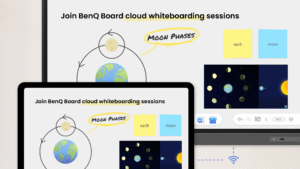
Enable cloud whiteboarding and use it with EZWrite on the BenQ Board to join classes or meetings, allowing you to engage and share your ideas without having to leave your seat.
With EZWrite 6, you can:
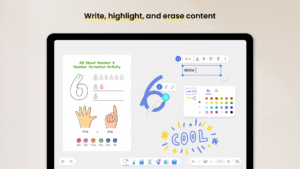
- Write, highlight, and erase content
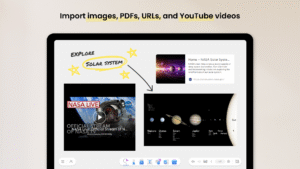
- Import images, PDFs, URLs, and YouTube videos
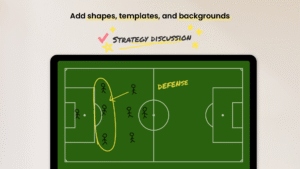
- Add shapes, templates, and backgrounds
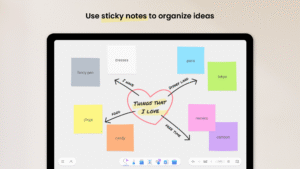
- Use sticky notes to organize ideas
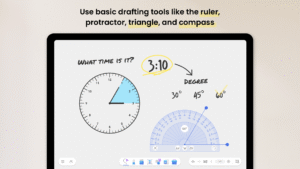
- Use basic drafting tools like the ruler, protractor, triangle, and compass
- Join BenQ Board cloud whiteboarding sessions
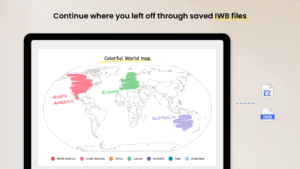
- Continue where you left off through saved IWB files
For questions and feedback, contact us at
support.benq.com
.
The new EZWrite 6 for Android turns your mobile device into a powerful digital whiteboard, giving you convenient ways to take notes, brainstorm ideas, or just doodle.
Enable cloud whiteboarding and use it with EZWrite on the BenQ Board to join classes or meetings, allowing you to engage and share your ideas without having to leave your seat.
With EZWrite 6, you can:
- Write, highlight, and erase content
- Import images, PDFs, URLs, and YouTube videos
- Add shapes, templates, and backgrounds
- Use sticky notes to organize ideas
- Use basic drafting tools like the ruler, protractor, triangle, and compass
- Join BenQ Board cloud whiteboarding sessions
- Continue where you left off through saved IWB files
For questions and feedback, contact us at
support.benq.com
.
Download EZWrite APK
Fast, free and safe download.
APK Permissions 20
- android.permission.ACCESS_DOWNLOAD_MANAGER
- android.permission.ACCESS_NETWORK_STATE
- android.permission.CAMERA
- android.permission.FOREGROUND_SERVICE
- android.permission.FOREGROUND_SERVICE_DATA_SYNC
- android.permission.FOREGROUND_SERVICE_MEDIA_PROJECTION
- android.permission.FOREGROUND_SERVICE_SPECIAL_USE
- android.permission.GET_ACCOUNTS
- android.permission.INTERNET
- android.permission.POST_NOTIFICATIONS
- android.permission.READ_EXTERNAL_STORAGE
- android.permission.READ_PHONE_STATE
- android.permission.READ_PRIVILEGED_PHONE_STATE
- android.permission.RECEIVE_BOOT_COMPLETED
- android.permission.SYSTEM_ALERT_WINDOW
- android.permission.USE_BIOMETRIC
- android.permission.USE_FINGERPRINT
- android.permission.WAKE_LOCK
- android.permission.WRITE_EXTERNAL_STORAGE
- com.benq.ezwrite.DYNAMIC_RECEIVER_NOT_EXPORTED_PERMISSION
APK Verified
The cryptographic signature guarantees that the file is safe to install and was not tampered with in any way.


Frequently Asked Questions about EZWrite APK
This is the universal variant — a single APK that contains native libraries for every CPU architecture. It installs on any Android device but is larger than per-architecture variants.
Yes — the APK's signature has been cryptographically verified against the publisher's signing key. The SHA-256 hash is shown in the File Information panel so you can independently confirm the file matches the original release.
Android 26 (API level 35) or newer. Older devices will refuse the install.
Install a free app like 'CPU-Z' or 'Droid Hardware Info' from the Play Store and look at the ABI / Instruction Set row. Most phones made after 2017 are arm64-v8a; if in doubt, download the universal variant.
All variants are functionally identical — same features, same version. They differ only in which CPU architectures the native code is compiled for, and (sometimes) which screen densities the included graphics target. Pick the one that matches your device for the smallest install size, or pick 'Universal' if you're unsure.