
This is the universal build of TOTP Authenticator – 2FA Cloud 1.95. It contains native libraries for every CPU architecture (arm64-v8a, armeabi-v7a, x86, x86_64), so it installs on any Android device. The trade-off is size — it's larger than per-architecture variants. Pick this one if you're unsure which CPU your phone has, or if you plan to share the APK with multiple devices.
File size: 13.6 MB • Min Android: 23 • Target Android: 36 • Version code: 63 • Framework: Native (Java/Kotlin) • Permissions: 15
Screenshots
File Information
| Package Name | com.authenticator.authservice2 |
|---|---|
| Version Name | 1.95 |
| Version Code | 63 |
| Architecture | Universal |
| Min Android Version | Android 23 (API 36) |
| Main Activity | com.authenticator.authservice.controllers.settings.PasscodeCheckActivity |
| Framework | Native (Java/Kotlin) |
| File Size | 13.60 MB |
| Signature (SHA1) | 37290F55799857E9E76585AD66F39AF15A322AA7 |
| File Hash (SHA256) | 5ba26953219a8e2c4ce700d0a6154e50762b092fc22e6f2ffa45bf0456441c81 |
What's New
1. Fixed issues with storage permissions for newer android versions.
2. Fixed issues with communication to/from chrome and firefox extensions.
2. Fixed issues with communication to/from chrome and firefox extensions.
App Description
TOTP Authenticator allows you to quickly and easily protect your accounts by adding 2-factor authentication (2FA). The app brings together best in class security practices and seamless user experience together.
This app generates one-time tokens on your device which are used in combination with your password. This helps to protect your accounts from hackers, making your security bulletproof. Just enable the two-factor authentication in your account settings for your provider, scan the QR code provided and you're good to go!
Cloud Sync
(Premium)
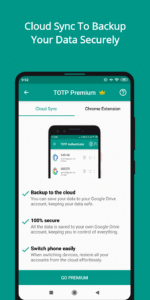
Never lose your codes again! With Cloud Sync, you can easily backup your 2FA accounts to your own Google Drive. This keeps you in total control of your data while providing effective cloud backup. Using the Cloud History feature, you can easily restore recently changed data with ease.
Browser Extension
(Premium)
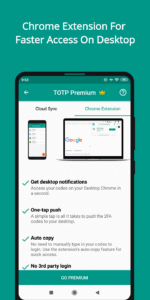
2FA on the desktop is now easier than ever before! With a single tap, push your 2FA codes to your desktop browser. No need to manually type in the codes again.
Dark theme
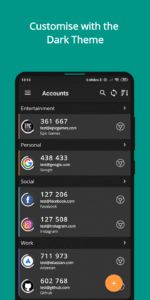
Do you love the dark mode? We sure do! Easily change between the light and dark mode in the app and widget. More power to you.
Organise via Labels
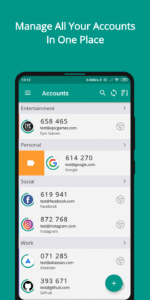
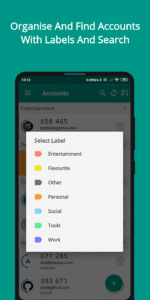
With the inbuilt labels, you can easily group and manage a large number of accounts. The inbuilt search feature helps to find any account in seconds.
Multi-platform support
TOTP Authenticator syncs seamlessly across Android and iOS platforms. You can export your data from one platform, and simply import it on the other.
Multi-device usage
This 2FA app empowers you to create both cloud backups (via Cloud Sync) and offline backups. You can then import these encrypted backups in any device running TOTP Authenticator. This is highly useful in cases where you use 2 devices or need to switch your phone.
Extensive Account Support
TOTP Authenticator works with the majority of the services offering 6-digit code based 2FA. If some service does not work for you, please contact our support.
Multiple language support
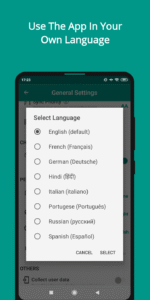
Experience the app in a more intuitive way by using it in your language. The app comes with the support of 7 popular supported languages. Don't see your language in the app? Reach out.
Multiple widgets
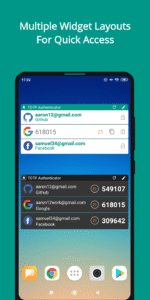
With TOTP Authenticator, you can easily add multiple widgets for your favourite accounts on the home screen for quick access. These widgets come in multiple layouts, so you can choose whichever suits you the best.
Personalization
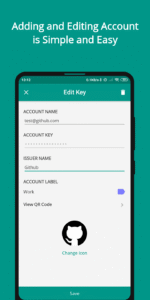
The app allows you to set unique icons to your accounts, either by selecting icons from the provided list or by uploading them. This helps you to easily recognize and sort your accounts.
Biometric security
Protect your accounts by using biometrics (Fingerprint, face scan) or a 4-digit PIN. This helps protect your codes from prying eyes or in case someone gets access to your phone. You can also block screen capture via screenshots and other methods.
For any questions or suggestions, reach us at
info@binaryboot.com
This app generates one-time tokens on your device which are used in combination with your password. This helps to protect your accounts from hackers, making your security bulletproof. Just enable the two-factor authentication in your account settings for your provider, scan the QR code provided and you're good to go!
Cloud Sync
(Premium)
Never lose your codes again! With Cloud Sync, you can easily backup your 2FA accounts to your own Google Drive. This keeps you in total control of your data while providing effective cloud backup. Using the Cloud History feature, you can easily restore recently changed data with ease.
Browser Extension
(Premium)
2FA on the desktop is now easier than ever before! With a single tap, push your 2FA codes to your desktop browser. No need to manually type in the codes again.
Dark theme
Do you love the dark mode? We sure do! Easily change between the light and dark mode in the app and widget. More power to you.
Organise via Labels
With the inbuilt labels, you can easily group and manage a large number of accounts. The inbuilt search feature helps to find any account in seconds.
Multi-platform support
TOTP Authenticator syncs seamlessly across Android and iOS platforms. You can export your data from one platform, and simply import it on the other.
Multi-device usage
This 2FA app empowers you to create both cloud backups (via Cloud Sync) and offline backups. You can then import these encrypted backups in any device running TOTP Authenticator. This is highly useful in cases where you use 2 devices or need to switch your phone.
Extensive Account Support
TOTP Authenticator works with the majority of the services offering 6-digit code based 2FA. If some service does not work for you, please contact our support.
Multiple language support
Experience the app in a more intuitive way by using it in your language. The app comes with the support of 7 popular supported languages. Don't see your language in the app? Reach out.
Multiple widgets
With TOTP Authenticator, you can easily add multiple widgets for your favourite accounts on the home screen for quick access. These widgets come in multiple layouts, so you can choose whichever suits you the best.
Personalization
The app allows you to set unique icons to your accounts, either by selecting icons from the provided list or by uploading them. This helps you to easily recognize and sort your accounts.
Biometric security
Protect your accounts by using biometrics (Fingerprint, face scan) or a 4-digit PIN. This helps protect your codes from prying eyes or in case someone gets access to your phone. You can also block screen capture via screenshots and other methods.
For any questions or suggestions, reach us at
info@binaryboot.com
Download TOTP Authenticator – 2FA Cloud APK
Fast, free and safe download.
APK Permissions 15
- android.permission.ACCESS_NETWORK_STATE
- android.permission.CAMERA
- android.permission.FLASHLIGHT
- android.permission.INTERNET
- android.permission.MODIFY_AUDIO_SETTINGS
- android.permission.READ_EXTERNAL_STORAGE
- android.permission.USE_BIOMETRIC
- android.permission.USE_FINGERPRINT
- android.permission.VIBRATE
- android.permission.WAKE_LOCK
- android.permission.WRITE_EXTERNAL_STORAGE
- com.android.vending.BILLING
- com.authenticator.authservice2.DYNAMIC_RECEIVER_NOT_EXPORTED_PERMISSION
- com.google.android.c2dm.permission.RECEIVE
- com.google.android.finsky.permission.BIND_GET_INSTALL_REFERRER_SERVICE
APK Verified
The cryptographic signature guarantees that the file is safe to install and was not tampered with in any way.


Frequently Asked Questions about TOTP Authenticator – 2FA Cloud APK
This is the universal variant — a single APK that contains native libraries for every CPU architecture. It installs on any Android device but is larger than per-architecture variants.
Yes — the APK's signature has been cryptographically verified against the publisher's signing key. The SHA-256 hash is shown in the File Information panel so you can independently confirm the file matches the original release.
Android 23 (API level 36) or newer. Older devices will refuse the install.
Install a free app like 'CPU-Z' or 'Droid Hardware Info' from the Play Store and look at the ABI / Instruction Set row. Most phones made after 2017 are arm64-v8a; if in doubt, download the universal variant.
All variants are functionally identical — same features, same version. They differ only in which CPU architectures the native code is compiled for, and (sometimes) which screen densities the included graphics target. Pick the one that matches your device for the smallest install size, or pick 'Universal' if you're unsure.