
This is the universal build of Bitdefender Antivirus 4.281.1203. It contains native libraries for every CPU architecture (arm64-v8a, armeabi-v7a, x86, x86_64), so it installs on any Android device. The trade-off is size — it's larger than per-architecture variants. Pick this one if you're unsure which CPU your phone has, or if you plan to share the APK with multiple devices.
File size: 25.8 MB • Min Android: 21 • Target Android: 35 • Version code: 42812406 • Framework: Native (Java/Kotlin) • Permissions: 23
Screenshots
File Information
| Package Name | com.bitdefender.antivirus |
|---|---|
| Version Name | 4.281.1203 |
| Version Code | 42812406 |
| Architecture | Universal |
| Min Android Version | Android 21 (API 35) |
| Main Activity | com.bitdefender.antivirus.MainActivity |
| Framework | Native (Java/Kotlin) |
| File Size | 25.77 MB |
| Signature (SHA1) | EE36DCB4385EEBFA43EB15C1AB260459A9A90801 |
| File Hash (SHA256) | 7a45828db3bd7e94f6d08b0041fd90d73f1ef75631689aac1dca0b41aa470ddf |
What's New
Enjoy the new look of Bitdefender Antivirus while continuing to receive the same powerful protection you're used to.
Dark mode is now supported, to enable you to choose the preferred look.
Become a beta tester and try out new versions ahead:
goo.gl/Qf7G4w
Dark mode is now supported, to enable you to choose the preferred look.
Become a beta tester and try out new versions ahead:
goo.gl/Qf7G4w
App Description
Take Bitdefender’s award-winning antivirus protection with you!
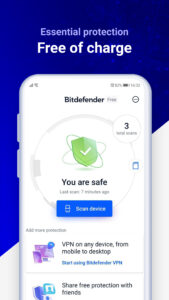
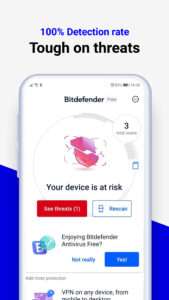
Bitdefender Antivirus Free is a powerful antivirus app with ultra-fast virus scanner, removal and virus cleaner capabilities. It is especially designed to keep your Android device safe from malware, viruses, ransomware, adware and trojans posing as legitimate apps, no matter their install source.
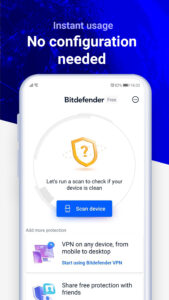
You get maximum protection without slowing down your phone or draining your battery. Simply install the app on your Android and it’s ready to go - nothing to configure.
And it's totally free!
Downloaded by millions of people, Bitdefender Antivirus Free keeps every Android phone safe using in-the-cloud scanning technology and the very latest industry leading virus detection. Join now to get:
✔ Free Antivirus
✔ Free Virus Cleaner
✔ On-Install Virus Scanner
✔ On-Demand Virus Scanner
Unparalleled Virus Detection
This powerful virus scanner keeps you protected 24/7 against all online threats. Bitdefender automatically scans any new apps that are downloaded to your Android device for viruses.
Feather-Light Performance
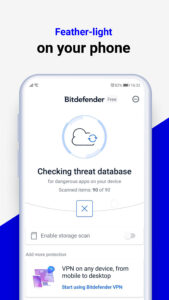
You get super-fast virus scans, with no impact on battery life and phone performance. Instead of downloading and storing virus signatures directly to Android devices, Bitdefender Antivirus Free uses in-the-cloud services to check online for the latest safeguards to outbreaks.
Hassle-Free App Protection
Put your security on autopilot. The included smart on-install virus scanner checks all apps for suspicious activity, making sure your Android phone is always protected. Threats and viruses are detected and blocked before any damage is done.
Zero Configuration
Bitdefender Antivirus Free offers you essential antivirus protection against all Android threats. It is ready to go right after installation, acting as an effective guardian against mobile viruses and online threats.
What Else Do You Get?
On-Install Scanning
Bitdefender Antivirus Free automatically scans any new apps you install, to make sure your smartphone is not at risk. You always stay informed and protected.
On-Demand Scanning
With Bitdefender Antivirus Free, on-demand virus scans may be run at any time, to make sure that all the applications that are installed and kept in the device’s storage are legitimate and safe.
In need of more than antivirus protection? We have you covered.
Upgrade to Bitdefender Mobile Security, and you’ll not only continue to enjoy the same virus protection features as above, but also gain an array of additional cutting-edge capabilities like scam alerts, phishing protection, real time malicious behavior alerts. Keep your browsing safe with real-time scanning of pages viewed online. You'll also gain the ability to lock, locate, and wipe your Android device in case it becomes lost or stolen.
Try it free for the first 14 days.
Bitdefender Antivirus uses foreground services (TYPE_SPECIAL_USE), so it can catch all the PACKAGE_INSTALLED events as soon as possible in order to scan all the apps installed or updated before the user access them which represents the main feature of the app.
Bitdefender Antivirus Free is a powerful antivirus app with ultra-fast virus scanner, removal and virus cleaner capabilities. It is especially designed to keep your Android device safe from malware, viruses, ransomware, adware and trojans posing as legitimate apps, no matter their install source.
You get maximum protection without slowing down your phone or draining your battery. Simply install the app on your Android and it’s ready to go - nothing to configure.
And it's totally free!
Downloaded by millions of people, Bitdefender Antivirus Free keeps every Android phone safe using in-the-cloud scanning technology and the very latest industry leading virus detection. Join now to get:
✔ Free Antivirus
✔ Free Virus Cleaner
✔ On-Install Virus Scanner
✔ On-Demand Virus Scanner
Unparalleled Virus Detection
This powerful virus scanner keeps you protected 24/7 against all online threats. Bitdefender automatically scans any new apps that are downloaded to your Android device for viruses.
Feather-Light Performance
You get super-fast virus scans, with no impact on battery life and phone performance. Instead of downloading and storing virus signatures directly to Android devices, Bitdefender Antivirus Free uses in-the-cloud services to check online for the latest safeguards to outbreaks.
Hassle-Free App Protection
Put your security on autopilot. The included smart on-install virus scanner checks all apps for suspicious activity, making sure your Android phone is always protected. Threats and viruses are detected and blocked before any damage is done.
Zero Configuration
Bitdefender Antivirus Free offers you essential antivirus protection against all Android threats. It is ready to go right after installation, acting as an effective guardian against mobile viruses and online threats.
What Else Do You Get?
On-Install Scanning
Bitdefender Antivirus Free automatically scans any new apps you install, to make sure your smartphone is not at risk. You always stay informed and protected.
On-Demand Scanning
With Bitdefender Antivirus Free, on-demand virus scans may be run at any time, to make sure that all the applications that are installed and kept in the device’s storage are legitimate and safe.
In need of more than antivirus protection? We have you covered.
Upgrade to Bitdefender Mobile Security, and you’ll not only continue to enjoy the same virus protection features as above, but also gain an array of additional cutting-edge capabilities like scam alerts, phishing protection, real time malicious behavior alerts. Keep your browsing safe with real-time scanning of pages viewed online. You'll also gain the ability to lock, locate, and wipe your Android device in case it becomes lost or stolen.
Try it free for the first 14 days.
Bitdefender Antivirus uses foreground services (TYPE_SPECIAL_USE), so it can catch all the PACKAGE_INSTALLED events as soon as possible in order to scan all the apps installed or updated before the user access them which represents the main feature of the app.
Download Bitdefender Antivirus APK
Fast, free and safe download.
APK Permissions 23
- android.permission.ACCESS_ADSERVICES_AD_ID
- android.permission.ACCESS_ADSERVICES_ATTRIBUTION
- android.permission.ACCESS_NETWORK_STATE
- android.permission.ACCESS_WIFI_STATE
- android.permission.FOREGROUND_SERVICE
- android.permission.FOREGROUND_SERVICE_SPECIAL_USE
- android.permission.INTERNET
- android.permission.MANAGE_EXTERNAL_STORAGE
- android.permission.POST_NOTIFICATIONS
- android.permission.QUERY_ALL_PACKAGES
- android.permission.READ_EXTERNAL_STORAGE
- android.permission.READ_PHONE_STATE
- android.permission.RECEIVE_BOOT_COMPLETED
- android.permission.REQUEST_DELETE_PACKAGES
- android.permission.VIBRATE
- android.permission.WAKE_LOCK
- android.permission.WRITE_EXTERNAL_STORAGE
- com.bitdefender.antivirus.DYNAMIC_RECEIVER_NOT_EXPORTED_PERMISSION
- com.bitdefender.security.CHECK_STATUS
- com.bitdefender.security.GET_SCAN_INFO
- com.google.android.c2dm.permission.RECEIVE
- com.google.android.finsky.permission.BIND_GET_INSTALL_REFERRER_SERVICE
- com.google.android.gms.permission.AD_ID
APK Verified
The cryptographic signature guarantees that the file is safe to install and was not tampered with in any way.
Similar in Tools


Frequently Asked Questions about Bitdefender Antivirus APK
This is the universal variant — a single APK that contains native libraries for every CPU architecture. It installs on any Android device but is larger than per-architecture variants.
Yes — the APK's signature has been cryptographically verified against the publisher's signing key. The SHA-256 hash is shown in the File Information panel so you can independently confirm the file matches the original release.
Android 21 (API level 35) or newer. Older devices will refuse the install.
Install a free app like 'CPU-Z' or 'Droid Hardware Info' from the Play Store and look at the ABI / Instruction Set row. Most phones made after 2017 are arm64-v8a; if in doubt, download the universal variant.
All variants are functionally identical — same features, same version. They differ only in which CPU architectures the native code is compiled for, and (sometimes) which screen densities the included graphics target. Pick the one that matches your device for the smallest install size, or pick 'Universal' if you're unsure.