
Download Lockwatch — Thief Catcher APK 8.0.0 arm64-v8a, armeabi-v7a, x86, x86_64 · Android 27+
Download APK
Verified Safe
This is the arm64-v8a, armeabi-v7a, x86, x86_64 build of Lockwatch — Thief Catcher 8.0.0. Pick this build if your device's primary ABI matches.
File size: 3.3 MB • Min Android: 27 • Target Android: 36 • Version code: 800 • Framework: Native (Java/Kotlin) • Permissions: 20
Screenshots
File Information
| Package Name | com.bloketech.lockwatch |
|---|---|
| Version Name | 8.0.0 |
| Version Code | 800 |
| Architecture | arm64-v8a, armeabi-v7a, x86, x86_64 |
| Min Android Version | Android 27 (API 36) |
| Main Activity | com.bloketech.lockwatch.MainActivity |
| Framework | Native (Java/Kotlin) |
| File Size | 3.27 MB |
| Signature (SHA1) | 25B8DB002C9702A22F1C6C5F7465B4C72507E02A |
| File Hash (SHA256) | 49960eafa0996bfbe7aa98d0807dc5f578491aeab0d9bd0bcb3f9975923c430d |
What's New
Lockwatch now supports power on and device unlock alerts even while your device is in a locked-down direct boot state.
App Description
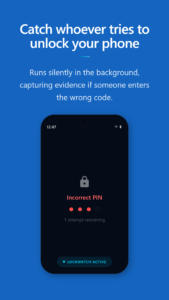
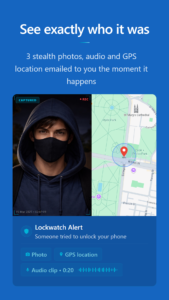
Lockwatch secretly takes a photo using the front camera when someone enters an incorrect unlock code on your phone. It then emails you a picture of the intruder along with their GPS location, without them knowing.
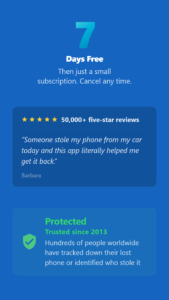
The app has helped recover many lost and stolen phones, and has been featured in several TV and online news stories.
Lockwatch uses Android's built-in lock screen and has a small app size, running only when an incorrect unlock code is entered.
Note: You must enter at least four digits or dots for each unlock attempt to be counted. If the correct code is entered within 10 seconds, Lockwatch will not send the email to avoid false alarms.
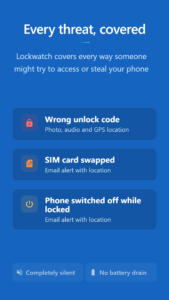
The app offers additional features, such as the ability to attach multiple photos and audio clips to the email, email notifications when a new SIM card is inserted or when the phone is turned on.
For help with Lockwatch, please visit
bloketech.com/lockwatch/help
.
This app uses the Device Administrator permission to monitor screen unlock attempts.
The app has helped recover many lost and stolen phones, and has been featured in several TV and online news stories.
Lockwatch uses Android's built-in lock screen and has a small app size, running only when an incorrect unlock code is entered.
Note: You must enter at least four digits or dots for each unlock attempt to be counted. If the correct code is entered within 10 seconds, Lockwatch will not send the email to avoid false alarms.
The app offers additional features, such as the ability to attach multiple photos and audio clips to the email, email notifications when a new SIM card is inserted or when the phone is turned on.
For help with Lockwatch, please visit
bloketech.com/lockwatch/help
.
This app uses the Device Administrator permission to monitor screen unlock attempts.
Download Lockwatch — Thief Catcher APK
Fast, free and safe download.
APK Permissions 20
- android.permission.ACCESS_BACKGROUND_LOCATION
- android.permission.ACCESS_COARSE_LOCATION
- android.permission.ACCESS_FINE_LOCATION
- android.permission.ACCESS_NETWORK_STATE
- android.permission.CAMERA
- android.permission.CHANGE_NETWORK_STATE
- android.permission.FOREGROUND_SERVICE
- android.permission.FOREGROUND_SERVICE_CAMERA
- android.permission.FOREGROUND_SERVICE_DATA_SYNC
- android.permission.FOREGROUND_SERVICE_LOCATION
- android.permission.FOREGROUND_SERVICE_MICROPHONE
- android.permission.GET_ACCOUNTS
- android.permission.INTERNET
- android.permission.READ_PHONE_STATE
- android.permission.RECEIVE_BOOT_COMPLETED
- android.permission.RECORD_AUDIO
- android.permission.REQUEST_DELETE_PACKAGES
- android.permission.WAKE_LOCK
- com.android.vending.BILLING
- com.bloketech.lockwatch.DYNAMIC_RECEIVER_NOT_EXPORTED_PERMISSION
APK Verified
The cryptographic signature guarantees that the file is safe to install and was not tampered with in any way.


Frequently Asked Questions about Lockwatch — Thief Catcher APK
This variant is built for devices that report `arm64-v8a, armeabi-v7a, x86, x86_64` as their primary ABI. If your device's CPU matches, this is the smallest, fastest version to install.
Yes — the APK's signature has been cryptographically verified against the publisher's signing key. The SHA-256 hash is shown in the File Information panel so you can independently confirm the file matches the original release.
Android 27 (API level 36) or newer. Older devices will refuse the install.
Install a free app like 'CPU-Z' or 'Droid Hardware Info' from the Play Store and look at the ABI / Instruction Set row. Most phones made after 2017 are arm64-v8a; if in doubt, download the universal variant.
All variants are functionally identical — same features, same version. They differ only in which CPU architectures the native code is compiled for, and (sometimes) which screen densities the included graphics target. Pick the one that matches your device for the smallest install size, or pick 'Universal' if you're unsure.