
Screenshots
File Information
| Package Name | pt.bluecover.gpsegnos |
|---|---|
| Version Name | 3.16 |
| Version Code | 304 |
| Architecture | Universal |
| Min Android Version | Android 23 (API 36) |
| Main Activity | pt.bluecover.gpsegnos.MainActivity |
| Framework | Native (Java/Kotlin) |
| File Size | 15.48 MB |
| Signature (SHA1) | 5C738731615C9D916BE11756705C6F6896803E55 |
| File Hash (SHA256) | cc17083f4e95d3330ebc4a6233992eef6b3f50b637fe3befbabc98a384079caa |
What's New
Version 3.16
- Autopath improvements (inc trigger by distance)
- Edit Points and Paths on map (Maps)
- High resolution Satellite basemap added (Maps)
- Ruler from map with imperial metrics (Maps)
- EO images improvements (Maps)
Version 3.15
- Add manual Points and draw Paths on map (Maps)
- Ruler for measurements (Maps)
- Line charts in time from multi-selected Paths
- Add Point based on multi GNSS acquisitions from external receivers
- Autopath improvements (inc trigger by distance)
- Edit Points and Paths on map (Maps)
- High resolution Satellite basemap added (Maps)
- Ruler from map with imperial metrics (Maps)
- EO images improvements (Maps)
Version 3.15
- Add manual Points and draw Paths on map (Maps)
- Ruler for measurements (Maps)
- Line charts in time from multi-selected Paths
- Add Point based on multi GNSS acquisitions from external receivers
App Description
Multi-purpose mapping and surveying tool for both professional and personal use. The tool is valuable in several professional land-based surveying activities, including agriculture, forest management, infrastructure maintenance (e.g. roads and electrical networks), urban planning & real estate and emergencies mapping. It is also used for personal outdoor activities, such as hiking, running, walking, travelling and geocaching.
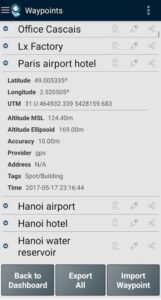
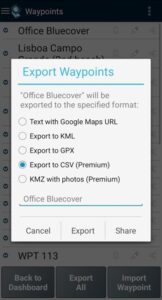
The application collects Points (such as points of interest) and Paths (sequence of points) to perform mapping and surveying activities. The Points, that are acquired with accuracy information, can be classified by the user with specific tags or characterized with photos. The Paths are created as a temporal sequence of newly acquired Points (e.g. to record a track) or alternatively with existing Points (e.g to create a route). Paths allows to measure distances and, if closed, forms Polygons that allows the determination of areas and perimeters. Both Points and Paths can be exported to a KML, GPX and CSV file and thus be processed externally with a geospatial tool.
The application uses the internal GPS receiver from the mobile device (typically with accuracies >3m) or, alternatively, allows professional users attaining better accuracies with a Bluetooth external GNSS receiver compatible with NMEA stream format (e.g. RTK receivers with centimeter level precision). See below some examples of the external receivers supported.
The application includes the following features:
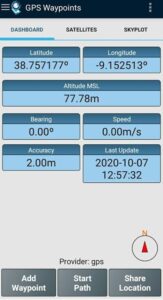
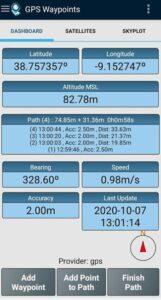
- Acquire current position with accuracy and navigation information;
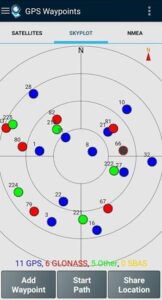
- Provide details of the active and visible satellites (GPS, GLONASS, GALILEO, BEIDOU and other);
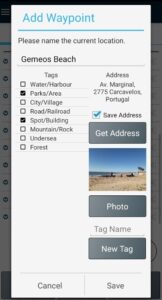
- Create Points with accuracy information, classify them with Tags, attach photos and convert coordinates into a human-readable address (reverse geocoding);
- Import Points from geographic coordinates (lat, long) or by searching for a street address/point of interest (geocoding);
- Create Paths by acquiring sequences of points manually or automatically;
- Import Paths from existing Points;
- Create survey's themes with custom Tags for classifing Points and Paths
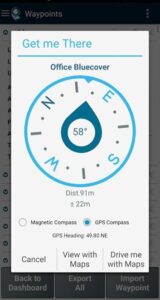
- Get directions and distances from current position to Points and Paths using a magnetic or gps compass;
- Export Points and Paths to KML and GPX file format;
- Share data with other applications (e.g. Dropbox/Google Drive);
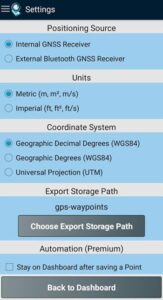
- Configure positioning source for the internal receiver or using an external receiver.
The Premium subscription include the following professional features:
- Backup and restore user's data (it also allows transfer data from one handset to another);
- Export Waypoints and Paths to CSV file format;
- Export Waypoints with photos to KMZ file
- Import multiple Points and Paths from CSV and GPX files;
- Sort and filter Points and Paths by creation time, name and proximity;
- Satellite signal analysis and interferences detection.
The Maps feature is an extra paid funcionality that allows selecting and visualizing your Points, Paths and Polygons on Open Street Maps.
Additionally to the internal mobile receiver, the current version is known to work with the following external receivers: Bad Elf GNSS Surveyor; Garmin Glo; Navilock BT-821G; Qstarz BT-Q818XT; Trimple R1; ublox F9P.
If you successfully tested the application with another external receiver please provide us your feedback as a user or manufacturer in order to extend this list.
For further information check our site (
www.bluecover.pt/gps-waypoints
) and get the details of our complete offer:
- Free and Premium features (
www.bluecover.pt/gps-waypoints/features
)
- GISUY Receivers (
www.bluecover.pt/gisuy-gnss-receiver/
)
- Enterprise (
www.bluecover.pt/gps-waypoints/enterprise-version/
)
The application collects Points (such as points of interest) and Paths (sequence of points) to perform mapping and surveying activities. The Points, that are acquired with accuracy information, can be classified by the user with specific tags or characterized with photos. The Paths are created as a temporal sequence of newly acquired Points (e.g. to record a track) or alternatively with existing Points (e.g to create a route). Paths allows to measure distances and, if closed, forms Polygons that allows the determination of areas and perimeters. Both Points and Paths can be exported to a KML, GPX and CSV file and thus be processed externally with a geospatial tool.
The application uses the internal GPS receiver from the mobile device (typically with accuracies >3m) or, alternatively, allows professional users attaining better accuracies with a Bluetooth external GNSS receiver compatible with NMEA stream format (e.g. RTK receivers with centimeter level precision). See below some examples of the external receivers supported.
The application includes the following features:
- Acquire current position with accuracy and navigation information;
- Provide details of the active and visible satellites (GPS, GLONASS, GALILEO, BEIDOU and other);
- Create Points with accuracy information, classify them with Tags, attach photos and convert coordinates into a human-readable address (reverse geocoding);
- Import Points from geographic coordinates (lat, long) or by searching for a street address/point of interest (geocoding);
- Create Paths by acquiring sequences of points manually or automatically;
- Import Paths from existing Points;
- Create survey's themes with custom Tags for classifing Points and Paths
- Get directions and distances from current position to Points and Paths using a magnetic or gps compass;
- Export Points and Paths to KML and GPX file format;
- Share data with other applications (e.g. Dropbox/Google Drive);
- Configure positioning source for the internal receiver or using an external receiver.
The Premium subscription include the following professional features:
- Backup and restore user's data (it also allows transfer data from one handset to another);
- Export Waypoints and Paths to CSV file format;
- Export Waypoints with photos to KMZ file
- Import multiple Points and Paths from CSV and GPX files;
- Sort and filter Points and Paths by creation time, name and proximity;
- Satellite signal analysis and interferences detection.
The Maps feature is an extra paid funcionality that allows selecting and visualizing your Points, Paths and Polygons on Open Street Maps.
Additionally to the internal mobile receiver, the current version is known to work with the following external receivers: Bad Elf GNSS Surveyor; Garmin Glo; Navilock BT-821G; Qstarz BT-Q818XT; Trimple R1; ublox F9P.
If you successfully tested the application with another external receiver please provide us your feedback as a user or manufacturer in order to extend this list.
For further information check our site (
www.bluecover.pt/gps-waypoints
) and get the details of our complete offer:
- Free and Premium features (
www.bluecover.pt/gps-waypoints/features
)
- GISUY Receivers (
www.bluecover.pt/gisuy-gnss-receiver/
)
- Enterprise (
www.bluecover.pt/gps-waypoints/enterprise-version/
)
Download GPS Waypoints APK
Fast, free and safe download.
APK Permissions 24
- android.permission.ACCESS_ADSERVICES_AD_ID
- android.permission.ACCESS_ADSERVICES_ATTRIBUTION
- android.permission.ACCESS_ADSERVICES_TOPICS
- android.permission.ACCESS_BACKGROUND_LOCATION
- android.permission.ACCESS_COARSE_LOCATION
- android.permission.ACCESS_FINE_LOCATION
- android.permission.ACCESS_NETWORK_STATE
- android.permission.BLUETOOTH
- android.permission.BLUETOOTH_ADMIN
- android.permission.BLUETOOTH_ADVERTISE
- android.permission.BLUETOOTH_CONNECT
- android.permission.BLUETOOTH_SCAN
- android.permission.FOREGROUND_SERVICE
- android.permission.FOREGROUND_SERVICE_LOCATION
- android.permission.INTERNET
- android.permission.POST_NOTIFICATIONS
- android.permission.READ_MEDIA_AUDIO
- android.permission.READ_MEDIA_IMAGES
- android.permission.READ_MEDIA_VIDEO
- android.permission.WAKE_LOCK
- android.permission.WRITE_EXTERNAL_STORAGE
- com.android.vending.BILLING
- com.google.android.gms.permission.AD_ID
- pt.bluecover.gpsegnos.DYNAMIC_RECEIVER_NOT_EXPORTED_PERMISSION
APK Verified
The cryptographic signature guarantees that the file is safe to install and was not tampered with in any way.


