
Screenshots



File Information
| Package Name | com.tapassistant.autoclicker |
|---|---|
| Version Name | 1.4.6 |
| Version Code | 157 |
| Architecture | Universal |
| Min Android Version | Android 26 (API 35) |
| Main Activity | com.tapassistant.autoclicker.ui.SplashActivity |
| Framework | Native (Java/Kotlin) |
| File Size | 66.28 MB |
| Signature (SHA1) | EB9F96727708F26B23408224B0E00571FE049C2A |
| File Hash (SHA256) | eb2576d0bf3c4a475df04020f430d3fad888cc2b3a18dc7fe89d3185fca24ad3 |
What's New
From version
1.4.5
:
🔧 New Update – Smoother Performance!
- Bug fixes for a more reliable experience
- Improved stability and overall performance
Update now for the best experience! 🚀
1.4.5
:
🔧 New Update – Smoother Performance!
- Bug fixes for a more reliable experience
- Improved stability and overall performance
Update now for the best experience! 🚀
App Description
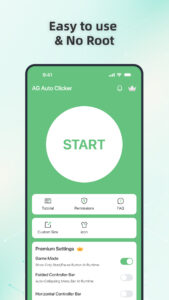
Auto Clicker automates taps and swipes at any location with custom intervals. Ideal for gaming, auto-liking, or any repetitive task requiring fast and precise actions.
Key Features:
Multi-touch Mode: Set multiple taps or swipes that run either in sync or in sequence, giving you full control over complex actions and enhancing automation flexibility.
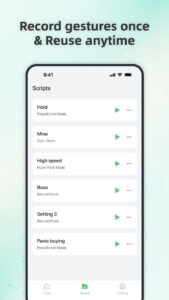
Record Mode: Capture and automate complex gestures—taps, swipes, and long presses—for easy playback and efficient task repetition
Synchronous Click Pattern: Tap multiple targets at once with precision—perfect for complex tasks.
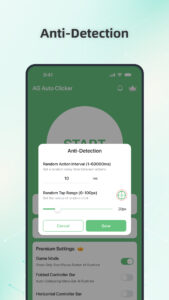
Game mode: Stay undetected with advanced game anti-detection technology.
Save/Load Scripts: Easily save and load your custom scripts for automated actions, allowing you to quickly switch between different configurations and optimize your workflow.
Custom Click Target: Choose from a variety of click target styles—personalize your tapping.
Floating Controls Transparency: Adjust the transparency of floating controls for seamless multitasking.
Timer Start: Set a custom start time for your taps—great for scheduled auto-clicking
Accessibility Services Declaration:
This Auto Clicker application requires the Accessibility Services API to perform essential functions, such as executing clicks, swipes, and other core interactions.
Accessibility permission is necessary for devices running Android 12 and above.
We do not collect or share any personal or sensitive data through the accessibility features.
Install Auto Clicker now and enjoy the freedom of automatic tapping! :)
Key Features:
Multi-touch Mode: Set multiple taps or swipes that run either in sync or in sequence, giving you full control over complex actions and enhancing automation flexibility.
Record Mode: Capture and automate complex gestures—taps, swipes, and long presses—for easy playback and efficient task repetition
Synchronous Click Pattern: Tap multiple targets at once with precision—perfect for complex tasks.
Game mode: Stay undetected with advanced game anti-detection technology.
Save/Load Scripts: Easily save and load your custom scripts for automated actions, allowing you to quickly switch between different configurations and optimize your workflow.
Custom Click Target: Choose from a variety of click target styles—personalize your tapping.
Floating Controls Transparency: Adjust the transparency of floating controls for seamless multitasking.
Timer Start: Set a custom start time for your taps—great for scheduled auto-clicking
Accessibility Services Declaration:
This Auto Clicker application requires the Accessibility Services API to perform essential functions, such as executing clicks, swipes, and other core interactions.
Accessibility permission is necessary for devices running Android 12 and above.
We do not collect or share any personal or sensitive data through the accessibility features.
Install Auto Clicker now and enjoy the freedom of automatic tapping! :)
Download AG Auto Clicker-Auto Tap APK
Fast, free and safe download.
APK Permissions 21
- android.permission.ACCESS_ADSERVICES_AD_ID
- android.permission.ACCESS_ADSERVICES_ATTRIBUTION
- android.permission.ACCESS_ADSERVICES_TOPICS
- android.permission.ACCESS_NETWORK_STATE
- android.permission.ACCESS_WIFI_STATE
- android.permission.DISABLE_KEYGUARD
- android.permission.FOREGROUND_SERVICE
- android.permission.INTERNET
- android.permission.POST_NOTIFICATIONS
- android.permission.QUERY_ALL_PACKAGES
- android.permission.REQUEST_IGNORE_BATTERY_OPTIMIZATIONS
- android.permission.WAKE_LOCK
- com.android.vending.BILLING
- com.android.vending.CHECK_LICENSE
- com.applovin.array.apphub.permission.BIND_APPHUB_SERVICE
- com.google.android.c2dm.permission.RECEIVE
- com.google.android.finsky.permission.BIND_GET_INSTALL_REFERRER_SERVICE
- com.google.android.gms.permission.AD_ID
- com.huawei.appmarket.service.commondata.permission.GET_COMMON_DATA
- com.samsung.android.mapsagent.permission.READ_APP_INFO
- com.tapassistant.autoclicker.DYNAMIC_RECEIVER_NOT_EXPORTED_PERMISSION
APK Verified
The cryptographic signature guarantees that the file is safe to install and was not tampered with in any way.


