
This is the universal build of Brother Pro Label Tool 1.7.0. It contains native libraries for every CPU architecture (arm64-v8a, armeabi-v7a, x86, x86_64), so it installs on any Android device. The trade-off is size — it's larger than per-architecture variants. Pick this one if you're unsure which CPU your phone has, or if you plan to share the APK with multiple devices.
File size: 94.2 MB • Min Android: 30 • Target Android: 35 • Version code: 143 • Framework: Native (Java/Kotlin) • Permissions: 15
Screenshots
File Information
| Package Name | com.brother.ptouch.mobilecablelabeltool2 |
|---|---|
| Version Name | 1.7.0 |
| Version Code | 143 |
| Architecture | Universal |
| Min Android Version | Android 30 (API 35) |
| Main Activity | com.brother.ptouch.mobilecablelabeltool2.module.home.HomeActivity |
| Framework | Native (Java/Kotlin) |
| File Size | 94.20 MB |
| Signature (SHA1) | C5F36C8E95C918D34D7CDFA7B6AAF4D90FBC62BF |
| File Hash (SHA256) | 85207a46a44df3709efe69aea1328896aea472e61eba82d2b4d79625e4275603 |
What's New
- Bug fixes
- Performance Improvements
- Performance Improvements
App Description
[Description]
Pro Label Tool is the successor to Mobile Cable Label Tool.
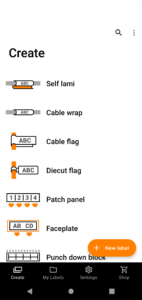
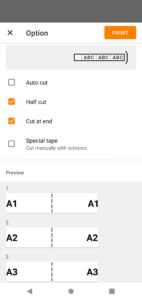
This is a free application designed to create labels for telecom, datacom and/or electrical identifications on demand. It enables you to easily print labels from your smartphone/tablet to a Brother label printer using a local wireless network.
[Key Features]
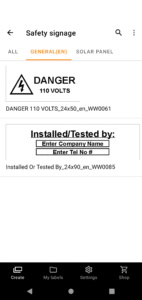
1. Automatic loading of pre-designed label templates from Brother's cloud server to keep them up to date.
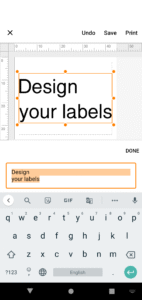
2. Easy to use - just a few taps to choose, edit and print professional quality labels.
3. No computer or printer driver required.
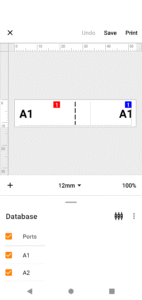
4. Powerful Print Preview
5. Enables you to work more efficiently by creating label designs with P-touch Editor at the office, then send them via email to others to print at the working site.
6. Connectable to CSV database
7. Serialize function frees you from duplicate typing when printing sequential labels with similar content on rows of ID labels.
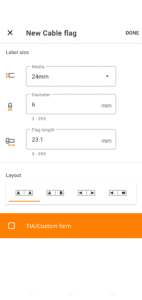
8. Use the Custom Form function to create labels with standardised network address information.
[Compatible machines]
PT-E550W,PT-P750W, PT-P900W, PT-P950NW, PT-D800W, PT-E800W,PT-E850TKW, PT-E310BT,PT-E560BT, PT-E720BT, PT-E920BT
To help us improve the application, send your feedback to
Feedback-mobile-apps-lm@brother.com
. Please note that we may not be able to respond to individual emails.
Pro Label Tool is the successor to Mobile Cable Label Tool.
This is a free application designed to create labels for telecom, datacom and/or electrical identifications on demand. It enables you to easily print labels from your smartphone/tablet to a Brother label printer using a local wireless network.
[Key Features]
1. Automatic loading of pre-designed label templates from Brother's cloud server to keep them up to date.
2. Easy to use - just a few taps to choose, edit and print professional quality labels.
3. No computer or printer driver required.
4. Powerful Print Preview
5. Enables you to work more efficiently by creating label designs with P-touch Editor at the office, then send them via email to others to print at the working site.
6. Connectable to CSV database
7. Serialize function frees you from duplicate typing when printing sequential labels with similar content on rows of ID labels.
8. Use the Custom Form function to create labels with standardised network address information.
[Compatible machines]
PT-E550W,PT-P750W, PT-P900W, PT-P950NW, PT-D800W, PT-E800W,PT-E850TKW, PT-E310BT,PT-E560BT, PT-E720BT, PT-E920BT
To help us improve the application, send your feedback to
Feedback-mobile-apps-lm@brother.com
. Please note that we may not be able to respond to individual emails.
Download Brother Pro Label Tool APK
Fast, free and safe download.
APK Permissions 15
- android.permission.ACCESS_COARSE_LOCATION
- android.permission.ACCESS_FINE_LOCATION
- android.permission.ACCESS_NETWORK_STATE
- android.permission.ACCESS_WIFI_STATE
- android.permission.BLUETOOTH
- android.permission.BLUETOOTH_ADMIN
- android.permission.BLUETOOTH_CONNECT
- android.permission.BLUETOOTH_PRIVILEGED
- android.permission.BLUETOOTH_SCAN
- android.permission.CHANGE_NETWORK_STATE
- android.permission.CHANGE_WIFI_STATE
- android.permission.INTERNET
- android.permission.WAKE_LOCK
- com.brother.ptouch.mobilecablelabeltool2.DYNAMIC_RECEIVER_NOT_EXPORTED_PERMISSION
- com.google.android.finsky.permission.BIND_GET_INSTALL_REFERRER_SERVICE
APK Verified
The cryptographic signature guarantees that the file is safe to install and was not tampered with in any way.
Similar in Tools


More by Brother Industries, Ltd.


Frequently Asked Questions about Brother Pro Label Tool APK
This is the universal variant — a single APK that contains native libraries for every CPU architecture. It installs on any Android device but is larger than per-architecture variants.
Yes — the APK's signature has been cryptographically verified against the publisher's signing key. The SHA-256 hash is shown in the File Information panel so you can independently confirm the file matches the original release.
Android 30 (API level 35) or newer. Older devices will refuse the install.
Install a free app like 'CPU-Z' or 'Droid Hardware Info' from the Play Store and look at the ABI / Instruction Set row. Most phones made after 2017 are arm64-v8a; if in doubt, download the universal variant.
All variants are functionally identical — same features, same version. They differ only in which CPU architectures the native code is compiled for, and (sometimes) which screen densities the included graphics target. Pick the one that matches your device for the smallest install size, or pick 'Universal' if you're unsure.