
Download CalcNote - Notepad Calculator APK 2.24.100 Universal · Android 24+
Download APK
Verified Safe
This is the universal build of CalcNote - Notepad Calculator 2.24.100. It contains native libraries for every CPU architecture (arm64-v8a, armeabi-v7a, x86, x86_64), so it installs on any Android device. The trade-off is size — it's larger than per-architecture variants. Pick this one if you're unsure which CPU your phone has, or if you plan to share the APK with multiple devices.
File size: 15.6 MB • Min Android: 24 • Target Android: 35 • Version code: 1305 • Framework: Native (Java/Kotlin) • Permissions: 13
Screenshots


File Information
| Package Name | com.burton999.notecal |
|---|---|
| Version Name | 2.24.100 |
| Version Code | 1305 |
| Architecture | Universal |
| Min Android Version | Android 24 (API 35) |
| Main Activity | com.burton999.notecal.ui.activity.CalcNoteActivity |
| Framework | Native (Java/Kotlin) |
| File Size | 15.61 MB |
| Signature (SHA1) | D70D8AC0F818EF942169D155ED011685D623C4A1 |
| File Hash (SHA256) | 4c932ebf8d6d8d82b65ed83772969c59f504b0c76e4b6177cf35721ad3934701 |
What's New
### v2.24.100
1.Fixed multiple bugs reported by users. Thank you for always reporting bugs.
2.Added support for Android 15 Edge-to-edge display. The toolbar and status bar are now integrated, which may feel a bit different at first, but it's likely just a matter of getting used to it.
### v2.24.99
1.Detailed feature improvements have been made based on user feedback.
### v2.24.98
1.Improved app performance.
1.Fixed multiple bugs reported by users. Thank you for always reporting bugs.
2.Added support for Android 15 Edge-to-edge display. The toolbar and status bar are now integrated, which may feel a bit different at first, but it's likely just a matter of getting used to it.
### v2.24.99
1.Detailed feature improvements have been made based on user feedback.
### v2.24.98
1.Improved app performance.
App Description
Write like a note. Calculate instantly.
CalcNote is a notepad-style calculator app that updates results instantly. Type numbers and text on multiple lines—prices, taxes, quantities, notes—and CalcNote recalculates automatically. It’s faster than a traditional calculator and more flexible than a spreadsheet.
Why CalcNote?
-
Instant results:
Edit any line and totals update immediately—no “=” needed.
-
Many lines at once:
See multiple problems, subtotals, and the grand total together.
-
Spreadsheet-like power:
Use functions (sum, avg, median, stdev), references, and variables without building a full sheet.
-
Saves and shares:
Keep your math as files, print, or share via Android.
Perfect for everyday math and money
-
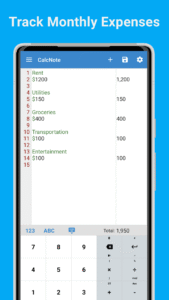
Budgeting & expense tracking:
groceries, utilities, subscriptions, trip costs.
-
Shopping comparisons:
price × quantity, shipping, discounts, coupons, tax/VAT.
-
Bills & invoices:
line items, service fees, tips, and taxes.
-
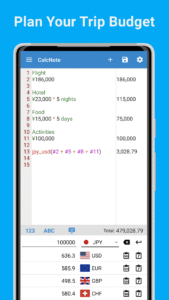
Travel budgets:
flights, hotels, per-day costs, currency conversion.
-
Study & work:
statistics, engineering, financial and scientific calculations.
Built-in calculator features
-
Percent & tax:
add/remove tax, discounts.
-
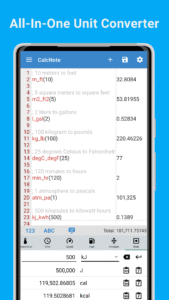
Converters:
currency converter and unit converter (length, area, volume, weight, etc.).
-
Scientific & financial:
trigonometry, logs, powers, roots, factorial, permutations, combinations.
-
Aggregate functions:
sum, average, min, max, median, variance, standard deviation.
-
Variables & reuse:
store values, reuse results across lines, reference earlier lines.
-
User-defined functions:
extend with custom logic (JavaScript).
-
Bases & bitwise:
hex, octal, binary, and bitwise operations.
Customize your workspace
-
Appearance:
themes, colors, fonts, and button sounds/vibration.
-
Layout:
reorder buttons and menus, hide what you don’t use.
-
Math rules:
rounding methods, decimal places, tax rates, precision.
-
Grammar:
choose decimal points, comment symbols, and more.
-
Personal library:
save constants and custom functions.
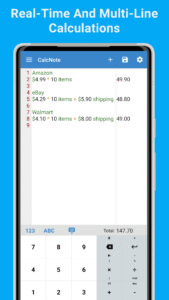
Example: quick shopping comparison
Shop A: USD 18 × 2 + USD 4 (shipping)
Shop B: USD 19 × 2 + 8% (sales tax)
Shop C: USD 18.30 × 2 + USD 5 − USD 2 (points)
→ Edit any part; totals update instantly.
Who is it for?
- Users seeking a
calculator app
that feels like a
note-taking app
.
- People comparing prices, managing
budgets
, or logging daily
expenses
.
- Anyone who wants spreadsheet-style
functions
without a heavy spreadsheet.
- Students, engineers, freelancers, and small businesses making
invoices
and estimates.
Why it boosts productivity
- Keep numbers
together with context
(labels, comments, units).
- Replace back-and-forth between a calculator, notes, and a spreadsheet.
- Recalculate entire notes by changing just one line.
Helpful details
- Works great as a
household account book
/
money manager
for simple daily tracking.
- Supports
budget categories
with subtotals and a final total.
- Use the
unit & currency converter
to normalize prices before comparing.
- Print or share your calculations as needed.
Notes
Currency conversion may require internet for the latest exchange rates.
Disclaimer
Results depend on your inputs and settings. For critical work, verify calculations.
CalcNote aims to offer Soulver on Android.
Special thanks go to Zac Cohan, the creator of Soulver.
Download CalcNote and experience a faster, clearer way to calculate, convert, and budget.
CalcNote is a notepad-style calculator app that updates results instantly. Type numbers and text on multiple lines—prices, taxes, quantities, notes—and CalcNote recalculates automatically. It’s faster than a traditional calculator and more flexible than a spreadsheet.
Why CalcNote?
-
Instant results:
Edit any line and totals update immediately—no “=” needed.
-
Many lines at once:
See multiple problems, subtotals, and the grand total together.
-
Spreadsheet-like power:
Use functions (sum, avg, median, stdev), references, and variables without building a full sheet.
-
Saves and shares:
Keep your math as files, print, or share via Android.
Perfect for everyday math and money
-
Budgeting & expense tracking:
groceries, utilities, subscriptions, trip costs.
-
Shopping comparisons:
price × quantity, shipping, discounts, coupons, tax/VAT.
-
Bills & invoices:
line items, service fees, tips, and taxes.
-
Travel budgets:
flights, hotels, per-day costs, currency conversion.
-
Study & work:
statistics, engineering, financial and scientific calculations.
Built-in calculator features
-
Percent & tax:
add/remove tax, discounts.
-
Converters:
currency converter and unit converter (length, area, volume, weight, etc.).
-
Scientific & financial:
trigonometry, logs, powers, roots, factorial, permutations, combinations.
-
Aggregate functions:
sum, average, min, max, median, variance, standard deviation.
-
Variables & reuse:
store values, reuse results across lines, reference earlier lines.
-
User-defined functions:
extend with custom logic (JavaScript).
-
Bases & bitwise:
hex, octal, binary, and bitwise operations.
Customize your workspace
-
Appearance:
themes, colors, fonts, and button sounds/vibration.
-
Layout:
reorder buttons and menus, hide what you don’t use.
-
Math rules:
rounding methods, decimal places, tax rates, precision.
-
Grammar:
choose decimal points, comment symbols, and more.
-
Personal library:
save constants and custom functions.
Example: quick shopping comparison
Shop A: USD 18 × 2 + USD 4 (shipping)
Shop B: USD 19 × 2 + 8% (sales tax)
Shop C: USD 18.30 × 2 + USD 5 − USD 2 (points)
→ Edit any part; totals update instantly.
Who is it for?
- Users seeking a
calculator app
that feels like a
note-taking app
.
- People comparing prices, managing
budgets
, or logging daily
expenses
.
- Anyone who wants spreadsheet-style
functions
without a heavy spreadsheet.
- Students, engineers, freelancers, and small businesses making
invoices
and estimates.
Why it boosts productivity
- Keep numbers
together with context
(labels, comments, units).
- Replace back-and-forth between a calculator, notes, and a spreadsheet.
- Recalculate entire notes by changing just one line.
Helpful details
- Works great as a
household account book
/
money manager
for simple daily tracking.
- Supports
budget categories
with subtotals and a final total.
- Use the
unit & currency converter
to normalize prices before comparing.
- Print or share your calculations as needed.
Notes
Currency conversion may require internet for the latest exchange rates.
Disclaimer
Results depend on your inputs and settings. For critical work, verify calculations.
CalcNote aims to offer Soulver on Android.
Special thanks go to Zac Cohan, the creator of Soulver.
Download CalcNote and experience a faster, clearer way to calculate, convert, and budget.
Download CalcNote - Notepad Calculator APK
Fast, free and safe download.
APK Permissions 13
- android.permission.ACCESS_ADSERVICES_AD_ID
- android.permission.ACCESS_ADSERVICES_ATTRIBUTION
- android.permission.ACCESS_ADSERVICES_TOPICS
- android.permission.ACCESS_NETWORK_STATE
- android.permission.FOREGROUND_SERVICE
- android.permission.INTERNET
- android.permission.READ_EXTERNAL_STORAGE
- android.permission.RECEIVE_BOOT_COMPLETED
- android.permission.VIBRATE
- android.permission.WAKE_LOCK
- com.burton999.notecal.DYNAMIC_RECEIVER_NOT_EXPORTED_PERMISSION
- com.google.android.c2dm.permission.RECEIVE
- com.google.android.gms.permission.AD_ID
APK Verified
The cryptographic signature guarantees that the file is safe to install and was not tampered with in any way.


Frequently Asked Questions about CalcNote - Notepad Calculator APK
This is the universal variant — a single APK that contains native libraries for every CPU architecture. It installs on any Android device but is larger than per-architecture variants.
Yes — the APK's signature has been cryptographically verified against the publisher's signing key. The SHA-256 hash is shown in the File Information panel so you can independently confirm the file matches the original release.
Android 24 (API level 35) or newer. Older devices will refuse the install.
Install a free app like 'CPU-Z' or 'Droid Hardware Info' from the Play Store and look at the ABI / Instruction Set row. Most phones made after 2017 are arm64-v8a; if in doubt, download the universal variant.
All variants are functionally identical — same features, same version. They differ only in which CPU architectures the native code is compiled for, and (sometimes) which screen densities the included graphics target. Pick the one that matches your device for the smallest install size, or pick 'Universal' if you're unsure.