
This is the universal build of Text Editor 3.0.b161. It contains native libraries for every CPU architecture (arm64-v8a, armeabi-v7a, x86, x86_64), so it installs on any Android device. The trade-off is size — it's larger than per-architecture variants. Pick this one if you're unsure which CPU your phone has, or if you plan to share the APK with multiple devices.
File size: 11.0 MB • Min Android: 23 • Target Android: 35 • Version code: 161 • Framework: Native (Java/Kotlin) • Permissions: 13
Screenshots
File Information
| Package Name | com.byteexperts.texteditor |
|---|---|
| Version Name | 3.0.b161 |
| Version Code | 161 |
| Architecture | Universal |
| Min Android Version | Android 23 (API 35) |
| Main Activity | com.byteexperts.texteditor.DEMainActivity |
| Framework | Native (Java/Kotlin) |
| File Size | 11.04 MB |
| Signature (SHA1) | 003790D49C1301AD7B1BAAE46B19EC4F91A066CB |
| File Hash (SHA256) | 53ee5b23be5db708f4167ee8e99bdb7458c0bee0aca66d9756a681885a5fbf36 |
App Description
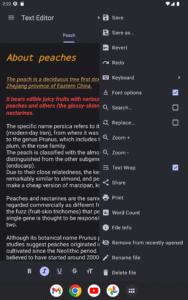
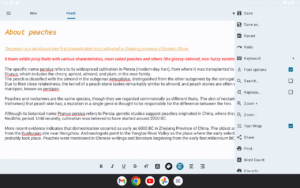
Oojao Text Editor is a simple and powerful file editor, to open and save files. It can open more files at once, as it supports tabs.
This app is ad-supported to keep it free, but ads are not annoying and can be quickly closed or temporarily turned off in Settings. And there are
no ads while editing
!
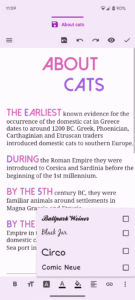
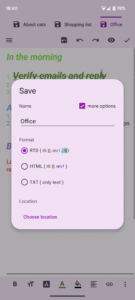
Added rich text styling options, so you can make your notes look just the way you want them.
FEATURES
• Create and edit documents
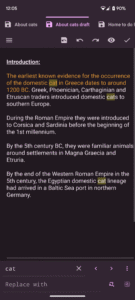
• Open more documents at once in tabs
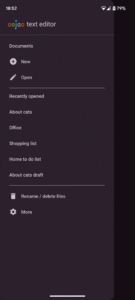
• Recently opened documents list, for quick access
• Open very large files with big file size
• Change font bold, italic, underline, strike-through
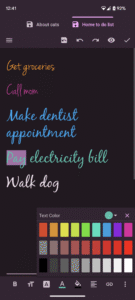
• Change font size, color, highlight, typeface, alignment
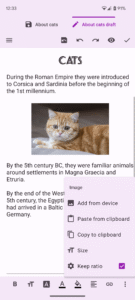
• Insert images and links
• Change selected text to uppercase or lowercase
• Change charset /encoding
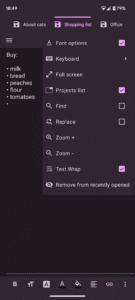
• Dark theme
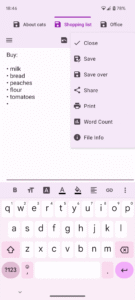
• Print option
And much more!
This app is ad-supported to keep it free, but ads are not annoying and can be quickly closed or temporarily turned off in Settings. And there are
no ads while editing
!
Added rich text styling options, so you can make your notes look just the way you want them.
FEATURES
• Create and edit documents
• Open more documents at once in tabs
• Recently opened documents list, for quick access
• Open very large files with big file size
• Change font bold, italic, underline, strike-through
• Change font size, color, highlight, typeface, alignment
• Insert images and links
• Change selected text to uppercase or lowercase
• Change charset /encoding
• Dark theme
• Print option
And much more!
Download Text Editor APK
Fast, free and safe download.
APK Permissions 13
- android.permission.ACCESS_ADSERVICES_AD_ID
- android.permission.ACCESS_ADSERVICES_ATTRIBUTION
- android.permission.ACCESS_ADSERVICES_TOPICS
- android.permission.ACCESS_NETWORK_STATE
- android.permission.FOREGROUND_SERVICE
- android.permission.INTERNET
- android.permission.READ_EXTERNAL_STORAGE
- android.permission.WAKE_LOCK
- android.permission.WRITE_EXTERNAL_STORAGE
- com.android.vending.BILLING
- com.byteexperts.texteditor.DYNAMIC_RECEIVER_NOT_EXPORTED_PERMISSION
- com.google.android.finsky.permission.BIND_GET_INSTALL_REFERRER_SERVICE
- com.google.android.gms.permission.AD_ID
APK Verified
The cryptographic signature guarantees that the file is safe to install and was not tampered with in any way.


Frequently Asked Questions about Text Editor APK
This is the universal variant — a single APK that contains native libraries for every CPU architecture. It installs on any Android device but is larger than per-architecture variants.
Yes — the APK's signature has been cryptographically verified against the publisher's signing key. The SHA-256 hash is shown in the File Information panel so you can independently confirm the file matches the original release.
Android 23 (API level 35) or newer. Older devices will refuse the install.
Install a free app like 'CPU-Z' or 'Droid Hardware Info' from the Play Store and look at the ABI / Instruction Set row. Most phones made after 2017 are arm64-v8a; if in doubt, download the universal variant.
All variants are functionally identical — same features, same version. They differ only in which CPU architectures the native code is compiled for, and (sometimes) which screen densities the included graphics target. Pick the one that matches your device for the smallest install size, or pick 'Universal' if you're unsure.