
This is the universal build of SELPHY Photo Layout 4.1.0. It contains native libraries for every CPU architecture (arm64-v8a, armeabi-v7a, x86, x86_64), so it installs on any Android device. The trade-off is size — it's larger than per-architecture variants. Pick this one if you're unsure which CPU your phone has, or if you plan to share the APK with multiple devices.
File size: 40.1 MB • Min Android: 31 • Target Android: 35 • Version code: 2041000020 • Framework: Native (Java/Kotlin) • Permissions: 14
Screenshots
File Information
| Package Name | jp.co.canon.ic.photolayout |
|---|---|
| Version Name | 4.1.0 |
| Version Code | 2041000020 |
| Architecture | Universal |
| Min Android Version | Android 31 (API 35) |
| Main Activity | jp.co.canon.ic.photolayout.MainActivity |
| Framework | Native (Java/Kotlin) |
| File Size | 40.09 MB |
| Signature (SHA1) | E612F6A8D02E02B8783FFECAE94A5774A91A2653 |
| File Hash (SHA256) | dc98ba3a5ad25619a6782a1cf1cf5c5ec57c6e24dc8dd71f0050ee26d532445d |
What's New
- You can now create original stamps and frames from images.
- You can now choose designs or photos for the background of your pictures.
- Now supports the Custom Size layout, allowing printing in any photo size.
- Now supports setting the number of copies for printing.
- Improved the user interface (UI).
[Ver.4.1.0]
- You can now choose designs or photos for the background of your pictures.
- Now supports the Custom Size layout, allowing printing in any photo size.
- Now supports setting the number of copies for printing.
- Improved the user interface (UI).
[Ver.4.1.0]
App Description
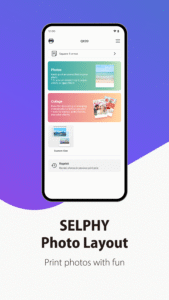
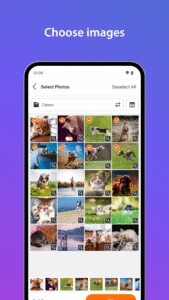
SELPHY Photo Layout is an application that allows you to create/save layouts of images to be printed with SELPHY using images stored on your smartphone or tablet.
[Key Features]
- Connect your smartphone or tablet wirelessly with SELPHY printers and enjoy high-quality photo printing.
("Canon PRINT" must be installed separately for CP1300, CP1200, CP910, and CP900.)
- Easily print photos directly from the ‘Photos’ menu.
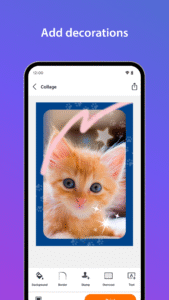
- Decorate and layout your photos freely with the ‘Collage’ menu before printing.
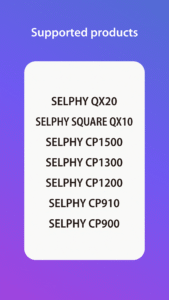
[Supported Products]
- CP1500, CP1300, CP1200, CP910, CP900
- QX20, SQUARE QX10
[System requirement]
- Android 12/13/14/15
[Supported Images]
- JPEG, PNG, HEIF
[Supported Layouts / Functions ]
- Photos (Easily print an unmodified original photo.)
- Collage (Have fun decorating or arranging multiple photos before you print.)
- ID Photo (Print ID photos such as passport and driver’s license pictures from selfies.)
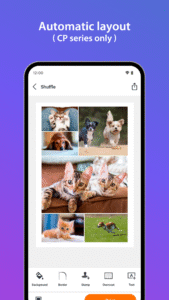
- Shuffle (Select up to 20 images, and they will be automatically arranged and printed on one sheet.)
- Custom Size (Print in any photo size)
- Reprint (Print additional copies from your previously printed collection.)
- Collage Decoration Features (Include stamps, text, and embedded QR codes.)
- Pattern Overcoat Processing (Only for CP1500).
- Photos (Easily print an unmodified original photo.)
- Collage (Have fun decorating or arranging multiple photos before you print.)
- Custom Size (Print in any photo size)
- Reprint (Print additional copies from your previously printed collection.)
- Collage Decoration Features (Include stamps, frames, text, and embedded QR codes.)
- Pattern Overcoat Processing.
- Card & Square Hybrid Printing / Borderless & Bordered Printing (Only for QX20).
[Supported Paper Size]
- All available SELPHY-specific paper sizes for purchase *2
- Postcard Size
- L (3R) Size
- Card Size
- Square Sticker Paper for QX.
- Card Sticker Paper for QX (Only for QX20).
*1: availability may differ depending on region.
[Important Notes]
- If application does not operate properly, try again after shutting down the application.
- Features and services available in this application may differ depending on the model, country or region, and environment.
- Visit your local Canon Web pages for more details.
[Key Features]
- Connect your smartphone or tablet wirelessly with SELPHY printers and enjoy high-quality photo printing.
("Canon PRINT" must be installed separately for CP1300, CP1200, CP910, and CP900.)
- Easily print photos directly from the ‘Photos’ menu.
- Decorate and layout your photos freely with the ‘Collage’ menu before printing.
[Supported Products]
- CP1500, CP1300, CP1200, CP910, CP900
- QX20, SQUARE QX10
[System requirement]
- Android 12/13/14/15
[Supported Images]
- JPEG, PNG, HEIF
[Supported Layouts / Functions ]
- Photos (Easily print an unmodified original photo.)
- Collage (Have fun decorating or arranging multiple photos before you print.)
- ID Photo (Print ID photos such as passport and driver’s license pictures from selfies.)
- Shuffle (Select up to 20 images, and they will be automatically arranged and printed on one sheet.)
- Custom Size (Print in any photo size)
- Reprint (Print additional copies from your previously printed collection.)
- Collage Decoration Features (Include stamps, text, and embedded QR codes.)
- Pattern Overcoat Processing (Only for CP1500).
- Photos (Easily print an unmodified original photo.)
- Collage (Have fun decorating or arranging multiple photos before you print.)
- Custom Size (Print in any photo size)
- Reprint (Print additional copies from your previously printed collection.)
- Collage Decoration Features (Include stamps, frames, text, and embedded QR codes.)
- Pattern Overcoat Processing.
- Card & Square Hybrid Printing / Borderless & Bordered Printing (Only for QX20).
[Supported Paper Size]
- All available SELPHY-specific paper sizes for purchase *2
- Postcard Size
- L (3R) Size
- Card Size
- Square Sticker Paper for QX.
- Card Sticker Paper for QX (Only for QX20).
*1: availability may differ depending on region.
[Important Notes]
- If application does not operate properly, try again after shutting down the application.
- Features and services available in this application may differ depending on the model, country or region, and environment.
- Visit your local Canon Web pages for more details.
Download SELPHY Photo Layout APK
Fast, free and safe download.
APK Permissions 14
- android.permission.ACCESS_NETWORK_STATE
- android.permission.ACCESS_WIFI_STATE
- android.permission.CAMERA
- android.permission.CHANGE_NETWORK_STATE
- android.permission.CHANGE_WIFI_STATE
- android.permission.INTERNET
- android.permission.POST_NOTIFICATIONS
- android.permission.READ_EXTERNAL_STORAGE
- android.permission.READ_MEDIA_IMAGES
- android.permission.READ_MEDIA_VISUAL_USER_SELECTED
- android.permission.WAKE_LOCK
- com.google.android.c2dm.permission.RECEIVE
- com.google.android.finsky.permission.BIND_GET_INSTALL_REFERRER_SERVICE
- jp.co.canon.ic.photolayout.DYNAMIC_RECEIVER_NOT_EXPORTED_PERMISSION
APK Verified
The cryptographic signature guarantees that the file is safe to install and was not tampered with in any way.
Similar in Photography


Frequently Asked Questions about SELPHY Photo Layout APK
This is the universal variant — a single APK that contains native libraries for every CPU architecture. It installs on any Android device but is larger than per-architecture variants.
Yes — the APK's signature has been cryptographically verified against the publisher's signing key. The SHA-256 hash is shown in the File Information panel so you can independently confirm the file matches the original release.
Android 31 (API level 35) or newer. Older devices will refuse the install.
Install a free app like 'CPU-Z' or 'Droid Hardware Info' from the Play Store and look at the ABI / Instruction Set row. Most phones made after 2017 are arm64-v8a; if in doubt, download the universal variant.
All variants are functionally identical — same features, same version. They differ only in which CPU architectures the native code is compiled for, and (sometimes) which screen densities the included graphics target. Pick the one that matches your device for the smallest install size, or pick 'Universal' if you're unsure.