
Screenshots
File Information
| Package Name | jp.co.canon.ic.photolayout |
|---|---|
| Version Name | 4.2.0 |
| Version Code | 2041001017 |
| Architecture | Universal |
| Min Android Version | Android 31 (API 35) |
| Main Activity | jp.co.canon.ic.photolayout.MainActivity |
| Framework | Native (Java/Kotlin) |
| File Size | 36.05 MB |
| Signature (SHA1) | E612F6A8D02E02B8783FFECAE94A5774A91A2653 |
| File Hash (SHA256) | f0f9ddeb1ad8b4b6561abbad8b1053cf204c6516ee7d1bf29f4e1f70b417013a |
What's New
- The Photo Menu now supports laying out multiple photos on a single page.
- Tile printing is supported, allowing you to print large images by splitting them into multiple tiles.
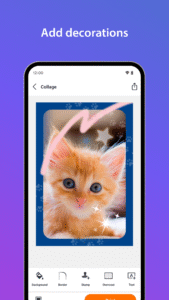
- The painting function now includes a sparkling brush and rainbow colors.
- Design frames are now available on the CP series as well.
[Ver.4.2.0]
- Tile printing is supported, allowing you to print large images by splitting them into multiple tiles.
- The painting function now includes a sparkling brush and rainbow colors.
- Design frames are now available on the CP series as well.
[Ver.4.2.0]
App Description
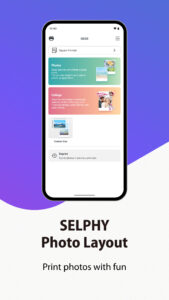
SELPHY Photo Layout is an application that allows you to create/save layouts of images to be printed with SELPHY using images stored on your smartphone or tablet.
[Key Features]
- Connect your smartphone or tablet wirelessly with SELPHY printers and enjoy high-quality photo printing.
("Canon PRINT" must be installed separately for CP1300, CP1200, CP910, and CP900.)
- Easily print photos directly from the ‘Photos’ menu.
- Decorate and layout your photos freely with the ‘Collage’ menu before printing.
[Supported Products]
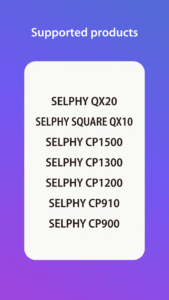
- CP1500, CP1300, CP1200, CP910, CP900
- QX20, SQUARE QX10
[System requirement]
- Android 12/13/14/15/16
[Supported Images]
- JPEG, PNG, HEIF
[Supported Layouts / Functions ]
- Photos (Easily print an unmodified original photo.)
- Collage (Have fun decorating or arranging multiple photos before you print.)
- ID Photo (Print ID photos such as passport and driver’s license pictures from selfies.)
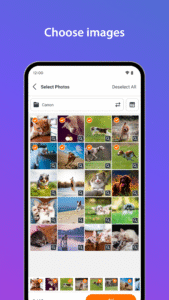
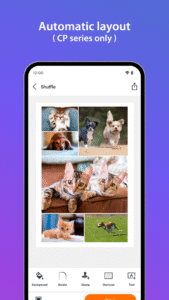
- Shuffle (Select up to 20 images, and they will be automatically arranged and printed on one sheet.)
- Custom Size (Print in any photo size)
- Tiling (split the photo into multiple tiles to print large)
- Reprint (Print additional copies from your previously printed collection.)
- Collage Decoration Features (Include stamps, text, and embedded QR codes.)
- Pattern Overcoat Processing (Only for CP1500).
- Photos (Easily print an unmodified original photo.)
- Collage (Have fun decorating or arranging multiple photos before you print.)
- Custom Size (Print in any photo size)
- Reprint (Print additional copies from your previously printed collection.)
- Collage Decoration Features (Include stamps, frames, text, and embedded QR codes.)
- Pattern Overcoat Processing.
- Card & Square Hybrid Printing / Borderless & Bordered Printing (Only for QX20).
[Supported Paper Size]
- All available SELPHY-specific paper sizes for purchase *2
- Postcard Size
- L (3R) Size
- Card Size
- Square Sticker Paper for QX.
- Card Sticker Paper for QX (Only for QX20).
*1: availability may differ depending on region.
[Important Notes]
- If application does not operate properly, try again after shutting down the application.
- Features and services available in this application may differ depending on the model, country or region, and environment.
- Visit your local Canon Web pages for more details.
[Key Features]
- Connect your smartphone or tablet wirelessly with SELPHY printers and enjoy high-quality photo printing.
("Canon PRINT" must be installed separately for CP1300, CP1200, CP910, and CP900.)
- Easily print photos directly from the ‘Photos’ menu.
- Decorate and layout your photos freely with the ‘Collage’ menu before printing.
[Supported Products]
- CP1500, CP1300, CP1200, CP910, CP900
- QX20, SQUARE QX10
[System requirement]
- Android 12/13/14/15/16
[Supported Images]
- JPEG, PNG, HEIF
[Supported Layouts / Functions ]
- Photos (Easily print an unmodified original photo.)
- Collage (Have fun decorating or arranging multiple photos before you print.)
- ID Photo (Print ID photos such as passport and driver’s license pictures from selfies.)
- Shuffle (Select up to 20 images, and they will be automatically arranged and printed on one sheet.)
- Custom Size (Print in any photo size)
- Tiling (split the photo into multiple tiles to print large)
- Reprint (Print additional copies from your previously printed collection.)
- Collage Decoration Features (Include stamps, text, and embedded QR codes.)
- Pattern Overcoat Processing (Only for CP1500).
- Photos (Easily print an unmodified original photo.)
- Collage (Have fun decorating or arranging multiple photos before you print.)
- Custom Size (Print in any photo size)
- Reprint (Print additional copies from your previously printed collection.)
- Collage Decoration Features (Include stamps, frames, text, and embedded QR codes.)
- Pattern Overcoat Processing.
- Card & Square Hybrid Printing / Borderless & Bordered Printing (Only for QX20).
[Supported Paper Size]
- All available SELPHY-specific paper sizes for purchase *2
- Postcard Size
- L (3R) Size
- Card Size
- Square Sticker Paper for QX.
- Card Sticker Paper for QX (Only for QX20).
*1: availability may differ depending on region.
[Important Notes]
- If application does not operate properly, try again after shutting down the application.
- Features and services available in this application may differ depending on the model, country or region, and environment.
- Visit your local Canon Web pages for more details.
Download SELPHY Photo Layout APK
Fast, free and safe download.
APK Permissions 14
- android.permission.ACCESS_NETWORK_STATE
- android.permission.ACCESS_WIFI_STATE
- android.permission.CAMERA
- android.permission.CHANGE_NETWORK_STATE
- android.permission.CHANGE_WIFI_STATE
- android.permission.INTERNET
- android.permission.POST_NOTIFICATIONS
- android.permission.READ_EXTERNAL_STORAGE
- android.permission.READ_MEDIA_IMAGES
- android.permission.READ_MEDIA_VISUAL_USER_SELECTED
- android.permission.WAKE_LOCK
- com.google.android.c2dm.permission.RECEIVE
- com.google.android.finsky.permission.BIND_GET_INSTALL_REFERRER_SERVICE
- jp.co.canon.ic.photolayout.DYNAMIC_RECEIVER_NOT_EXPORTED_PERMISSION
APK Verified
The cryptographic signature guarantees that the file is safe to install and was not tampered with in any way.


