
Download ZoneAlarm Mobile Security APK 3.8-9650 arm64-v8a, armeabi-v7a · Android 24+
Download APK
Verified Safe
This is the arm64-v8a, armeabi-v7a build of ZoneAlarm Mobile Security 3.8-9650. Pick this build if your device's primary ABI matches.
File size: 43.5 MB • Min Android: 24 • Target Android: 34 • Version code: 30809650 • Framework: Native (Java/Kotlin) • Permissions: 24
Screenshots

File Information
| Package Name | com.checkpoint.zonealarm.mobilesecurity |
|---|---|
| Version Name | 3.8-9650 |
| Version Code | 30809650 |
| Architecture | arm64-v8a, armeabi-v7a |
| Min Android Version | Android 24 (API 34) |
| Main Activity | com.checkpoint.zonealarm.mobilesecurity.Activities.SplashActivity |
| Framework | Native (Java/Kotlin) |
| File Size | 43.55 MB |
| Signature (SHA1) | 37E270757904B13D79A67F2FDBE44D8CF8F099CB |
| File Hash (SHA256) | 09fcdb1dc02a34fed566a80432bf902c367d61fc7e0ccb8813739b5ae487df2f |
What's New
From version
3.6-9057
:
We made stability and performance improvements.
3.6-9057
:
We made stability and performance improvements.
App Description
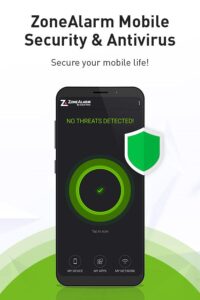
Zonealarm Mobile Security is the ultimate antivirus security solution for your mobile device. Developed by Cyber Security leader Check Point, it uses enterprise-grade technology to
protect your data and privacy
and keep your device
free from malicious threats, apps, and malware.
Get your 7-day free trial and experience ZoneAlarm for yourself!
Why ZoneAlarm Mobile Security & Antivirus Protection App?
Mobile attacks are a major threat that affects thousands of people every day. ZoneAlarm Mobile Security protects your mobile device from the newest, most sophisticated kinds of mobile attacks using the most advanced and up-to-date technology by Check Point.
✔Connect to
public Wi-Fi
at the airport, hotel, or any public place worry-free.
✔
“Privacy-first” approach
- we make sure you are not being eavesdropped by a third party.
✔
Shopping or banking online?
Our
Zero-Phishing
feature makes sure your credentials are not seen or stolen by hackers.
✔
Browse the web and download apps
without any concerns. All apps and URLs are checked in real-time.
✔Protect your device from malicious apps from
USB
or
Bluetooth
connections.
✔Keep blackmailers out of sight with ZoneAlarm’s
Anti-Ransomware
protection.
✔Get a detailed
weekly report
to see all the threats from the previous week and how
ZoneAlarm helped you keep your device safe.
How do we protect you?
ZoneAlarm Mobile Security & Antivirus
protection is built on three lines of defense: App, Network, and Operating System.
First line of defense: App Protection
✔
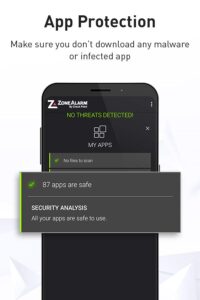
Antivirus Protection
– Scans and alerts on malicious apps in real-time using the latest antivirus mobile protection features for your phone or tablet.
✔
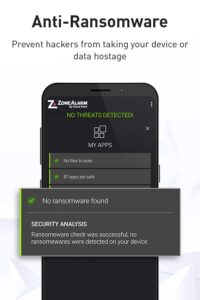
Anti-Ransomware
– Uses behavioral algorithms and artificial intelligence to stop costly ransomware attacks.
✔
Zero-Day App Protection
– Our machine-learning engine protects you against new and unknown malware both when you are using the app or not.
✔
Bluetooth and USB Protection
– Cutting-edge feature that protects against malicious apps coming from USB and Bluetooth connections.
Second line of defense: Network
✔
Zero-Phishing
- Real-time protection from phishing attacks and frauds across all apps: banking, email, messaging, and social.
✔
Safe Browsing
- Blocks browser access to malicious sites established to steal your information.
✔
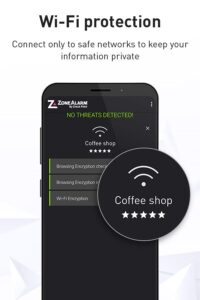
Wi-Fi Network Security
- Detects malicious network behavior and eavesdropping (Man-in-the-Middle attacks).
✔
Anti-Bot
- Blocks data such as photos, documents, credentials, etc. from being stolen and sent from the device.
✔
- The app uses the VPN channel for internal URL inspection as part of the advanced phishing protection under “My Web” to prevent the user from using phishing sites.
Third line of defense: Operating System
✔
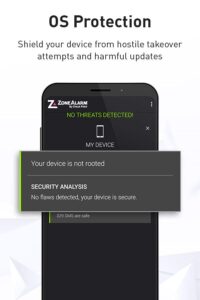
Device Shield
– Uses real-time risk assessments by detecting attacks, vulnerabilities, changes in configurations, as well as advanced rooting.
✔
Break alert
– Behavioral detection engine alerts you if someone has gained control over your operating system.
Your experience is our priority:
✔ 100% privacy
- We don't collect or share your personal information.
✔ No ads
– Our app is hassle-free. You won’t see ads, even during your trial.
✔ Low device resources
- Minimal effect on battery life.
✔ Interactive user interface
– Our app is sleek, fast, and easy-to-use.
For more information visit:
www.zonealarm.com/mobile-security
Privacy policy:
www.zonealarm.com/privacy
protect your data and privacy
and keep your device
free from malicious threats, apps, and malware.
Get your 7-day free trial and experience ZoneAlarm for yourself!
Why ZoneAlarm Mobile Security & Antivirus Protection App?
Mobile attacks are a major threat that affects thousands of people every day. ZoneAlarm Mobile Security protects your mobile device from the newest, most sophisticated kinds of mobile attacks using the most advanced and up-to-date technology by Check Point.
✔Connect to
public Wi-Fi
at the airport, hotel, or any public place worry-free.
✔
“Privacy-first” approach
- we make sure you are not being eavesdropped by a third party.
✔
Shopping or banking online?
Our
Zero-Phishing
feature makes sure your credentials are not seen or stolen by hackers.
✔
Browse the web and download apps
without any concerns. All apps and URLs are checked in real-time.
✔Protect your device from malicious apps from
USB
or
Bluetooth
connections.
✔Keep blackmailers out of sight with ZoneAlarm’s
Anti-Ransomware
protection.
✔Get a detailed
weekly report
to see all the threats from the previous week and how
ZoneAlarm helped you keep your device safe.
How do we protect you?
ZoneAlarm Mobile Security & Antivirus
protection is built on three lines of defense: App, Network, and Operating System.
First line of defense: App Protection
✔
Antivirus Protection
– Scans and alerts on malicious apps in real-time using the latest antivirus mobile protection features for your phone or tablet.
✔
Anti-Ransomware
– Uses behavioral algorithms and artificial intelligence to stop costly ransomware attacks.
✔
Zero-Day App Protection
– Our machine-learning engine protects you against new and unknown malware both when you are using the app or not.
✔
Bluetooth and USB Protection
– Cutting-edge feature that protects against malicious apps coming from USB and Bluetooth connections.
Second line of defense: Network
✔
Zero-Phishing
- Real-time protection from phishing attacks and frauds across all apps: banking, email, messaging, and social.
✔
Safe Browsing
- Blocks browser access to malicious sites established to steal your information.
✔
Wi-Fi Network Security
- Detects malicious network behavior and eavesdropping (Man-in-the-Middle attacks).
✔
Anti-Bot
- Blocks data such as photos, documents, credentials, etc. from being stolen and sent from the device.
✔
- The app uses the VPN channel for internal URL inspection as part of the advanced phishing protection under “My Web” to prevent the user from using phishing sites.
Third line of defense: Operating System
✔
Device Shield
– Uses real-time risk assessments by detecting attacks, vulnerabilities, changes in configurations, as well as advanced rooting.
✔
Break alert
– Behavioral detection engine alerts you if someone has gained control over your operating system.
Your experience is our priority:
✔ 100% privacy
- We don't collect or share your personal information.
✔ No ads
– Our app is hassle-free. You won’t see ads, even during your trial.
✔ Low device resources
- Minimal effect on battery life.
✔ Interactive user interface
– Our app is sleek, fast, and easy-to-use.
For more information visit:
www.zonealarm.com/mobile-security
Privacy policy:
www.zonealarm.com/privacy
Download ZoneAlarm Mobile Security APK
Fast, free and safe download.
APK Permissions 24
- android.permission.ACCESS_NETWORK_STATE
- android.permission.ACCESS_WIFI_STATE
- android.permission.CAMERA
- android.permission.CHANGE_WIFI_STATE
- android.permission.FOREGROUND_SERVICE
- android.permission.FOREGROUND_SERVICE_DATA_SYNC
- android.permission.FOREGROUND_SERVICE_SPECIAL_USE
- android.permission.INTERNET
- android.permission.KILL_BACKGROUND_PROCESSES
- android.permission.NET_RAW
- android.permission.PACKAGE_USAGE_STATS
- android.permission.POST_NOTIFICATIONS
- android.permission.QUERY_ALL_PACKAGES
- android.permission.READ_PHONE_STATE
- android.permission.RECEIVE_BOOT_COMPLETED
- android.permission.REQUEST_DELETE_PACKAGES
- android.permission.VPN
- android.permission.WAKE_LOCK
- com.android.vending.BILLING
- com.checkpoint.zonealarm.mobilesecurity.DYNAMIC_RECEIVER_NOT_EXPORTED_PERMISSION
- com.checkpoint.zonealarm.mobilesecurity.urlf.IPC
- com.google.android.c2dm.permission.RECEIVE
- com.google.android.finsky.permission.BIND_GET_INSTALL_REFERRER_SERVICE
- com.google.android.gms.permission.AD_ID
APK Verified
The cryptographic signature guarantees that the file is safe to install and was not tampered with in any way.


Frequently Asked Questions about ZoneAlarm Mobile Security APK
This variant is built for devices that report `arm64-v8a, armeabi-v7a` as their primary ABI. If your device's CPU matches, this is the smallest, fastest version to install.
Yes — the APK's signature has been cryptographically verified against the publisher's signing key. The SHA-256 hash is shown in the File Information panel so you can independently confirm the file matches the original release.
Android 24 (API level 34) or newer. Older devices will refuse the install.
Install a free app like 'CPU-Z' or 'Droid Hardware Info' from the Play Store and look at the ABI / Instruction Set row. Most phones made after 2017 are arm64-v8a; if in doubt, download the universal variant.
All variants are functionally identical — same features, same version. They differ only in which CPU architectures the native code is compiled for, and (sometimes) which screen densities the included graphics target. Pick the one that matches your device for the smallest install size, or pick 'Universal' if you're unsure.