
This is the universal build of Choicelunch 5.2.6.153. It contains native libraries for every CPU architecture (arm64-v8a, armeabi-v7a, x86, x86_64), so it installs on any Android device. The trade-off is size — it's larger than per-architecture variants. Pick this one if you're unsure which CPU your phone has, or if you plan to share the APK with multiple devices.
File size: 43.2 MB • Min Android: 24 • Target Android: 35 • Version code: 52060153 • Framework: React Native • Permissions: 10
Screenshots
File Information
| Package Name | com.choicelunch |
|---|---|
| Version Name | 5.2.6.153 |
| Version Code | 52060153 |
| Architecture | Universal |
| Min Android Version | Android 24 (API 35) |
| Main Activity | com.choicelunch.MainActivity |
| Framework | React Native |
| File Size | 43.22 MB |
| Signature (SHA1) | 3E398A859BA8820015C19B74CF14DBFE7427BF40 |
| File Hash (SHA256) | 98b1d3754e78de7c0caf8d0f6d3b3c1ff11274892e2b7bb03c93b433c5888a6e |
What's New
Bugfixes (Choose/Shared account, Order by Menu), inline message support
App Description
Order healthy school lunch right from your Android device!
Choicelunch has been redefining "school lunch" by making food kids love and parents are proud of. We believe wholesome food and kid appeal are not opposing forces, and offer a kid-friendly menu that's fresh prepared from the best ingredients. By pre-ordering what you want, when you want it from our expansive menu, parents can accommodate their child's food needs and preferences while saving hours a week in the kitchen.
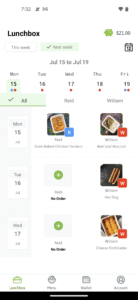
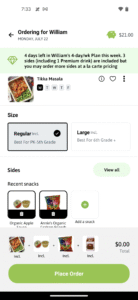
And now you can do it all from your Android device! With the Choicelunch app you can browse the Choicelunch menu, order lunches, view lunches already on order, cancel lunches in advance, and view all entrée information, including nutritional facts and allergen, and entrée descriptions and pictures.
Key Features:
- Order lunches from the school calendar
- View the lunches you've already ordered
- Cancel or change upcoming lunches
- Edit lunch (change entree, size or sides)
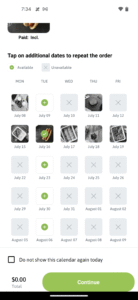
- Ability to repeat your order on other days that entree is available
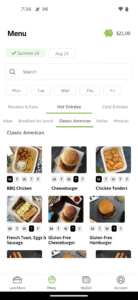
- Order by entree (see for which dates your favorite entree is offered), including filtering by day-of-week & hot/cold entrees
- View/manage/reload your Choicelunch Account Balance
- Sign-up for a new account
- Manage account and students
- Add/update/delete credit card details
- See size-specific photos and descriptions of entrées
- Menu is filtered by allergens for each student
- Set "Favorite" entrées for quick ordering
- Browse entrée nutritional information
Choicelunch provides healthy, wholesome school lunches to over 300 schools in California.
For more information on Choicelunch or assistance in setting up your registered user account, visit
www.choicelunch.com
or contact
support@choicelunch.com
.
Choicelunch has been redefining "school lunch" by making food kids love and parents are proud of. We believe wholesome food and kid appeal are not opposing forces, and offer a kid-friendly menu that's fresh prepared from the best ingredients. By pre-ordering what you want, when you want it from our expansive menu, parents can accommodate their child's food needs and preferences while saving hours a week in the kitchen.
And now you can do it all from your Android device! With the Choicelunch app you can browse the Choicelunch menu, order lunches, view lunches already on order, cancel lunches in advance, and view all entrée information, including nutritional facts and allergen, and entrée descriptions and pictures.
Key Features:
- Order lunches from the school calendar
- View the lunches you've already ordered
- Cancel or change upcoming lunches
- Edit lunch (change entree, size or sides)
- Ability to repeat your order on other days that entree is available
- Order by entree (see for which dates your favorite entree is offered), including filtering by day-of-week & hot/cold entrees
- View/manage/reload your Choicelunch Account Balance
- Sign-up for a new account
- Manage account and students
- Add/update/delete credit card details
- See size-specific photos and descriptions of entrées
- Menu is filtered by allergens for each student
- Set "Favorite" entrées for quick ordering
- Browse entrée nutritional information
Choicelunch provides healthy, wholesome school lunches to over 300 schools in California.
For more information on Choicelunch or assistance in setting up your registered user account, visit
www.choicelunch.com
or contact
support@choicelunch.com
.
Download Choicelunch APK
Fast, free and safe download.
APK Permissions 10
- android.permission.ACCESS_NETWORK_STATE
- android.permission.ACCESS_WIFI_STATE
- android.permission.INTERNET
- android.permission.POST_NOTIFICATIONS
- android.permission.READ_EXTERNAL_STORAGE
- android.permission.WAKE_LOCK
- android.permission.WRITE_EXTERNAL_STORAGE
- com.choicelunch.DYNAMIC_RECEIVER_NOT_EXPORTED_PERMISSION
- com.google.android.c2dm.permission.RECEIVE
- com.google.android.finsky.permission.BIND_GET_INSTALL_REFERRER_SERVICE
APK Verified
The cryptographic signature guarantees that the file is safe to install and was not tampered with in any way.
Similar in Food & Drink


Frequently Asked Questions about Choicelunch APK
This is the universal variant — a single APK that contains native libraries for every CPU architecture. It installs on any Android device but is larger than per-architecture variants.
Yes — the APK's signature has been cryptographically verified against the publisher's signing key. The SHA-256 hash is shown in the File Information panel so you can independently confirm the file matches the original release.
Android 24 (API level 35) or newer. Older devices will refuse the install.
Install a free app like 'CPU-Z' or 'Droid Hardware Info' from the Play Store and look at the ABI / Instruction Set row. Most phones made after 2017 are arm64-v8a; if in doubt, download the universal variant.
All variants are functionally identical — same features, same version. They differ only in which CPU architectures the native code is compiled for, and (sometimes) which screen densities the included graphics target. Pick the one that matches your device for the smallest install size, or pick 'Universal' if you're unsure.