
Download CloudBeats Cloud Music Player APK 2.6.03 arm64-v8a, armeabi-v7a, x86, x86_64 · Android 29+
Download APK
Verified Safe
This is the arm64-v8a, armeabi-v7a, x86, x86_64 build of CloudBeats Cloud Music Player 2.6.03. Pick this build if your device's primary ABI matches.
File size: 31.7 MB • Min Android: 29 • Target Android: 35 • Version code: 210 • Framework: Native (Java/Kotlin) • Permissions: 21
Screenshots

File Information
| Package Name | com.cloudbeats |
|---|---|
| Version Name | 2.6.03 |
| Version Code | 210 |
| Architecture | arm64-v8a, armeabi-v7a, x86, x86_64 |
| Min Android Version | Android 29 (API 35) |
| Main Activity | com.cloudbeats.presentation.feature.splash.SplashActivity |
| Framework | Native (Java/Kotlin) |
| File Size | 31.70 MB |
| Signature (SHA1) | 49B38C9298BC593978DBFD029AE11292DDC92414 |
| File Hash (SHA256) | 104c7e8e426210e9a1c16eb943dc3b8d13ae4162fce2bffb7ec5e4870257a4b3 |
What's New
Fixed webDAV login
App Description
Take control over your music and enhance your music listening experience with
CloudBeats – cloud music player.
Whether you need an offline cloud music player listener, or a music cloud player to sync all your music albums and download mp3 songs on multiple devices, this mp3 cloud music player and downloader is the only app you need.
All you audiophiles and die-hard music fans finally have a simple app that will organize and play your vast music collection the way you want it. Anywhere. Anytime.
Download CloudBeats 🎧 it’s the easiest way to organize, stream & play your music on the cloud.
☁️
CLOUD MUSIC PLAYER
▶️
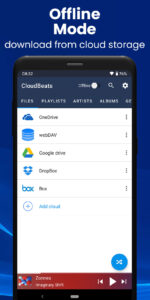
● Works with the popular cloud services for music streaming: Dropbox, Google Drive, OneDrive, OneDrive for Business, Box, pCloud, HiDrive. Personal clouds that support webDAV, including ownCloud and NextCloud. Network-Attached Servers (NAS) by Synology, QNAP, Western Digital (WD) and others that support webDAV protocol. These integrations make our cloud music internet song player one of the most versatile cloud music song organizers.
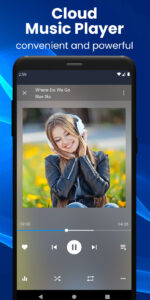
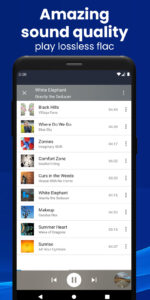
● Plays audio files in different formats: Our free local music player offline app allows you to play mp3, m4a, wav and lossless FLAC audio (Premium). Meaning our music cloud player can play almost any song you have on your phone.
● Works online and offline: Want to enjoy cloud music with no wifi? Well, our no wifi music cloud player allows you that. Simply swap between offline/online mode using the dedicated toggle button in the top corner. Also supports shuffle mode.
📁
MUSIC MANAGER & ORGANIZER
🎵
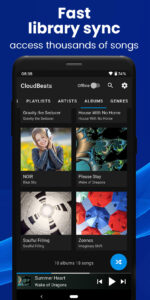
◉ Sync music libraries: The cloud music organizer app auto-detects all the music on your phone and syncs all your music libraries automatically. All songs are grouped by artist, album, genre.
◉ Create playlists: Want to organize your music and create cloud playlists? Add files and entire folders to playlists, change order of the tracks in the Playlist section of our free music player and listen music offline.
◉ Organize & download music: Upload, download, sync any of your music across multiple devices on the cloud with this free cloud music organizer. It also supports audiobooks file formats so you can listen offline without wifi.
📲
ALL FEATURES:
・Supports most cloud services, personal clouds, and servers.
・Works without internet. Download albums, playlists, folders or files onto the device for playback in offline mode (Premium feature)
・Playlist maker.
・Sync your music library with connected network accounts. Sync manager will scan selected folders and add audio files to your music library.
・Supports mp3, wav and m4a (aac only)*
・Supports lossless FLAC format (Premium feature)
・Advanced buffering technologies to provide smooth playback
・Repeat all, one and shuffle mode. Shuffle the entire library, a single folder, artist or album.
・Sleep timer
・Equalizer (EQ) to adjust bass and treble settings
・Playback speed control (tempo) within the 0.5x-3.0x range. This function is part of the Premium pack.
・Play offline–no internet or WiFi needed
・Add music to your favorite playlist
・Cast to your Chromecast device and any compatible speaker or TV without losing sound quality
・Android Auto
・no ads 💎
☑️ Cloudbeats is
free with unlimited streaming capabilities
from a single cloud account. With a one-time purchase of Premium pack you get:
・download songs with our cloud music downloader, as well as folders, playlists and albums
・unlimited number of connected clouds and accounts
・FLAC format support
・adjust playback speed within the 0.5x-3.0x range.
・cast to compatible devices
・Android Auto integration
* Apple lossless (ALAC) encoding is not supported
-----
If you have any queries or suggestions with our free offline music player for android, contact us! We are working hard to make our cloud mp3 player even better so we are open to any suggestions you might have. Enjoy your music with CloudBeats!
CloudBeats – cloud music player.
Whether you need an offline cloud music player listener, or a music cloud player to sync all your music albums and download mp3 songs on multiple devices, this mp3 cloud music player and downloader is the only app you need.
All you audiophiles and die-hard music fans finally have a simple app that will organize and play your vast music collection the way you want it. Anywhere. Anytime.
Download CloudBeats 🎧 it’s the easiest way to organize, stream & play your music on the cloud.
☁️
CLOUD MUSIC PLAYER
▶️
● Works with the popular cloud services for music streaming: Dropbox, Google Drive, OneDrive, OneDrive for Business, Box, pCloud, HiDrive. Personal clouds that support webDAV, including ownCloud and NextCloud. Network-Attached Servers (NAS) by Synology, QNAP, Western Digital (WD) and others that support webDAV protocol. These integrations make our cloud music internet song player one of the most versatile cloud music song organizers.
● Plays audio files in different formats: Our free local music player offline app allows you to play mp3, m4a, wav and lossless FLAC audio (Premium). Meaning our music cloud player can play almost any song you have on your phone.
● Works online and offline: Want to enjoy cloud music with no wifi? Well, our no wifi music cloud player allows you that. Simply swap between offline/online mode using the dedicated toggle button in the top corner. Also supports shuffle mode.
📁
MUSIC MANAGER & ORGANIZER
🎵
◉ Sync music libraries: The cloud music organizer app auto-detects all the music on your phone and syncs all your music libraries automatically. All songs are grouped by artist, album, genre.
◉ Create playlists: Want to organize your music and create cloud playlists? Add files and entire folders to playlists, change order of the tracks in the Playlist section of our free music player and listen music offline.
◉ Organize & download music: Upload, download, sync any of your music across multiple devices on the cloud with this free cloud music organizer. It also supports audiobooks file formats so you can listen offline without wifi.
📲
ALL FEATURES:
・Supports most cloud services, personal clouds, and servers.
・Works without internet. Download albums, playlists, folders or files onto the device for playback in offline mode (Premium feature)
・Playlist maker.
・Sync your music library with connected network accounts. Sync manager will scan selected folders and add audio files to your music library.
・Supports mp3, wav and m4a (aac only)*
・Supports lossless FLAC format (Premium feature)
・Advanced buffering technologies to provide smooth playback
・Repeat all, one and shuffle mode. Shuffle the entire library, a single folder, artist or album.
・Sleep timer
・Equalizer (EQ) to adjust bass and treble settings
・Playback speed control (tempo) within the 0.5x-3.0x range. This function is part of the Premium pack.
・Play offline–no internet or WiFi needed
・Add music to your favorite playlist
・Cast to your Chromecast device and any compatible speaker or TV without losing sound quality
・Android Auto
・no ads 💎
☑️ Cloudbeats is
free with unlimited streaming capabilities
from a single cloud account. With a one-time purchase of Premium pack you get:
・download songs with our cloud music downloader, as well as folders, playlists and albums
・unlimited number of connected clouds and accounts
・FLAC format support
・adjust playback speed within the 0.5x-3.0x range.
・cast to compatible devices
・Android Auto integration
* Apple lossless (ALAC) encoding is not supported
-----
If you have any queries or suggestions with our free offline music player for android, contact us! We are working hard to make our cloud mp3 player even better so we are open to any suggestions you might have. Enjoy your music with CloudBeats!
Download CloudBeats Cloud Music Player APK
Fast, free and safe download.
APK Permissions 21
- android.permission.ACCESS_ADSERVICES_AD_ID
- android.permission.ACCESS_ADSERVICES_ATTRIBUTION
- android.permission.ACCESS_NETWORK_STATE
- android.permission.ACCESS_WIFI_STATE
- android.permission.FOREGROUND_SERVICE
- android.permission.FOREGROUND_SERVICE_DATA_SYNC
- android.permission.FOREGROUND_SERVICE_MEDIA_PLAYBACK
- android.permission.INTERNET
- android.permission.MODIFY_AUDIO_SETTINGS
- android.permission.NFC
- android.permission.POST_NOTIFICATIONS
- android.permission.READ_EXTERNAL_STORAGE
- android.permission.READ_MEDIA_AUDIO
- android.permission.RECORD_AUDIO
- android.permission.USE_CREDENTIALS
- android.permission.WAKE_LOCK
- android.permission.WRITE_EXTERNAL_STORAGE
- com.android.vending.BILLING
- com.cloudbeats.DYNAMIC_RECEIVER_NOT_EXPORTED_PERMISSION
- com.google.android.finsky.permission.BIND_GET_INSTALL_REFERRER_SERVICE
- com.google.android.gms.permission.AD_ID
APK Verified
The cryptographic signature guarantees that the file is safe to install and was not tampered with in any way.


Frequently Asked Questions about CloudBeats Cloud Music Player APK
This variant is built for devices that report `arm64-v8a, armeabi-v7a, x86, x86_64` as their primary ABI. If your device's CPU matches, this is the smallest, fastest version to install.
Yes — the APK's signature has been cryptographically verified against the publisher's signing key. The SHA-256 hash is shown in the File Information panel so you can independently confirm the file matches the original release.
Android 29 (API level 35) or newer. Older devices will refuse the install.
Install a free app like 'CPU-Z' or 'Droid Hardware Info' from the Play Store and look at the ABI / Instruction Set row. Most phones made after 2017 are arm64-v8a; if in doubt, download the universal variant.
All variants are functionally identical — same features, same version. They differ only in which CPU architectures the native code is compiled for, and (sometimes) which screen densities the included graphics target. Pick the one that matches your device for the smallest install size, or pick 'Universal' if you're unsure.