
This is the arm64-v8a build of Cốc Cốc: Browser & Adblock 145.0.76 — the modern 64-bit ARM build that runs on virtually every Android phone released since 2017. It's smaller and faster than the universal variant because Android only loads the native code your CPU actually needs. If your phone is from the last 8 years, this is the right pick.
File size: 214.5 MB • Min Android: 29 • Target Android: 35 • Version code: 925807624 • Framework: Native (Java/Kotlin) • Permissions: 40
Screenshots

File Information
| Package Name | com.coccoc.trinhduyet |
|---|---|
| Version Name | 145.0.76 |
| Version Code | 925807624 |
| Architecture | arm64-v8a |
| Min Android Version | Android 29 (API 35) |
| Framework | Native (Java/Kotlin) |
| File Size | 214.46 MB |
| Signature (SHA1) | AA1E541431E682ADCCE0CE795A4254C727909058 |
| File Hash (SHA256) | 91c9e39720e25b96ad438ce3f6137c26571b3588963abd3a0a8cfefd96fdae2c |
What's New
Thank you for using Cốc Cốc. To make your web browsing experience more satisfying, we've made some changes in this version:
- Upgraded to Chromium 139
- Fixed bugs and improved performance
- Upgraded to Chromium 139
- Fixed bugs and improved performance
App Description
Co Co is the best browser with built-in video adblocker, unlimited entertainment features as well as many useful information lookups.
Set Co Co as your default web browser on your Android device. Follow the instructions on Co Co app, or go to Settings > Apps > Co Co > Set as your default browser.
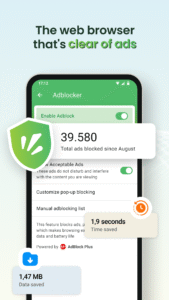
★ POWERFUL ADBLOCK
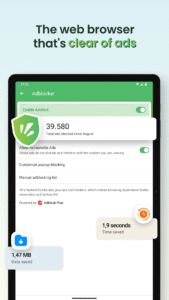
- Integrating Adlock Plus technology: Allow you to browse the web without malicious and annoying ads.
- More enhanced with Co Co optimization: Effectively block ads that interrupt the video you are watching, pop-up ads and auto redirect ads.
★ UNLIMITED ENTERTAINMENT
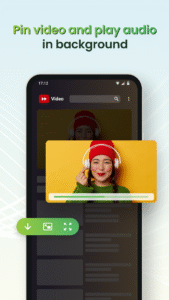
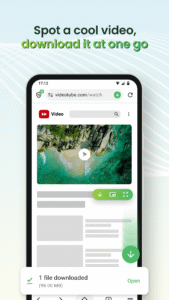
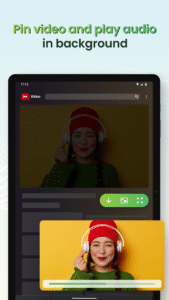
- Pin Video: Continue watching video in Picture-in-Picture mode (PiP) when switching to another app
- Play Audio in Background: Listen to music when the screen is off, while you're surfing social media, chatting or playing game on another app.
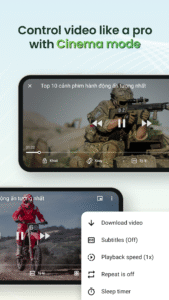
- Cinema Mode: Watch video in fullscreen mode and personalize your experience with advanced settings such as adjusting volume, brightness and seeking in video using touch gestures; disabling touch gestures; selecting play speed, screen ratio, subtitles and setting sleep timer.
★ MULTIPLE BROWSER UTILITIES
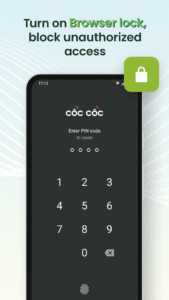
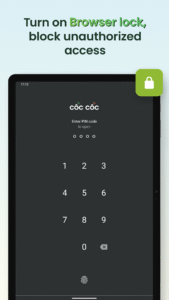
- Browser Lock: Secure the Co Co app with a PIN code, Touch ID, or Face ID. Protect your browsing activity and personal data. Now supporting Incognito Lock for extra privacy during private sessions.
- Dark Mode: Change browser appearance from light to dark theme, helping to save battery and reduce eye strain.
- Synchronization: Get the same bookmarks, passwords, and browsing history across all your devices.
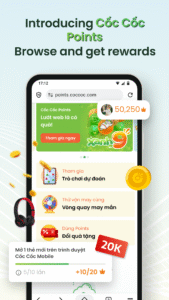
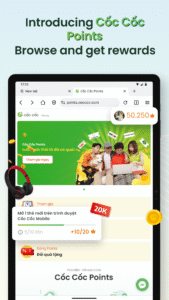
- Earn Points - Exchange Gifts: Earn Co Co Points for your daily browsing activities. Redeem points to exchange gifts or join interesting games with valuable rewards.
★ EASY TO SEARCH
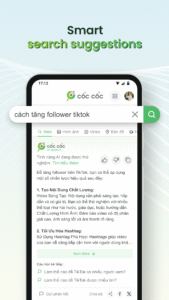
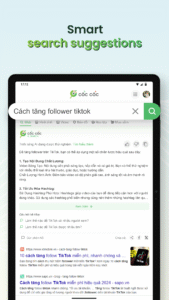
- Search: More than 20 vertical search about news, entertainment and education; Voice search and QR code scanner.
- AI Search Summarizer Assistant: Automatically summarize information from multiple sources for you on how-to queries. Save time with more concise and relevant answers right at the top of the search result page.
Choose Entertainment, Choose Co Co!
Download Co Co Mobile Browser today and enjoy!
Follow us:
- Website:
www.coccoc.com/
- YouTube:
www.youtube.com/@CocCocCom
- Facebook:
facebook.com/CocCocTrinhDuyet/
- Blog:
blog.coccoc.com/
- Community:
facebook.com/groups/CocCocGroup/"
Set Co Co as your default web browser on your Android device. Follow the instructions on Co Co app, or go to Settings > Apps > Co Co > Set as your default browser.
★ POWERFUL ADBLOCK
- Integrating Adlock Plus technology: Allow you to browse the web without malicious and annoying ads.
- More enhanced with Co Co optimization: Effectively block ads that interrupt the video you are watching, pop-up ads and auto redirect ads.
★ UNLIMITED ENTERTAINMENT
- Pin Video: Continue watching video in Picture-in-Picture mode (PiP) when switching to another app
- Play Audio in Background: Listen to music when the screen is off, while you're surfing social media, chatting or playing game on another app.
- Cinema Mode: Watch video in fullscreen mode and personalize your experience with advanced settings such as adjusting volume, brightness and seeking in video using touch gestures; disabling touch gestures; selecting play speed, screen ratio, subtitles and setting sleep timer.
★ MULTIPLE BROWSER UTILITIES
- Browser Lock: Secure the Co Co app with a PIN code, Touch ID, or Face ID. Protect your browsing activity and personal data. Now supporting Incognito Lock for extra privacy during private sessions.
- Dark Mode: Change browser appearance from light to dark theme, helping to save battery and reduce eye strain.
- Synchronization: Get the same bookmarks, passwords, and browsing history across all your devices.
- Earn Points - Exchange Gifts: Earn Co Co Points for your daily browsing activities. Redeem points to exchange gifts or join interesting games with valuable rewards.
★ EASY TO SEARCH
- Search: More than 20 vertical search about news, entertainment and education; Voice search and QR code scanner.
- AI Search Summarizer Assistant: Automatically summarize information from multiple sources for you on how-to queries. Save time with more concise and relevant answers right at the top of the search result page.
Choose Entertainment, Choose Co Co!
Download Co Co Mobile Browser today and enjoy!
Follow us:
- Website:
www.coccoc.com/
- YouTube:
www.youtube.com/@CocCocCom
- Facebook:
facebook.com/CocCocTrinhDuyet/
- Blog:
blog.coccoc.com/
- Community:
facebook.com/groups/CocCocGroup/"
Download Cốc Cốc: Browser & Adblock APK
Fast, free and safe download.
APK Permissions 40
- android.permission.ACCESS_COARSE_LOCATION
- android.permission.ACCESS_FINE_LOCATION
- android.permission.ACCESS_NETWORK_STATE
- android.permission.ACCESS_WIFI_STATE
- android.permission.CAMERA
- android.permission.CREDENTIAL_MANAGER_QUERY_CANDIDATE_CREDENTIALS
- android.permission.CREDENTIAL_MANAGER_SET_ALLOWED_PROVIDERS
- android.permission.CREDENTIAL_MANAGER_SET_ORIGIN
- android.permission.DOWNLOAD_WITHOUT_NOTIFICATION
- android.permission.FOREGROUND_SERVICE
- android.permission.FOREGROUND_SERVICE_DATA_SYNC
- android.permission.FOREGROUND_SERVICE_MEDIA_PLAYBACK
- android.permission.GET_ACCOUNTS
- android.permission.INTERNET
- android.permission.MANAGE_ACCOUNTS
- android.permission.MODIFY_AUDIO_SETTINGS
- android.permission.NFC
- android.permission.POST_NOTIFICATIONS
- android.permission.QUERY_ALL_PACKAGES
- android.permission.READ_EXTERNAL_STORAGE
- android.permission.RECEIVE_BOOT_COMPLETED
- android.permission.RECORD_AUDIO
- android.permission.RUN_USER_INITIATED_JOBS
- android.permission.SYSTEM_ALERT_WINDOW
- android.permission.USE_BIOMETRIC
- android.permission.USE_CREDENTIALS
- android.permission.USE_FINGERPRINT
- android.permission.VIBRATE
- android.permission.WAKE_LOCK
- android.permission.WRITE_EXTERNAL_STORAGE
- com.android.launcher.permission.INSTALL_SHORTCUT
- com.chrome.permission.DEVICE_EXTRAS
- com.coccoc.trinhduyet.permission.C2D_MESSAGE
- com.coccoc.trinhduyet.permission.READ_WRITE_BOOKMARK_FOLDERS
- com.coccoc.trinhduyet.TOS_ACKED
- com.google.android.apps.now.CURRENT_ACCOUNT_ACCESS
- com.google.android.c2dm.permission.RECEIVE
- com.google.android.finsky.permission.BIND_GET_INSTALL_REFERRER_SERVICE
- com.google.android.gms.permission.AD_ID
- com.samsung.android.providers.context.permission.WRITE_USE_APP_FEATURE_SURVEY
APK Verified
The cryptographic signature guarantees that the file is safe to install and was not tampered with in any way.
Similar in Communication


More by Cốc Cốc

Frequently Asked Questions about Cốc Cốc: Browser & Adblock APK
This variant is built for 64-bit ARM (most Android phones made since 2017). If your device's CPU matches, this is the smallest, fastest version to install.
Yes — the APK's signature has been cryptographically verified against the publisher's signing key. The SHA-256 hash is shown in the File Information panel so you can independently confirm the file matches the original release.
Android 29 (API level 35) or newer. Older devices will refuse the install.
Install a free app like 'CPU-Z' or 'Droid Hardware Info' from the Play Store and look at the ABI / Instruction Set row. Most phones made after 2017 are arm64-v8a; if in doubt, download the universal variant.
All variants are functionally identical — same features, same version. They differ only in which CPU architectures the native code is compiled for, and (sometimes) which screen densities the included graphics target. Pick the one that matches your device for the smallest install size, or pick 'Universal' if you're unsure.