
Download Hola-Private&Fast web Browser v2.23.2.1 (Android APK v2.25.4.2 arm64-v8a, armeabi-v7a · Android 24+
Download APK
Verified Safe
This is the arm64-v8a, armeabi-v7a build of Hola-Private&Fast web Browser v2.23.2.1 (Android v2.25.4.2. Pick this build if your device's primary ABI matches.
File size: 56.6 MB • Min Android: 24 • Target Android: 34 • Version code: 2250402 • Framework: Native (Java/Kotlin) • Permissions: 71
Screenshots
File Information
| Package Name | com.talpa.hibrowser |
|---|---|
| Version Name | v2.25.4.2 |
| Version Code | 2250402 |
| Architecture | arm64-v8a, armeabi-v7a |
| Min Android Version | Android 24 (API 34) |
| Main Activity | com.talpa.hibrowser.framework.ui.HiStartActivity |
| Framework | Native (Java/Kotlin) |
| File Size | 56.63 MB |
| Signature (SHA1) | 94CD22D504059190FEF64898F16B988D2851B6CB |
| File Hash (SHA256) | 93a82232f4aa877b1199fd83505b9b5fa6ca7c65cc830bd8ba042e409dc16497 |
App Description
Hola Browser is your private browser and mobile desktop browser with custom news recommendation, free video downloader, ad blocker, and quick scan web pages that help you save mobile data, also protect your private information.
😀Why choose Hola Browser?
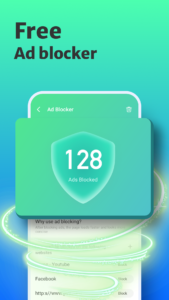
√The free ad blocker can block annoying ads when you search in Hola browser and help you implement safe and free Adblock.
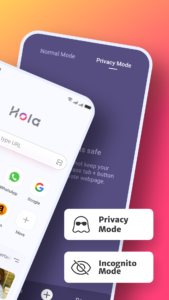
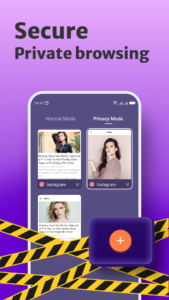
√Incognito browsing mode that you can conduct the private search as a private browser and keep your privacy protected all the time.
√Dark web mode gives you a better experience in a low-light environment. √Video downloader to play and download wonderful and favorite videos with AdBlock as you like.
√Private incognito browser mode to freely browse and search for information.
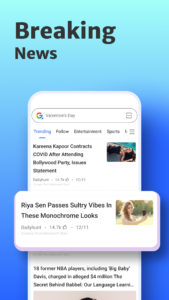
√Breaking news recommendations keep you up to date on local news.
-------All Functions-------
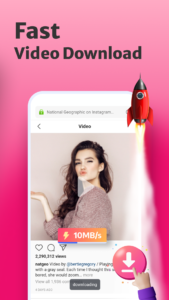
⭐Smart Video Downloader
Fast and Easy
With Hola browser which is a multifunction private browser that has fast and free video sniffer, you can download easily and quickly all videos and movies from mainstream websites and any social media application, like
Instagram, WhatsApp, Telegram, Snapchat, and Facebook to your devices.
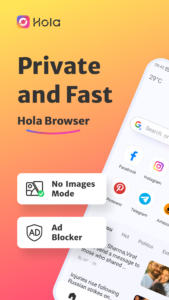
⭐AD Blocker
Safe and Private
A plug-ins-free adblocker blocks ads that prevent your privacy from being invaded and Adblock stop ads impact your user experience on hola browser, also incognito keeps you from being tracked on the web browser.
⭐Fast web page search
Convenient and Quick
By enabling quick web search for notification panel in settings, you can incognito and private search directly and safely in the notification panel.
⭐No Images mode
Fast and Economical
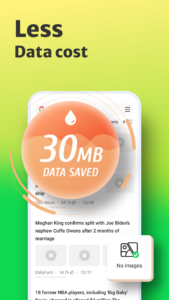
Web browser with No Images mode will help you save your mobile data and money in the hola browser, also implement the private browser experience.
⭐Incognito Mode
Safe and Privacy
The private hola browser has Incognito mode that allows you to browse and search the web pages privacy and incognito without leaving any search or browsing history.
⭐Bookmark management
Customized and Fast
Bookmark web pages at any time and visit your favorite web with one tap.
⭐Night mode
Protect your eyes
Turn on the Night mode for a great visual search experience when you browse web pages in low-light environments.
-------Q&A-------
1.How to turn on incognito mode on hola browser?
Open the Me tab in hola browser, “Incognito” will appear on the screen page, click the button on the right to open incognito mode. Incognito mode can protect your privacy.
2.How to use the video downloader?
Search the video or movie you want to download, there will be a download button below the video, click the download button to launch the video downloader then you can watch it in the hola browser.
3.Why use adblocker?
Hola browser is a safe and private browser with a free ad blocker, search with adblocker allows the web pages to load faster and reduce annoying ads on the web, also can save your data and money.
4.What kind of video can be downloaded in hola browser?
Hola Browser’s video sniffer can automatically identify the media resources in the URL. You can download videos on social media channels like Instagram, Facebook, WhatsApp, and so on, also use video downloader to download the favorite movies and interesting videos you searched on the web.
😀Why choose Hola Browser?
√The free ad blocker can block annoying ads when you search in Hola browser and help you implement safe and free Adblock.
√Incognito browsing mode that you can conduct the private search as a private browser and keep your privacy protected all the time.
√Dark web mode gives you a better experience in a low-light environment. √Video downloader to play and download wonderful and favorite videos with AdBlock as you like.
√Private incognito browser mode to freely browse and search for information.
√Breaking news recommendations keep you up to date on local news.
-------All Functions-------
⭐Smart Video Downloader
Fast and Easy
With Hola browser which is a multifunction private browser that has fast and free video sniffer, you can download easily and quickly all videos and movies from mainstream websites and any social media application, like
Instagram, WhatsApp, Telegram, Snapchat, and Facebook to your devices.
⭐AD Blocker
Safe and Private
A plug-ins-free adblocker blocks ads that prevent your privacy from being invaded and Adblock stop ads impact your user experience on hola browser, also incognito keeps you from being tracked on the web browser.
⭐Fast web page search
Convenient and Quick
By enabling quick web search for notification panel in settings, you can incognito and private search directly and safely in the notification panel.
⭐No Images mode
Fast and Economical
Web browser with No Images mode will help you save your mobile data and money in the hola browser, also implement the private browser experience.
⭐Incognito Mode
Safe and Privacy
The private hola browser has Incognito mode that allows you to browse and search the web pages privacy and incognito without leaving any search or browsing history.
⭐Bookmark management
Customized and Fast
Bookmark web pages at any time and visit your favorite web with one tap.
⭐Night mode
Protect your eyes
Turn on the Night mode for a great visual search experience when you browse web pages in low-light environments.
-------Q&A-------
1.How to turn on incognito mode on hola browser?
Open the Me tab in hola browser, “Incognito” will appear on the screen page, click the button on the right to open incognito mode. Incognito mode can protect your privacy.
2.How to use the video downloader?
Search the video or movie you want to download, there will be a download button below the video, click the download button to launch the video downloader then you can watch it in the hola browser.
3.Why use adblocker?
Hola browser is a safe and private browser with a free ad blocker, search with adblocker allows the web pages to load faster and reduce annoying ads on the web, also can save your data and money.
4.What kind of video can be downloaded in hola browser?
Hola Browser’s video sniffer can automatically identify the media resources in the URL. You can download videos on social media channels like Instagram, Facebook, WhatsApp, and so on, also use video downloader to download the favorite movies and interesting videos you searched on the web.
Download Hola-Private&Fast web Browser v2.23.2.1 (Android APK
Fast, free and safe download.
APK Permissions 71
- android.hardware.sensor.accelerometer
- android.permission.ACCESS_ADSERVICES_AD_ID
- android.permission.ACCESS_ADSERVICES_ATTRIBUTION
- android.permission.ACCESS_ADSERVICES_TOPICS
- android.permission.ACCESS_COARSE_LOCATION
- android.permission.ACCESS_FINE_LOCATION
- android.permission.ACCESS_NETWORK_STATE
- android.permission.ACCESS_WIFI_STATE
- android.permission.AUTHENTICATE_ACCOUNTS
- android.permission.BLUETOOTH
- android.permission.CAMERA
- android.permission.CHANGE_NETWORK_STATE
- android.permission.CHANGE_WIFI_STATE
- android.permission.DISABLE_KEYGUARD
- android.permission.DOWNLOAD_WITHOUT_NOTIFICATION
- android.permission.EXPAND_STATUS_BAR
- android.permission.FOREGROUND_SERVICE
- android.permission.FOREGROUND_SERVICE_DATA_SYNC
- android.permission.FOREGROUND_SERVICE_MEDIA_PLAYBACK
- android.permission.GET_ACCOUNTS
- android.permission.INTERNET
- android.permission.MANAGE_EXTERNAL_STORAGE
- android.permission.MODIFY_AUDIO_SETTINGS
- android.permission.NFC
- android.permission.PEERS_MAC_ADDRESS
- android.permission.PERFORM_DEXOPT
- android.permission.POST_NOTIFICATIONS
- android.permission.QUERY_ALL_PACKAGES
- android.permission.READ_EXTERNAL_STORAGE
- android.permission.READ_MEDIA_IMAGES
- android.permission.READ_MEDIA_VIDEO
- android.permission.READ_MEDIA_VISUAL_USER_SELECTED
- android.permission.READ_SETTINGS
- android.permission.READ_SYNC_SETTINGS
- android.permission.REAL_GET_TASKS
- android.permission.RECEIVE_BOOT_COMPLETED
- android.permission.RECEIVE_USER_PRESENT
- android.permission.RECORD_AUDIO
- android.permission.REORDER_TASKS
- android.permission.REQUEST_INSTALL_PACKAGES
- android.permission.ROOT_RECOVERY_STATE
- android.permission.SET_WALLPAPER
- android.permission.START_ANY_ACTIVITY
- android.permission.STOP_APP_SWITCHES
- android.permission.VIBRATE
- android.permission.WAKE_LOCK
- android.permission.WRITE_EXTERNAL_STORAGE
- android.permission.WRITE_MEDIA_STORAGE
- android.permission.WRITE_SETTINGS
- android.permission.WRITE_SYNC_SETTINGS
- android.webkit.PermissionRequest
- com.android.browser.permission.READ_HISTORY_BOOKMARKS
- com.android.browser.permission.WRITE_HISTORY_BOOKMARKS
- com.android.launcher.permission.INSTALL_SHORTCUT
- com.android.launcher.permission.READ_SETTINGS
- com.android.launcher.permission.UNINSTALL_SHORTCUT
- com.android.launcher.permission.WRITE_SETTINGS
- com.google.android.c2dm.permission.RECEIVE
- com.google.android.finsky.permission.BIND_GET_INSTALL_REFERRER_SERVICE
- com.google.android.gms.permission.AD_ID
- com.google.android.providers.gsf.permission.READ_GSERVICES
- com.talpa.hibrowser.DYNAMIC_RECEIVER_NOT_EXPORTED_PERMISSION
- com.transsion.dataservice.permission.READ
- com.transsion.dataservice.permission.WRITE
- com.transsion.gamemode.permission.WRITE_APP_LIST
- com.transsion.permission.ACCESS_ALL_DOWNLOADS
- com.transsion.permission.ACCESS_DOWNLOAD_MANAGER
- com.transsion.permission.ACCESS_DOWNLOAD_MANAGER_ADVANCED
- com.transsion.permission.SEND_DOWNLOAD_COMPLETED_INTENTS
- com.transsion.tpush.permission.READ_PROVIDER
- com.transsion.tpush.permission.WRITE_PROVIDER
APK Verified
The cryptographic signature guarantees that the file is safe to install and was not tampered with in any way.
Similar in Communication


Frequently Asked Questions about Hola-Private&Fast web Browser v2.23.2.1 (Android APK
This variant is built for devices that report `arm64-v8a, armeabi-v7a` as their primary ABI. If your device's CPU matches, this is the smallest, fastest version to install.
Yes — the APK's signature has been cryptographically verified against the publisher's signing key. The SHA-256 hash is shown in the File Information panel so you can independently confirm the file matches the original release.
Android 24 (API level 34) or newer. Older devices will refuse the install.
Install a free app like 'CPU-Z' or 'Droid Hardware Info' from the Play Store and look at the ABI / Instruction Set row. Most phones made after 2017 are arm64-v8a; if in doubt, download the universal variant.
All variants are functionally identical — same features, same version. They differ only in which CPU architectures the native code is compiled for, and (sometimes) which screen densities the included graphics target. Pick the one that matches your device for the smallest install size, or pick 'Universal' if you're unsure.