
This is the universal build of Copper CRM 5.53.1. It contains native libraries for every CPU architecture (arm64-v8a, armeabi-v7a, x86, x86_64), so it installs on any Android device. The trade-off is size — it's larger than per-architecture variants. Pick this one if you're unsure which CPU your phone has, or if you plan to share the APK with multiple devices.
File size: 49.2 MB • Min Android: 26 • Target Android: 35 • Version code: 553013 • Framework: Native (Java/Kotlin) • Permissions: 29
Screenshots
File Information
| Package Name | com.prosperworks.android |
|---|---|
| Version Name | 5.53.1 |
| Version Code | 553013 |
| Architecture | Universal |
| Min Android Version | Android 26 (API 35) |
| Main Activity | com.prosperworks.android.ui.screens.splash.SplashActivity |
| Framework | Native (Java/Kotlin) |
| File Size | 49.20 MB |
| Signature (SHA1) | 0E6FC14EF3DD64A275F2D658AC07ED2FAB284991 |
| File Hash (SHA256) | e618d22bbfc46730081aa3848f4fc141ffdb2719acf9044d735ca2beed79f516 |
What's New
Crash fixes
App Description
Copper CRM helps you connect with leads, win deals, deliver projects and create repeat clients. It’s the CRM made for Google Workspace, so it pulls in contact information and email conversations, and layers on productivity tools. Copper helps you manage your entire sales process and projects using visual pipelines right from your phone, so you can bring Copper anywhere your business takes you.
➤ You can try Copper CRM for free with our 14-day trial—no credit card required.
➤ Copper for Android is designed as a companion to the Copper web app.
**Highlights:**
➤ CRM for Google—Syncs with Gmail, Contacts, Calendar, Docs, Sheets, Slides and Google Drive.
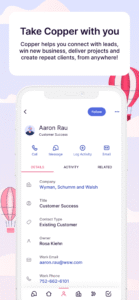
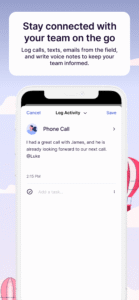
➤ Access all customer data, log calls and text messages, and add meeting notes so every interaction is tracked.
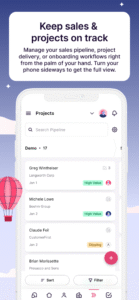
➤ Manage opportunities and projects in a visual pipeline. Easily sort, filter and track updates to keep deals and projects moving forward.
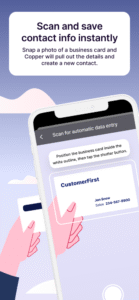
➤ Scan business cards at meetings and events to easily add new contacts
➤ Save time by speaking into your phone to log activities and notes – no typing needed.
**Features & Benefits:**
**Native G Suite Integration**
Copper CRM is seamlessly integrated with Google Workspace, so you can access your CRM where you already work—your Gmail, Google Calendar, and
Google Drive.
**Automated Workflows**
Capture website form fills and reply instantly to set up your first meeting. Automatically send follow up emails when you move an opportunity or project to the next stage in your process.
**Insights across the entire customer journey**
With advanced reporting, dashboards, project management and customizable pipelines, you will have real-time analytics to help you deliver client projects and exceed expectations.
**Get up and running in days, not months**
Connect your team’s Gmail accounts first. Copper then pulls in contact information and email conversations.
**Connect the tools you’re already using**
Copper’s powerful integrations seamlessly connect with your favorite tools to bring in even more customer information.
➤ You can try Copper CRM for free with our 14-day trial—no credit card required.
➤ Copper for Android is designed as a companion to the Copper web app.
**Highlights:**
➤ CRM for Google—Syncs with Gmail, Contacts, Calendar, Docs, Sheets, Slides and Google Drive.
➤ Access all customer data, log calls and text messages, and add meeting notes so every interaction is tracked.
➤ Manage opportunities and projects in a visual pipeline. Easily sort, filter and track updates to keep deals and projects moving forward.
➤ Scan business cards at meetings and events to easily add new contacts
➤ Save time by speaking into your phone to log activities and notes – no typing needed.
**Features & Benefits:**
**Native G Suite Integration**
Copper CRM is seamlessly integrated with Google Workspace, so you can access your CRM where you already work—your Gmail, Google Calendar, and
Google Drive.
**Automated Workflows**
Capture website form fills and reply instantly to set up your first meeting. Automatically send follow up emails when you move an opportunity or project to the next stage in your process.
**Insights across the entire customer journey**
With advanced reporting, dashboards, project management and customizable pipelines, you will have real-time analytics to help you deliver client projects and exceed expectations.
**Get up and running in days, not months**
Connect your team’s Gmail accounts first. Copper then pulls in contact information and email conversations.
**Connect the tools you’re already using**
Copper’s powerful integrations seamlessly connect with your favorite tools to bring in even more customer information.
Download Copper CRM APK
Fast, free and safe download.
APK Permissions 29
- android.permission.ACCESS_COARSE_LOCATION
- android.permission.ACCESS_FINE_LOCATION
- android.permission.ACCESS_NETWORK_STATE
- android.permission.ACCESS_WIFI_STATE
- android.permission.AUTHENTICATE_ACCOUNTS
- android.permission.CALL_PHONE
- android.permission.CAMERA
- android.permission.FOREGROUND_SERVICE
- android.permission.GET_ACCOUNTS
- android.permission.INTERNET
- android.permission.MANAGE_ACCOUNTS
- android.permission.POST_NOTIFICATIONS
- android.permission.READ_CALL_LOG
- android.permission.READ_CONTACTS
- android.permission.READ_EXTERNAL_STORAGE
- android.permission.READ_SMS
- android.permission.READ_SYNC_SETTINGS
- android.permission.READ_USER_DICTIONARY
- android.permission.RECEIVE_BOOT_COMPLETED
- android.permission.RECORD_AUDIO
- android.permission.USE_CREDENTIALS
- android.permission.VIBRATE
- android.permission.WAKE_LOCK
- android.permission.WRITE_CONTACTS
- android.permission.WRITE_EXTERNAL_STORAGE
- android.permission.WRITE_SYNC_SETTINGS
- com.google.android.c2dm.permission.RECEIVE
- com.google.android.finsky.permission.BIND_GET_INSTALL_REFERRER_SERVICE
- com.prosperworks.android.DYNAMIC_RECEIVER_NOT_EXPORTED_PERMISSION
APK Verified
The cryptographic signature guarantees that the file is safe to install and was not tampered with in any way.


Frequently Asked Questions about Copper CRM APK
This is the universal variant — a single APK that contains native libraries for every CPU architecture. It installs on any Android device but is larger than per-architecture variants.
Yes — the APK's signature has been cryptographically verified against the publisher's signing key. The SHA-256 hash is shown in the File Information panel so you can independently confirm the file matches the original release.
Android 26 (API level 35) or newer. Older devices will refuse the install.
Install a free app like 'CPU-Z' or 'Droid Hardware Info' from the Play Store and look at the ABI / Instruction Set row. Most phones made after 2017 are arm64-v8a; if in doubt, download the universal variant.
All variants are functionally identical — same features, same version. They differ only in which CPU architectures the native code is compiled for, and (sometimes) which screen densities the included graphics target. Pick the one that matches your device for the smallest install size, or pick 'Universal' if you're unsure.