
Download SD Maid 2/SE - System Cleaner (github version) APK 1.5.0-beta0 Universal · Android 26+
Download APK
Verified Safe
This is the universal build of SD Maid 2/SE - System Cleaner (github version) 1.5.0-beta0. It contains native libraries for every CPU architecture (arm64-v8a, armeabi-v7a, x86, x86_64), so it installs on any Android device. The trade-off is size — it's larger than per-architecture variants. Pick this one if you're unsure which CPU your phone has, or if you plan to share the APK with multiple devices.
File size: 5.7 MB • Min Android: 26 • Target Android: 35 • Version code: 10500000 • Framework: Native (Java/Kotlin) • Permissions: 20
Screenshots
File Information
| Package Name | eu.darken.sdmse |
|---|---|
| Version Name | 1.5.0-beta0 |
| Version Code | 10500000 |
| Architecture | Universal |
| Min Android Version | Android 26 (API 35) |
| Main Activity | eu.darken.sdmse.main.ui.MainActivity |
| Framework | Native (Java/Kotlin) |
| File Size | 5.68 MB |
| Signature (SHA1) | 5657BE4CD178BBCAE6280BC78E9B2C64B808AB5D |
| File Hash (SHA256) | 7faa7ae51e433785444305df4a7ae2f4731bb5ee315c775087529de882f2d4ba |
What's New
Hey 👋
SD Maid 2/SE is actively developed—I'm adding new stuff all the time!
Got ideas? Let me know 😊
🐛 Bug fixes, 🚀 performance boosts, maybe even ✨ new features.
Changelog:
sdmse.darken.eu/changelog
FYI: It’s just me here, sometimes replies might take a bit. Sorry for that!
SD Maid 2/SE is actively developed—I'm adding new stuff all the time!
Got ideas? Let me know 😊
🐛 Bug fixes, 🚀 performance boosts, maybe even ✨ new features.
Changelog:
sdmse.darken.eu/changelog
FYI: It’s just me here, sometimes replies might take a bit. Sorry for that!
App Description
SD Maid 2/SE
is your Android’s trusted assistant, to keep it clean and tidy.
Nobody is perfect and neither is Android.
* Apps you have already removed leave something behind.
* Logs, crash reports and other files you don't want are constantly being created.
* Your storage is collecting files and folders you don't recognize.
* Duplicate photos in your gallery.
Let’s not go on here… Let SD Maid 2/SE help you!
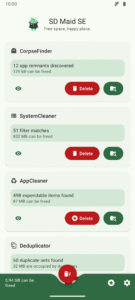
SD Maid 2/SE is an app and file manager that specializes in knowing which apps have created specific files on your device. SD Maid 2/SE searches your device and compares files with installed apps to offer options for safely freeing up storage space.
✨ Clean up after uninstalling apps
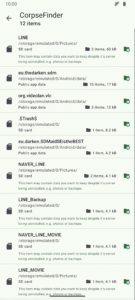
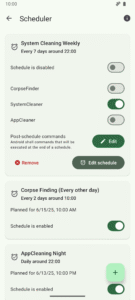
If apps create files outside their designated folders then files can remain even after uninstalling the apps. The "CorpseFinder" tool finds app remnants, tells you to which app they belonged and helps you delete them.
🔍 Search your device the smart way
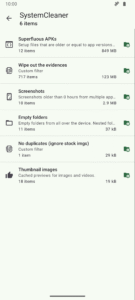
Filter for empty folders, temporary files, already installed apps and more. You can even create your own search criteria. The "SystemCleaner" tool allows you to automatically search your device and delete files based on various criteria.
🧹 Delete expendable files and hidden caches
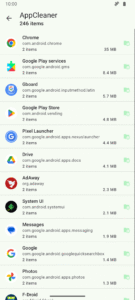
Thumbnails, trash bins, offline caches and more: If apps don't clean up after themselves, then this app will. The "AppCleaner" tool finds apps with expendable files.
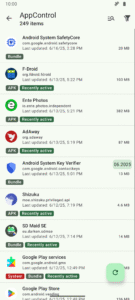
📦 Manage all of your apps
Get a comprehensive list of all apps installed on your device. Enabled, disabled, user or system app: no app can hide from you. The "AppControl" tool is an app manager that allows you to search, sort and control your apps.
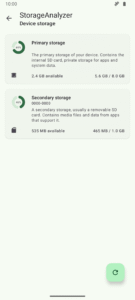
📊 What is using all your space
Storage management can be complex with apps, media, system, and other files across phone storage, SD cards, and USB devices. "StorageAnalyzer" is a file manager that displays how space is used on your device, simplifying your storage management.
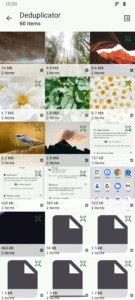
📷 Find duplicate data
Duplicate downloads, photos sent through social media or just similar pictures of the same scene: Over time copies can accumulate. The "Deduplicator" tool finds files that are exactly the same or similar and helps you delete extra copies.
This app is ad-free. Some features require a paid upgrade.
SD Maid 2/SE is the successor to SD Maid 1/Legacy.
Optimized for newer Android versions and focused on cleaning up.
This app has optional features that utilize the AccessibilityService API to automate tedious actions.
Using the AccessibilityService API, this app can click buttons for you to perform operations on multiple apps, e.g. deleting caches.
This app does not use the AccessibilityService API to collect information.
SD Maid 2/SE is a File Manager & Cleaner App.
is your Android’s trusted assistant, to keep it clean and tidy.
Nobody is perfect and neither is Android.
* Apps you have already removed leave something behind.
* Logs, crash reports and other files you don't want are constantly being created.
* Your storage is collecting files and folders you don't recognize.
* Duplicate photos in your gallery.
Let’s not go on here… Let SD Maid 2/SE help you!
SD Maid 2/SE is an app and file manager that specializes in knowing which apps have created specific files on your device. SD Maid 2/SE searches your device and compares files with installed apps to offer options for safely freeing up storage space.
✨ Clean up after uninstalling apps
If apps create files outside their designated folders then files can remain even after uninstalling the apps. The "CorpseFinder" tool finds app remnants, tells you to which app they belonged and helps you delete them.
🔍 Search your device the smart way
Filter for empty folders, temporary files, already installed apps and more. You can even create your own search criteria. The "SystemCleaner" tool allows you to automatically search your device and delete files based on various criteria.
🧹 Delete expendable files and hidden caches
Thumbnails, trash bins, offline caches and more: If apps don't clean up after themselves, then this app will. The "AppCleaner" tool finds apps with expendable files.
📦 Manage all of your apps
Get a comprehensive list of all apps installed on your device. Enabled, disabled, user or system app: no app can hide from you. The "AppControl" tool is an app manager that allows you to search, sort and control your apps.
📊 What is using all your space
Storage management can be complex with apps, media, system, and other files across phone storage, SD cards, and USB devices. "StorageAnalyzer" is a file manager that displays how space is used on your device, simplifying your storage management.
📷 Find duplicate data
Duplicate downloads, photos sent through social media or just similar pictures of the same scene: Over time copies can accumulate. The "Deduplicator" tool finds files that are exactly the same or similar and helps you delete extra copies.
This app is ad-free. Some features require a paid upgrade.
SD Maid 2/SE is the successor to SD Maid 1/Legacy.
Optimized for newer Android versions and focused on cleaning up.
This app has optional features that utilize the AccessibilityService API to automate tedious actions.
Using the AccessibilityService API, this app can click buttons for you to perform operations on multiple apps, e.g. deleting caches.
This app does not use the AccessibilityService API to collect information.
SD Maid 2/SE is a File Manager & Cleaner App.
Download SD Maid 2/SE - System Cleaner (github version) APK
Fast, free and safe download.
APK Permissions 20
- android.permission.ACCESS_NETWORK_STATE
- android.permission.BROADCAST_CLOSE_SYSTEM_DIALOGS
- android.permission.CLEAR_APP_CACHE
- android.permission.FOREGROUND_SERVICE
- android.permission.FOREGROUND_SERVICE_DATA_SYNC
- android.permission.FOREGROUND_SERVICE_SPECIAL_USE
- android.permission.INTERNET
- android.permission.MANAGE_EXTERNAL_STORAGE
- android.permission.PACKAGE_USAGE_STATS
- android.permission.POST_NOTIFICATIONS
- android.permission.QUERY_ALL_PACKAGES
- android.permission.READ_EXTERNAL_STORAGE
- android.permission.RECEIVE_BOOT_COMPLETED
- android.permission.REQUEST_DELETE_PACKAGES
- android.permission.WAKE_LOCK
- android.permission.WRITE_EXTERNAL_STORAGE
- android.permission.WRITE_SECURE_SETTINGS
- com.android.vending.BILLING
- eu.darken.sdmse.DYNAMIC_RECEIVER_NOT_EXPORTED_PERMISSION
- moe.shizuku.manager.permission.API_V23
APK Verified
The cryptographic signature guarantees that the file is safe to install and was not tampered with in any way.
Similar in Tools


More by darken

Frequently Asked Questions about SD Maid 2/SE - System Cleaner (github version) APK
This is the universal variant — a single APK that contains native libraries for every CPU architecture. It installs on any Android device but is larger than per-architecture variants.
Yes — the APK's signature has been cryptographically verified against the publisher's signing key. The SHA-256 hash is shown in the File Information panel so you can independently confirm the file matches the original release.
Android 26 (API level 35) or newer. Older devices will refuse the install.
Install a free app like 'CPU-Z' or 'Droid Hardware Info' from the Play Store and look at the ABI / Instruction Set row. Most phones made after 2017 are arm64-v8a; if in doubt, download the universal variant.
All variants are functionally identical — same features, same version. They differ only in which CPU architectures the native code is compiled for, and (sometimes) which screen densities the included graphics target. Pick the one that matches your device for the smallest install size, or pick 'Universal' if you're unsure.