
Download SD Maid 2/SE - System Cleaner (github version) APK 1.4.11-rc0 Universal · Android 26+
Download APK
Verified Safe
This is the universal build of SD Maid 2/SE - System Cleaner (github version) 1.4.11-rc0. It contains native libraries for every CPU architecture (arm64-v8a, armeabi-v7a, x86, x86_64), so it installs on any Android device. The trade-off is size — it's larger than per-architecture variants. Pick this one if you're unsure which CPU your phone has, or if you plan to share the APK with multiple devices.
File size: 7.7 MB • Min Android: 26 • Target Android: 35 • Version code: 10411000 • Framework: Native (Java/Kotlin) • Permissions: 19
Screenshots
File Information
| Package Name | eu.darken.sdmse |
|---|---|
| Version Name | 1.4.11-rc0 |
| Version Code | 10411000 |
| Architecture | Universal |
| Min Android Version | Android 26 (API 35) |
| Main Activity | eu.darken.sdmse.main.ui.MainActivity |
| Framework | Native (Java/Kotlin) |
| File Size | 7.70 MB |
| Signature (SHA1) | AC0DA18DAB55FDC5B2A099DE0EBF5C0694D0D854 |
| File Hash (SHA256) | 9c513ed97242ce654999f2bddec5c987868b119e5c30e0580accc31ddd38c602 |
What's New
What's Changed
🚀 Enhancements
AppCleaner: Add Mintegral SDK hidden cache detection by
@d4rken
in
#1758
AppCleaner: Add crashlytics v2 support to bugreporting filter by
@d4rken
in
#1759
AppCleaner: Improve StorageEntryFinder on Android 13+ by
@d4rken
in
#1774
Setup: Check
DocumentsUI
version to determine SAF grantability by
@d4rken
in
#1786
AppCleaner: Add OUKITEL ROM type and specs by
@d4rken
in
#1778
AppCleaner: ACS support for
DOOGEE
ROMs/devices by
@d4rken
in
#1782
Automation: Introduce AutomationTimeoutException and improve error reporting by
@d4rken
in
#1803
Automation: Add AutomationBadTokenException by
@d4rken
in
#1804
AppCleaner: Detect if
com.miui.securitycenter
is missing the
GET_USAGE_STATS
permission by
@d4rken
in
#1769
🐞 Bug fixes
AppCleaner: Fix minimum file age input in Russian by
@d4rken
in
#1765
General: Support manual size input in Arabic by
@d4rken
in
#1760
Setup: Ask for MANAGE_EXTERNAL_STORAGE on AndroidTVs running Android 13+. by
@d4rken
in
#1766
AppCleaner: Improve window label search, handling of different locales and ZWSP by
@d4rken
in
#1775
Dependency: Update WorkManager to 2.10.1 to fix possible background crash on updates by
@d4rken
in
#1776
Fix random crash when navigating screens by
@d4rken
in
#1790
AppCleaner: Fix finding of "Clear Cache" button on Android 16 Beta Q1 by
@d4rken
in
#1796
🤷 Other changes
AppCleaner: Add more logging to ClearCacheModule by
@d4rken
in
#1757
ROM Type refactoring by
@d4rken
in
#1767
Update dependency versions by
@d4rken
in
#1770
Logging: Improve ADB Shizuku tags by
@d4rken
in
#1773
AppControl: ROM Type refactoring (OneUI) by
@d4rken
in
#1772
Update KSP dependency to 2.1.21-2.0.1 by
@d4rken
in
#1779
Automation: Log window check failure by
@d4rken
in
#1780
ACS: Improve logging by
@d4rken
in
#1783
Refactor: Add AutomationService.Snapshot and debug logging by
@d4rken
in
#1784
Update translations by
@d4rken
in
#1805
Add Vietnamese translation for pkgrepo error strings by
@d4rken
in
#1806
Full Changelog
:
v1.4.10-rc0...v1.4.11-rc0
🚀 Enhancements
AppCleaner: Add Mintegral SDK hidden cache detection by
@d4rken
in
#1758
AppCleaner: Add crashlytics v2 support to bugreporting filter by
@d4rken
in
#1759
AppCleaner: Improve StorageEntryFinder on Android 13+ by
@d4rken
in
#1774
Setup: Check
DocumentsUI
version to determine SAF grantability by
@d4rken
in
#1786
AppCleaner: Add OUKITEL ROM type and specs by
@d4rken
in
#1778
AppCleaner: ACS support for
DOOGEE
ROMs/devices by
@d4rken
in
#1782
Automation: Introduce AutomationTimeoutException and improve error reporting by
@d4rken
in
#1803
Automation: Add AutomationBadTokenException by
@d4rken
in
#1804
AppCleaner: Detect if
com.miui.securitycenter
is missing the
GET_USAGE_STATS
permission by
@d4rken
in
#1769
🐞 Bug fixes
AppCleaner: Fix minimum file age input in Russian by
@d4rken
in
#1765
General: Support manual size input in Arabic by
@d4rken
in
#1760
Setup: Ask for MANAGE_EXTERNAL_STORAGE on AndroidTVs running Android 13+. by
@d4rken
in
#1766
AppCleaner: Improve window label search, handling of different locales and ZWSP by
@d4rken
in
#1775
Dependency: Update WorkManager to 2.10.1 to fix possible background crash on updates by
@d4rken
in
#1776
Fix random crash when navigating screens by
@d4rken
in
#1790
AppCleaner: Fix finding of "Clear Cache" button on Android 16 Beta Q1 by
@d4rken
in
#1796
🤷 Other changes
AppCleaner: Add more logging to ClearCacheModule by
@d4rken
in
#1757
ROM Type refactoring by
@d4rken
in
#1767
Update dependency versions by
@d4rken
in
#1770
Logging: Improve ADB Shizuku tags by
@d4rken
in
#1773
AppControl: ROM Type refactoring (OneUI) by
@d4rken
in
#1772
Update KSP dependency to 2.1.21-2.0.1 by
@d4rken
in
#1779
Automation: Log window check failure by
@d4rken
in
#1780
ACS: Improve logging by
@d4rken
in
#1783
Refactor: Add AutomationService.Snapshot and debug logging by
@d4rken
in
#1784
Update translations by
@d4rken
in
#1805
Add Vietnamese translation for pkgrepo error strings by
@d4rken
in
#1806
Full Changelog
:
v1.4.10-rc0...v1.4.11-rc0
App Description
SD Maid 2/SE
SD Maid 2/SE is actively being worked on and not feature complete. Feature requests are welcome!
SD Maid SE
(AKA SD Maid 2) is a file management tool for Android that specialises in maintenance. Its core purpose is freeing up space and removing unwanted data.
Features include:
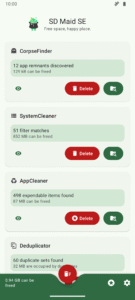
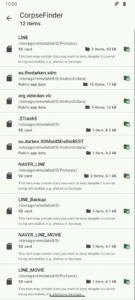
Removing data that belongs to apps that are no longer installed (CorpseFinder)
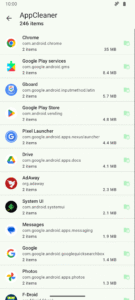
Deleting expendable files, e.g. caches (AppCleaner)
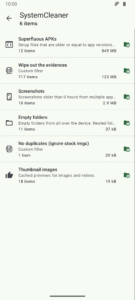
User configurable filters for random files (SystemCleaner)
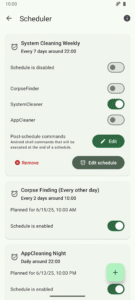
Scheduling actions (Scheduler)
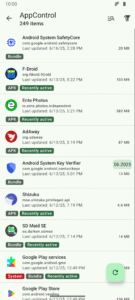
Controlling/disabling apps (AppControl)
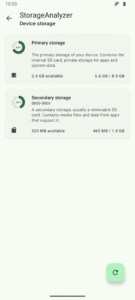
Storage overview (StorageAnalyzer)
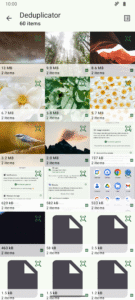
Find duplicate data (Deduplicator)
Root and Shizuku support
SD Maid SE
is the successor to
SD Maid
. A complete rewrite, optimized for newer Android versions, with a focus on
SD Maid's
most popular features. More details about SD Maid vs SD Maid SE can be found in the
FAQ
.
Download
Source
Status
Google Play (Release)
Google Play (Open Testing)
Github (Release)
Github (Pre-Release)
F-Droid (Main Repo)
F-Droid (IzzyOnDroid)
Support the project
SD Maid has no ads and doesn't sell your data.
Development is financed by individual user contributions, i.e. you buying the upgrade on Google Play or becoming a sponsor ❤️.
Upgrade to
SD Maid SE Pro
on
Google Play
Become a sponsor
on GitHub
Get help
Github Discussions
Discord
Frequently Asked Question
Screenshots
License
SD Maid SE's code is available under a GPL v3 license, this excludes:
SD Maid SE icons, logos, mascots, marketing materials and assets.
SD Maid SE animations and videos.
SD Maid SE documentation.
Google Play screenshots.
Google Play texts & descriptions.
Translations.
Thanks
Thanks to
crowdin.com
for supporting open-source projects
SD Maid 2/SE is actively being worked on and not feature complete. Feature requests are welcome!
SD Maid SE
(AKA SD Maid 2) is a file management tool for Android that specialises in maintenance. Its core purpose is freeing up space and removing unwanted data.
Features include:
Removing data that belongs to apps that are no longer installed (CorpseFinder)
Deleting expendable files, e.g. caches (AppCleaner)
User configurable filters for random files (SystemCleaner)
Scheduling actions (Scheduler)
Controlling/disabling apps (AppControl)
Storage overview (StorageAnalyzer)
Find duplicate data (Deduplicator)
Root and Shizuku support
SD Maid SE
is the successor to
SD Maid
. A complete rewrite, optimized for newer Android versions, with a focus on
SD Maid's
most popular features. More details about SD Maid vs SD Maid SE can be found in the
FAQ
.
Download
Source
Status
Google Play (Release)
Google Play (Open Testing)
Github (Release)
Github (Pre-Release)
F-Droid (Main Repo)
F-Droid (IzzyOnDroid)
Support the project
SD Maid has no ads and doesn't sell your data.
Development is financed by individual user contributions, i.e. you buying the upgrade on Google Play or becoming a sponsor ❤️.
Upgrade to
SD Maid SE Pro
on
Google Play
Become a sponsor
on GitHub
Get help
Github Discussions
Discord
Frequently Asked Question
Screenshots
License
SD Maid SE's code is available under a GPL v3 license, this excludes:
SD Maid SE icons, logos, mascots, marketing materials and assets.
SD Maid SE animations and videos.
SD Maid SE documentation.
Google Play screenshots.
Google Play texts & descriptions.
Translations.
Thanks
Thanks to
crowdin.com
for supporting open-source projects
Download SD Maid 2/SE - System Cleaner (github version) APK
Fast, free and safe download.
APK Permissions 19
- android.permission.ACCESS_NETWORK_STATE
- android.permission.BROADCAST_CLOSE_SYSTEM_DIALOGS
- android.permission.CLEAR_APP_CACHE
- android.permission.FOREGROUND_SERVICE
- android.permission.FOREGROUND_SERVICE_DATA_SYNC
- android.permission.FOREGROUND_SERVICE_SPECIAL_USE
- android.permission.INTERNET
- android.permission.MANAGE_EXTERNAL_STORAGE
- android.permission.PACKAGE_USAGE_STATS
- android.permission.POST_NOTIFICATIONS
- android.permission.QUERY_ALL_PACKAGES
- android.permission.READ_EXTERNAL_STORAGE
- android.permission.RECEIVE_BOOT_COMPLETED
- android.permission.REQUEST_DELETE_PACKAGES
- android.permission.WAKE_LOCK
- android.permission.WRITE_EXTERNAL_STORAGE
- android.permission.WRITE_SECURE_SETTINGS
- eu.darken.sdmse.DYNAMIC_RECEIVER_NOT_EXPORTED_PERMISSION
- moe.shizuku.manager.permission.API_V23
APK Verified
The cryptographic signature guarantees that the file is safe to install and was not tampered with in any way.
Similar in Tools


More by darken

Frequently Asked Questions about SD Maid 2/SE - System Cleaner (github version) APK
This is the universal variant — a single APK that contains native libraries for every CPU architecture. It installs on any Android device but is larger than per-architecture variants.
Yes — the APK's signature has been cryptographically verified against the publisher's signing key. The SHA-256 hash is shown in the File Information panel so you can independently confirm the file matches the original release.
Android 26 (API level 35) or newer. Older devices will refuse the install.
Install a free app like 'CPU-Z' or 'Droid Hardware Info' from the Play Store and look at the ABI / Instruction Set row. Most phones made after 2017 are arm64-v8a; if in doubt, download the universal variant.
All variants are functionally identical — same features, same version. They differ only in which CPU architectures the native code is compiled for, and (sometimes) which screen densities the included graphics target. Pick the one that matches your device for the smallest install size, or pick 'Universal' if you're unsure.