
Download SD Maid 2/SE - System Cleaner (github version) APK 1.4.16-beta0 Universal · Android 26+
Download APK
Verified Safe
This is the universal build of SD Maid 2/SE - System Cleaner (github version) 1.4.16-beta0. It contains native libraries for every CPU architecture (arm64-v8a, armeabi-v7a, x86, x86_64), so it installs on any Android device. The trade-off is size — it's larger than per-architecture variants. Pick this one if you're unsure which CPU your phone has, or if you plan to share the APK with multiple devices.
File size: 9.9 MB • Min Android: 26 • Target Android: 35 • Version code: 10416000 • Framework: Native (Java/Kotlin) • Permissions: 19
Screenshots
File Information
| Package Name | eu.darken.sdmse |
|---|---|
| Version Name | 1.4.16-beta0 |
| Version Code | 10416000 |
| Architecture | Universal |
| Min Android Version | Android 26 (API 35) |
| Main Activity | eu.darken.sdmse.main.ui.MainActivity |
| Framework | Native (Java/Kotlin) |
| File Size | 9.85 MB |
| Signature (SHA1) | AC0DA18DAB55FDC5B2A099DE0EBF5C0694D0D854 |
| File Hash (SHA256) | 778c1f23d4d08b078725cea37da46e47c1e009d4a71fb1c8aaa11538d98b17f5 |
What's New
What's Changed
🚀 Enhancements
Settings: Use Material Design for ListPreference dialogs by
@d4rken
in
#1883
AppCleaner: Support for detecting weird button setups in custom ROMs by
@d4rken
in
#1897
🐞 Bug fixes
Refactor: Improve PreferenceStoreMapper key lookup by
@d4rken
in
#1865
Prevent Google Play errors from crashing SD Maid by
@d4rken
in
#1875
Setup: Disable fastscroll in setup list by
@d4rken
in
#1882
🤷 Other changes
Extend MIUI gallery test by
@d4rken
in
#1874
Update Gradle and dependencies by
@d4rken
in
#1894
Update more dependencies by
@d4rken
in
#1895
Add Claude configuration and documentation by
@d4rken
in
#1898
AppCleaner: Improve clear cache button targeting on AOSP ROMs by
@d4rken
in
#1899
Update translations by
@d4rken
in
#1900
Full Changelog
:
v1.4.15-rc0...v1.4.16-beta0
🚀 Enhancements
Settings: Use Material Design for ListPreference dialogs by
@d4rken
in
#1883
AppCleaner: Support for detecting weird button setups in custom ROMs by
@d4rken
in
#1897
🐞 Bug fixes
Refactor: Improve PreferenceStoreMapper key lookup by
@d4rken
in
#1865
Prevent Google Play errors from crashing SD Maid by
@d4rken
in
#1875
Setup: Disable fastscroll in setup list by
@d4rken
in
#1882
🤷 Other changes
Extend MIUI gallery test by
@d4rken
in
#1874
Update Gradle and dependencies by
@d4rken
in
#1894
Update more dependencies by
@d4rken
in
#1895
Add Claude configuration and documentation by
@d4rken
in
#1898
AppCleaner: Improve clear cache button targeting on AOSP ROMs by
@d4rken
in
#1899
Update translations by
@d4rken
in
#1900
Full Changelog
:
v1.4.15-rc0...v1.4.16-beta0
App Description
SD Maid 2/SE
SD Maid 2/SE is actively being worked on and not feature complete. Feature requests are welcome!
SD Maid SE
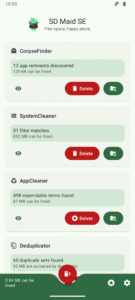
(AKA SD Maid 2) is a file management tool for Android that specialises in maintenance. Its core purpose is freeing up space and removing unwanted data.
Features include:
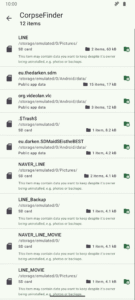
Removing data that belongs to apps that are no longer installed (CorpseFinder)
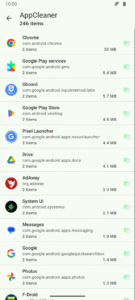
Deleting expendable files, e.g. caches (AppCleaner)
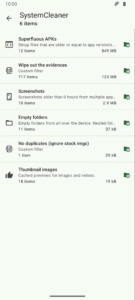
User configurable filters for random files (SystemCleaner)
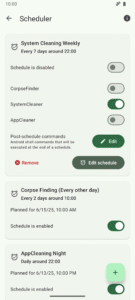
Scheduling actions (Scheduler)
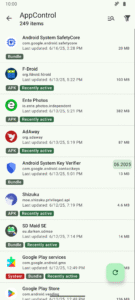
Controlling/disabling apps (AppControl)
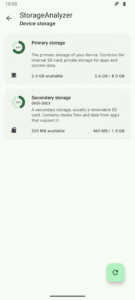
Storage overview (StorageAnalyzer)
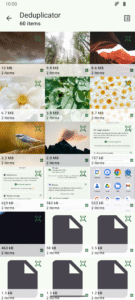
Find duplicate data (Deduplicator)
Root and Shizuku support
SD Maid SE
is the successor to
SD Maid
. A complete rewrite, optimized for newer Android versions, with a focus on
SD Maid's
most popular features. More details about SD Maid vs SD Maid SE can be found in the
FAQ
.
Download
Source
Status
Google Play (Release)
Google Play (Open Testing)
Github (Release)
Github (Pre-Release)
F-Droid (Main Repo)
F-Droid (IzzyOnDroid)
Support the project
SD Maid has no ads and doesn't sell your data.
Development is financed by individual user contributions, i.e. you buying the upgrade on Google Play or becoming a sponsor ❤️.
Upgrade to
SD Maid SE Pro
on
Google Play
Become a sponsor
on GitHub
Get help
Github Discussions
Discord
Frequently Asked Question
Screenshots
License
SD Maid SE's code is available under a GPL v3 license, this excludes:
SD Maid SE icons, logos, mascots, marketing materials and assets.
SD Maid SE animations and videos.
SD Maid SE documentation.
Google Play screenshots.
Google Play texts & descriptions.
Translations.
Thanks
Thanks to
crowdin.com
for supporting open-source projects
SD Maid 2/SE is actively being worked on and not feature complete. Feature requests are welcome!
SD Maid SE
(AKA SD Maid 2) is a file management tool for Android that specialises in maintenance. Its core purpose is freeing up space and removing unwanted data.
Features include:
Removing data that belongs to apps that are no longer installed (CorpseFinder)
Deleting expendable files, e.g. caches (AppCleaner)
User configurable filters for random files (SystemCleaner)
Scheduling actions (Scheduler)
Controlling/disabling apps (AppControl)
Storage overview (StorageAnalyzer)
Find duplicate data (Deduplicator)
Root and Shizuku support
SD Maid SE
is the successor to
SD Maid
. A complete rewrite, optimized for newer Android versions, with a focus on
SD Maid's
most popular features. More details about SD Maid vs SD Maid SE can be found in the
FAQ
.
Download
Source
Status
Google Play (Release)
Google Play (Open Testing)
Github (Release)
Github (Pre-Release)
F-Droid (Main Repo)
F-Droid (IzzyOnDroid)
Support the project
SD Maid has no ads and doesn't sell your data.
Development is financed by individual user contributions, i.e. you buying the upgrade on Google Play or becoming a sponsor ❤️.
Upgrade to
SD Maid SE Pro
on
Google Play
Become a sponsor
on GitHub
Get help
Github Discussions
Discord
Frequently Asked Question
Screenshots
License
SD Maid SE's code is available under a GPL v3 license, this excludes:
SD Maid SE icons, logos, mascots, marketing materials and assets.
SD Maid SE animations and videos.
SD Maid SE documentation.
Google Play screenshots.
Google Play texts & descriptions.
Translations.
Thanks
Thanks to
crowdin.com
for supporting open-source projects
Download SD Maid 2/SE - System Cleaner (github version) APK
Fast, free and safe download.
APK Permissions 19
- android.permission.ACCESS_NETWORK_STATE
- android.permission.BROADCAST_CLOSE_SYSTEM_DIALOGS
- android.permission.CLEAR_APP_CACHE
- android.permission.FOREGROUND_SERVICE
- android.permission.FOREGROUND_SERVICE_DATA_SYNC
- android.permission.FOREGROUND_SERVICE_SPECIAL_USE
- android.permission.INTERNET
- android.permission.MANAGE_EXTERNAL_STORAGE
- android.permission.PACKAGE_USAGE_STATS
- android.permission.POST_NOTIFICATIONS
- android.permission.QUERY_ALL_PACKAGES
- android.permission.READ_EXTERNAL_STORAGE
- android.permission.RECEIVE_BOOT_COMPLETED
- android.permission.REQUEST_DELETE_PACKAGES
- android.permission.WAKE_LOCK
- android.permission.WRITE_EXTERNAL_STORAGE
- android.permission.WRITE_SECURE_SETTINGS
- eu.darken.sdmse.DYNAMIC_RECEIVER_NOT_EXPORTED_PERMISSION
- moe.shizuku.manager.permission.API_V23
APK Verified
The cryptographic signature guarantees that the file is safe to install and was not tampered with in any way.
Similar in Tools


More by darken

Frequently Asked Questions about SD Maid 2/SE - System Cleaner (github version) APK
This is the universal variant — a single APK that contains native libraries for every CPU architecture. It installs on any Android device but is larger than per-architecture variants.
Yes — the APK's signature has been cryptographically verified against the publisher's signing key. The SHA-256 hash is shown in the File Information panel so you can independently confirm the file matches the original release.
Android 26 (API level 35) or newer. Older devices will refuse the install.
Install a free app like 'CPU-Z' or 'Droid Hardware Info' from the Play Store and look at the ABI / Instruction Set row. Most phones made after 2017 are arm64-v8a; if in doubt, download the universal variant.
All variants are functionally identical — same features, same version. They differ only in which CPU architectures the native code is compiled for, and (sometimes) which screen densities the included graphics target. Pick the one that matches your device for the smallest install size, or pick 'Universal' if you're unsure.