
This is the universal build of VicEmergency 6.8.0. It contains native libraries for every CPU architecture (arm64-v8a, armeabi-v7a, x86, x86_64), so it installs on any Android device. The trade-off is size — it's larger than per-architecture variants. Pick this one if you're unsure which CPU your phone has, or if you plan to share the APK with multiple devices.
File size: 7.5 MB • Min Android: 21 • Target Android: 35 • Version code: 604060 • Framework: Native (Java/Kotlin) • Permissions: 29
Screenshots
File Information
| Package Name | com.naturallybeing.fireready |
|---|---|
| Version Name | 6.8.0 |
| Version Code | 604060 |
| Architecture | Universal |
| Min Android Version | Android 21 (API 35) |
| Main Activity | com.naturallybeing.fireready.MainActivity |
| Framework | Native (Java/Kotlin) |
| File Size | 7.50 MB |
| Signature (SHA1) | C19FB09B1098241ECFF82C865F41FED6EEA17988 |
| File Hash (SHA256) | 1b321740e63eefc428d503634b1d824718115a70a2e647a36595e7ef0a19b204 |
What's New
General updates and enhancements.
App Description
VicEmergency is the official Victorian Government app for emergency warnings and information. Download VicEmergency, set up a user profile and watch zones to ensure you receive official warnings and information for areas that interest you.
Watch the VicEmergency video at
www.youtube.com/channel/UCskGgVGdfEp1C3BMiiwAyzQ
To review support articles or submit a request, visit
support.emergency.vic.gov.au
Main Features:
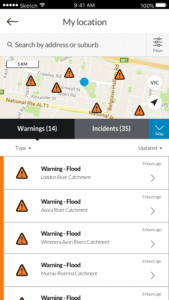
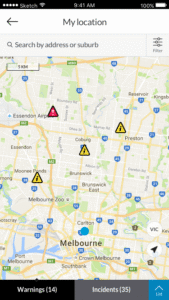
• Live incident map showing current warnings, planned burns and other types of incidents across Victoria.***
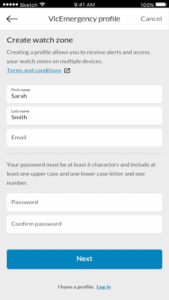
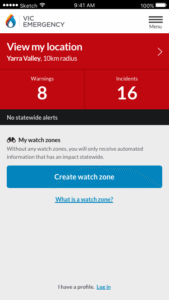
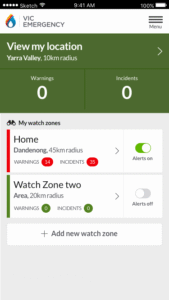
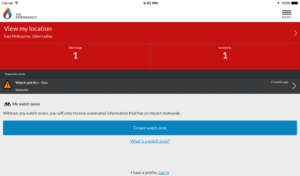
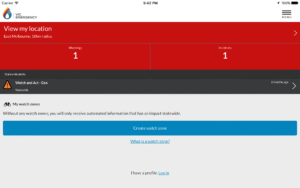
• Simple to create a profile and use watch zones that ensure you get official warnings for your local area. Warnings and information* are pushed out to a user's phone when issued by Victoria’s emergency services.
• GPS integration to determine your current location** and surrounding incidents.
• Emergency Warnings, Warnings, Advice and information as issued by Victoria’s emergency services
• Share incidents and warnings with friends and family.
• View forecast Fire Danger Ratings on the map.
• View today's and tomorrow’s Total Fire Ban status.
* Your device must have an internet connection to receive warnings and information issued by Victorian emergency services.
** To view your current location, GPS must be switched on and location functionality enabled.
*** Map symbols represent the origin of the emergency, not its current location or spread.
The VicEmergency app is just one tool to assist you to access warnings and information about emergencies, however you should never rely on just one information channel. Emergency services use a range of other information channels including SKY TV, ABC local radio, some commercial and designated community radio stations, VicEmergency Hotline on 1800 226 226, VicEmergency website on
www.emergency.vic.gov.au
and VicEmergency Twitter and Facebook.
What's New in this Version?
• Addition of other types of emergencies e.g. flood, earthquake, storms, tsunami, shark sightings etc
• Addition of user profile so watch zones can be accessed across multiple devices
• Integration of user profiles and watch zones with the VicEmergency website
• Addition of landscape view for all screens
• Addition of custom tone for notifications
• Addition of edit function for all aspects of watch zones
• Addition of warning notifications by email
Are you getting a message asking Allow "VicEmergency" to access to your location? You need to allow access to see incidents and warnings for your current location. The steps for this will vary depending on your device, model and version of android, but should be similar to this:
• Open device settings
• Select applications
• Select manage applications
• Choose VicEmergency from the list
• Tick the ‘show notifications’ box at the top of the screen
Watch the VicEmergency video at
www.youtube.com/channel/UCskGgVGdfEp1C3BMiiwAyzQ
To review support articles or submit a request, visit
support.emergency.vic.gov.au
Main Features:
• Live incident map showing current warnings, planned burns and other types of incidents across Victoria.***
• Simple to create a profile and use watch zones that ensure you get official warnings for your local area. Warnings and information* are pushed out to a user's phone when issued by Victoria’s emergency services.
• GPS integration to determine your current location** and surrounding incidents.
• Emergency Warnings, Warnings, Advice and information as issued by Victoria’s emergency services
• Share incidents and warnings with friends and family.
• View forecast Fire Danger Ratings on the map.
• View today's and tomorrow’s Total Fire Ban status.
* Your device must have an internet connection to receive warnings and information issued by Victorian emergency services.
** To view your current location, GPS must be switched on and location functionality enabled.
*** Map symbols represent the origin of the emergency, not its current location or spread.
The VicEmergency app is just one tool to assist you to access warnings and information about emergencies, however you should never rely on just one information channel. Emergency services use a range of other information channels including SKY TV, ABC local radio, some commercial and designated community radio stations, VicEmergency Hotline on 1800 226 226, VicEmergency website on
www.emergency.vic.gov.au
and VicEmergency Twitter and Facebook.
What's New in this Version?
• Addition of other types of emergencies e.g. flood, earthquake, storms, tsunami, shark sightings etc
• Addition of user profile so watch zones can be accessed across multiple devices
• Integration of user profiles and watch zones with the VicEmergency website
• Addition of landscape view for all screens
• Addition of custom tone for notifications
• Addition of edit function for all aspects of watch zones
• Addition of warning notifications by email
Are you getting a message asking Allow "VicEmergency" to access to your location? You need to allow access to see incidents and warnings for your current location. The steps for this will vary depending on your device, model and version of android, but should be similar to this:
• Open device settings
• Select applications
• Select manage applications
• Choose VicEmergency from the list
• Tick the ‘show notifications’ box at the top of the screen
Download VicEmergency APK
Fast, free and safe download.
APK Permissions 29
- android.permission.ACCESS_COARSE_LOCATION
- android.permission.ACCESS_FINE_LOCATION
- android.permission.ACCESS_NETWORK_STATE
- android.permission.BLUETOOTH
- android.permission.INTERNET
- android.permission.POST_NOTIFICATIONS
- android.permission.READ_APP_BADGE
- android.permission.VIBRATE
- android.permission.WAKE_LOCK
- android.permission.WRITE_EXTERNAL_STORAGE
- com.anddoes.launcher.permission.UPDATE_COUNT
- com.google.android.c2dm.permission.RECEIVE
- com.htc.launcher.permission.READ_SETTINGS
- com.htc.launcher.permission.UPDATE_SHORTCUT
- com.huawei.android.launcher.permission.CHANGE_BADGE
- com.huawei.android.launcher.permission.READ_SETTINGS
- com.huawei.android.launcher.permission.WRITE_SETTINGS
- com.majeur.launcher.permission.UPDATE_BADGE
- com.naturallybeing.fireready.DYNAMIC_RECEIVER_NOT_EXPORTED_PERMISSION
- com.naturallybeing.fireready.permission.BackgroundHandlerActivity
- com.naturallybeing.fireready.permission.PushHandlerActivity
- com.oppo.launcher.permission.READ_SETTINGS
- com.oppo.launcher.permission.WRITE_SETTINGS
- com.sec.android.provider.badge.permission.READ
- com.sec.android.provider.badge.permission.WRITE
- com.sonyericsson.home.permission.BROADCAST_BADGE
- com.sonymobile.home.permission.PROVIDER_INSERT_BADGE
- me.everything.badger.permission.BADGE_COUNT_READ
- me.everything.badger.permission.BADGE_COUNT_WRITE
APK Verified
The cryptographic signature guarantees that the file is safe to install and was not tampered with in any way.


Frequently Asked Questions about VicEmergency APK
This is the universal variant — a single APK that contains native libraries for every CPU architecture. It installs on any Android device but is larger than per-architecture variants.
Yes — the APK's signature has been cryptographically verified against the publisher's signing key. The SHA-256 hash is shown in the File Information panel so you can independently confirm the file matches the original release.
Android 21 (API level 35) or newer. Older devices will refuse the install.
Install a free app like 'CPU-Z' or 'Droid Hardware Info' from the Play Store and look at the ABI / Instruction Set row. Most phones made after 2017 are arm64-v8a; if in doubt, download the universal variant.
All variants are functionally identical — same features, same version. They differ only in which CPU architectures the native code is compiled for, and (sometimes) which screen densities the included graphics target. Pick the one that matches your device for the smallest install size, or pick 'Universal' if you're unsure.