
Download GnssLogger App v3.1.0.1 (120-640dpi) (Android APK v3.1.1.1 Universal · Android 24+
Download APK
Verified Safe
This is the universal build of GnssLogger App v3.1.0.1 (120-640dpi) (Android v3.1.1.1. It contains native libraries for every CPU architecture (arm64-v8a, armeabi-v7a, x86, x86_64), so it installs on any Android device. The trade-off is size — it's larger than per-architecture variants. Pick this one if you're unsure which CPU your phone has, or if you plan to share the APK with multiple devices.
File size: 6.5 MB • Min Android: 24 • Target Android: 35 • Version code: 108 • Framework: Native (Java/Kotlin) • Permissions: 13
Screenshots
File Information
| Package Name | com.google.android.apps.location.gps.gnsslogger |
|---|---|
| Version Name | v3.1.1.1 |
| Version Code | 108 |
| Architecture | Universal |
| Min Android Version | Android 24 (API 35) |
| Main Activity | com.google.android.apps.location.gps.gnsslogger.MainActivity |
| Framework | Native (Java/Kotlin) |
| File Size | 6.52 MB |
| Signature (SHA1) | C0F74E7DD4F14F380E9A78BD802DB55217DBA575 |
| File Hash (SHA256) | 419a34b7e8e4975a03661e1d1fc3ded7ad97f1773bf0de8dceb26e83a5c3be6e |
What's New
• Share data for AI analysis - Tap on the new "Share" button to send yourself data files optimized for analysis by Gemini!
• Satellite PVT - Satellite PVT is now logged along with raw measurements.
• NavIC support - On Plots and Spoof/Jam tabs.
• Satellite PVT - Satellite PVT is now logged along with raw measurements.
• NavIC support - On Plots and Spoof/Jam tabs.
App Description
GnssLogger by Google enables in-depth analysis and logging of all types of location and sensor data such as GPS (Global Positioning System), network location and other sensor data. GnssLogger is available for phones and watches. It comes with the following features for phones:
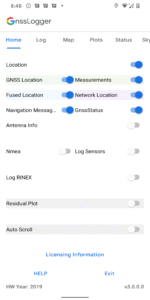
HOME TAB:
● Control various data logging such as raw GNSS measurements, GnssStatus, NMEA, navigation messages, sensor data and RINEX logs.
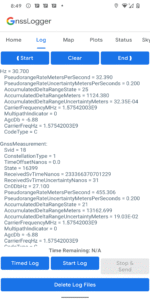
LOG TAB:
● View all location and raw measurement data.
● Control offline logging using 'Start Log', 'Stop & Send' and 'Timed Log'.
● Enable specific items to be logged using corresponding switches in Home Tab.
● Delete existing log files from disk.
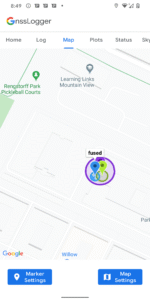
MAP TAB:
● Visualize on GoogleMap, the location provided by GPS chipset, Network Location Provider (NLP), Fused Location Provider (FLP), and computed Weighted Least Square (WLS) position.
● Toggle between different map views and location types.
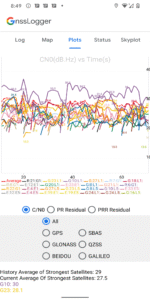
PLOTS TAB:
● Visualize CN0 (Signal Strength), PR (pseudorange) Residual and PRR (pseudorange rate) Residual vs time.
STATUS TAB:
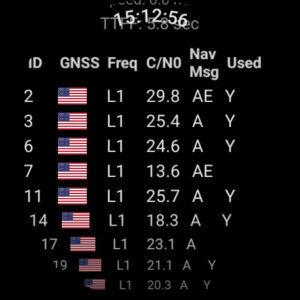
● View detailed information of all visible GNSS (Global Navigation Satellite System) satellites such as GPS, Beidou (BDS), QZSS, GAL (Galileo), GLO (GLONASS) and IRNSS.
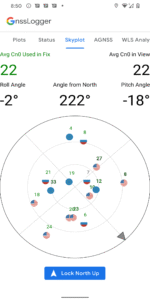
SKYPLOT TAB:
● Visualize the data of all visible GNSS satellites using a skyplot.
● View the average CN0 of all the satellites in view and the ones used in fix.
AGNSS TAB:
● Experiment with Assisted-GNSS functionalities.
WLS Analysis TAB:
● View the Weighted Least Square position, velocity and their uncertainties computed based on raw GNSS measurements.
● Compare the WLS results to the GNSS chipset reported values.
It comes with the following features for watches running Wear OS 3.0 and higher:
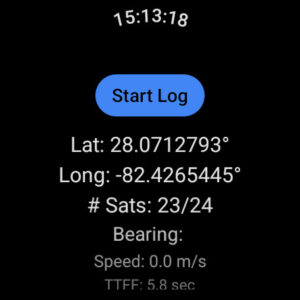
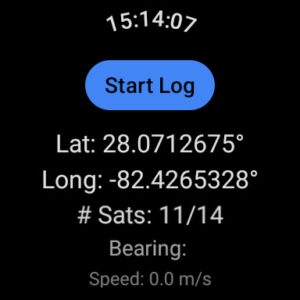
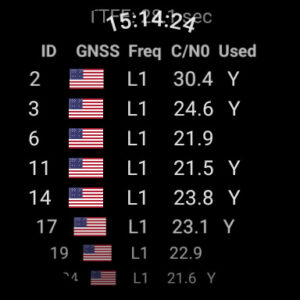
● View real-time GNSS chipset status information.
● Log various GNSS and sensor data to CSV and RINEX files.
HOME TAB:
● Control various data logging such as raw GNSS measurements, GnssStatus, NMEA, navigation messages, sensor data and RINEX logs.
LOG TAB:
● View all location and raw measurement data.
● Control offline logging using 'Start Log', 'Stop & Send' and 'Timed Log'.
● Enable specific items to be logged using corresponding switches in Home Tab.
● Delete existing log files from disk.
MAP TAB:
● Visualize on GoogleMap, the location provided by GPS chipset, Network Location Provider (NLP), Fused Location Provider (FLP), and computed Weighted Least Square (WLS) position.
● Toggle between different map views and location types.
PLOTS TAB:
● Visualize CN0 (Signal Strength), PR (pseudorange) Residual and PRR (pseudorange rate) Residual vs time.
STATUS TAB:
● View detailed information of all visible GNSS (Global Navigation Satellite System) satellites such as GPS, Beidou (BDS), QZSS, GAL (Galileo), GLO (GLONASS) and IRNSS.
SKYPLOT TAB:
● Visualize the data of all visible GNSS satellites using a skyplot.
● View the average CN0 of all the satellites in view and the ones used in fix.
AGNSS TAB:
● Experiment with Assisted-GNSS functionalities.
WLS Analysis TAB:
● View the Weighted Least Square position, velocity and their uncertainties computed based on raw GNSS measurements.
● Compare the WLS results to the GNSS chipset reported values.
It comes with the following features for watches running Wear OS 3.0 and higher:
● View real-time GNSS chipset status information.
● Log various GNSS and sensor data to CSV and RINEX files.
Download GnssLogger App v3.1.0.1 (120-640dpi) (Android APK
Fast, free and safe download.
APK Permissions 13
- android.permission.ACCESS_COARSE_LOCATION
- android.permission.ACCESS_FINE_LOCATION
- android.permission.ACCESS_LOCATION_EXTRA_COMMANDS
- android.permission.ACCESS_NETWORK_STATE
- android.permission.ACTIVITY_RECOGNITION
- android.permission.FOREGROUND_SERVICE
- android.permission.FOREGROUND_SERVICE_LOCATION
- android.permission.INTERNET
- android.permission.POST_NOTIFICATIONS
- com.google.android.apps.location.gps.gnsslogger.DYNAMIC_RECEIVER_NOT_EXPORTED_PERMISSION
- com.google.android.gms.permission.ACTIVITY_RECOGNITION
- com.google.android.providers.gsf.permission.READ_GSERVICES
- com.google.android.providers.gsf.permission.WRITE_GSERVICES
APK Verified
The cryptographic signature guarantees that the file is safe to install and was not tampered with in any way.
Similar in Tools


Frequently Asked Questions about GnssLogger App v3.1.0.1 (120-640dpi) (Android APK
This is the universal variant — a single APK that contains native libraries for every CPU architecture. It installs on any Android device but is larger than per-architecture variants.
Yes — the APK's signature has been cryptographically verified against the publisher's signing key. The SHA-256 hash is shown in the File Information panel so you can independently confirm the file matches the original release.
Android 24 (API level 35) or newer. Older devices will refuse the install.
Install a free app like 'CPU-Z' or 'Droid Hardware Info' from the Play Store and look at the ABI / Instruction Set row. Most phones made after 2017 are arm64-v8a; if in doubt, download the universal variant.
All variants are functionally identical — same features, same version. They differ only in which CPU architectures the native code is compiled for, and (sometimes) which screen densities the included graphics target. Pick the one that matches your device for the smallest install size, or pick 'Universal' if you're unsure.