
This is the universal build of Fraction Calculator Plus 6.1.2. It contains native libraries for every CPU architecture (arm64-v8a, armeabi-v7a, x86, x86_64), so it installs on any Android device. The trade-off is size — it's larger than per-architecture variants. Pick this one if you're unsure which CPU your phone has, or if you plan to share the APK with multiple devices.
File size: 17.2 MB • Min Android: 23 • Target Android: 35 • Version code: 20601020 • Framework: Native (Java/Kotlin) • Permissions: 16
Screenshots

File Information
| Package Name | com.digitalchemy.calculator.freefraction |
|---|---|
| Version Name | 6.1.2 |
| Version Code | 20601020 |
| Architecture | Universal |
| Min Android Version | Android 23 (API 35) |
| Main Activity | com.digitalchemy.calculator.droidphone.FreeFractionMainActivity |
| Framework | Native (Java/Kotlin) |
| File Size | 17.22 MB |
| Signature (SHA1) | 36456234B0F5356225C53C3190490FE8F32958B0 |
| File Hash (SHA256) | 7e8695d33c7ac7388c45c99bfc5d46d394fe161118c3177ea9061508f3e197f1 |
What's New
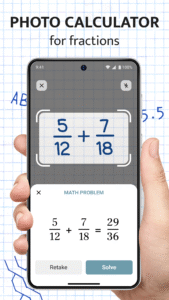
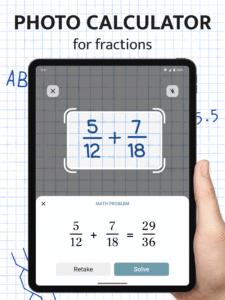
- Added Photo Calculator for a smarter calculation experience!
- Minor issues reported by users were fixed.
- Please send us your feedback!
- Minor issues reported by users were fixed.
- Please send us your feedback!
App Description
NEW
Fraction Calculator Plus with step-by-step operations is your best calculator app to deal with everyday fraction problems or even more complex construction and woodworking calculations for free. Add, subtract, multiply, divide and even convert fractions to decimals or decimals to fractions quickly and clearly.
Fraction Calculator is invaluable when:
- Helping kids do the math homework.
- Adjusting the recipe ingredients to the number of servings you need.
- Doing the calculations for your craft or even construction project and more.
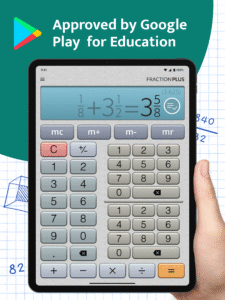
Fraction calculator is easy and fun calculator app to use both on phones and tablets as:
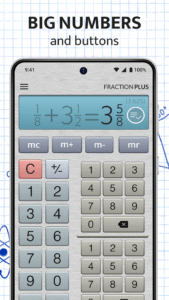
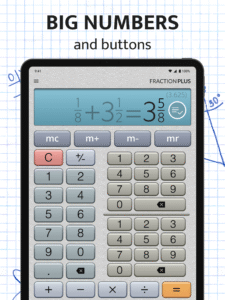
- Calculations appear in crisp type that you can read at a glance and from a distance.
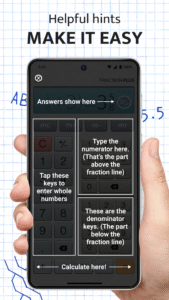
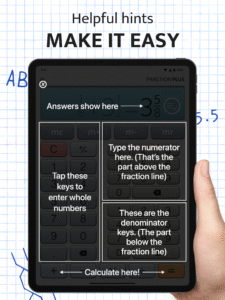
- Innovative triple keypad display of the calculator with fractions lets you type extra fast and enter mixed numbers like 3 3/4 with only 3 taps.
- Every fraction result is automatically reduced to its simplest form providing prompt and clear answers.
- Every fraction result is also converted to a decimal number to have both values at hand.
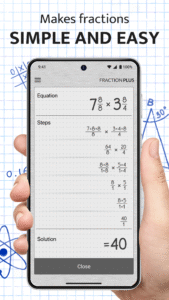
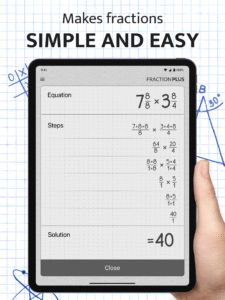
- Step-by-step explanations help get a deeper understanding of the calculation process.
- The integrated decimal calculator allows solving math problems containing either fractions or decimals or both.
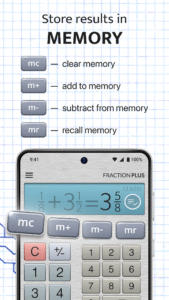
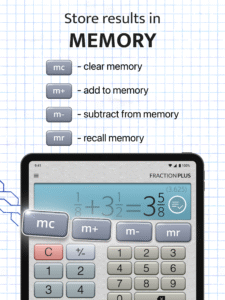
- Calculator memory (M+, M- etc.) would be useful if you need to do a bunch of individual calculations and add or subtract their results.
- Our calculator with fractions supports improper and proper fractions, mixed numbers and whole numbers.
It couldn't be easier to add, subtract, multiply, and divide fractions!
Let Fraction Calculator Plus turn your phone or tablet into an indispensable assistant.
This free version is ad-supported, but you can also try our ad-free version and PRO version for woodworkers. The latter boasts advanced features that anyone working with measure tape will appreciate.
Fraction calculator PRO version for woodworkers
With a PRO version, both the professional and DIY carpenters and woodworkers will be able to:
- round to the specified denominator (2nds, 4ths, 8ths, 16ths, 32nds, or 64ths of an inch)
- select to round up, down, or to the nearest number to avoid rounding errors
- get the decimal equivalent of the fraction result calculated automatically
Double-checking your wood plank measurements for accuracy whether in a workshop or at a construction site is a matter of few taps. Save time, effort, and material precisely calculating fractional inches for any project.
Get the Fraction Calculator Plus to solve everyday math problems!
Fraction Calculator Plus with step-by-step operations is your best calculator app to deal with everyday fraction problems or even more complex construction and woodworking calculations for free. Add, subtract, multiply, divide and even convert fractions to decimals or decimals to fractions quickly and clearly.
Fraction Calculator is invaluable when:
- Helping kids do the math homework.
- Adjusting the recipe ingredients to the number of servings you need.
- Doing the calculations for your craft or even construction project and more.
Fraction calculator is easy and fun calculator app to use both on phones and tablets as:
- Calculations appear in crisp type that you can read at a glance and from a distance.
- Innovative triple keypad display of the calculator with fractions lets you type extra fast and enter mixed numbers like 3 3/4 with only 3 taps.
- Every fraction result is automatically reduced to its simplest form providing prompt and clear answers.
- Every fraction result is also converted to a decimal number to have both values at hand.
- Step-by-step explanations help get a deeper understanding of the calculation process.
- The integrated decimal calculator allows solving math problems containing either fractions or decimals or both.
- Calculator memory (M+, M- etc.) would be useful if you need to do a bunch of individual calculations and add or subtract their results.
- Our calculator with fractions supports improper and proper fractions, mixed numbers and whole numbers.
It couldn't be easier to add, subtract, multiply, and divide fractions!
Let Fraction Calculator Plus turn your phone or tablet into an indispensable assistant.
This free version is ad-supported, but you can also try our ad-free version and PRO version for woodworkers. The latter boasts advanced features that anyone working with measure tape will appreciate.
Fraction calculator PRO version for woodworkers
With a PRO version, both the professional and DIY carpenters and woodworkers will be able to:
- round to the specified denominator (2nds, 4ths, 8ths, 16ths, 32nds, or 64ths of an inch)
- select to round up, down, or to the nearest number to avoid rounding errors
- get the decimal equivalent of the fraction result calculated automatically
Double-checking your wood plank measurements for accuracy whether in a workshop or at a construction site is a matter of few taps. Save time, effort, and material precisely calculating fractional inches for any project.
Get the Fraction Calculator Plus to solve everyday math problems!
Download Fraction Calculator Plus APK
Fast, free and safe download.
APK Permissions 16
- android.permission.ACCESS_ADSERVICES_AD_ID
- android.permission.ACCESS_ADSERVICES_ATTRIBUTION
- android.permission.ACCESS_ADSERVICES_TOPICS
- android.permission.ACCESS_NETWORK_STATE
- android.permission.CAMERA
- android.permission.FOREGROUND_SERVICE
- android.permission.INTERNET
- android.permission.POST_NOTIFICATIONS
- android.permission.RECEIVE_BOOT_COMPLETED
- android.permission.REQUEST_DELETE_PACKAGES
- android.permission.VIBRATE
- android.permission.WAKE_LOCK
- com.android.vending.BILLING
- com.digitalchemy.calculator.freefraction.DYNAMIC_RECEIVER_NOT_EXPORTED_PERMISSION
- com.google.android.finsky.permission.BIND_GET_INSTALL_REFERRER_SERVICE
- com.google.android.gms.permission.AD_ID
APK Verified
The cryptographic signature guarantees that the file is safe to install and was not tampered with in any way.


Frequently Asked Questions about Fraction Calculator Plus APK
This is the universal variant — a single APK that contains native libraries for every CPU architecture. It installs on any Android device but is larger than per-architecture variants.
Yes — the APK's signature has been cryptographically verified against the publisher's signing key. The SHA-256 hash is shown in the File Information panel so you can independently confirm the file matches the original release.
Android 23 (API level 35) or newer. Older devices will refuse the install.
Install a free app like 'CPU-Z' or 'Droid Hardware Info' from the Play Store and look at the ABI / Instruction Set row. Most phones made after 2017 are arm64-v8a; if in doubt, download the universal variant.
All variants are functionally identical — same features, same version. They differ only in which CPU architectures the native code is compiled for, and (sometimes) which screen densities the included graphics target. Pick the one that matches your device for the smallest install size, or pick 'Universal' if you're unsure.