
This is the universal build of Alice AI 25.16.2.universal. It contains native libraries for every CPU architecture (arm64-v8a, armeabi-v7a, x86, x86_64), so it installs on any Android device. The trade-off is size — it's larger than per-architecture variants. Pick this one if you're unsure which CPU your phone has, or if you plan to share the APK with multiple devices.
File size: 76.7 MB • Min Android: 28 • Target Android: 35 • Version code: 251620845 • Framework: Native (Java/Kotlin) • Permissions: 26
Screenshots




File Information
| Package Name | com.yandex.aliceapp |
|---|---|
| Version Name | 25.16.2.universal |
| Version Code | 251620845 |
| Architecture | Universal |
| Min Android Version | Android 28 (API 35) |
| Main Activity | com.yandex.aliceapp.ui.MainActivity |
| Framework | Native (Java/Kotlin) |
| File Size | 76.71 MB |
| Signature (SHA1) | 5D224274D9377C35DA777AD934C65C8CCA6E7A20 |
| File Hash (SHA256) | 8ab9e97e2927c011343c93056ae02de1755a4a41a30827bd1a3822995bbfe52d |
What's New
From version
25.16.0.universal
:
Maximum stability! Even if you shake your phone, nothing will fall out.
25.16.0.universal
:
Maximum stability! Even if you shake your phone, nothing will fall out.
App Description
Chat with Alice: texts, neural network, new ideas, knowledge
The vast capabilities of artificial intelligence at a world-class technological level from Yandex — now in your smartphone: help with routine tasks, solving problems for study, work, and creativity.
Ask questions, write and edit texts — the Alice neural network will respond accurately and comprehensively using the latest generative model YandexGPT 5.1 Pro. Ask questions by voice or use the text input field.
Work with files (DOC, DOCX, PDF, TXT) — structure information and turn it into convenient reports. Alice will help quickly extract key insights.
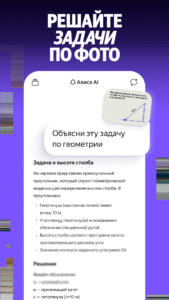
Work with photos — recognize text in images, identify objects, and get instant visual data analysis. The AI assistant will help extract data from a bill photo, understand what’s shown in an image, and convert it into a convenient text format for further use.
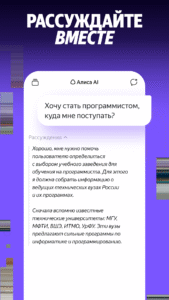
Solve complex problems — in Reasoning mode, the Alice neural network gives not just fast and detailed, but also thoughtful answers with conclusions. It offers well-grounded solutions with expert-level analysis.
Create creative texts in English, ask questions, translate, and edit. The AI assistant will help craft any kind of English text — from personal letters and school assignments to business proposals.
Find inspiration: generate new project ideas, brainstorm, write descriptions, messages, and your own text templates. Alice’s neural network will take care of the routine part of the job. The AI assistant will help write a letter, an event script, a speech, come up with a name, a post idea, or even a pet name.
Create images — the YandexArt model will generate pictures based on your request, offering up to four options. Alice will help you create eye-catching visuals for social media posts and stories, draw a logo or a birthday card.
Use Alice to solve professional tasks. The AI assistant will help with programming and code writing, offering several solution options.
Alice will help you learn logic, explain logical tasks in detail and clearly, and share interesting facts.
Get simple tips and expert recommendations on topics you’re interested in. Alice will answer all your questions in detail, suggest action plans and instructions, and assist with planning.
Ask questions, type text, attach photos and files, or communicate through your camera in real time using live mode. Show Alice (Pro version) in live mode what you want to know about and get instant answers and ideas. Just open the Alice app and point your phone camera at what you want to learn more about.
Alice can become your guide and tell you about architectural landmarks, suggest what to cook with the ingredients you have, or help choose the best shoes for your pants. Ask anything and switch topics if needed. Alice considers the context of the conversation, recognizes objects in the frame, and quickly provides detailed answers.
The vast capabilities of artificial intelligence at a world-class technological level from Yandex — now in your smartphone: help with routine tasks, solving problems for study, work, and creativity.
Ask questions, write and edit texts — the Alice neural network will respond accurately and comprehensively using the latest generative model YandexGPT 5.1 Pro. Ask questions by voice or use the text input field.
Work with files (DOC, DOCX, PDF, TXT) — structure information and turn it into convenient reports. Alice will help quickly extract key insights.
Work with photos — recognize text in images, identify objects, and get instant visual data analysis. The AI assistant will help extract data from a bill photo, understand what’s shown in an image, and convert it into a convenient text format for further use.
Solve complex problems — in Reasoning mode, the Alice neural network gives not just fast and detailed, but also thoughtful answers with conclusions. It offers well-grounded solutions with expert-level analysis.
Create creative texts in English, ask questions, translate, and edit. The AI assistant will help craft any kind of English text — from personal letters and school assignments to business proposals.
Find inspiration: generate new project ideas, brainstorm, write descriptions, messages, and your own text templates. Alice’s neural network will take care of the routine part of the job. The AI assistant will help write a letter, an event script, a speech, come up with a name, a post idea, or even a pet name.
Create images — the YandexArt model will generate pictures based on your request, offering up to four options. Alice will help you create eye-catching visuals for social media posts and stories, draw a logo or a birthday card.
Use Alice to solve professional tasks. The AI assistant will help with programming and code writing, offering several solution options.
Alice will help you learn logic, explain logical tasks in detail and clearly, and share interesting facts.
Get simple tips and expert recommendations on topics you’re interested in. Alice will answer all your questions in detail, suggest action plans and instructions, and assist with planning.
Ask questions, type text, attach photos and files, or communicate through your camera in real time using live mode. Show Alice (Pro version) in live mode what you want to know about and get instant answers and ideas. Just open the Alice app and point your phone camera at what you want to learn more about.
Alice can become your guide and tell you about architectural landmarks, suggest what to cook with the ingredients you have, or help choose the best shoes for your pants. Ask anything and switch topics if needed. Alice considers the context of the conversation, recognizes objects in the frame, and quickly provides detailed answers.
Download Alice AI APK
Fast, free and safe download.
APK Permissions 26
- android.permission.ACCESS_COARSE_LOCATION
- android.permission.ACCESS_FINE_LOCATION
- android.permission.ACCESS_NETWORK_STATE
- android.permission.ACCESS_WIFI_STATE
- android.permission.AUTHENTICATE_ACCOUNTS
- android.permission.CAMERA
- android.permission.GET_ACCOUNTS
- android.permission.INTERNET
- android.permission.MANAGE_ACCOUNTS
- android.permission.MODIFY_AUDIO_SETTINGS
- android.permission.NFC
- android.permission.POST_NOTIFICATIONS
- android.permission.READ_EXTERNAL_STORAGE
- android.permission.RECEIVE_BOOT_COMPLETED
- android.permission.RECORD_AUDIO
- android.permission.USE_CREDENTIALS
- android.permission.VIBRATE
- android.permission.WAKE_LOCK
- android.permission.WRITE_EXTERNAL_STORAGE
- com.android.vending.BILLING
- com.google.android.c2dm.permission.RECEIVE
- com.google.android.finsky.permission.BIND_GET_INSTALL_REFERRER_SERVICE
- com.google.android.gms.permission.AD_ID
- com.yandex.aliceapp.DYNAMIC_RECEIVER_NOT_EXPORTED_PERMISSION
- com.yandex.permission.AM_COMMUNICATION
- com.yandex.permission.READ_CREDENTIALS
APK Verified
The cryptographic signature guarantees that the file is safe to install and was not tampered with in any way.
Similar in Productivity


![Text Scanner [OCR] icon](https://img.apk.now/icons/text-scanner-ocr/283.png)


More by Direct Cursus Computer Systems Trading LLC


Frequently Asked Questions about Alice AI APK
This is the universal variant — a single APK that contains native libraries for every CPU architecture. It installs on any Android device but is larger than per-architecture variants.
Yes — the APK's signature has been cryptographically verified against the publisher's signing key. The SHA-256 hash is shown in the File Information panel so you can independently confirm the file matches the original release.
Android 28 (API level 35) or newer. Older devices will refuse the install.
Install a free app like 'CPU-Z' or 'Droid Hardware Info' from the Play Store and look at the ABI / Instruction Set row. Most phones made after 2017 are arm64-v8a; if in doubt, download the universal variant.
All variants are functionally identical — same features, same version. They differ only in which CPU architectures the native code is compiled for, and (sometimes) which screen densities the included graphics target. Pick the one that matches your device for the smallest install size, or pick 'Universal' if you're unsure.