
Download ScreenStream (f-droid version) APK 4.2.6 arm64-v8a, armeabi-v7a, x86, x86_64 · Android 23+
Download APK
Verified Safe
This is the arm64-v8a, armeabi-v7a, x86, x86_64 build of ScreenStream (f-droid version) 4.2.6. Pick this build if your device's primary ABI matches.
File size: 3.8 MB • Min Android: 23 • Target Android: 36 • Version code: 42006 • Framework: Native (Java/Kotlin) • Permissions: 13
Screenshots
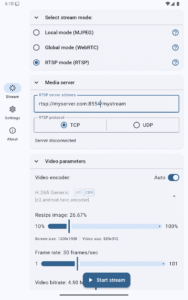
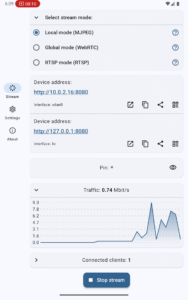
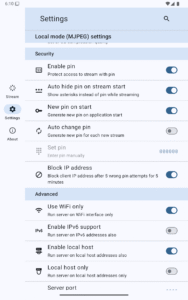
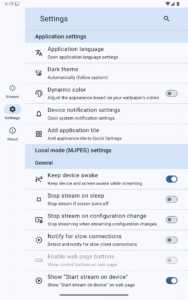
File Information
| Package Name | info.dvkr.screenstream |
|---|---|
| Version Name | 4.2.6 |
| Version Code | 42006 |
| Architecture | arm64-v8a, armeabi-v7a, x86, x86_64 |
| Min Android Version | Android 23 (API 36) |
| Main Activity | info.dvkr.screenstream.SingleActivity |
| Framework | Native (Java/Kotlin) |
| File Size | 3.78 MB |
| Signature (SHA1) | 37BB486452ADA73C054EB51B2DD797E9072A1851 |
| File Hash (SHA256) | b8e49e1ab1ea6d94dd43f595296285318eef646742cc6bd5d8f581d7b51e7d2e |
What's New
From version
3.7.6
:
Add Ukrainian translation, thanks Yurii Boiko
Translation update, thanks @mezysinc
Dependency updates
3.7.6
:
Add Ukrainian translation, thanks Yurii Boiko
Translation update, thanks @mezysinc
Dependency updates
App Description
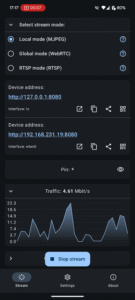
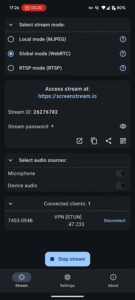
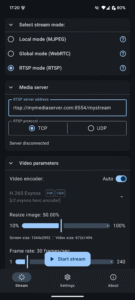
The application allows viewing the device screen in your web browser. The main
idea is to show your device screen during presentations and demos. No need of
any additional software except for this app and a web browser. No annoying ads
or pop-ups.
It uses MJPEG to encode screen images and send them through the network. So it
works with any desktop or mobile browser which supports MJPEG (Chrome, Safari,
EDGE, Firefox).
The application works via WiFi and/or 3G/LTE network. Fast and stable WiFi
recommended because of high traffic and low network delay requirement. No
Internet required, however, there must be a network connection between the
client and the device.
The number of client connections is unlimited, but be aware that each of them
requires some CPU resources and bandwidth to send data.
Application uses Android Cast feature and requires at least Android 5.0 to run.
WARNING: This is not a real time streaming app. Expected delay is at least 0.5-1
second or more on slow devices, bad WiFi or on heavy CPU load by other apps.
WARNING: This app is not designed for streaming video, especially HD video. Use
Chromecast instead.
WARNING: This app does NOT support SOUND streaming, because MJPEG does not
support sound.
WARNING: Some cell operators may block incoming connections to your device for
security reasons, so, even if the device has an IP address from a cell operator,
you may not be able to connect to the device on using this IP address.
WARNING: Some WiFi networks (mostly public/guest) block connections between its
clients for security reasons, so you may not be able to connect to the device
via WiFi. For example, a laptop and a phone in this such a WiFi network will not
be able to connect to each other.
Author:
Dmitriy Krivoruchko
License:
MIT License
Issue Tracker
Source Code
Changelog
Build Metadata
Reproducibility Status
idea is to show your device screen during presentations and demos. No need of
any additional software except for this app and a web browser. No annoying ads
or pop-ups.
It uses MJPEG to encode screen images and send them through the network. So it
works with any desktop or mobile browser which supports MJPEG (Chrome, Safari,
EDGE, Firefox).
The application works via WiFi and/or 3G/LTE network. Fast and stable WiFi
recommended because of high traffic and low network delay requirement. No
Internet required, however, there must be a network connection between the
client and the device.
The number of client connections is unlimited, but be aware that each of them
requires some CPU resources and bandwidth to send data.
Application uses Android Cast feature and requires at least Android 5.0 to run.
WARNING: This is not a real time streaming app. Expected delay is at least 0.5-1
second or more on slow devices, bad WiFi or on heavy CPU load by other apps.
WARNING: This app is not designed for streaming video, especially HD video. Use
Chromecast instead.
WARNING: This app does NOT support SOUND streaming, because MJPEG does not
support sound.
WARNING: Some cell operators may block incoming connections to your device for
security reasons, so, even if the device has an IP address from a cell operator,
you may not be able to connect to the device on using this IP address.
WARNING: Some WiFi networks (mostly public/guest) block connections between its
clients for security reasons, so you may not be able to connect to the device
via WiFi. For example, a laptop and a phone in this such a WiFi network will not
be able to connect to each other.
Author:
Dmitriy Krivoruchko
License:
MIT License
Issue Tracker
Source Code
Changelog
Build Metadata
Reproducibility Status
Download ScreenStream (f-droid version) APK
Fast, free and safe download.
APK Permissions 13
- android.permission.ACCESS_NETWORK_STATE
- android.permission.ACCESS_WIFI_STATE
- android.permission.FOREGROUND_SERVICE
- android.permission.FOREGROUND_SERVICE_MEDIA_PROJECTION
- android.permission.FOREGROUND_SERVICE_MICROPHONE
- android.permission.INTERNET
- android.permission.MODIFY_AUDIO_SETTINGS
- android.permission.POST_NOTIFICATIONS
- android.permission.RECEIVE_BOOT_COMPLETED
- android.permission.RECORD_AUDIO
- android.permission.TURN_SCREEN_ON
- android.permission.WAKE_LOCK
- info.dvkr.screenstream.DYNAMIC_RECEIVER_NOT_EXPORTED_PERMISSION
APK Verified
The cryptographic signature guarantees that the file is safe to install and was not tampered with in any way.


Frequently Asked Questions about ScreenStream (f-droid version) APK
This variant is built for devices that report `arm64-v8a, armeabi-v7a, x86, x86_64` as their primary ABI. If your device's CPU matches, this is the smallest, fastest version to install.
Yes — the APK's signature has been cryptographically verified against the publisher's signing key. The SHA-256 hash is shown in the File Information panel so you can independently confirm the file matches the original release.
Android 23 (API level 36) or newer. Older devices will refuse the install.
Install a free app like 'CPU-Z' or 'Droid Hardware Info' from the Play Store and look at the ABI / Instruction Set row. Most phones made after 2017 are arm64-v8a; if in doubt, download the universal variant.
All variants are functionally identical — same features, same version. They differ only in which CPU architectures the native code is compiled for, and (sometimes) which screen densities the included graphics target. Pick the one that matches your device for the smallest install size, or pick 'Universal' if you're unsure.