
This is the universal build of Doodle - Easy Scheduling 5.0.27. It contains native libraries for every CPU architecture (arm64-v8a, armeabi-v7a, x86, x86_64), so it installs on any Android device. The trade-off is size — it's larger than per-architecture variants. Pick this one if you're unsure which CPU your phone has, or if you plan to share the APK with multiple devices.
File size: 63.0 MB • Min Android: 23 • Target Android: 34 • Version code: 269 • Framework: React Native • Permissions: 35
Screenshots
File Information
| Package Name | com.doodle.android |
|---|---|
| Version Name | 5.0.27 |
| Version Code | 269 |
| Architecture | Universal |
| Min Android Version | Android 23 (API 34) |
| Main Activity | com.doodle.MainActivity |
| Framework | React Native |
| File Size | 62.98 MB |
| Signature (SHA1) | D5770FC88F15B5B5109F94C607A719EFA02200E7 |
| File Hash (SHA256) | f64214fb83aebf4c63457daea5f81527f40c832427d332faea04988c4d10b439 |
What's New
The Doodle mobile app is taking a break — but scheduling isn’t.
We’re temporarily pausing the Doodle app as we work on something exciting — a brand-new mobile experience that’s faster, simpler, and designed around how you schedule.
Starting July 1st 2025, the app will no longer be available in the App Store and Google Play. Until the new app launches, you can continue using Doodle on any device through the Doodle website at doodle.com. All your data is already available there — nothing is lost.
We’re temporarily pausing the Doodle app as we work on something exciting — a brand-new mobile experience that’s faster, simpler, and designed around how you schedule.
Starting July 1st 2025, the app will no longer be available in the App Store and Google Play. Until the new app launches, you can continue using Doodle on any device through the Doodle website at doodle.com. All your data is already available there — nothing is lost.
App Description
We’re just checking in to let you know that we’ve heard your concerns and we are working hard to upgrade the app and fix any existing issues.
If you’re having trouble using the app, feel free to reach out to our Support Team. They can help you solve any issues you might be having:
help.doodle.com/hc/en-us
Hello, it’s us. No, not another Adele joke. The new Doodle app.
It’s been what feels like 84 years. And while some of us may still be in lockdown, we’re opening up and launching a whole new experience with this app.
It’s sleeker, it’s easier to use. And chiefly, it works with our new product which lets you schedule anything. And save time doing it. So while we have to excuse ourselves for the long time between updates, we hope you take the time to get the new app. See you in the app.
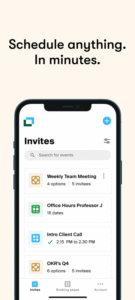
Seriously easy scheduling for any type of event—all in one app. Just pick what kind of event you want to schedule, set it up, send it to participants and let Doodle handle the rest.
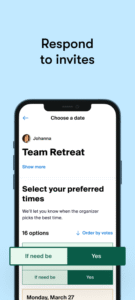
Say goodbye to all the back-and-forth and no-shows. The Doodle app lets you send times for appointments, team meetings, and even share your rolling availability. See who has responded or booked a time and have us automatically send the event details after booking. Doodle makes scheduling happen—without the hassle.
DIFFERENT WAYS TO SCHEDULE
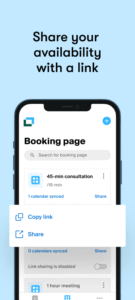
📅 Booking Page - share your availability with a link
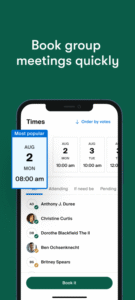
🧑🤝🧑Group poll - share times with multiple people and find which time works best for everyone.
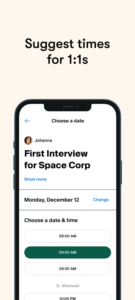
✉️ 1:1 - propose times to meet with one person and let them book what works best.
HOW IT WORKS
🆕 Set up your event and choose from Booking Page, group polls, and 1:1s.
📍 Add the details, location, and video conferencing if it's remote.
🕐 Set up your availability or add times for group polls and 1:1s.
✉️ Create your event and then send your Booking Page or invite to participants. They pick what time(s) work for them.
THE BEST FEATURES
- Group polls: The fastest way to find the right time for a meeting without having access to people’s calendars.
- 1:1s: Meet on your terms: select multiple times and let participants book what fits their schedule.
- Booking pages: Let clients, co-workers, and more book time with you instantly. You define your availability.
- No ads: Keep it professional for your participants with ad-free scheduling.
Custom branding: Delight your marketing team by putting your branding on every invite or booking page.
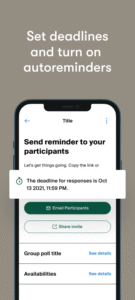
- Deadlines and reminders: Get the most responses or make your invites time-limited.
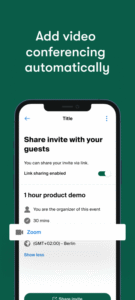
- Video conferencing links: Automatically add video conferencing to every booked remote meeting.
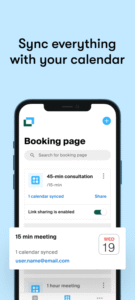
- Automatic calendar syncing: Avoid double bookings and keep your invites and booking pages always current.
HOW TO GET STARTED
- Download the app and create an account. We’ll take you to our website to do this. You can also start a trial.
- Take Doodle for a spin: Hit the create button (the + button) in the top right to create your first invite or booking page.
- Add the times or availability and details. Create then send the link to your participants.
- Is it a group poll? Make sure to close the poll after everyone has responded and we’ll email them all the details.
LOVING THE APP?
Make sure you leave a review. We’d love to hear your feedback so we can make it even better.
NEED HELP?
We’re here if something breaks or you can’t figure anything out. Head here for how to’s and to contact Support:
help.doodle.com/
If you’re having trouble using the app, feel free to reach out to our Support Team. They can help you solve any issues you might be having:
help.doodle.com/hc/en-us
Hello, it’s us. No, not another Adele joke. The new Doodle app.
It’s been what feels like 84 years. And while some of us may still be in lockdown, we’re opening up and launching a whole new experience with this app.
It’s sleeker, it’s easier to use. And chiefly, it works with our new product which lets you schedule anything. And save time doing it. So while we have to excuse ourselves for the long time between updates, we hope you take the time to get the new app. See you in the app.
Seriously easy scheduling for any type of event—all in one app. Just pick what kind of event you want to schedule, set it up, send it to participants and let Doodle handle the rest.
Say goodbye to all the back-and-forth and no-shows. The Doodle app lets you send times for appointments, team meetings, and even share your rolling availability. See who has responded or booked a time and have us automatically send the event details after booking. Doodle makes scheduling happen—without the hassle.
DIFFERENT WAYS TO SCHEDULE
📅 Booking Page - share your availability with a link
🧑🤝🧑Group poll - share times with multiple people and find which time works best for everyone.
✉️ 1:1 - propose times to meet with one person and let them book what works best.
HOW IT WORKS
🆕 Set up your event and choose from Booking Page, group polls, and 1:1s.
📍 Add the details, location, and video conferencing if it's remote.
🕐 Set up your availability or add times for group polls and 1:1s.
✉️ Create your event and then send your Booking Page or invite to participants. They pick what time(s) work for them.
THE BEST FEATURES
- Group polls: The fastest way to find the right time for a meeting without having access to people’s calendars.
- 1:1s: Meet on your terms: select multiple times and let participants book what fits their schedule.
- Booking pages: Let clients, co-workers, and more book time with you instantly. You define your availability.
- No ads: Keep it professional for your participants with ad-free scheduling.
Custom branding: Delight your marketing team by putting your branding on every invite or booking page.
- Deadlines and reminders: Get the most responses or make your invites time-limited.
- Video conferencing links: Automatically add video conferencing to every booked remote meeting.
- Automatic calendar syncing: Avoid double bookings and keep your invites and booking pages always current.
HOW TO GET STARTED
- Download the app and create an account. We’ll take you to our website to do this. You can also start a trial.
- Take Doodle for a spin: Hit the create button (the + button) in the top right to create your first invite or booking page.
- Add the times or availability and details. Create then send the link to your participants.
- Is it a group poll? Make sure to close the poll after everyone has responded and we’ll email them all the details.
LOVING THE APP?
Make sure you leave a review. We’d love to hear your feedback so we can make it even better.
NEED HELP?
We’re here if something breaks or you can’t figure anything out. Head here for how to’s and to contact Support:
help.doodle.com/
Download Doodle - Easy Scheduling APK
Fast, free and safe download.
APK Permissions 35
- android.permission.ACCESS_FINE_LOCATION
- android.permission.ACCESS_NETWORK_STATE
- android.permission.ACCESS_WIFI_STATE
- android.permission.DOWNLOAD_WITHOUT_NOTIFICATION
- android.permission.FOREGROUND_SERVICE
- android.permission.INTERNET
- android.permission.READ_APP_BADGE
- android.permission.READ_CALENDAR
- android.permission.READ_EXTERNAL_STORAGE
- android.permission.RECEIVE_BOOT_COMPLETED
- android.permission.SYSTEM_ALERT_WINDOW
- android.permission.VIBRATE
- android.permission.WAKE_LOCK
- android.permission.WRITE_CALENDAR
- android.permission.WRITE_EXTERNAL_STORAGE
- com.anddoes.launcher.permission.UPDATE_COUNT
- com.android.vending.BILLING
- com.doodle.android.permission.C2D_MESSAGE
- com.google.android.c2dm.permission.RECEIVE
- com.google.android.finsky.permission.BIND_GET_INSTALL_REFERRER_SERVICE
- com.google.android.gms.permission.AD_ID
- com.htc.launcher.permission.READ_SETTINGS
- com.htc.launcher.permission.UPDATE_SHORTCUT
- com.huawei.android.launcher.permission.CHANGE_BADGE
- com.huawei.android.launcher.permission.READ_SETTINGS
- com.huawei.android.launcher.permission.WRITE_SETTINGS
- com.majeur.launcher.permission.UPDATE_BADGE
- com.oppo.launcher.permission.READ_SETTINGS
- com.oppo.launcher.permission.WRITE_SETTINGS
- com.sec.android.provider.badge.permission.READ
- com.sec.android.provider.badge.permission.WRITE
- com.sonyericsson.home.permission.BROADCAST_BADGE
- com.sonymobile.home.permission.PROVIDER_INSERT_BADGE
- me.everything.badger.permission.BADGE_COUNT_READ
- me.everything.badger.permission.BADGE_COUNT_WRITE
APK Verified
The cryptographic signature guarantees that the file is safe to install and was not tampered with in any way.
Similar in Productivity


Frequently Asked Questions about Doodle - Easy Scheduling APK
This is the universal variant — a single APK that contains native libraries for every CPU architecture. It installs on any Android device but is larger than per-architecture variants.
Yes — the APK's signature has been cryptographically verified against the publisher's signing key. The SHA-256 hash is shown in the File Information panel so you can independently confirm the file matches the original release.
Android 23 (API level 34) or newer. Older devices will refuse the install.
Install a free app like 'CPU-Z' or 'Droid Hardware Info' from the Play Store and look at the ABI / Instruction Set row. Most phones made after 2017 are arm64-v8a; if in doubt, download the universal variant.
All variants are functionally identical — same features, same version. They differ only in which CPU architectures the native code is compiled for, and (sometimes) which screen densities the included graphics target. Pick the one that matches your device for the smallest install size, or pick 'Universal' if you're unsure.