
This is the universal build of Blitzer.de 3.9.3. It contains native libraries for every CPU architecture (arm64-v8a, armeabi-v7a, x86, x86_64), so it installs on any Android device. The trade-off is size — it's larger than per-architecture variants. Pick this one if you're unsure which CPU your phone has, or if you plan to share the APK with multiple devices.
File size: 19.5 MB • Min Android: 26 • Target Android: 34 • Version code: 135 • Framework: Native (Java/Kotlin) • Permissions: 22
Screenshots
File Information
| Package Name | de.blitzer |
|---|---|
| Version Name | 3.9.3 |
| Version Code | 135 |
| Architecture | Universal |
| Min Android Version | Android 26 (API 34) |
| Main Activity | de.blitzer.activity.SplashScreen |
| Framework | Native (Java/Kotlin) |
| File Size | 19.51 MB |
| Signature (SHA1) | 1782946008BEA985CEC2A2C38631FAF8A18F186B |
| File Hash (SHA256) | 85b4d607ce5f5168fae25636ffb1dcef0b0820a5b0829e45ccfc3e706f2760f9 |
What's New
Optimized permission requests
Optimized Android 14 support
Optimized map usage
Updated database 10.24
Optimized Android 14 support
Optimized map usage
Updated database 10.24
App Description
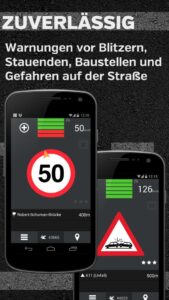
Blitzer.de turns your smartphone into the perfect speed camera alert system! Receive mobile speedcam alerts in real time and be warned against all fixed speed cameras worldwide.
★★★★★ NEW: Blitzer.de PLUS available - ADVANTAGES ★★★★★
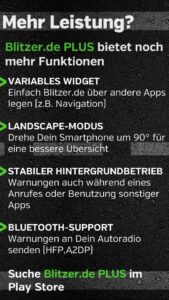
[✔]Landscape mode, simply turn your smartphone 90°
[✔]Even faster updates in case of software bugs
[✔]Support for Widget and Multi-Windows
[✔]New features will always be available in the PLUS version first
★★★★★ Look for Blitzer.de PLUS in the MARKET ★★★★★
Install Blitzer.de for free now and be part of the large community of over 5 million participants all over the world.
Review:
goo.gl/8nFtC
★★★★★ OVERVIEW OF FUNCTIONS ★★★★★
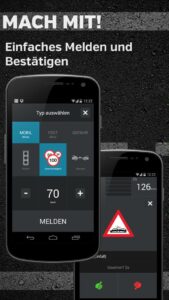
+ Real time alerts of mobile radar traps
+ More than 47,000 fixed speedcams worldwide from SCDB.info
+ Directional alerts for all fixed speedcams
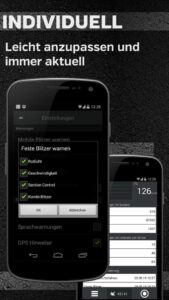
+ Automatic updates every 5 minutes
+ Visual and acoustic warnings
+ Indication of device type and of legal speed limit
+ Simple alert function
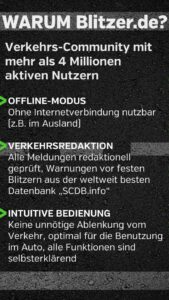
+ Online/offline mode
+ Locations of fixed speedcams checked on site
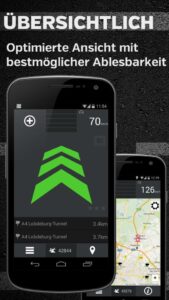
+ Listening and radar view
+ Distance and direction of speedcam indicated
System requirements:
- Android operating system 2.x or higher
- Internet access for online updates (flat rate recommended)
- Internal GPS
★★★★★ NEW: Blitzer.de PLUS available - ADVANTAGES ★★★★★
[✔]Landscape mode, simply turn your smartphone 90°
[✔]Even faster updates in case of software bugs
[✔]Support for Widget and Multi-Windows
[✔]New features will always be available in the PLUS version first
★★★★★ Look for Blitzer.de PLUS in the MARKET ★★★★★
Install Blitzer.de for free now and be part of the large community of over 5 million participants all over the world.
Review:
goo.gl/8nFtC
★★★★★ OVERVIEW OF FUNCTIONS ★★★★★
+ Real time alerts of mobile radar traps
+ More than 47,000 fixed speedcams worldwide from SCDB.info
+ Directional alerts for all fixed speedcams
+ Automatic updates every 5 minutes
+ Visual and acoustic warnings
+ Indication of device type and of legal speed limit
+ Simple alert function
+ Online/offline mode
+ Locations of fixed speedcams checked on site
+ Listening and radar view
+ Distance and direction of speedcam indicated
System requirements:
- Android operating system 2.x or higher
- Internet access for online updates (flat rate recommended)
- Internal GPS
Download Blitzer.de APK
Fast, free and safe download.
APK Permissions 22
- android.permission.ACCESS_COARSE_LOCATION
- android.permission.ACCESS_FINE_LOCATION
- android.permission.ACCESS_NETWORK_STATE
- android.permission.ACCESS_WIFI_STATE
- android.permission.BLUETOOTH
- android.permission.BLUETOOTH_ADMIN
- android.permission.BLUETOOTH_CONNECT
- android.permission.BLUETOOTH_SCAN
- android.permission.BROADCAST_STICKY
- android.permission.DISABLE_KEYGUARD
- android.permission.FOREGROUND_SERVICE
- android.permission.FOREGROUND_SERVICE_LOCATION
- android.permission.INTERNET
- android.permission.MODIFY_AUDIO_SETTINGS
- android.permission.POST_NOTIFICATIONS
- android.permission.READ_PHONE_STATE
- android.permission.RECEIVE_BOOT_COMPLETED
- android.permission.SYSTEM_ALERT_WINDOW
- android.permission.VIBRATE
- android.permission.WAKE_LOCK
- com.android.launcher.permission.INSTALL_SHORTCUT
- de.blitzer.DYNAMIC_RECEIVER_NOT_EXPORTED_PERMISSION
APK Verified
The cryptographic signature guarantees that the file is safe to install and was not tampered with in any way.
Similar in Maps & Navigation


More by Eifrig Media GmbH

Frequently Asked Questions about Blitzer.de APK
This is the universal variant — a single APK that contains native libraries for every CPU architecture. It installs on any Android device but is larger than per-architecture variants.
Yes — the APK's signature has been cryptographically verified against the publisher's signing key. The SHA-256 hash is shown in the File Information panel so you can independently confirm the file matches the original release.
Android 26 (API level 34) or newer. Older devices will refuse the install.
Install a free app like 'CPU-Z' or 'Droid Hardware Info' from the Play Store and look at the ABI / Instruction Set row. Most phones made after 2017 are arm64-v8a; if in doubt, download the universal variant.
All variants are functionally identical — same features, same version. They differ only in which CPU architectures the native code is compiled for, and (sometimes) which screen densities the included graphics target. Pick the one that matches your device for the smallest install size, or pick 'Universal' if you're unsure.