
Download All Email Access: Mail Inbox APK 3.1.0.1818 Universal · Android 28+
Download APK
Verified Safe
This is the universal build of All Email Access: Mail Inbox 3.1.0.1818. It contains native libraries for every CPU architecture (arm64-v8a, armeabi-v7a, x86, x86_64), so it installs on any Android device. The trade-off is size — it's larger than per-architecture variants. Pick this one if you're unsure which CPU your phone has, or if you plan to share the APK with multiple devices.
File size: 38.4 MB • Min Android: 28 • Target Android: 35 • Version code: 1818 • Framework: Native (Java/Kotlin) • Permissions: 39
Screenshots
File Information
| Package Name | info.myapp.allemailaccess |
|---|---|
| Version Name | 3.1.0.1818 |
| Version Code | 1818 |
| Architecture | Universal |
| Min Android Version | Android 28 (API 35) |
| Main Activity | info.myapp.allemailaccess.presentation.splash.ui.SplashActivity |
| Framework | Native (Java/Kotlin) |
| File Size | 38.42 MB |
| Signature (SHA1) | A7F64829DE2874C3E41E26A1E668974C52959002 |
| File Hash (SHA256) | 06b5fa587f0c063ef5474c63e57cfa34db94e3e74d5a79540a9819b37b66a9ae |
What's New
From version
2.16.1.1784
:
Thank you for using All Email Access with call screening. We regularly update this app to optimize performance, add new features and integrate improvements based on your suggestions. We hope you continue to enjoy using this app.
2.16.1.1784
:
Thank you for using All Email Access with call screening. We regularly update this app to optimize performance, add new features and integrate improvements based on your suggestions. We hope you continue to enjoy using this app.
App Description
All Email Access is a mail app for Android that allows you to
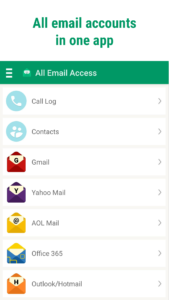
connect to your multiple email accounts from a single mail app
. Finally, you can avoid switching between multiple email accounts and better manage your mail.
Mail App Features
📩
All Email Accounts in One Place:
Manage all your mail in one app.
📍
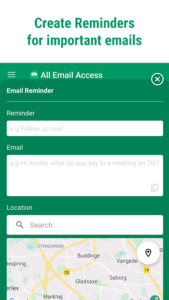
Email Reminder:
Helps you remember to send important emails when you arrive at locations such as work.
📧
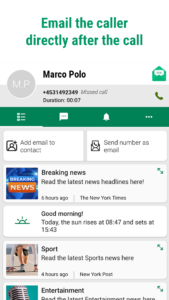
Email after calls:
A useful call information screen allows instant access to send emails to the caller when you've finished the call.
📱
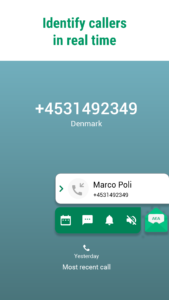
Smart Caller ID:
Know who is calling you to avoid Spam calls.
📁
Email Folder:
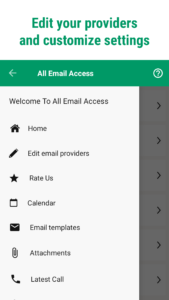
See all your downloaded email attachments clearly in one place, without the need to search for them on your device.
📅
Email Calendar:
Make new entries directly from the app.
🤝
Dedicated customer support:
Our dedicated customer support team will ensure you have great functionality from amazing features.
All Your Emails In One Mail App
In today's fast-paced digital world, email has become an integral part of our personal and professional lives. However, managing the ever-increasing volume of messages, email accounts can quickly become overwhelming and lead to inefficiency. That's where All Email Access comes in. Our user-friendly mail management app offers a range of features designed to streamline your email experience and maximize productivity. We offer our users
fast mail login
access and better ways to
manage their inbox
. This easy-to-use email app simplifies email login and allows you to manage various mailboxes with a single click. Now you don’t have to have to switch between multiple mail apps on your phone. With All Email Access, you only need one app, increasing your productivity and avoiding missing out on important mail that needs a response.
Unique Mail Functions
All Access Email uses Caller ID. It creates a powerful link between your mailbox and phone calls, identifying callers, and displaying e-mail options directly from the call information screen. You can easily and instantly send emails to the caller’s email address or access your mailbox directly after the call ends.
Easy Mail Management
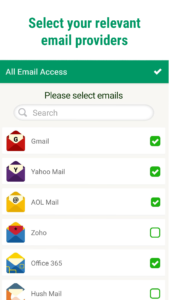
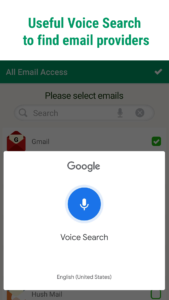
Our app seamlessly integrates multiple email accounts, whether they are from Gmail, Outlook, Yahoo, or other popular email providers. With All Email Access, you can view, compose, and reply to emails from all your accounts within a single intuitive interface. What sets All Email Access apart is its simplicity, We've designed our app with simplicity in mind making it possible for almost anyone to use it to their benefit. The app is completely free to use which makes it perfect to try out and test. Finding specific emails is a breeze with our app's simple search functionality. You can search by sender, subject, keywords, or date range to quickly locate the mail you need. This makes it convenient to filter through newsletters, notifications, and other recurring emails. Gone are the days of sifting through countless emails to locate crucial pieces of information.
All Email Access - Conclusion
All Email Access: Mail Inbox is a simple yet useful mobile app for Android that simplifies the way you manage your emails. With its intuitive interface, unified mailbox, and useful features, it provides a seamless and convenient email experience. Whether you're a busy professional or a casual email user, this app streamlines your email management tasks, saving you time and effort. Stay connected, organized, and in control of your emails with All Email Access: Mail Inbox, the ultimate email companion for Android.
connect to your multiple email accounts from a single mail app
. Finally, you can avoid switching between multiple email accounts and better manage your mail.
Mail App Features
📩
All Email Accounts in One Place:
Manage all your mail in one app.
📍
Email Reminder:
Helps you remember to send important emails when you arrive at locations such as work.
📧
Email after calls:
A useful call information screen allows instant access to send emails to the caller when you've finished the call.
📱
Smart Caller ID:
Know who is calling you to avoid Spam calls.
📁
Email Folder:
See all your downloaded email attachments clearly in one place, without the need to search for them on your device.
📅
Email Calendar:
Make new entries directly from the app.
🤝
Dedicated customer support:
Our dedicated customer support team will ensure you have great functionality from amazing features.
All Your Emails In One Mail App
In today's fast-paced digital world, email has become an integral part of our personal and professional lives. However, managing the ever-increasing volume of messages, email accounts can quickly become overwhelming and lead to inefficiency. That's where All Email Access comes in. Our user-friendly mail management app offers a range of features designed to streamline your email experience and maximize productivity. We offer our users
fast mail login
access and better ways to
manage their inbox
. This easy-to-use email app simplifies email login and allows you to manage various mailboxes with a single click. Now you don’t have to have to switch between multiple mail apps on your phone. With All Email Access, you only need one app, increasing your productivity and avoiding missing out on important mail that needs a response.
Unique Mail Functions
All Access Email uses Caller ID. It creates a powerful link between your mailbox and phone calls, identifying callers, and displaying e-mail options directly from the call information screen. You can easily and instantly send emails to the caller’s email address or access your mailbox directly after the call ends.
Easy Mail Management
Our app seamlessly integrates multiple email accounts, whether they are from Gmail, Outlook, Yahoo, or other popular email providers. With All Email Access, you can view, compose, and reply to emails from all your accounts within a single intuitive interface. What sets All Email Access apart is its simplicity, We've designed our app with simplicity in mind making it possible for almost anyone to use it to their benefit. The app is completely free to use which makes it perfect to try out and test. Finding specific emails is a breeze with our app's simple search functionality. You can search by sender, subject, keywords, or date range to quickly locate the mail you need. This makes it convenient to filter through newsletters, notifications, and other recurring emails. Gone are the days of sifting through countless emails to locate crucial pieces of information.
All Email Access - Conclusion
All Email Access: Mail Inbox is a simple yet useful mobile app for Android that simplifies the way you manage your emails. With its intuitive interface, unified mailbox, and useful features, it provides a seamless and convenient email experience. Whether you're a busy professional or a casual email user, this app streamlines your email management tasks, saving you time and effort. Stay connected, organized, and in control of your emails with All Email Access: Mail Inbox, the ultimate email companion for Android.
Download All Email Access: Mail Inbox APK
Fast, free and safe download.
APK Permissions 39
- android.permission.ACCESS_ADSERVICES_AD_ID
- android.permission.ACCESS_ADSERVICES_ATTRIBUTION
- android.permission.ACCESS_ADSERVICES_CUSTOM_AUDIENCE
- android.permission.ACCESS_ADSERVICES_TOPICS
- android.permission.ACCESS_BACKGROUND_LOCATION
- android.permission.ACCESS_COARSE_LOCATION
- android.permission.ACCESS_FINE_LOCATION
- android.permission.ACCESS_NETWORK_STATE
- android.permission.ACCESS_NOTIFICATION_POLICY
- android.permission.ACCESS_WIFI_STATE
- android.permission.ANSWER_PHONE_CALLS
- android.permission.BATTERY_STATS
- android.permission.CALL_PHONE
- android.permission.FOREGROUND_SERVICE
- android.permission.FOREGROUND_SERVICE_PHONE_CALL
- android.permission.INTERNET
- android.permission.MANAGE_OWN_CALLS
- android.permission.MODIFY_AUDIO_SETTINGS
- android.permission.POST_NOTIFICATIONS
- android.permission.READ_BASIC_PHONE_STATE
- android.permission.READ_CALL_LOG
- android.permission.READ_CONTACTS
- android.permission.READ_EXTERNAL_STORAGE
- android.permission.READ_PHONE_NUMBERS
- android.permission.READ_PHONE_STATE
- android.permission.RECEIVE_BOOT_COMPLETED
- android.permission.SYSTEM_ALERT_WINDOW
- android.permission.USE_FULL_SCREEN_INTENT
- android.permission.VIBRATE
- android.permission.WAKE_LOCK
- android.permission.WRITE_CONTACTS
- android.permission.WRITE_EXTERNAL_STORAGE
- com.android.vending.BILLING
- com.applovin.array.apphub.permission.BIND_APPHUB_SERVICE
- com.google.android.c2dm.permission.RECEIVE
- com.google.android.finsky.permission.BIND_GET_INSTALL_REFERRER_SERVICE
- com.google.android.gms.permission.AD_ID
- info.myapp.allemailaccess.assistant.RECEIVE_BROADCAST_PERMISSION
- info.myapp.allemailaccess.DYNAMIC_RECEIVER_NOT_EXPORTED_PERMISSION
APK Verified
The cryptographic signature guarantees that the file is safe to install and was not tampered with in any way.


Frequently Asked Questions about All Email Access: Mail Inbox APK
This is the universal variant — a single APK that contains native libraries for every CPU architecture. It installs on any Android device but is larger than per-architecture variants.
Yes — the APK's signature has been cryptographically verified against the publisher's signing key. The SHA-256 hash is shown in the File Information panel so you can independently confirm the file matches the original release.
Android 28 (API level 35) or newer. Older devices will refuse the install.
Install a free app like 'CPU-Z' or 'Droid Hardware Info' from the Play Store and look at the ABI / Instruction Set row. Most phones made after 2017 are arm64-v8a; if in doubt, download the universal variant.
All variants are functionally identical — same features, same version. They differ only in which CPU architectures the native code is compiled for, and (sometimes) which screen densities the included graphics target. Pick the one that matches your device for the smallest install size, or pick 'Universal' if you're unsure.