
This is the universal build of Ember 4.5.7. It contains native libraries for every CPU architecture (arm64-v8a, armeabi-v7a, x86, x86_64), so it installs on any Android device. The trade-off is size — it's larger than per-architecture variants. Pick this one if you're unsure which CPU your phone has, or if you plan to share the APK with multiple devices.
File size: 33.3 MB • Min Android: 29 • Target Android: 35 • Version code: 215 • Framework: Native (Java/Kotlin) • Permissions: 21
Screenshots

File Information
| Package Name | com.embertech |
|---|---|
| Version Name | 4.5.7 |
| Version Code | 215 |
| Architecture | Universal |
| Min Android Version | Android 29 (API 35) |
| Main Activity | com.embertech.MainActivity |
| Framework | Native (Java/Kotlin) |
| File Size | 33.27 MB |
| Signature (SHA1) | C6F5CF05B793D4760D170FA5CB5050014E82615C |
| File Hash (SHA256) | 93f5804f26dc1c539e14da0961afc9eaeb30089841ef54190d3f5e5aa97b58fd |
What's New
This version contains bug fixes and performance improvements
App Description
At Ember®, we use temperature control to change the world in ordinary (and extraordinary) ways. With an Ember Temperature Control Smart Mug and the Ember app, you can transform your mornings by making hot beverages set to your chosen temperature an everyday reality.
Our redesigned Ember app is simple, easy to use, and customizable. Whether you are a first-time user or a long-time customer, get ready for a whole new temperature control experience. The Ember app seamlessly pairs with your Ember products to precisely adjust your favorite hot drinks to your preferred drinking temperature, saves temperature presets, offers recipes, sends notifications when your desired drinking temperature has been reached, and more.
Ember App Features:
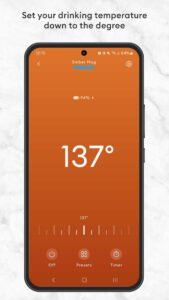
- Control the temperature of your beverage down to the degree
- Use your previous temperature setting for a set-it-and-forget-it beverage experience
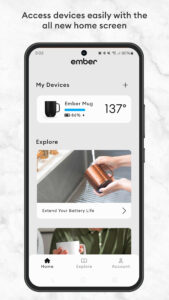
- Manage unlimited paired mugs on an all-new Ember home screen
- Find recipes and blogs you can save and share with friends and family in the new Explore section
- Receive notifications when your preferred temperature has been reached, or your battery is low
- Customize presets for multiple beverages and engage timers
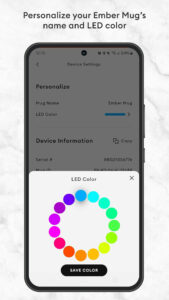
- Personalize your mugs with names and adjust the color of the smart LED
- Easily switch between °C/°F and control sounds and haptic feedback in the redesigned Account section
Our redesigned Ember app is simple, easy to use, and customizable. Whether you are a first-time user or a long-time customer, get ready for a whole new temperature control experience. The Ember app seamlessly pairs with your Ember products to precisely adjust your favorite hot drinks to your preferred drinking temperature, saves temperature presets, offers recipes, sends notifications when your desired drinking temperature has been reached, and more.
Ember App Features:
- Control the temperature of your beverage down to the degree
- Use your previous temperature setting for a set-it-and-forget-it beverage experience
- Manage unlimited paired mugs on an all-new Ember home screen
- Find recipes and blogs you can save and share with friends and family in the new Explore section
- Receive notifications when your preferred temperature has been reached, or your battery is low
- Customize presets for multiple beverages and engage timers
- Personalize your mugs with names and adjust the color of the smart LED
- Easily switch between °C/°F and control sounds and haptic feedback in the redesigned Account section
Download Ember APK
Fast, free and safe download.
APK Permissions 21
- android.permission.ACCESS_ADSERVICES_AD_ID
- android.permission.ACCESS_ADSERVICES_ATTRIBUTION
- android.permission.ACCESS_NETWORK_STATE
- android.permission.BLUETOOTH
- android.permission.BLUETOOTH_ADMIN
- android.permission.BLUETOOTH_CONNECT
- android.permission.BLUETOOTH_SCAN
- android.permission.FOREGROUND_SERVICE
- android.permission.FOREGROUND_SERVICE_CONNECTED_DEVICE
- android.permission.INTERNET
- android.permission.POST_NOTIFICATIONS
- android.permission.SCHEDULE_EXACT_ALARM
- android.permission.USE_EXACT_ALARM
- android.permission.VIBRATE
- android.permission.WAKE_LOCK
- com.android.vending.CHECK_LICENSE
- com.embertech.DYNAMIC_RECEIVER_NOT_EXPORTED_PERMISSION
- com.google.android.c2dm.permission.RECEIVE
- com.google.android.finsky.permission.BIND_GET_INSTALL_REFERRER_SERVICE
- com.google.android.gms.permission.AD_ID
- com.google.android.providers.gsf.permission.READ_GSERVICES
APK Verified
The cryptographic signature guarantees that the file is safe to install and was not tampered with in any way.


Frequently Asked Questions about Ember APK
This is the universal variant — a single APK that contains native libraries for every CPU architecture. It installs on any Android device but is larger than per-architecture variants.
Yes — the APK's signature has been cryptographically verified against the publisher's signing key. The SHA-256 hash is shown in the File Information panel so you can independently confirm the file matches the original release.
Android 29 (API level 35) or newer. Older devices will refuse the install.
Install a free app like 'CPU-Z' or 'Droid Hardware Info' from the Play Store and look at the ABI / Instruction Set row. Most phones made after 2017 are arm64-v8a; if in doubt, download the universal variant.
All variants are functionally identical — same features, same version. They differ only in which CPU architectures the native code is compiled for, and (sometimes) which screen densities the included graphics target. Pick the one that matches your device for the smallest install size, or pick 'Universal' if you're unsure.