
This is the universal build of MemeOS Enhancer: for HyperOS 3.3.3. It contains native libraries for every CPU architecture (arm64-v8a, armeabi-v7a, x86, x86_64), so it installs on any Android device. The trade-off is size — it's larger than per-architecture variants. Pick this one if you're unsure which CPU your phone has, or if you plan to share the APK with multiple devices.
File size: 53.1 MB • Min Android: 24 • Target Android: 36 • Version code: 125 • Framework: Native (Java/Kotlin) • Permissions: 36
Screenshots
File Information
| Package Name | en.hyperosdownloader |
|---|---|
| Version Name | 3.3.3 |
| Version Code | 125 |
| Architecture | Universal |
| Min Android Version | Android 24 (API 36) |
| Main Activity | en.hyperosdownloader.MainActivity |
| Framework | Native (Java/Kotlin) |
| File Size | 53.07 MB |
| Signature (SHA1) | CD83569DDF81BE4115339C736D7A7E08E62B09BF |
| File Hash (SHA256) | af11894bfbce7cda3dd0dcfc103289425c2ec34f018925d9652037b8d0f98877 |
What's New
- Bug fixes
App Description
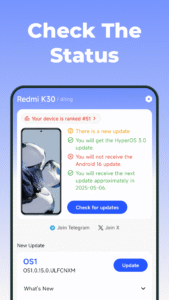
Want to find your version? Look no further. Our app offers a simple solution by presenting your OS version in seconds. With a sleek interface and fast processing, it puts all the necessary details at your fingertips, allowing you to effortlessly stay informed about your device's software status.
Features
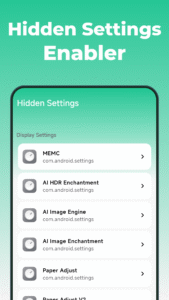
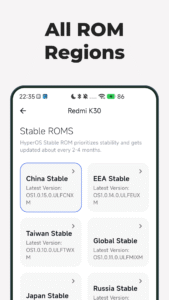
🪄 First-launch setup wizard: auto-detects correct device/method & allows configuring privacy options
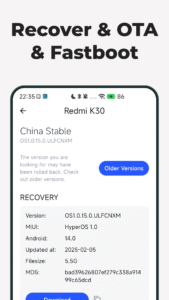
📝 View important info: changelog & device/OS versions (including security patch)
📖 Fully transparent: check filename & MD5 checksums
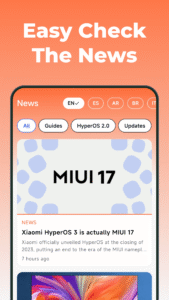
📰 High-quality news articles: cover a variety of topics about Mi.
☀️ Themes: Light, Dark, System, Auto
♿ Fully accessible: professionally-crafted design (adhering to WCAG 2.0), support for screen readers
There is no MemeUI. It reflects our imagination.
Remove ads button - Subscription details:
Subscription may be canceled at any time from the Play Store Settings. All prices include applicable local sales taxes. Payment will be charged to Play Store Account at confirmation of purchase. Subscription automatically renews unless auto-renew is turned off at least 24-hours before the end of the current period and identify the cost of the renewal. Subscription may the managed by the user and auto-renewal may be turned off by going to the user's Account Settings after purchase. If a user cancels a subscription purchased from an app on Google Play, Google policy is that the user will not receive a refund for the current billing period, but will continue to receive their subscription content for the remainder of the current billing period, regardless of the cancellation date. The user's cancellation goes into effect after the current billing period has passed.
Features
🪄 First-launch setup wizard: auto-detects correct device/method & allows configuring privacy options
📝 View important info: changelog & device/OS versions (including security patch)
📖 Fully transparent: check filename & MD5 checksums
📰 High-quality news articles: cover a variety of topics about Mi.
☀️ Themes: Light, Dark, System, Auto
♿ Fully accessible: professionally-crafted design (adhering to WCAG 2.0), support for screen readers
There is no MemeUI. It reflects our imagination.
Remove ads button - Subscription details:
Subscription may be canceled at any time from the Play Store Settings. All prices include applicable local sales taxes. Payment will be charged to Play Store Account at confirmation of purchase. Subscription automatically renews unless auto-renew is turned off at least 24-hours before the end of the current period and identify the cost of the renewal. Subscription may the managed by the user and auto-renewal may be turned off by going to the user's Account Settings after purchase. If a user cancels a subscription purchased from an app on Google Play, Google policy is that the user will not receive a refund for the current billing period, but will continue to receive their subscription content for the remainder of the current billing period, regardless of the cancellation date. The user's cancellation goes into effect after the current billing period has passed.
Download MemeOS Enhancer: for HyperOS APK
Fast, free and safe download.
APK Permissions 36
- android.permission.ACCESS_ADSERVICES_AD_ID
- android.permission.ACCESS_ADSERVICES_ATTRIBUTION
- android.permission.ACCESS_ADSERVICES_TOPICS
- android.permission.ACCESS_NETWORK_STATE
- android.permission.FOREGROUND_SERVICE
- android.permission.INTERNET
- android.permission.POST_NOTIFICATIONS
- android.permission.QUERY_ALL_PACKAGES
- android.permission.READ_APP_BADGE
- android.permission.REQUEST_DELETE_PACKAGES
- android.permission.USE_BIOMETRIC
- android.permission.USE_FINGERPRINT
- android.permission.vending.BILLING
- android.permission.VIBRATE
- android.permission.WAKE_LOCK
- com.anddoes.launcher.permission.UPDATE_COUNT
- com.android.vending.BILLING
- com.google.android.c2dm.permission.RECEIVE
- com.google.android.gms.permission.AD_ID
- com.google.android.providers.gsf.permission.READ_GSERVICES
- com.htc.launcher.permission.READ_SETTINGS
- com.htc.launcher.permission.UPDATE_SHORTCUT
- com.huawei.android.launcher.permission.CHANGE_BADGE
- com.huawei.android.launcher.permission.READ_SETTINGS
- com.huawei.android.launcher.permission.WRITE_SETTINGS
- com.majeur.launcher.permission.UPDATE_BADGE
- com.oppo.launcher.permission.READ_SETTINGS
- com.oppo.launcher.permission.WRITE_SETTINGS
- com.sec.android.provider.badge.permission.READ
- com.sec.android.provider.badge.permission.WRITE
- com.sonyericsson.home.permission.BROADCAST_BADGE
- com.sonymobile.home.permission.PROVIDER_INSERT_BADGE
- en.hyperosdownloader.DYNAMIC_RECEIVER_NOT_EXPORTED_PERMISSION
- en.hyperosdownloader.permission.C2D_MESSAGE
- me.everything.badger.permission.BADGE_COUNT_READ
- me.everything.badger.permission.BADGE_COUNT_WRITE
APK Verified
The cryptographic signature guarantees that the file is safe to install and was not tampered with in any way.


Frequently Asked Questions about MemeOS Enhancer: for HyperOS APK
This is the universal variant — a single APK that contains native libraries for every CPU architecture. It installs on any Android device but is larger than per-architecture variants.
Yes — the APK's signature has been cryptographically verified against the publisher's signing key. The SHA-256 hash is shown in the File Information panel so you can independently confirm the file matches the original release.
Android 24 (API level 36) or newer. Older devices will refuse the install.
Install a free app like 'CPU-Z' or 'Droid Hardware Info' from the Play Store and look at the ABI / Instruction Set row. Most phones made after 2017 are arm64-v8a; if in doubt, download the universal variant.
All variants are functionally identical — same features, same version. They differ only in which CPU architectures the native code is compiled for, and (sometimes) which screen densities the included graphics target. Pick the one that matches your device for the smallest install size, or pick 'Universal' if you're unsure.