
Download Fotor–AI Photo Editor & Filter APK 8.0.4.1 Universal · Android 24+
Download APK
Verified Safe
This is the universal build of Fotor–AI Photo Editor & Filter 8.0.4.1. It contains native libraries for every CPU architecture (arm64-v8a, armeabi-v7a, x86, x86_64), so it installs on any Android device. The trade-off is size — it's larger than per-architecture variants. Pick this one if you're unsure which CPU your phone has, or if you plan to share the APK with multiple devices.
File size: 205.3 MB • Min Android: 24 • Target Android: 35 • Version code: 1047 • Framework: React Native • Permissions: 30
Screenshots



File Information
| Package Name | com.everimaging.photoeffectstudio |
|---|---|
| Version Name | 8.0.4.1 |
| Version Code | 1047 |
| Architecture | Universal |
| Min Android Version | Android 24 (API 35) |
| Main Activity | com.everimaging.fotor.SplashActivity |
| Framework | React Native |
| File Size | 205.26 MB |
| Signature (SHA1) | 150E7333E49F6D31074A15F23689D7924404CE87 |
| File Hash (SHA256) | 75046cde2b9ecf1a744836ba852cd1cac5d0385e9295e2898bff4fb6dd53d4df |
What's New
Feature Optimization:
* Fotor Agent Sisi now supports posting to the community!
* Fix some minor bugs;
* Optimize user experience;
If you need help or have any suggestions, please click "Feedback" in the "Profile" in the App to tell us, and we will reply to you as soon as possible.
* Fotor Agent Sisi now supports posting to the community!
* Fix some minor bugs;
* Optimize user experience;
If you need help or have any suggestions, please click "Feedback" in the "Profile" in the App to tell us, and we will reply to you as soon as possible.
App Description
Nano Banana – Bring Your Ideas to Life
With Nano Banana, turn your imagination into stunning visuals using text or image prompts. Nano Banana leverages Gemini 2.5 Flash Image AI to generate sharp, context-aware, lifelike images for both image-to-image and text-to-image creation. Experience natural language photo editing and explore a new way to generate and transform images effortlessly.
Photo editing used to be a task. Now it's just a talk.
With Fotor, editing is easier than ever.
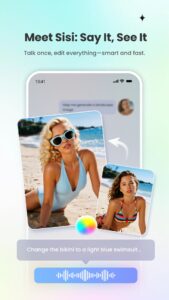
Fotor is your all-in-one AI photo editing toolbox, now featuring the new AI Agent. Just upload a photo and say or type what you want—Fotor's smart Agent understands your commands and applies multiple edits at once, saving you time and effort.
Whether you're a creator, a photo enthusiast, or just having fun, Fotor makes editing smarter, faster, and more creative than ever.
In the Fotor App, you can:
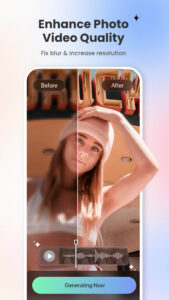
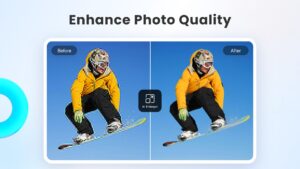
‒ Use the AI Photo Enhancer to instantly clarify blurry photos. Fix grainy, pixelated, and low-resolution images instantly with this powerful tool.
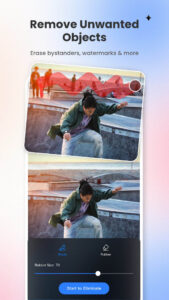
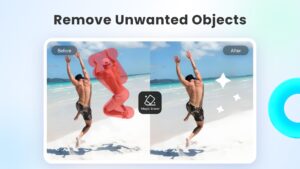
‒ Effortlessly remove unwanted elements from photos and videos—like bystanders, watermarks, or buildings—using the Magic Eraser for photos and Video Eraser for videos, all without sacrificing quality. Perfect for anyone with no editing experience.
‒ Use the BG Remover to extract subjects from your images with one click, allowing you to replace the background and create highly personalized photos. The AI background eraser makes it easy to achieve professional-looking results.
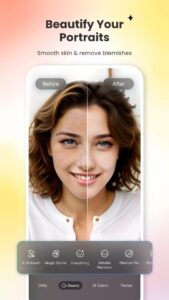
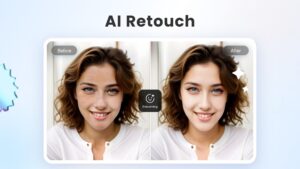
‒ Use AI Retouch to achieve flawless skin. Enjoy natural and delicate skin smoothing and blemish removal to effortlessly create a refined appearance.
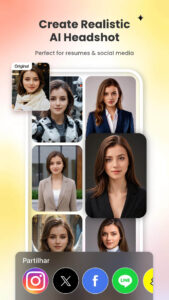
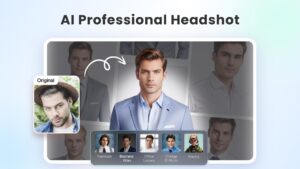
‒ Use the AI Headshot Generator to create PFPs and avatars for LinkedIn and other social media platforms. The headshot generator ensures high-quality results that rival professional studios.
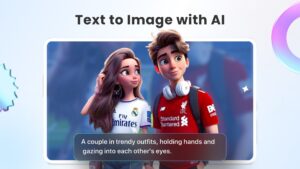
‒ Turn text into stunning images! Just describe what you want, like “a magician baking bread in the kitchen” or “Spider-Man at a bar,” then choose a style, and transform your ideas into reality in seconds.
‒ Instantly convert your text prompts into videos with an AI video generator, creating studio-quality videos without any watermarks. Just enter your text or upload an image, choose a style, and get a polished video.
‒ Curious about what your future baby with your partner might look like? Just try our Baby Generator, and let AI show you the results.
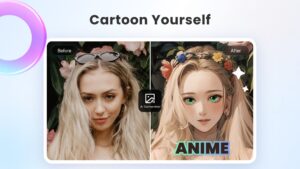
‒ Use trendy 3D Cartoon and Ghibli Anime AI art effects to easily transform your selfies into vibrant cartoon comics.
Explore more features of Fotor and unleash your creativity with this AI photo editor.
AI Tools:
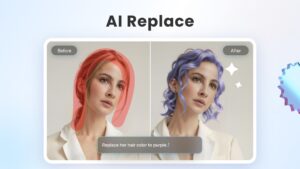
‒ Instantly change outfits, hairstyles, and colors with AI Replace to find your best style.
‒ Extend photo subjects and backgrounds with AI Expand to fit different sizes and achieve a balanced effect.
‒ Generate unique AI avatars from selfies, add luxurious backgrounds, or place yourself in iconic destinations.
‒ Restore and colorize old family photos, turning them into vibrant, high-definition images.
‒ Use face swap templates for movie characters or 80s styles to create memorable moments.
Photo Editor:
‒ Use unique photo filters to set the mood and captivate.
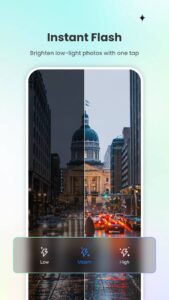
‒ Adjust brightness, clarity, contrast, saturation, curves, hue, and grain.
The Fotor Pro subscription fee is charged monthly or yearly. The fees for the Fotor Pro plan are paid following purchase confirmation. The subscription will automatically renew on expiry unless the automatic renewal is turned off at least 24 hours before the expiry of the current subscription period. Once the subscription is confirmed, your iTunes account will be charged according to the plan you chose. After purchase, you may go to the iTunes Settings to manage your subscription and turn the automatic renewal off. A canceled subscription becomes effective after one month.
Terms of Service:
www.fotor.com/service.html?f=iphoneapp&v=1
Privacy Policy:
www.fotor.com/privacy.html
With Nano Banana, turn your imagination into stunning visuals using text or image prompts. Nano Banana leverages Gemini 2.5 Flash Image AI to generate sharp, context-aware, lifelike images for both image-to-image and text-to-image creation. Experience natural language photo editing and explore a new way to generate and transform images effortlessly.
Photo editing used to be a task. Now it's just a talk.
With Fotor, editing is easier than ever.
Fotor is your all-in-one AI photo editing toolbox, now featuring the new AI Agent. Just upload a photo and say or type what you want—Fotor's smart Agent understands your commands and applies multiple edits at once, saving you time and effort.
Whether you're a creator, a photo enthusiast, or just having fun, Fotor makes editing smarter, faster, and more creative than ever.
In the Fotor App, you can:
‒ Use the AI Photo Enhancer to instantly clarify blurry photos. Fix grainy, pixelated, and low-resolution images instantly with this powerful tool.
‒ Effortlessly remove unwanted elements from photos and videos—like bystanders, watermarks, or buildings—using the Magic Eraser for photos and Video Eraser for videos, all without sacrificing quality. Perfect for anyone with no editing experience.
‒ Use the BG Remover to extract subjects from your images with one click, allowing you to replace the background and create highly personalized photos. The AI background eraser makes it easy to achieve professional-looking results.
‒ Use AI Retouch to achieve flawless skin. Enjoy natural and delicate skin smoothing and blemish removal to effortlessly create a refined appearance.
‒ Use the AI Headshot Generator to create PFPs and avatars for LinkedIn and other social media platforms. The headshot generator ensures high-quality results that rival professional studios.
‒ Turn text into stunning images! Just describe what you want, like “a magician baking bread in the kitchen” or “Spider-Man at a bar,” then choose a style, and transform your ideas into reality in seconds.
‒ Instantly convert your text prompts into videos with an AI video generator, creating studio-quality videos without any watermarks. Just enter your text or upload an image, choose a style, and get a polished video.
‒ Curious about what your future baby with your partner might look like? Just try our Baby Generator, and let AI show you the results.
‒ Use trendy 3D Cartoon and Ghibli Anime AI art effects to easily transform your selfies into vibrant cartoon comics.
Explore more features of Fotor and unleash your creativity with this AI photo editor.
AI Tools:
‒ Instantly change outfits, hairstyles, and colors with AI Replace to find your best style.
‒ Extend photo subjects and backgrounds with AI Expand to fit different sizes and achieve a balanced effect.
‒ Generate unique AI avatars from selfies, add luxurious backgrounds, or place yourself in iconic destinations.
‒ Restore and colorize old family photos, turning them into vibrant, high-definition images.
‒ Use face swap templates for movie characters or 80s styles to create memorable moments.
Photo Editor:
‒ Use unique photo filters to set the mood and captivate.
‒ Adjust brightness, clarity, contrast, saturation, curves, hue, and grain.
The Fotor Pro subscription fee is charged monthly or yearly. The fees for the Fotor Pro plan are paid following purchase confirmation. The subscription will automatically renew on expiry unless the automatic renewal is turned off at least 24 hours before the expiry of the current subscription period. Once the subscription is confirmed, your iTunes account will be charged according to the plan you chose. After purchase, you may go to the iTunes Settings to manage your subscription and turn the automatic renewal off. A canceled subscription becomes effective after one month.
Terms of Service:
www.fotor.com/service.html?f=iphoneapp&v=1
Privacy Policy:
www.fotor.com/privacy.html
Download Fotor–AI Photo Editor & Filter APK
Fast, free and safe download.
APK Permissions 30
- android.permission.ACCESS_ADSERVICES_AD_ID
- android.permission.ACCESS_ADSERVICES_ATTRIBUTION
- android.permission.ACCESS_ADSERVICES_TOPICS
- android.permission.ACCESS_COARSE_LOCATION
- android.permission.ACCESS_MEDIA_LOCATION
- android.permission.ACCESS_NETWORK_STATE
- android.permission.AD_ID
- android.permission.CAMERA
- android.permission.CHANGE_WIFI_MULTICAST_STATE
- android.permission.FLASHLIGHT
- android.permission.FOREGROUND_SERVICE
- android.permission.INTERNET
- android.permission.POST_NOTIFICATIONS
- android.permission.READ_EXTERNAL_STORAGE
- android.permission.READ_MEDIA_IMAGES
- android.permission.READ_MEDIA_VIDEO
- android.permission.READ_MEDIA_VISUAL_USER_SELECTED
- android.permission.RECORD_AUDIO
- android.permission.REORDER_TASKS
- android.permission.VIBRATE
- android.permission.WAKE_LOCK
- android.permission.WRITE_EXTERNAL_STORAGE
- com.android.vending.BILLING
- com.android.vending.CHECK_LICENSE
- com.everimaging.photoeffectstudio.DYNAMIC_RECEIVER_NOT_EXPORTED_PERMISSION
- com.everimaging.photoeffectstudio.permission.MODULE_CHANGED_RECIVER
- com.everimaging.photoeffectstudio.permission.POLLMSG
- com.google.android.c2dm.permission.RECEIVE
- com.google.android.finsky.permission.BIND_GET_INSTALL_REFERRER_SERVICE
- com.google.android.gms.permission.AD_ID
APK Verified
The cryptographic signature guarantees that the file is safe to install and was not tampered with in any way.


Frequently Asked Questions about Fotor–AI Photo Editor & Filter APK
This is the universal variant — a single APK that contains native libraries for every CPU architecture. It installs on any Android device but is larger than per-architecture variants.
Yes — the APK's signature has been cryptographically verified against the publisher's signing key. The SHA-256 hash is shown in the File Information panel so you can independently confirm the file matches the original release.
Android 24 (API level 35) or newer. Older devices will refuse the install.
Install a free app like 'CPU-Z' or 'Droid Hardware Info' from the Play Store and look at the ABI / Instruction Set row. Most phones made after 2017 are arm64-v8a; if in doubt, download the universal variant.
All variants are functionally identical — same features, same version. They differ only in which CPU architectures the native code is compiled for, and (sometimes) which screen densities the included graphics target. Pick the one that matches your device for the smallest install size, or pick 'Universal' if you're unsure.